Electric Imp As An Internet To RF Gateway

a-little-automation-with-the-electric-imp

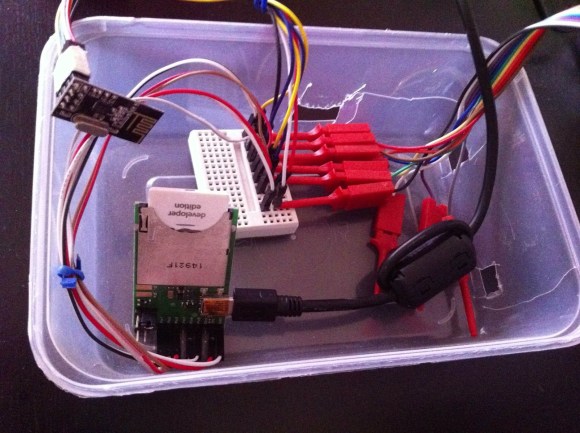
This project is a study in connecting several different families of hobby electronic hardware. The image above shows the Electric Imp side of things. It bridges its Internet connection with the RF connections of the rest of the project.

The Imp is a peculiar (intriguing?) piece of hardware. Take a look at [Brian Benchoff’s] hand’s on experience with the SD form factor hardware which is not an SD card at all. It’s an embedded system which uses light programming and a cloud-based software setup to bring wireless Internet to your projects.

In this case [Stanley Seow] started wondering if he needed multiple Imps to connect different parts of his setup. A bit of head scratching led him to the use of nRF24L01 modules which are cheap and easy to use Radio Frequency transceiver boards. He took a partially finished driver project and brought it home to play nicely with the Imp. Now he can use the system to communicate with other components which will eventually be used for home automation. Right now his proof of concept issues wireless commands to an Arduino driving a strip of LEDs.
Home Audio And Lighting Taken Over By The Raspberry Pi

687474703a2f2f7777772e6265616b61626c652e636f6d2f696d672f707265766965772d312e706e67

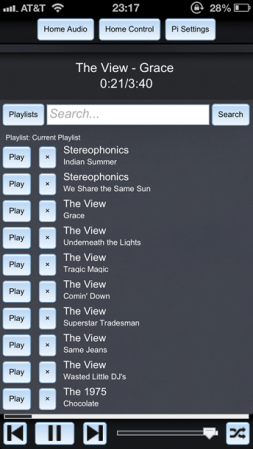
We’re beginning to see a lot of momentum building for using Raspberry Pi boards as the basis of your home automation. This latest offering from [Iain Hamilton] combines lighting and audio control through a single web interface. His frontend is run as a web page from the RPi board. It even includes separate layouts for mobile devices and computers in order to maximize use of the screen real estate.

Three buttons at the top of the interface allow him to configure the settings and switch between lighting and audio controls. This audio control screen issues commands to the Spotify client running on the Pi. The Mopidy package takes care of almost everything (as we’ve seen with other single-board computer Spotify servers). Future iterations will offer other streaming services like SoundCloud. [Iain’s] home lighting system uses X10 modules for control. He’s using a USB dongle to facilitate control of that system.

Continue reading “Home Audio And Lighting Taken Over By The Raspberry Pi”

Web Based Automation Courtesy Of Raspberry Pi

web-based-automation-via-rpi

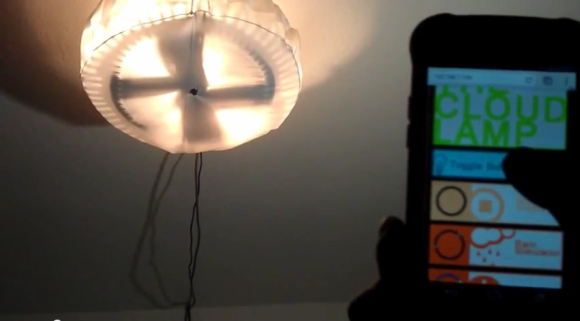
This project is a great example of the Raspberry Pi’s ability to eclipse Arduino when it comes to interaction. [Fall Deaf] mentions that he used to use an Arduino board with an Ethernet shield to add extensible interactivity to his project. But this one, which is a home automation lamp project, uses a Raspberry Pi instead. The concepts end up being very similar. But the cost of the hardware is less and the coding work is arguably orders of magnitude easier.

Don’t get us wrong, the hardware is fundamentally different. When you move from Arduino to RPi you lose some I/O pins and the low level control of them isn’t quite as straight-forward. But you also don’t have to program the thing in C. The Linux kernel handles the low level control which means you can write your scripts using Python. Because Python is an interpreted language the testing and debugging is much faster — no need to flash new code, just run the script again.

This project used the RPi GPIO to drive a strip of LEDs which use the WS2801 protocol. The board includes a NIC which makes it a snap to use as a web server. The smart phone controls seen above are served up from the Pi using jQuery. Right now there’s a cord running out of the lamp. But there should be plenty of room to use a screw-in outlet adapter and to hide the RPi and its PSU inside.

The board still has enough juice to drive other automation features too, like acting as a web radio server.

Continue reading “Web Based Automation Courtesy Of Raspberry Pi”

24-hour Hackathon Project Adds Object-based Automation To Hackerspace

hackerspace-automation

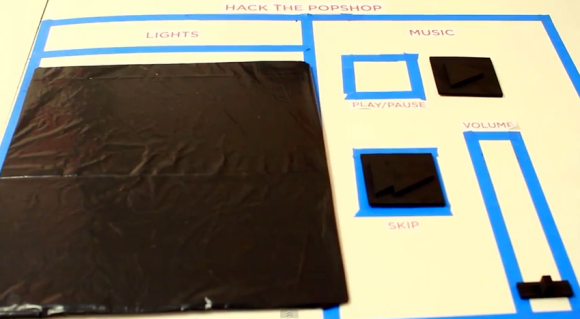
[Jeremy Blum], [Jason Wright], and [Sam Sinensky] combined forces for twenty-four hours to automate how the entertainment and lighting works at their hackerspace. They commandeered the whiteboard and used an already present webcam as part of their project. You can see the black tokens which can be moved around the blue tape outline to actuate the controls.

MATLAB is fed an image from the webcam which monitors the space. Frames are received once every second and parsed for changes in the tokens. There are small black squares which either skip to the next track of music or affect pause/play. Simply move them off of their designated spot and the image processing does the rest. This goes for the volume slider as well. We think the huge token for the lights is to ensure that the camera can sense a change in a darkened room.

If image processing isn’t your thing you can still control your audio entertainment with a frickin’ laser.

Continue reading “24-hour Hackathon Project Adds Object-based Automation To Hackerspace”

Perfect Wall-mounted Tablet Integration

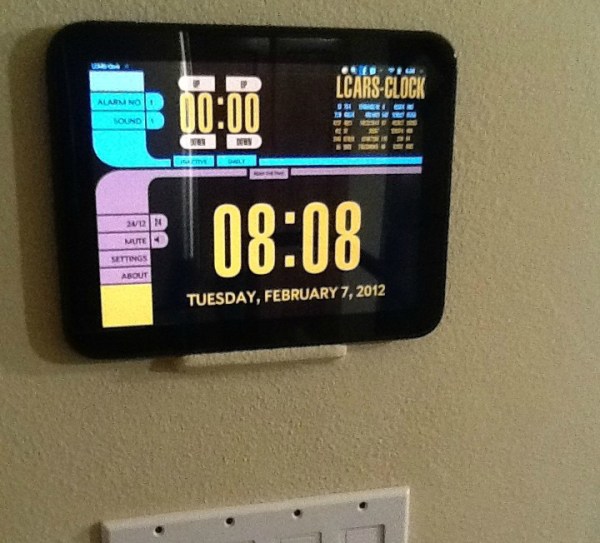
There’s a building downtown built about ten years ago that has tablet-sized LCD screens next to the entrance of each large meeting room. They’re never on and we always wonder why they didn’t just use one of those things that holds a sheet of printer paper to label what’s happening in the meeting space? Now this is a similar idea but with much better execution. Instead of just displaying data the in-wall tablet mount makes your room interactive.

[Tim’s] been working on it for a couple of years. He started out trying to house an iPod Touch behind a junction box cover plate. There are some pictures of that at the top of his build album. That didn’t quite take so keep scrolling to see the path to the finished product shown above. He cut a hole in the drywall and figured out how to mount a tablet dock that includes inductive charging. It holds the tablet in place with the small ledge and a few magnets, keeping its battery charged without a need for wires. Once tested he mudded, sanded, textured, and painted for a perfect finished product.

TP-Link Router Turned Into A DALI Automated Lighting Controller

dali-control-in-tplink-router

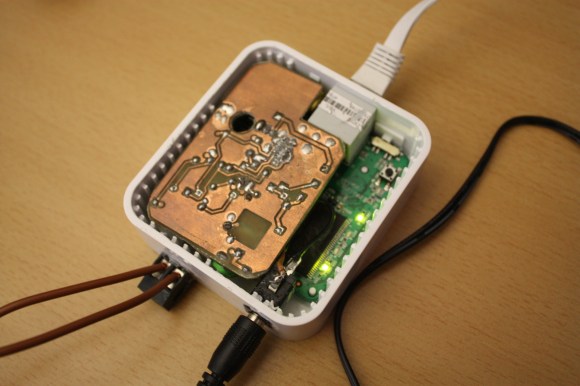
The members of Shackspace continue to put up impressive hacks based around the tiny TP-Link routers. This time around [Timm] has shoehorned a DALI controller inside the router case. This is a protocol we don’t remember hearing about before. The Digital Addressable Lighting Interface is a control network for commercial lighting. That way people responsible for taking care of large buildings can shut off all the lights at night (to name just one use). The new room at Shackspace has this style of controllers in its lights.

The two brown wires coming into the router make up the data bus for the DALI system. It connects to the add-on PCB which uses an Atmel AT90PWM316 microcontroller. The chip is specifically designed for DALI networks which made the rest of the project quite easy. It talks to the lights, the router talks to it, bob’s your uncle, and you’ve got network controlled lighting. Get this in a big enough building and you can play some Tetris.

In case you were wondering. Yes, this project has already been added to their TP-Link firmware generator.

Raspberry Pi Helps With 2.4GHz Home Automation

Wanting to extend the capabilities of the radio frequency devices in his home [Kalle Löfgren] turned a Raspberry Pi into an RF control hub. We’ve seen some of his home automation work in the past. In his media room he built a universal remote base station which used the same RF board as in this project. The main difference is that before he went with an AVR microcontroller and this time he’s upgrade to a Raspberry Pi board.

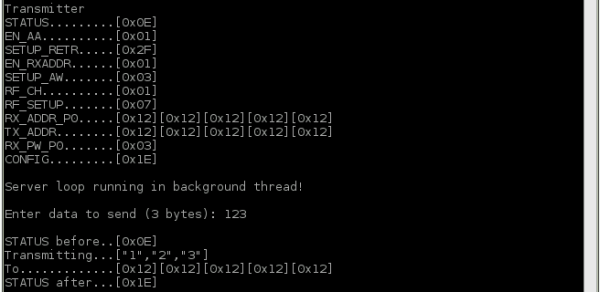
The RPi brings a lot more to the table. Notably, the scripting (whose output is shown above) and networking features. His radio board is an nRF24L01 which he talks to via the SPI protocol. The Raspberry Pi has no problem talking to SPI devices through its GPIO header. [Kalle] just needed to do a bit of setup to configure the pin modes.

A Python script lets him sent commands using his keyboard, but this can also be automated. Combine that with the TCP server script he wrote and it opens up the a wide range of configurations to switch or talk to any device operating on the 2.4 GHz band.