Portable Power Strip Control Lights And Appliances Using SMS

sms_triggered_appliance_control

[Julian] wanted a way to remotely control various appliances and lights around his house without spending an arm and a leg on home automation. He also desired the ability to easily switch what items he was controlling without a ton of hassle. Since he couldn’t find anything reasonably priced to do what he desired, he built his own SMS-triggered remote control system.

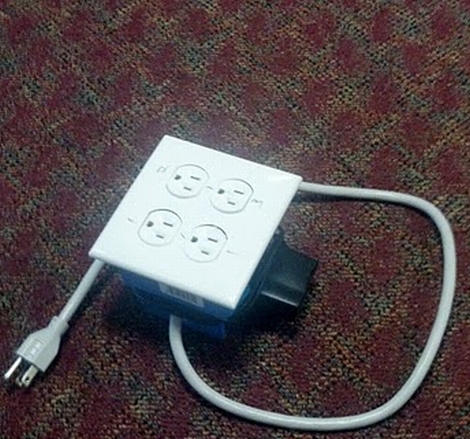
He designed his system to be used like an extension cord, hence the portable junction box enclosure. This enables him to regulate up to four different items at a time, with the ability to swap out components or relocate his controller at will.

The power strip is controlled by an Arduino which receives commands from his PC via an Xbee module. Any text messages sent to his Gmail account are retrieved by his computer and then transmitted to the Arduino. The Arduino in turn triggers relays as designated by [Julain’s] text messages, utilizing H-bridges to provide the required current.

Check out his schematics and code if you’re interested in implementing something similar in your home.

Zigbee Home Automation Gives Us Another Reason Not To Get Up

[Russell] sent in a neat home automation project he’s been working on. Even though the project only has two devices so far, we can already see the potential of his project.

Instead of the X10 standard that has been a staple of home automation for more than 30 years, [Russell] went with ZigBee modules. Aside from being much faster and more flexible than X10 home automation modules, ZigBees also open up a bunch of projects that would be impossible if he went with X10. With some well-placed IR transmitters hidden in his living room, it would be possible to have a TV and cable box controlled via the Internet.

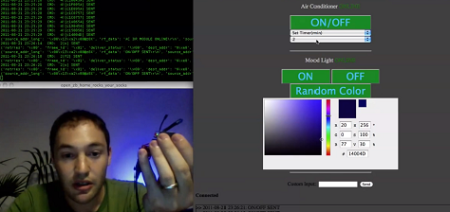
So far, [Russell] built an network-controlled RGB ‘mood lamp’ and an infrared remote for his central air. Everything is controlled through a web app, and [Russell] says that additional modules can be easily added to the code.

Check out [Russell]’s demo of his project after the break.

Continue reading “Zigbee Home Automation Gives Us Another Reason Not To Get Up”

Home Automation Systems Easily Hacked Via The Power Grid

x10_home_automation_hacked

As home automation becomes more and more popular, hackers and security experts alike are turning their attention to these systems, to see just how (in)secure they are.

This week at DefCon, a pair of researchers demonstrated just how vulnerable home automation systems can be. Carrying out their research independently, [Kennedy] and [Rob Simon] came to the same conclusion – that manufacturers of this immature technology have barely spent any time or resources properly securing their wares.

The researchers built tools that focus on the X10 line of home automation products, but they also looked at ZWave, another commonly used protocol for home automation communications. They found that ZWare-based devices encrypted their conversations, but that the initial key exchange was done in the open, allowing any interested 3rd party to intercept the keys and decrypt the communications.

While you might initially assume that attacks are limited to the power lines within a single house, [Kennedy] says that the signals leak well beyond the confines of your home, and that he was able to intercept communications from 15 distinct systems in his neighborhood without leaving his house.

Voice Recognition System Controls Everything, Hopefully Won’t Kill Us.

[Aaron Bitler] and [Bud Townsend] have been working a natural user system that is, in their own words, “what android@home should have been.”

The video they posted is pretty impressive. The automation system responds to voice and can control appliances, ‘throw a party’, and provide a user with their location. This is just the foundation of a system that can be built upon – developers  can easily integrate a microphone and speaker into a device so it can connect to the system’s server. Apps, too, are pretty extensible – they’re registered on the server with meta tags that provide a wealth of data to be manipulated. It’s a very, very cool project that we really want to try out.

Continue reading “Voice Recognition System Controls Everything, Hopefully Won’t Kill Us.”

Use Bluetooth To Open Your Garage And Start Your Car Remotely

bluetooth_remote_garage_opener_and_car_starter

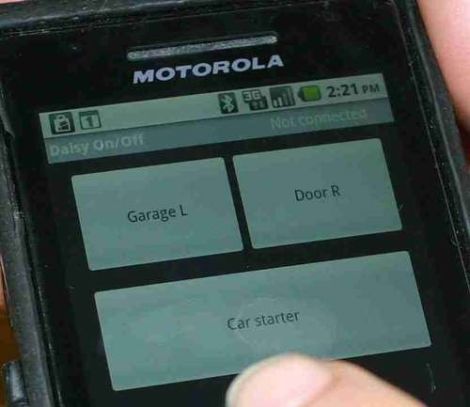
Instructables user [tcollinsworth] is a big fan of his Android smart phone. He practically carries it with him everywhere, so he figured it would be cool to integrate as many of his home electronics with the phone as possible. His garage door openers seemed like easy enough targets, and while he was in the garage, he decided to hack his car’s remote starter as well.

He put together a small circuit that allows him to trigger any device via an application called Daisy On/Off, made specifically for the Bluetooth board he selected. One set of pins were wired to the garage door opener’s terminals, and the other to his remote start key fob. Once he had everything connected up, he packaged his components in a project box courtesy of his MakerBot. With that finished, he put together a simple interface in the Daisy application which can start his car or open the garage with a single button press.

It should be mentioned that [tcollinsworth] works for Daisy, so the reasoning behind his choice of components and Android applications is an obvious one. That said, schematics for the Daisy Bluetooth board are available online and the device can be controlled using BlueTerm, so you can feel free to roll your own implementation if you wish.

Our only nagging thought is that the system should probably include a feedback circuit that relays messages to the phone, indicating that the door is indeed open and that the car has been started. Pocket dialing your car to start without opening the garage first would definitely be a bad thing.

Check out the video below to see the system in action.

Continue reading “Use Bluetooth To Open Your Garage And Start Your Car Remotely”

Google? In My Lightbulbs? It’s More Likely Than You Think

led_lighting_by_google

With the recent announcement and release of their ADK, it was only a matter of time before Google started invading your home in a big way. From the looks of it, Google will be jumping into the home lighting market very shortly, which could prove to be quite interesting.

Partnering with Florida-based Lighting Sciences, Google is planning on developing consumer-grade 60W equivalent smart LED light bulbs. The bulbs will be able to wirelessly communicate using Google’s new open-source home networking protocol. The lights will be controllable using any Android device allowing users to dim, brighten and toggle the lights on and off without ever touching a wall switch.

We think it’s an interesting idea, and we’re all for getting quality LED lighting in the home. That said, some of Google’s other utility-centric endeavors such as PowerMeter have met only mediocre success, so it remains to be seen if this concept takes off. If it does however, we can’t wait to see the flood of ADK-based hacks the community puts together. Since their new wireless protocol will likely be extended to all sorts of other household systems, the possibilities are endless.

Building A Home Automation Mesh Network

[Ian Harris] designed a bunch of home automation for his parents using X10 hardware. He was a bit disappointed by the failure rate of the modules and the overall performance of the system so he set out to replace it with his own hardware. Lucky for use he’s documented the journey in a four-part series about mesh networks.

The hardware seen above is his test rig. He’s using a couple of Sparkfun breakout boards to develop for nrf2401a RF transceiver chips. These could be used as slave modules, with a central command device, but due to the home’s architecture wireless signals don’t propagate well from one end of the house to the other. The solution is to build a mesh network that will allow each module to act as a network node, receiving and passing on messages until they arrive at the target device. He’s trying to do this with cheap hardware, selecting the PIC 16F88 which boasts 7 KB or program memory and 368 bytes of ram. In the end it doesn’t take much code to get this running, it’s the concepts that take some time and research before you’ll be comfortable working with them.

[Thanks Oakkar7]