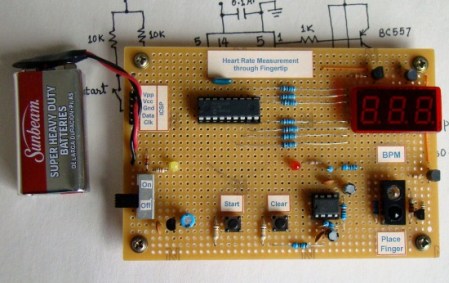
Fingertip Heart Rate Monitor

[Embedded lab] has a nice tutorial on building your own heart rate monitor. The monitor works by shining infrared light into the fingertip and looking at the changes in the reflected infrared signal caused by a heartbeat.  The IR detector produces a very small AC signal so a couple of op-amps are used to filter and amplify the signal. The output of the filter circuit is then read in by a PIC16F628A, which counts the beats and displays it on a seven segment display.  This might be a good project to try if you’ve got your microcontrollers down and you are looking to learn some analog electronics. Its noted at the end that the two main problems with building a circuit like this are going to be cross talk and adjusting the filters. The infrared diode and receiver should be close to each other to allow maximum reflection but you also need to make sure that you don’t allow the emitter to shine directly into the detector because the reflected light will be drowned out by the bright emitter.

[via make]
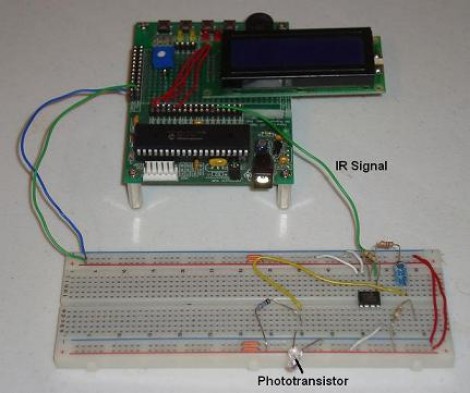
38 KHz IR Communications Tutorial

Learning about how infrared remote controls work is a great way to expand your electronics knowledge. That’s because this technology is invisible to our eye, and happening faster than we can comprehend without help from test equipment. This tutorial over at Pyroelectro talks about the theory behind how the data is transferred and shows you how to build a couple of circuits to experiment with and communicate through infrared light transmissions.

Instead of going with an IR receiver module you’ll build your own using a photo-transistor and an operational amplifier. The Opamp is used to amplify and invert the signal picked up from the IR transmission of a common home entertainment remote control. From there the digital signal is read by a PIC 18F452 microcontroller for processing. But if you want to use a different microcontroller there’s still more than enough usable information to get you across the finish line.

Long-range Laser Night-vision

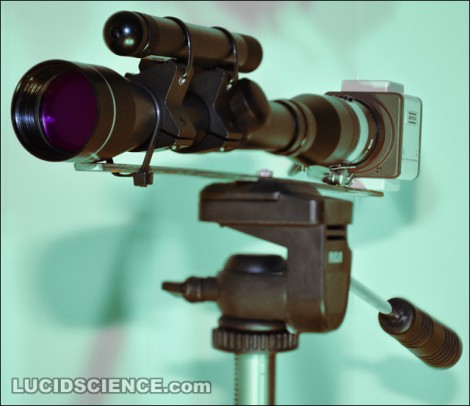
[Oneironaut] is back at it again, churning out yet another great hack in this long-distance night vision build. This isn’t the first time we’ve seen him build a night vision device, you may remember the monocle he put together using the view finder from an old camcorder. This time around he’ll give you look at distant object by using a laser instead of LEDs. He pulled an IR laser diode out of an old CD burner, then used a lens to spread out the dot in order to illuminate a larger area. A standard rifle scope is used as the optics, along with a security camera which can detect the infrared light. As always, he’s done a fantastic job with the images and the write-up. You’ll find his overview video embedded after the break.

Continue reading “Long-range Laser Night-vision”

Video Game Installations For Kids’ Parties

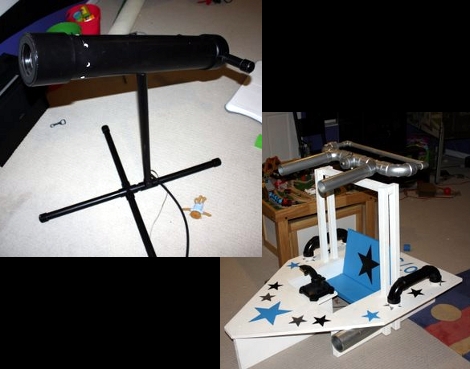
Why won’t someone think of the children?! Actually, some of the best hacks come from entertaining the little ones. Take [Piles of Spam’s] two video game builds. The first is a telescope-based controller that is used to shoot virtual cannon balls at a projection of a pirate ship. The second is a two-player cooperative game where one player drives and the other shoots. Both of them use a projector to display the playing field, an IR laser for targeting, and an NTSC camera to pick up the location of the laser dot. This works really well, thanks to the quality of the physical builds, and great audio and video on the game side of things. See for yourself in the clips after the break.

A couple of posts into the thread [Piles of Spam] talks about laser intensity. He wanted to make sure that there wouldn’t be a room full of half-blind five year olds thanks to the targeting system. Continue reading “Video Game Installations For Kids’ Parties”

BendDesk Multi-touch Furniture

The BendDesk is a horizontal and a vertical multi-touch display connected as one curved surface. Think of it as a smart white-board and a multi-touch desk all in one. It can be used to sort and edit information, or to play games. Check out “Bend Invaders”, a game demonstrated in the video after the break. When you touch two fingers to the display the two points are used to aim a laser at the oncoming monsters.

The system uses a combination of two projectors shining on the surface from underneath and behind. A series of LEDs around the edges of the display bathe it in infrared light. Three cameras with IR filters peer at the underside of the acrylic surface and detect touches by distinguishing variances in the IR pattern through a process called Frustrated Total Internal Reflection. If you’re interested in more of the math and science involved there are a couple of papers available from the project site linked at the top of this post.

We’ve seen so many displays using the Kinect lately, it’s refreshing to see one that doesn’t.

Continue reading “BendDesk Multi-touch Furniture”

Projector Introduces Augmented Reality To Reality

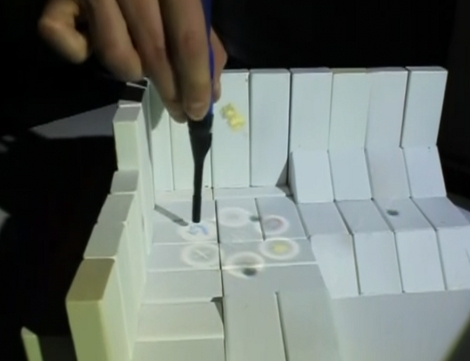
[Raj Sodhi] and [Brett Jones] have been working on interactive augmented reality as part of their research at the University of Illinois. What they have come up with is a stylus-based input system that can use physical objects to create a virtual landscape. Above you can see that an environment was built using white blocks. A camera maps a virtual world that matches the physical design. From there an infrared stylus can be used to manipulate virtual data which is projected on the blocks.

What they’ve created is a very advanced IR Whiteboard. There are buttons on the stylus, one of which opens the menu, made up of circles that you can see above. From there, you can select a tool and make it do your bidding. After the break there’s a video demonstration where a game is set up, using the menu to place tanks and mines on the 3D playing field. We wonder how hard it would be to do this using a projector and a Kinect.

Continue reading “Projector Introduces Augmented Reality To Reality”

Make A Point-and-shoot See Infrared Light

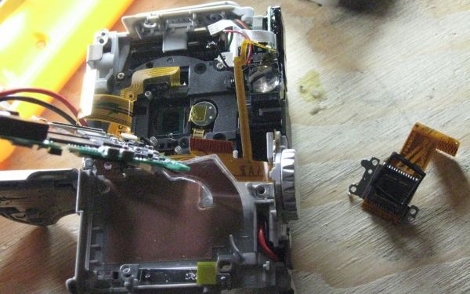
[Daniel Reetz] has caught the Kinect hacking fever. But he needs one important tool for his work; a camera that can see infrared light. This shouldn’t be hard to accomplish, as the sensors in digital cameras are more than capable of this task, but it requires the removal of an infrared filter. In [Daniel’s] case he disassembled a Canon Powershot to get at that filter. There’s a lot packed into those point-and-shoot camera bodies and his teardown images tell that tale. He also ended up with extra parts after putting it back together but that didn’t seem to do any harm.

After the break you can see video that shows the Kinect’s speckled IR grid, which is why he needed IR sensing in the first place. But there’s also some interesting photos at the bottom of his post showing the effect achieved in outdoor photography by removing the filter.

The flash never made it back in the camera. That’d be a perfect place for an IR light source. You’d end up with a night-vision camera that way.

Continue reading “Make A Point-and-shoot See Infrared Light”