Chorded Keyboard For Touchscreens

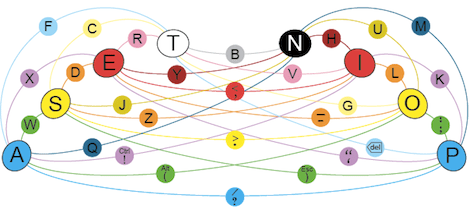
For over a hundred years, good typists didn’t ‘hunt and peck’ but instead relied on keeping their fingers on the home row. This technique relies on physical buttons, but with on-screen keyboards used on tablets and other touch screen devices touch typists have a very hard time. [Zach] is working on a new project to bring a chorded keyboard to these devices called ASETNIOP.

Instead of training a typist where to place their finger – the technique used in most other keyboard replacements, ASETNIOP trains the typist which fingers to press. For example, typing ‘H’ requires the typist to press the index and middle fingers of their right hand against the touchscreen. In addition to touchscreens, ASETNIOP can be used with projection systems, Nintendo Power Glove replicas, and extremely large touchpads that include repurposed nooks and Kindles.

If you’d like to try out ASENTNIOP, there’s a tutorial that allows you to try it out on a physical keyboard as well as one for the iPad. It’s a little weird to try out but surely no more difficult to learn than a Dvorak keyboard.
Custom Starcraft Controller

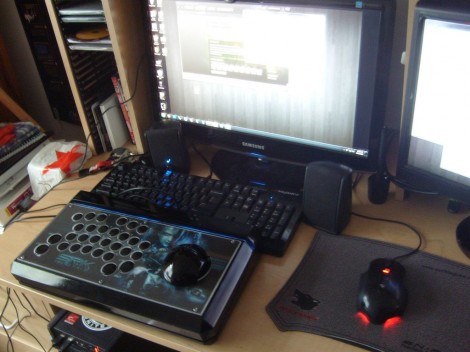
This Starcraft controller was designed as a contest entry. The goal of the contest was to provide a custom controller for the Starcraft Real-Time-Strategy game that shared some of the features seen in First Person Shooter controllers.

The design started as rough sketches. From the there button layout was prototyped before actually building a virtual model of the entire controller. A rendering of the model was submitted as a contest entry, and we’re glad it was also seen through to a physical device. This involved sending the design files off for 3D printing. What came back was painted and assembled to achieve the beautiful look seen above.

On the right is a stick that acts as the mouse controller. The buttons on the left are just the most necessary of Starcraft control keys. They all map to the appropriate keyboard keys and the device enumerates as an HID keyboard so no button mapping is necessary. That being said, a player does have the option of remapping if the layout doesn’t suit.

[Via Reddit with more info at Shoryuken]

Update: Many Improvements To Optical-sensor-based Piano

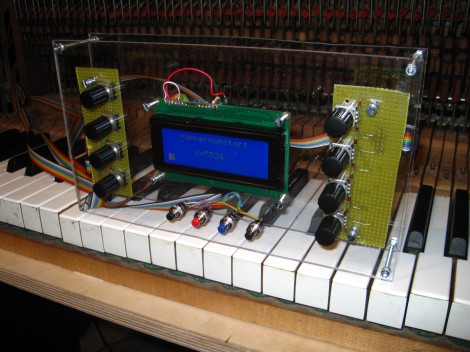
[Sebastian] wrote in to update us about the optical sensor project he started a couple of years ago. You’ll find his most recent update here, but there are four different post links after the break that document various parts of his progress.

You may not recall the original project, but he was looking to add resolution and sensitivity to the keystroke of an electric keyboard. With the sensors built, he started experimenting with using the force data to affect other parts of the sound. His post back in January shows this bending the pitch as the keys receive more force from the player.

In March he installed the sensor array in an old piano. The video he posted where he plays the piano, but we hear the sound generated from the sensor inputs. We’ve embedded it after the break.

Last week he published two posts. They cover a redesign of the sensor boards, and the panelization work he’s done to help bring down manufacturing costs. The base unit was redesigned to use an AT90USB microcontroller which consolidates the separate chips used in the previous version.

Continue reading “Update: Many Improvements To Optical-sensor-based Piano”

Moppy Lets You Play Your Floppy Drives

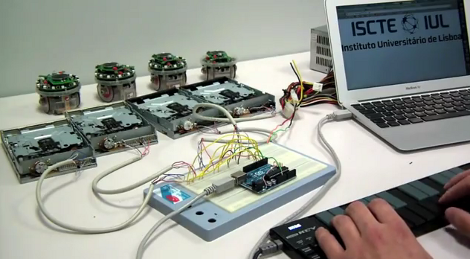
Get ready to join a band. Just follow the guide over at the Moppy project page and you’ll have your very own floppy drive instrument.

The name is a mashup between Musical and Floppy. By using an Arduino UNO as a translator, you can command an array of floppy drives with a musical keyboard (think piano). The head on each floppy drive is controlled by a stepper motor which will put out some sweet sounds if driven at just the right frequency. The lower notes tend to fair a bit better than the high range. One great example of this is the Imperial March theme as heard after the break.

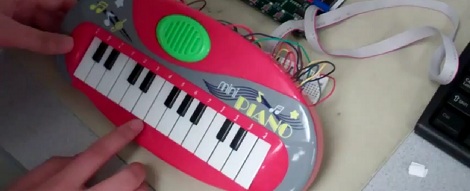
Once you get the base system up and running, it’s time to think of some alternate interfaces. Sure, you can obvious things like toy keyboards. But wouldn’t it be more fun to make it fruit controlled?

Continue reading “Moppy Lets You Play Your Floppy Drives”

Simple Mod To Keep Your Downstairs Neighbors From Hearing You Pound The Keys

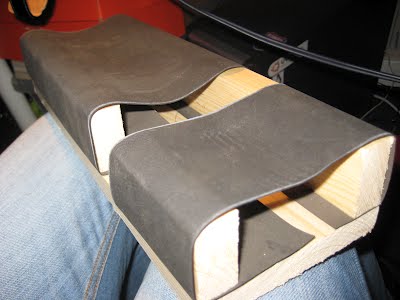
[Mesoiam] managed to pick up a Viscount hammer weighted keyboard for pretty cheap. For those who are unfamiliar, Viscount makes keyboards that feel like you’re playing a piano, hammers and all. The only problem with this, as [Mesoiam] discovered, is that even when he’s jamming with headphones in, his friends down stairs can still hear the keyboard banging due to the vibration going through the stand to the floor. His resolution to this problem was to build some custom dampers to reduce the vibration. He built two brackets that fit over the stand and suspend the keyboard on two strips of flexible rubber. Quite a simple solution to a possibly annoying problem.

Keyboard Composes Its Own Music

Summer is right around the corner and all the final projects from electronic design classes are rolling into the tip line. This time, we’ve got [Chaorong] and [Siyu]’s auto-composing keyboard from their time in ECE4760 at Cornell.

The keyboard has two modes: a ‘happy’ mode and a ‘tender’ mode, the difference being the tender mode is slower and sounds a little like a lullaby. After two keys are pressed, the ATMega644 figures out what key it should play in and starts generating a random-ish sounding song using a Markov probability matrix.

There’s a third option for the keyboard as well: play a short melody and the software will loop through a few permutations of the melody. After the break, you can see [Siyu] play Ode to Joy and have the autocomposer improvise around the tune. Very, very nice work and we can’t wait to see more senior design projects hit the tip line.

Continue reading “Keyboard Composes Its Own Music”

Making Old Organs More Portable With MIDI

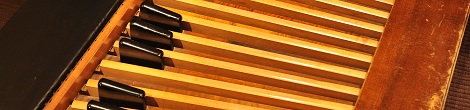
In the 60s 70s and early 80s, roadies would lug hundreds of pounds of musical equipment around to gigs. Although the 8×10 Ampeg bass cabinet wasn’t fun in the least, the absolute worst was the Hammond organ. These behemoths of tonewheel organs sounded great, but moving them was a pain. For better or worse, portable MIDI keyboards caught up with the sound quality of these old electromechanical monsters. Everything is still not right with keyboard players; a good set of organ foot pedals is still hard to come by. To solve this problem, [Jeremy] converted his old Hammond A-100 organ pedals to MIDI giving him all the feel and aesthetics of an ancient instrument without all the heft.

To transform the ancient A-100 bass pedals into a keyboard, [Jeremy] turned to the HighlyLiquid MIDI CPU. This small board provides a few dozen pins to wire up to switches and potentiometers. A new switch assembly was built for the bass pedals using a momentary push button switch under each key. These buttons are wired up to the MIDI CPU, and everything worked out wonderfully.

Although there’s no video of the newly portable Hammond organ in action (something off Zeppelin I, [Jeremy]…) there is a great Flickr photoset of the entire build. Awesome work, [Jeremy]