Macro Lens For A Nexus One

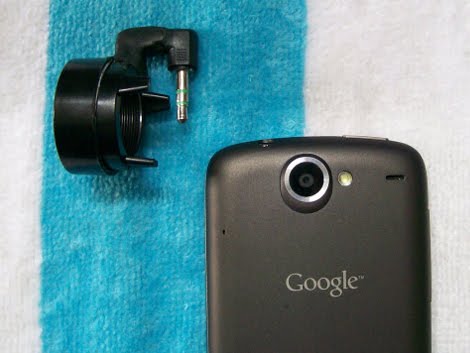
[Thomas] tipped us off about a macro lens attachment for his Nexus One. As you’d expect, adding the lens helps the phone’s camera bring tiny details into focus. He re-purposed a lens from a pair of mini binoculars, using epoxy putty to make a mounting bracket. Now the last time we saw this putty used with a phone it was for a snap-in bracket that cradled the phone and included a lens adapter. Rather than go that route [Thomas] made use of the headphone jack just above the camera lens. An old headphone plug has been epoxied to the macro lens ring, holding it in place securely while remaining easily removable.
Using Quality Optics With A Webcam

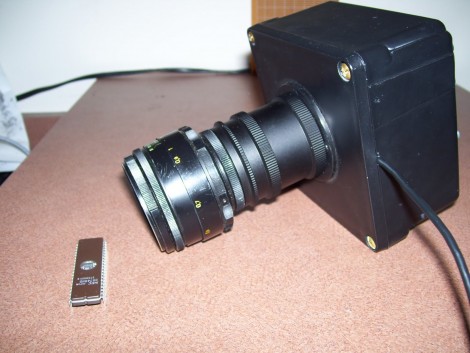
[Devon Croy] built a case to join a webcam sensor with a camera lens. The box is a PVC conduit box you’d find at a home center. He used JB Weld to attach four bolts to the back of the box. These are used to fine-tune the mounting plate for the webcam sensor to ensure it’s at the focal point of the lens. The lens connects through a couple of extension tubes to an adapter mounted in the center of the box’s cover plate. The setup above shows a macro lens that takes pretty good pictures.

If you need images of really tiny things you should look into a microscope adapter for your camera.

Guide To Producing Tilt-shift Photography

[Bhautik] is back again with more tilt-shift photography.  This time, hes brought us a quite in depth guide to tilt-shift photography. He covers the technical side of how tilt-shift works, showing the differences in several methods. There is a breakdown of different cameras and ease of modification as well as links to several of his past projects. He even shows comparisons between instant tilt-shift Photoshop methods and the real thing, pointing out key things to look for to identify the real deal.

Building A SuperMacro Lens

[youtube=http://www.youtube.com/watch?v=KW0cFk9d-P0]

[Lozzless] has a steady hand and plenty of confidence in his hacking skills. The video above is worth watching for the full eight minutes. In it you’ll see him convert a lens into what he calls a SuperMacro lens with a working aperture. The process involves fashioning a connector ring from a lens cap, modifying an Electro-focus lens mount, and assembling the parts to do his bidding. We don’t have the photography background to fully understand what he’s doing here, but we can appreciate the process, and the results are shown at the end of the clip.

[Thanks TommyC]

Fisheye Lens For Your SLR

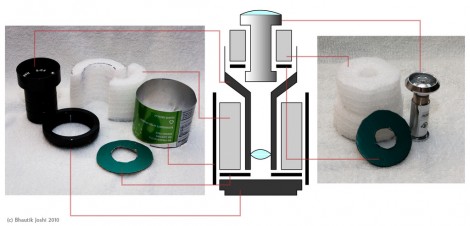
[Bhautik Joshi’s] fisheye lens hack works well and looks OK too. It uses a door peephole from the hardware store as the fisheye and a slide projector lens to enlarge the image for proper sizing on the camera’s sensor. He included an EOS lens adapter so that it is easy to install and remove, then grabbed a soda can and some foam for the rest of the build. This will take those fun bendy pictures but don’t forget that you can correct for that in software if you wish.

Spherical And Stereoscopic Photography

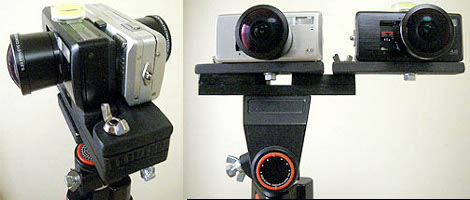
[Ryubin’s] experiments with spherical video continue. This time around he’s using two cameras, both with fisheye lenses, to capture 360 degree by 360 degree video. The two cameras mount back to back and each record a 360 degree vertical view in a 180 degree horizontal range. By stitching the two recordings together and synchronizing them by comparing moving objects a seamless spherical video is produced.

He’s got one more trick up his sleeve with this setup. The tripod mount has a pivot point that allows the two cameras to shoot side-by-side instead of back-to-back. This produces a hemispherical video that is stereoscopic. That’s a pretty cheap way to make this type of 3D imaging compared to some of the CES offerings.

There are a few example videos up on his webpage. If you missed it earlier this month, he’s the guy that build a spherical video setup using a light bulb.

Making A Tilt-shift Lens

tilt

[Bhautik] is on version 2 of his tilt-shift lens, and wrote in to share what he has learned. Some aspects of the design on version 1 made it a bit quirky to use. You had to hold the lens in place, manually adjusting the focus. This meant that no two shots were the same. Since [Bhautik] wanted to do time lapse with it, he needed to re design it. He kept it simple and cheap, around $22 total.  Version two takes a lot longer to setup for the shot, but the result is reproducible. This means he can make his tilt-shift time lapse videos.