Speed Up Web Browsing In Linux

In modern computer systems, the biggest bottleneck of information tends to be in communicating with the hard disks. High seek times and relatively slow transmission rates when compared to RAM speeds can add up quickly. This was a necessary evil back when RAM space and costs were at a premium, but now it is not uncommon to see 4GB of RAM on laptops, and even 12GB on desktops. For  users whose primary computer use is browsing the internet (either for work, writing articles, or lolcats) and have some extra RAM, moving the browser cache to the RAM from the hard disk is a definite option for increasing speed.

In Linux systems (specifically Fedora and Ubuntu systems), this can be achieved for Chrome and Firefox by creating a larger ramdisk, mounting the ramdisk after boot, and then setting the browser of choice to use that ramdisk as a cache. The necessary commands to do this are readily available (internet archive) on the internet, which makes life easy. Using ramdisks for performance boosts are not exclusive to browsers, and can be used for other software such as Nagios for example.

We have previously covered a tool called Espérance DV for moving cache to RAM in Mac OSX, and for any Windows users feeling left out, there are ways of making Firefox bend to your will. Obviously you will see an increase in RAM use (duh), but this shouldn’t be a problem unless you are running out of free RAM on your system. Remember, free RAM is wasted RAM.
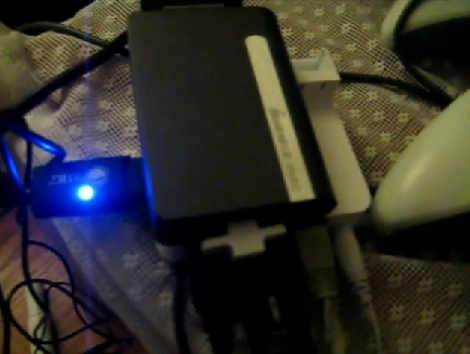

Classic Game Emulation On The Dockstar

[Hunter Davis] is playing games like Contra, Monkey Island, and Quake 3 by running them on a Seagate Dockstar. We were shocked after seeing how well these run in the video after the break. [Hunter], who used the ZipIt for game emulation in the past, added a couple of hardware peripherals to get everything running. For sound he picked up an inexpensive USB sound card which was no problem to get up and running. Next he picked up a USB to DVI adapter and fired up the Linux USB DisplayLink driver. With the peripherals running he loaded up Fluxbox and the rest was history. Not bad for a small network storage adapter. Continue reading “Classic Game Emulation On The Dockstar”

How-to: Program PICs Using Linux

Arguably, Microchip’s PIC microcontrollers do not get enough posts here. One of the drawbacks for some of us is that Linux support for PICs is not very well known. The information is out there, but no one has laid out the process of going from writing C code to programming a chip. Written for Linux users that are familiar with microcontrollers, basic circuits, the C programming language, and can read a datasheet, this how-to should get you up and programming a PIC quickly with Linux.

Continue reading “How-to: Program PICs Using Linux”

Augen E-Go Booting Linux

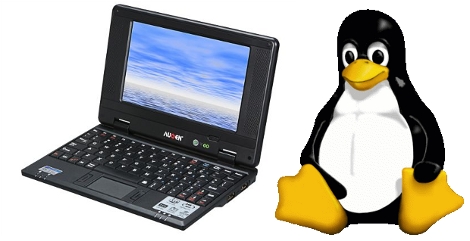
The Augen E-Go is billed as a Netbook that ships with Windows CE. [Moogle] got it to boot the Linux kernel after a bit of hardware snooping. He found a UART connector on the main board and discovered that if you tie the enable pin to ground you can send an ARM bootloader to the device during boot up. His past experience hacking the Didj and the Explorer helped him recognize the processor used in the Augen. This lead to using a zimage from the Didj to boot the Linux kernel. So far the process halts at a kernel panic, but that’s because he hasn’t built the image with a file system for the device yet.

If the E-Go ends up playing nicely with Linux, [Moogle] may have found a suitable replacement for the Zipit.

Update: Looks like we’ve got the wrong version of the E-Go pictured above (and linked below). Check out [Moogle’s] comment for model numbers.

[Augen photo credit: Newegg.com]

Keyboard Concept Uses Magic Trackpad

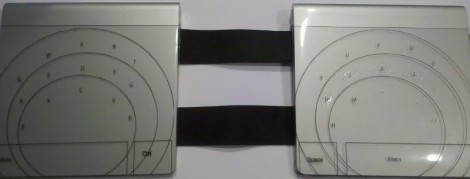
This is a keyboard alternative that [Sebastian] is building from two Apple Magic Trackpads. The multitouch devices are a good platform for this because they’re designed to pick up several events at the same time. To prototype the locations of the keys he’s using printable transparency sheets. He gives you a sense of where the home row is with a dab of clear fingernail polish that you can feel with your digits.

He may laser etch these pads once the key location is just right. This should give a bit of texture in itself and do away with the need for nail polish but we still like the ingenuity of that solution. The device is being developed in Linux, with some kernel hacking to handle the devices. We asked about source code and [Sebastian] is hesitant to post it because he’s been getting a lot of kernel panics. It sounds like once he cleans things up a bit he’ll share his work.

Don’t forget, there’s an easy hack to do away with the batteries in these things.

Using A Cellphone LCD As Auxiliary Linux Display

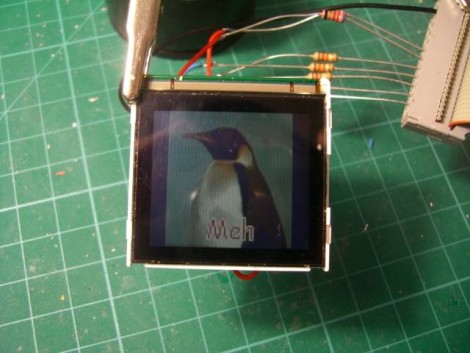
[Neil] is driving this Siemens A60 LCD using a parallel port on his Linux box. He likes this module because it has an integrated LED back-light, controller IC, and the pads are large enough for a human to solder. He notes that the screen runs on 2.9V, which matches the forward voltage of the LEDs used as back-lights. This means it is possible to use one f the LEDs as a shunt to drop  incoming voltage down to a safe level for the controller. In fact, that’s what he did. The data lines are connected to the parallel port along with some current limiting resistors. The LEDs are connected with resistor calculated for maximum brightness, with the output from the LED used as the source voltage for the LCD controller chip.Whether you want to use one of these screens with a PC or something else, the code that [Neil] worked out should provide the information necessary to do so.

The Nokia cellphone LCD post inspired [Neil] to send in a tip about this project. If you’ve got well documented hacks that you’re just sitting on why not let us know about them?

An Interesting Take On WEP Cracking

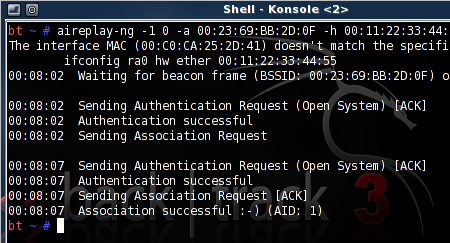
[Ben Kurtz] is doing a little WEP cracking but in a bit of a different way than we’re used to. WEP cracking makes us think of war driving; driving around with your laptop open, looking for WiFi access points, and stopping to run some software when you find them. [Ben’s] way is similar but different in one key way, he’s using an iPhone as the frontend.

This started as a way to find a use for some leftover equipment. He threw together a Linux box and loaded up Aircrack-ng, the software we often see used in penetration testing. To remove himself from shady-looking activities in public he coded a web interface using the Python package Turbogears. It uses screen, a program often used with SSH to run services concurrently in different terminals, with the option to disconnect without stopping the processes. Now it’s just a matter of parking the hardware near an AP, and doing the work in a browser on your mobile device. You can check out the script he wrote, as well as installation instructions, in his post linked above.

[Thanks Tech B.]

[Note: Banner image not directly related to this post]