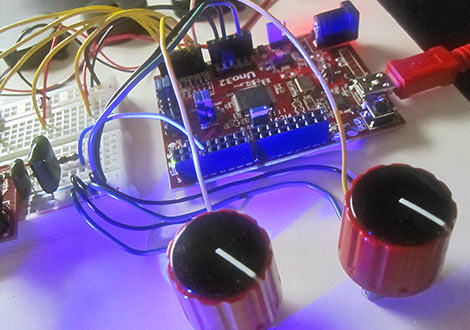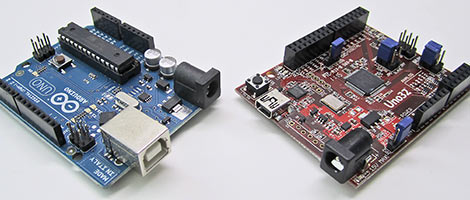
mbed is a next-generation 32-bit microcontroller platform. It’s a prototyping and teaching tool somewhat along the lines of Arduino. On steroids. With claws and fangs. Other contenders in this class include the MAKE Controller, STM32 Primer and Primer 2, Freescale Tower, and Microchip’s PIC32 Starter Kit. The mbed hardware has a number of advantages (and a few disadvantages) compared to these other platforms, but what really sets it apart is the development environment: the entire system — editor, compiler, libraries and reference materials — are completely web-based. There is no software to install or maintain on the host system. Read the rest of this entry »
The DIY LIL CNC project is the newest member of the homebrew fabrication scene. This is a three-axis CNC mill that can be built by anyone with basic shop skills and about $700 in their pocket. Many of the materials can be acquired from the likes of Home Depot: the basic framework is assembled from Masonite, while other cost-cutting measures include the use of skate bearings and a common Dremel tool for powering the cutting bit. About half of the cost is for the HobbyCNC driver and stepper motor package that runs the show.
The instructions for the DIY LIL CNC are distributed under a Creative Commons license, allowing for modification and distribution with few restrictions. They’re well-written and quite thorough, including all patterns and a complete bill of materials with suppliers, part numbers and costs. As documented, the ’bot can produce parts up to 12 x 14 x 2 inches, but the project’s creators offer some suggestions on adapting the design for larger work. It’s not self-replicating like the RepRap aims for; you’ll need access to a laser cutter for some of the parts. If you can clear that hurdle, this looks like a great introduction to CNC production.
We’ve covered homebrew PCBfabricationtechniques about a billiontimesbefore. What sets this tutorial apart is that it collects many bits of knowledge otherwise scattered all about the web, and then depicts the entire process on video, from initial printing to cut PCB…because reading about it versus seeing it done are two different things entirely. They give a number of immensely useful tips throughout: choice of materials and where to get them, tools and techniques, and dispelling several myths about these methods (for example, they’re adamant about notusing acetone to clean toner from the PCB). Well worth the 30 minutes to watch. If that’s too much and you’ve been stuck on just one part of the process, the tutorial is in three segments.
Trimming finished boards on a paper cutter? Who would’ve guessed?
[Cyberspice] informs us she likes snakes. Hey, who doesn’t? She’ll soon be adopting a lovely ball python and wanted to keep close tabs on the sensitive creature’s environment. To that end she assembled a network-enabled vivarium monitoring system based on Adafruit’s Boarduino (a minimalist Arduino clone), a TMP36 analog temperature sensor, Saelig’s WIZ810MJ Ethernet interface, and a common LCD screen. The Arduino rig periodically issues updates to a web server, which can then generate informative graphs using a set of PHP scripts (what, no Python?).
Okay, so we could probably count on one hand the number of readers in need of fancy reptile monitoring and still have fingers left over. There are countless other applications where networked sensor monitoring of this sort is a frequent necessity, so the article could be a good starting point for your own projects. There’s lots of source code to work with, on both the Arduino and web server sides. And the parts list demonstrates serious frugality: the Boarduino, the generic LCD, and especially the Ethernet interface; even with the breadboard adapter, this unit is about half the cost of the usual Arduino Ethernet shield, leaving more funds available for the snake food budget!
Oh, for crying out loud! While we were all giddy reporting on yesterday’s wonderfully done head-mounted computer, [Andrew Lim] of recombu.com comes along and essentially does the same thing with an HTC Magic handset and three dollars worth of Harbor Freight crap. Linux kernel, WiFi, accelerometer, the whole nine yards. Consider our collective ass handed to us.
Funny thing is, either of these could be considered The Consummate Hack. One flaunting the creator’s know-how with its custom-designed parts and delicate engineering, the other exhibiting a more punk flair with random scraps and off-the-shelf technology achieving much the same effect — a solution so obvious we were blind to it. Whatever your outlook, this is a great day to be a hacker!
[Pascal Brisset’s] WXHMD is based on the tiny Gumstix Overo Fire computer-on-module which features a beefy, 3D-capable OMAP processor that runs Linux. The Gumstix is interfaced with a Vuzix VR920 head-mounted display that includes a three-axis accelerometer and compass. Tying these together is a custom video digital-to-analog converter board of [Pascal’s] own design, created using direct-to-PCB inkjet printing techniques. For less than $1,000 total in parts, the result is a spatially aware six ounce computer, with display and battery and all, that fits neatly over the bridge of one’s nose.
It’s a fantastic hack and a nicely documented project, though even the device’s creator himself questions whether having a pair of microwave transceivers and a LiPo battery strapped directly over one’s eyes and brain is such a good idea.
As if bankruptcy shenanigans and an unresolved exchange of lawsuits with Apple weren’t enough, Mac clone maker Psystar is really swatting the beehive now with the release of Rebel EFI, a $50 software package that promises a straightforward installation of Mac OS X on a variety of commodity x86 systems.
Setting up one’s own “Hackintosh” system has traditionally been a painstaking process of duplicating the OS install disc and fiddling around with various kernel extensions. Rebel EFI claims to do away with all this, bringing click-and-drool simplicity to the Hackintosh experience. The package can be downloaded free of charge in order to test compatibility with one’s hardware before committing to buy; in this trial mode, the system is limited to two hours run time. Minimum requirements include an Intel Core 2 Duo, Core 2 Quad, Core i7, or Xeon Nehalem CPU.
Normally we’re all for voiding warranties, challenging EULAs, and sticking it to The Man, but some have been calling Psystar’s underdog image a charade, claiming the commercial Rebel EFI software is simply an uncredited derivative of open source efforts such as the Chameleon bootloader. Whether or not this proves true, it will be interesting to see how this whole surreal skit plays out between Apple, Psystar and the open source Hackintosh community.
The folks at iFixit must hold some kind of record for fastest-voided warranty. It’s been less than 48 hours since Apple unleashed a torrent of new computers and peripherals, and they’ve already set upon the new wares like a pack of ravenous, spudger-wielding Velociraptors, photoblogging the splayed entrails for our edutainment.
The refreshed MacBook holds few surprises, resembling a Star Trek teleportation mix-up between the prior 13″ white MacBook and the current 13″ MacBook Pro. It retains a white polycarbonate case much like its predecessor while adopting a subset of the Pro’s components — CPU and GPU, glass trackpad, Mini DisplayPort, and the long-lived but sealed battery. Internally the system is still a maze of different-sized Torx, Phillips and tri-wing screws, but they do report this latest revision to be easier to dismantle for repair.
No teardowns of the new iMacs, Mac mini or Time Capsule have taken place yet, but it’s surely just a matter of time. Even Velociraptors need to eat and sleep.
A dedicated rolling chest for one’s tools is among the most indulgent yet worthwhile acquisitions. Having everything mobile and organized for quick access improves efficiency and keeps the shop tidy. But holy living crap, have you priced these things? Even a mediocre setup costs more than the gross national product of some small nations!
Here’s a project that tarts up a dresser into a passable tool chest. Using casters, modern drawer pulls and a tidy paint job, they turn a nasty old dresser into something presentable. It’s nowhere near as slick as the commercial units…no ball bearing glides, not chemical resistant, and your macho grease monkey friends will just roll their eyes…but if you’d rather spend your hard-earned money on more and bettertools than a pretty box to put them in, this might be just the thing. From across the room, you’d hardly know the difference.
A good tool chest will include several shallow drawers so that all the tools are visible at a glance and not buried in a jumble. If searching for a piece of furniture to re-use, look for something with multiple slim drawers rather than just a few deep ones; a large jewelry chest might work well.
[Blair] feels the unit compares favorably to buying a similarly-priced secondhand analog oscilloscope. The DSO nano wins major points for ease of use, a good range of functionality, and of course the whole portability thing (the enclosure is a repurposed portable media player). Can’t say we’re entirely convinced though. As a single-trace ’scope with 1 MHz bandwidth, the DSO nano may be extremely limiting for anything but basic hobbyist use…which, to be fair, is exactly how they’re marketing it. We can see a place for this the same way there’s a place for $10 multimeters — an inexpensive, toss-in-the-toolbag second ’scope to quickly test for vital signs, something that might complement but not replace a good bench unit.