The Basics Of Reading Data From Resistive Touchscreens

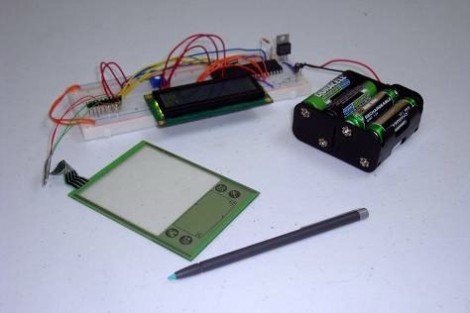
[Chris] just posted his latest tutorial which shows you how to read position data from a resistive touchscreen. These devices are fairly simple, and since they’re used in a lot of consumer electronics you can pick one up for a few bucks. This looks like it is overstock for an old Palm device.

The interface is simple, there’s just four conductors on the tab at the top of the overlay. But connecting to these is a bit of an issue since you can’t really solder directly to them. [Chris] ended up using scotch-tape to hold wires in place, with a paperclip to keep them presses against the conductors. Those conductors are used in pairs, with a positive and negative lead for the X and Y axis. To take a measurement you use I/O pins to connect voltage and ground, then read the voltage that makes it to the gound side using an ADC. This works because the point that’s being pressed on the screen acts as a variable resistor for the circuit. Data for the two axes must be read in separate operations so that the positive voltages don’t interfere with each other.

The nice thing is that once you’ve got it working with a small screen it is easily scaled up. In fact, the 23″ touchscreen used on this Android hack is just another 4-wire resistive device.

You can see a video demonstration of [Chris’] test rig embedded after the break.

Continue reading “The Basics Of Reading Data From Resistive Touchscreens”

C64 Joystick Adapter

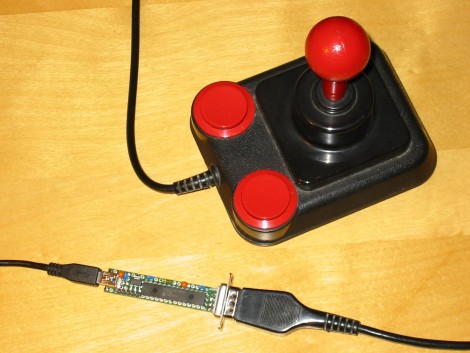
[Marcus Gritsch] wanted to do his retro gaming using retro hardware… or at least using some retro hardware. Although he was playing his Commodore 64 games in an emulator, he figured that using an original controller would boost the nostalgia quite a bit. This is a vintage Competition Pro joystick that has buttons and a joystick of a similar quality to arcade hardware and a DE-9 connector. He managed to connect new to old by building his own USB to C64 joystick adapter.

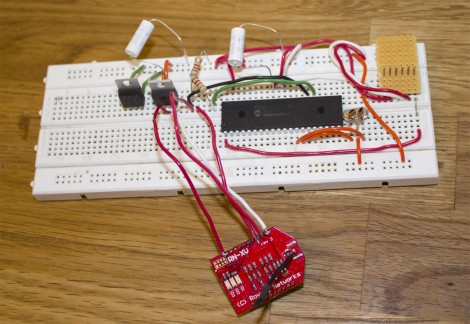
His project started out by breadboarding a circuit based on a PIC 24FJ64GB002 microcontroller. This does all of the work, having native USB support, and no problem reading and translating the signals from the old hardware which are simply conductors for each internal switch that pull to ground when actuated. Once working, he soldered everything to some protoboard; a connector at each end, the chip itself, a voltage regulator, and some passive components. It’s a, robust build that should give him years of emulated fun.

Throw Together A Temperature Logger In Minutes

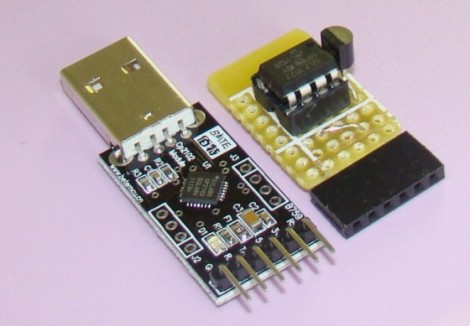
[Rajendra] found an easy way to make a USB temperature logger. He already had a USB to UART adapter that takes care of the heavy lifting. On one end it’s got the USB plug, on the other a set of pins provide a ground connection, 3.3V and 5V feed, as well as RX/TX lines.

To get the hardware up and running all he needed was something to read a temperature sensor and push that data over the serial connection. An 8-pin microcontroller in the form of a PIC 12F1822 does the trick. It runs off of the 5V pin on the USB-UART, and uses the ADC to get temperature data from an MCP9701A sensor.

The sample rate is hard-coded into to the PIC’s firmware, but adding a button, or coding some serial monitoring could easily make that configurable. [Rajendra] used Processing to write an app which displays the incoming temperature info and uses the computer to time-stamp and log the inputs. We could see this as a quick solution to tracking wort temperature during fermentation to make sure your beer comes out just right.

PlayStation 3 Controller Made Fully Remappable

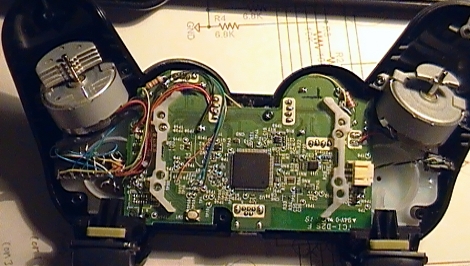
[Hazer] managed to take a PlayStation 3 SixAxis controller and modify it so that all of the buttons can be remapped in hardware. Aside from this being really cool, he had a good reason for doing it. Regular readers should remember the feature regarding [Chuck Bittner’s] internet petition calling for button mapping as a feature in all games. As the industry still hasn’t taken up the torch in this area, [Hazer] developed this mod for [Chuck] to use and has released it for any others out there who wish to give it a try.

The hardware alterations are pretty hardcore. On the left of the image, just below the rumble motor, a DIP microcontroller is nestled dead-bug style. This is a PIC 18F14K50. It’s running a bootloader, and has its own USB port on the opposite side of the controller. By cutting traces and soldering to vias, this chip intercepts button presses and shoots them off to the controller’s processor based on alternative mapping stored in EEPROM. There’s a helper app that lets you plug the controller into a computer to specify what each button does, including features like toggle for the buttons. Check out [Chuck’s] thoughts on the hardware in the video after the break.

Continue reading “PlayStation 3 Controller Made Fully Remappable”

Ultrasonic Rangefinder As Scanning Radar

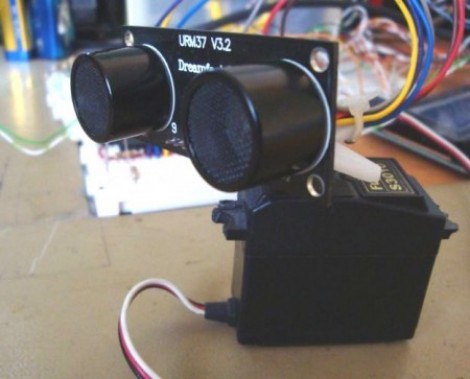
Ultrasonic rangfinders are a cheap and easy way to gather obstacle avoidance data. When added to a servo motor they form something of a scanning radar for near-proximity objects.

In this implementation, [Rui Cabral] is driving the servo, and collecting data from the sensor using a PIC 18F4520. The servo rotates 180 degreees, taking sensor measurements in increments of nine degrees. If it discovers obstacles, the distance and orientation are recorded. Feedback is displayed on a 20-LED bar graph display which shows a moving LED to track the sensor orientation, with LEDs remaining lit whenever an object is found. Right now the obstacle data is pushed over a serial connection with a PC, but could easily be injected into navigation logic for a robot in order to triangulate a path around the obstruction. You can see [Rui’s] project in action after the break.

We looked in on the same concept with a different display technique a couple of years back. That hack used an Arduino and Processing to map sensor data with a traditional green sweep display.

Continue reading “Ultrasonic Rangefinder As Scanning Radar”

Making The Most Of Your Diy Development Boards

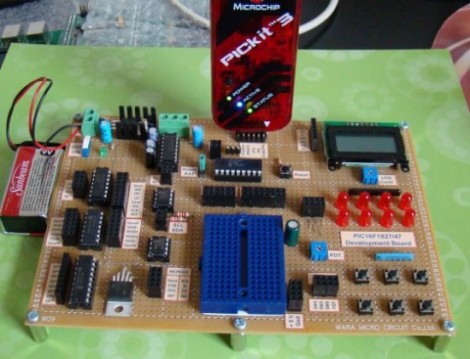
[Rajendra] built a rather impressive development board based around a PIC microcontroller. At its center, he’s got a PIC 16F1827 chip, but we think the design is easily adapted to your microcontroller of choice.

The I/O pins on the microcontroller aren’t actually connected to any of the components on the board. Instead, female pin headers neatly organize the pins grouped by their register. Jumper wires make for quick connections to all of the available peripheral devices. There’s an additional header for connecting the PICKit programmer, and the small blue breadboard lets you add your own components to the mix, or lets you utilize the board with a different microcontroller.

[Rajendra] took the time to carefully label all of the connectors, removing the guesswork (or pin counting) from the setup process. Many of the peripherals are i2c devices, and there’s a pin header to connect more, or to sniff the data using a Bus Pirate or other tool.

Quick And Easy DIY PIC Development Board

diy_pic_dev_board

A few months back, [Phil] was looking to get into PIC development, but he couldn’t seem to find a simple development board for the PIC16F883 microcontroller he wanted to use. Since no retail offering had exactly what he was looking for, he decided to put together a dev board of his own.

He spent a couple hours in Eagle, putting together a simple board layout. [Phil] then busted out the iron and copper clad, making his dev board a reality using the tried and true toner transfer method.

He says that the board itself is quite simple, consisting of little more than the PIC, an LM1117 linear voltage regulator, and all the pin headers you could possibly need. While very basic and not necessarily a hack, we do like seeing people make their own tools when the market doesn’t provide what they want.

If you have been looking around for a simple PIC development solution, be sure to swing by [Phil’s] site – all of the schematics and layout files are free for the taking.