Location Tracking? ‘Droid Does

i_spy

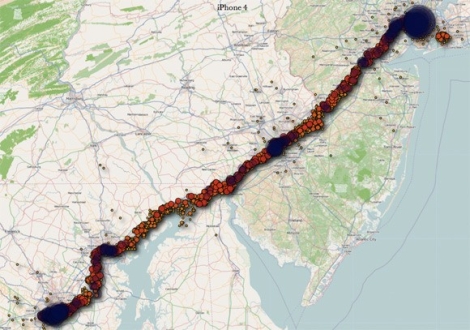
Last week, the Internet was alight with stories of iPhone location tracking. While this wasn’t exactly breaking news in security circles, it was new information to many people out there. Lots of blogs were full of commentary on the situation, including ours, with many Android users chiming in saying, “Android doesn’t do that”.

Well, that’s not entirely true – the playing field is far more level than most people would like to admit.

Android does have the same tracking capability, as do Windows Mobile phones for that matter. Both companies also monitor the cell towers you have connected to, as well as which Wi-Fi hotspots you have passed by. All three companies anonymize the data, though they do assign a unique ID to your location details in order to tell you apart from other users.

Where things really differ is in regards to how much information is stored. Microsoft claims that they only store the most recent location entry, while Andriod systems store the 200 most recent Wi-Fi hotspot locations as well as the most recent 50 cell towers.

At the end of the day each vendor does allow you to opt out of the tracking services, and if you are seriously concerned about the data they are tracking, you can always periodically wipe the information from your handset, should you desire.

[Image via TheTelecomBlog]
The LayerOne Hacking Conference Is Around The Corner

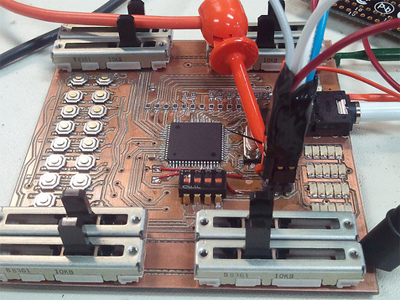
We just wanted to give a heads up to everyone to remind them that the annual layerOne hacking and security conference is coming up soon. They have announced their speaker line-up which includes talks on home monitoring, lockpicking, mobile malware and tons more. The event is located in Anaheim California on May 28-29.

They sent us sort of a press release with some information on the event and some details on the badge. You can read their email after the break.

Continue reading “The LayerOne Hacking Conference Is Around The Corner”

IPhone Watching Every Breath You Take, Every Move You Make

iphone_data

Most people tend to enjoy a certain modicum of privacy. Aside from the data we all share willingly on the web in the form of forum posts, Twitter activity, etc., people generally like keeping to themselves.

What would you think then, if you found out your iPhone (or any iDevice with 3G) was tracking and logging your every movement?

That’s exactly what two researchers from the UK are claiming. They state that the phone is constantly logging your location using cell towers, placing the information into a timestamped database. That database is not encrypted, and is copied to your computer each time you sync with iTunes. Additionally, the database is copied back to your new phone should you ever replace your handset.

We understand that many iPhone apps use location awareness to enhance the user experience, and law enforcement officials should be able to pull data from your phone if necessary – we’re totally cool with that. However, when everywhere you have been is secretly logged in plaintext without any sort of notification, we get a bit wary. At the very least, Apple should consider encrypting the file.

While this data is not quite as sensitive as say your Social Security number or bank passwords, it is dangerous in the wrong hands just the same. Even a moderately skilled thief, upon finding or swiping an iPhone, could easily dump the contents and have a robust dataset showing where you live and when you leave – all the makings of a perfect home invasion.

Continue reading to see a fairly long video of the two researchers discussing their findings.

[Image courtesy of Engadget]

Continue reading “IPhone Watching Every Breath You Take, Every Move You Make”

Defcon 19 Call For Workshops

defcon

The crew at Defcon is hard at work getting things ready for this year’s event, taking place over the first weekend in August. While the typical call for papers has been out for almost two months now, the extra space afforded by the RIO hotel has given the organizers a chance to shake things up a bit and try something new.

Along side the call for papers, they have issued a call for workshops. Since they have about 8 spare rooms on hand, they have decided to allow people who consider themselves a leader, ‘leet hacker, or ninja in their particular field to share their knowledge in a small (30 person) workshop setting.

The organizers are not strict on content, though it should be compelling. They cite examples such as teaching people to build an impenetrable Linux installation, PS3 hacking, or even helping people prep for a Ham radio license exam.

If you have something interesting to share with the community, be sure to swing by the Defcon site and get your application started!

Laser Tripwire Alarm System Uses Mirrors To Increase Coverage

laser_tripwire_alarm

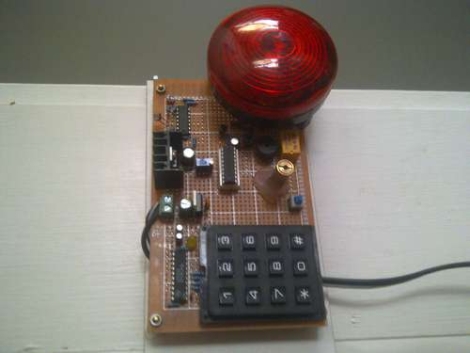
Instructables user [EngineeringShock] has been hard at work building a laser trip wire security system, complete with a combination lock. The security system works just like you see in the movies, employing an array of mirrors to bounce the laser across an opening several times in order to secure the space.

A PIC18F1220 micro controller sits at the center of the alarm and handles the majority of its functions. It takes input from the laser detection circuit, triggers the buzzer, as well as arms and disarms the entire alarm system. An LS7222 digital lock handles the passcode verification side of things, taking input from a 16-button matrix keypad, and telling the PIC when the proper code has been entered.

As you can see in the video below, the alarm system works and the buzzer is quite loud. There is one small problem however – the alarm only arms itself after the proper code has been entered and the lights have been turned off. The light sensing circuit he uses is too sensitive and can only operate in darkness, though he discusses the ability to add a more accurate sensing solution.

If you are interested in reading more about laser tripwire security systems, check out this similar passcode-based system, this alarm system built into a toy, and this Arduino-based alarm system.

Continue reading “Laser Tripwire Alarm System Uses Mirrors To Increase Coverage”

Nixie Tube Conference Badge

troopers11_badge

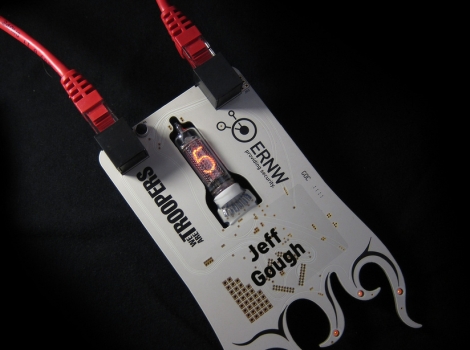
Maker [Jeffrey Gough] was recently asked to construct a set of badges for the TROOPERS11 IT security conference held in Heidelberg last month. The badges were to reflect the overall theme of this year’s conference – personal progression, education, and striving to become better IT security professionals. To do this, he designed a badge that tracked a conference attendee’s participation in various activities.

The badge sports a center-mounted nixie tube that is used to show the attendee’s score. It is worn around the neck using a Cat-5 cable that acts as a LANyard as well serves as a power switch for the badge. The badge can be plugged in to a special programmer used by conference organizers, which updates the attendee’s score after completing each activity.

[Jeffrey] made sure to add all sorts of extra goodies to the badge, including a capacitive touch button that displays a secret message via the nixie, as well as plenty of hole and SMT pads so that hackers could get their game on.

Overall, the reception of the badge was extremely positive. All of the conference attendees had lots of fun exploiting the badges as well as adding components such as LEDs and speakers.

Continue reading to check out a quick demonstration video [Jeffrey] put together, highlighting the badge’s features.

Continue reading “Nixie Tube Conference Badge”

Body Heat Sensing PC Security System

lockifnothot

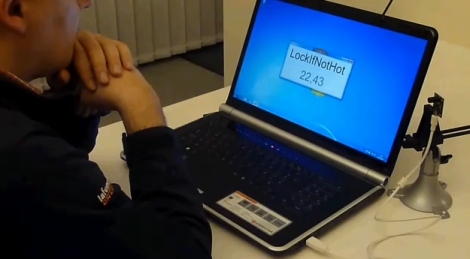
[Didier Stevens] wrote in to tell us about a little piece of PC security software he put together recently. His application, LockIfNotHot, works in conjunction with your PC as well as an IR temperature sensor in order to lock your computer the moment you step away.

The theory behind the system is pretty simple. Basically, the IR temp sensor monitors when you are at your desk, sensing your presence by the heat your body gives off. As soon as you step away however, it locks the computer since the temperature of the surrounding area immediately drops. It’s pretty simple, but as you can see in the video below, it works quite well.

The software has configurable set points and timeout values, which make it flexible enough to adapt to your specific situation. He happens to use an off-the-shelf IR sensor, but we assume any USB temperature module will do the trick. If you happen to work with sensitive information but often forget to lock your workstation, this is the program for you!

Continue reading to see a quick demonstration of his software in action.

Continue reading “Body Heat Sensing PC Security System”