Update: Testing The Accuracy Of A Magnetic Rotary Encoder

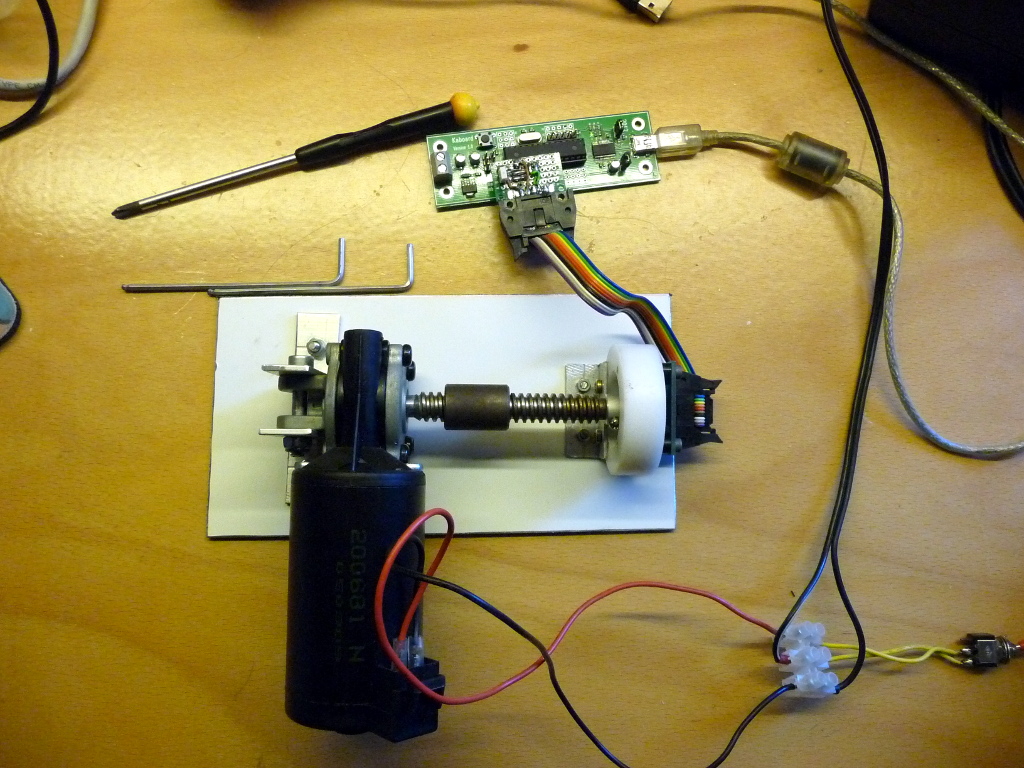
A while back we featured a magnetic rotary encoder that [LongHairedHacker] designed. The heart of the system is an AS5043 magnetic rotary sensor which runs from $6.5-$11 and has a 10 bits precision. As we wanted to check if his design was really efficient, he made a test bench for it.

For 360 degrees, a 10 bits precision means a ±0.175º accuracy, which is quite impossible to check with conventional measurement equipment. The first approach he thought of was to attach a mirror to the encoders axis and point a laser beam at it. The laser beam would be reflected across the room to a big scale, but the minimum required distance would have been 5 meters (16 feet). So he preferred attaching a motor to the sensor, rotating at a given speed and measuring the sensor output.

In the first part of his write-up, [LongHairedHacker] lays the math which explains the different kinds of errors that should be expected from his setup and sensor. He then proceeds with his test, where an ATMEGA8 based board is used to send the measured position to his computer. It should be noted that [LongHairedHacker] currently uses the time spent between two received measurements on his computer as a time base, but he is planning on time stamping the data on his board in the next future. Nevertheless, he managed to measure an average ±0.179º accuracy with his simple test bench, which is very close to the manufacturer specification.

Here is the link to our original post about his sensor.
Making The Electronics For A Doppler Motion Sensor

There are many different sensors that can be used to detect motion in a given environment. Passive InfraRed (PIR) sensors are the most used today, as they work by detecting moving heat signatures. However, they are less reliable in the hotter days and obviously only work for animals and humans.

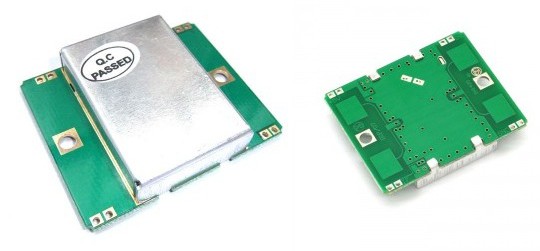
Sensors like the one shown in the above picture started to appear on the internet, they use the doppler effect to detect motion. I (limpkin) designed the electronics you need to add in order to get them to work.

Here is a simple explanation of the doppler effect: if you send an RF signal at a given frequency to a moving target, the reflected signal’s frequency will be shifted. It is commonly heard when a vehicle sounding a siren or horn approaches, passes, and recedes from an observer. The received frequency is higher (compared to the emitted frequency) during the approach, it is identical at the instant of passing by, and it is lower during the recession. Continue reading “Making The Electronics For A Doppler Motion Sensor”

Gas, Water, And Electricity Monitoring

???????????????????????????????

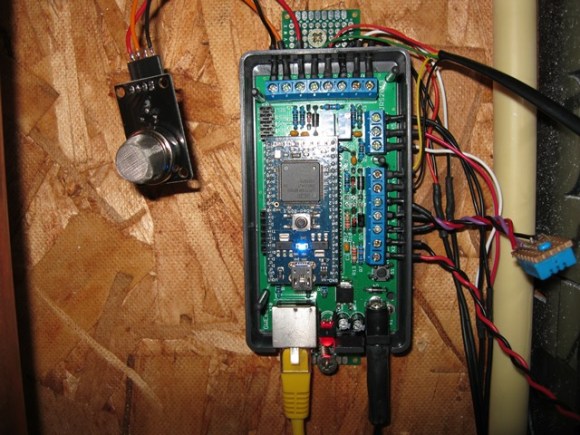
From the look of this you can tell that [Jasper Sikken] has some pretty interesting stuff going on to monitor the utilities in his home. But it’s important to note that this is a rental home. So adding sensors to the gas, water, and electric meters had to be done without making any type of permanent changes.

The module above is his own base PCB which accepts an mbed board to harvest and report on usage. His electric meter has an LED that will flash for every Watt hour that is used. He monitors that with a light dependent resistor, crafting a clever way to fasten it to the meter using four magnets. The water meter has a disc that makes one revolution for each liter of water that passes through it. Half of the disc is reflective so he uses a photoreflective sensor to keep track of that. And finally the gas meter has a reflective digit on one of the wheels. The sensor tracks each time this digit passes by, signifying 10 liters of gas used. He also monitors temperature which we’re sure comes in handy when trying to make sense of the data.

[Thanks Stephen]


Converting A Bottle Style Water Cooler To Self-fill From The Tap

water-cooler-water-line-conversion

[Roy Bean] thought it was pretty silly for the Milwaukee Makerspace to keep buying bottles of water for their water cooler. He rigged up a system that automatically fills the refrigerated reservoir in their water cooler. It’s a functional hack that also provided an excuse for him to learn about a couple of different sensors.

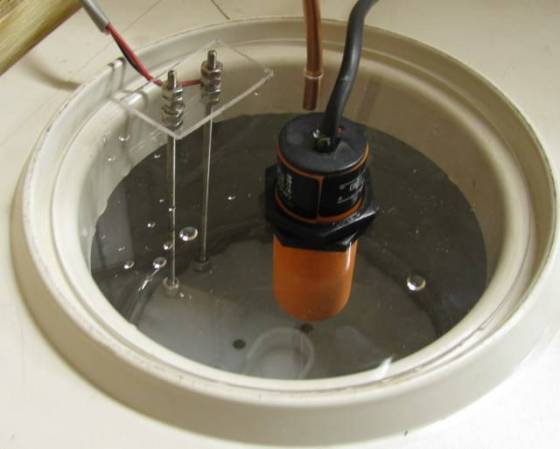
What you see above is the meat and potatoes of the hack. The well is where water from a bottle drains into the cooler. This has been covered with a sheet of acrylic to keep the drinking water clean. There is a copper pipe which has been plumbed into the tap water supply. The other two bits are redundant level sensors to make sure the water valve shuts off without overflowing. One of them is a capacitive proximity sensor, the other is a conductivity sensor hacked together using stainless steel hardware submerged in the pool.

If you’re worried about the taste or odor of your tap water just add in a single or multiple stage under-counter filter system when plumbing in the water line. The filters are easy to find and we’d bet they cost less than a contract with a bottled water company.

[Thanks Pete]

Tracking A Car Like It Were A Computer Mouse

optical-mouse-sensor-tracks-vehicle-motion

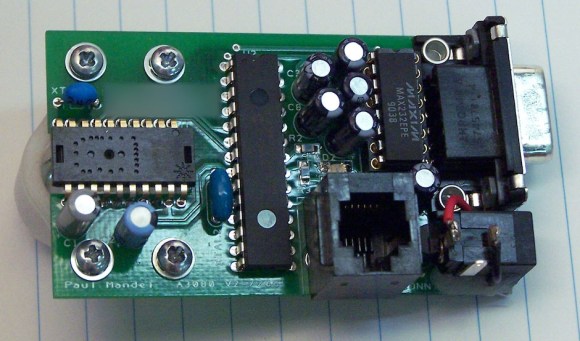
This is [Paul Mandel’s] Ground-truth velocity sensor. That’s a fancy name for a device which tracks the movement of a vehicle by actually monitoring the ground its travelling over. This differs from simply measuring wheel rotation (which is how traditional odometers work) in that those systems are an indirect measurement of motion. For us the interesting part is the use of an ADNS-3080 single-chip optical mouse sensor on the left. It’s cheap, accurate, and only needs to be ruggedized before being strapped to the bottom of a car.

[Paul] designed a case that would protect the electronics and allow the sensor to mount on the uneven underbelly of a vehicle. The optical chip needs to be paired with a lens, and he went with one that cost about ten times as much as the sensor. Data is fed from the sensor to the main system controller using the PIC 18F2221. One little nugget that we learned from this project is to poll a register that always returns a default value as a sanity check. If you don’t get the expected value back it signals a communications problem, an important test for hardware going into the vibration-hell that is automotive technology.

12-axis Sensor Adds Auto Screen Orientation To This Older Tablet PC

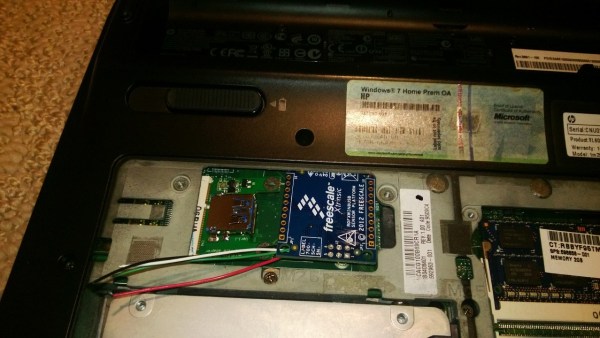
[Mal’oo] has one of those laptop computers whose screen swivels to turn it into a tablet. But the thing is a few years old and didn’t come with an orientation sensor that changes the screen between landscape and desktop, but also knows which side is up. His solution was to add a 12-axis sensor via the mini PCI express header.

The hardware comes in two pieces. The first is a mini-PCIe card to USB interface. This is handy if you want to add a Bluetooth dongle permanently to your computer. But he’s got other things in mind for it. After hacking the BIOS (which for some reason limits what you can plug into this slot) he moved onto the second part which is a USB 12-axis sensor. This picture shows the wires before they were soldered to the USB card. [Mal’oo] couldn’t just plug it in because the sensor wouldn’t have been oriented correctly in relation to the computer. The final product is quite response, as shown in the clip after the jump. Continue reading “12-axis Sensor Adds Auto Screen Orientation To This Older Tablet PC”

Sensor Sleeve Makes Tablet Use Easier And Benefitial For Disabled Children

tablet-accessiblity-hack

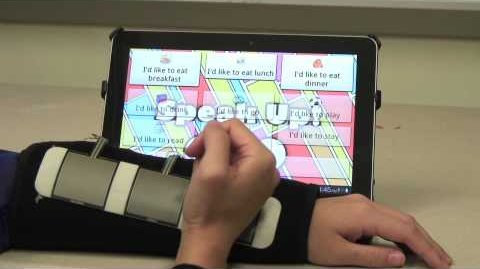
Pinch-zoom is a godsend (and shouldn’t be patent-able) and although we mourn the loss of a physical keyboard on a lot of device we use a tablet nearly as often as we do a full computer. But the touch screen interface is not open to everyone. Those who lack full dexterity of their digits will find the interface frustrating at best or completely unusable at worst. A team of researchers from the Atlanta Pediatric Device Consortium came up with a way to control touch-screen tablets with a sensor array that mounts on your arm.

The project — called Access4Kids — looks not only to make tablet use possible, but to use it as a means of rehabilitation. The iPad seen above is running a custom app designed for use with the sensor sleeve. The interface is explained in the video after the break. Each sensor can serve as an individual button, but the hardware can also process sequential input from all three as a swipe in one direction or the other. If they can get the kids interested in the game it ends up being its own physical therapy coach by encouraging them to practice their upper body motor skills.

Continue reading “Sensor Sleeve Makes Tablet Use Easier And Benefitial For Disabled Children”