Commandeering Public Video Screens: Real Or Fake?

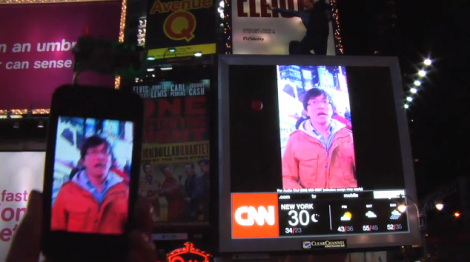
It’s time for everyone’s favorite comment thread game: Real or Fake? This week’s edition comes in from a tip that [Phil] sent about a way to take over video screens in Times Square. Watch the video after the break to see the hackers using a two-part solution to rebroadcast video from an iPhone onto a screen in the busy urban setting. The first part is a transmitter that plugs into the iPhone, the second is a signal repeater that, when held close to a video screen, overrides the clip currently being displayed with the video from the handheld. The image above shows the repeater being floated up to the big screen using a giant red balloon which you can make out in the black bar to the left of the replayed video.

Our first thought is that someone just watched Tron: Legacy and wanted to have a little Sci-Fi fun with the Internets. We can’t imagine a hardware solution that would actually make this work, but please do share your thoughts about that in the comments. We’d suspect this is more of a video hack that uses After Effects, similar to how the stopped motion candle video of the eyelid shutter glasses videos were faked. But apparently there is a follow-up video on the way that will show how the prototype was made so we could be wrong.

update: [Phil Burgess] points out that the “repeater” looks awfully familiar.

Fake for a variety of already-stated reasons (e.g. video out the headphone jack?). But the smoking gun, watching the 720P video on YouTube, is that I plainly recognize the hardware they’re using as the “repeater”: it’s simply the internals from a Digipower JS1-V3 cell phone USB boost charger (having torn apart a few myself):

Continue reading “Commandeering Public Video Screens: Real Or Fake?”
Hackerspace Camera Rig Auto-alerts The Internets When Projects Are Finished

alerttheinternets_cam

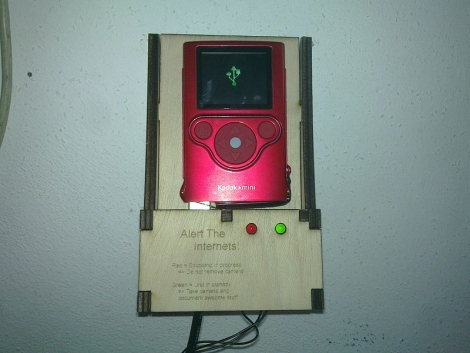
It seems like every hackerspace has their own means of communicating status messages to their members. The hackers at [MetaLab] in Vienna have put together a rather novel way (Google translation) of letting the world know they have completed a project. While some hackerspaces simply notify their members that they are open for business, this hack takes things a step further.

When a project is deemed complete, the camera is removed from the dock, and any number of videos can be recorded. When the camera is returned to the dock, a canned introduction video is added to the recordings, then everything is automatically uploaded to YouTube. No extra time is required, no video editing needs to be done – their work hits the Internet immediately once they have finished filming it.

It’s a great idea, and something that every hackerspace should have. It would be even better to see these things installed in public areas to allow for immediate reporting of events as they occur.

If you are so inclined, be sure to check out [MetaLab’s] YouTube channel.

[via Make]

Automated Window Curtain Hits The Road

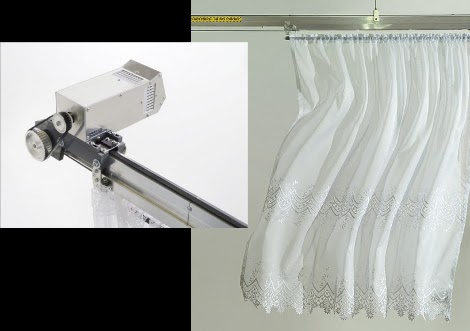
[Niklas Roy] upgraded his privacy curtain and is taking it on the road. Regular readers will remember the first version that resided in his shop window and used video processing in conjunction with a motor to keep the small bit of curtain in front of any passersby. We’ve embedded the original demo video after the break and it’s not to be missed.

But now he’s decided to make some upgrades to the system because it’s going to be shown as an art display. He looked around for a motor upgrade but found that the best motor at the most reasonable price could be pulled from a Makita power drill. The track itself is modular, making the installation scalable up to ten meters in total length. He even built a clean-looking laptop dock that handles the video processing end of things. But there’s something here for you as well. He’s released all of his source code, schematics, board design, and even the SketchUp files for the motor mounts and other parts. Dig out that old power drill and build one of your own.

Continue reading “Automated Window Curtain Hits The Road”

Giant Oscilloscope Music Display

oscilloscope_wall

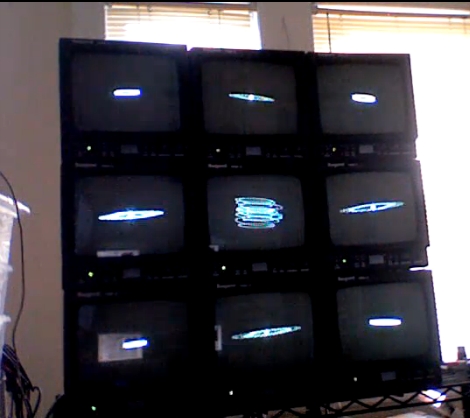
[Andrew] sent us a video of his home made oscilloscope wall, which he uses to visualize different audio tracks he has created. The wall is made up of nine old broadcast monitors he wired together in his studio. At first it appears that the monitors are split into two sets of four, with the center monitor running separately, but upon further inspection it looks as if he can control the display of each monitor independently.

We’re pretty sure he is not using an actual oscilloscope to generate the visuals, but rather visualization software that can approximate the output of an O-scope set in X-Y display mode. Though the screens run independently, it would be great to see all nine screens working in concert to display one large visualization. [Andrew] mentions that an high-def version is in the works, so perhaps we’ll see more features added in that iteration.

Stick around to watch a video of his oscilloscope wall in motion.

Continue reading “Giant Oscilloscope Music Display”

Pactuator: Mechanical Pac-Man Frame

As a proof of concept for his long term work in progress “The Pac-Machina” (an electro-mechanical reimagining of a Pac-Man cabinet), [Jonathan] needed some way to make a mechanical Pac-Man, flappy jaw and all. After working through a couple different design possibilities, he decided on an interesting setup which includes using a cog with only half its teeth to make the mouth open and close. Unfortunately, NAMCO BANDAI has asked him nicely not to sell these as kits, but he has helpfully included just about all that is required to make one of these from scratch. [Jonathan] even cut and laser etched his own faux-Victorian frame to keep his proof of concept Pac-Man ready until needed for the main project.

Composite Video With MSP430 Chip

[NatureTM] used part of the Thanksgiving holiday to get composite video output working with an MSP430 microcontroller. He’s using one of the chips that came with the TI Launchpad, which is a big hardware limitation because of the relatively small code memory and RAM. The chip displays one still image at a resolution of 192×40 pixels. Still, this is a great way to learn about composite video signals, as a lot of other projects use a TVout library to save you the headaches. All you’ll need is a TI Launchpad, a 16 MHz crystal oscillator, two resistors, and an RCA jack. Dig through the code and see what a great job [NatureTM] did of offloading as much work onto the chip’s peripherals as possible.

LED Wall And Kinect Join Forces

[Alex] wrote in to let us know about this Kinect controlled LED wall that was whipped up at the Tetalab hackerspace in Toulouse, France. The wall, which was built earlier in the year, uses some MAX7313 LED intensity controlling shift registers. Each gets its own board and controls the intensity of sixteen different red LEDs. They’re embedded in the wall module and covered with ping-pong balls as diffusers.

The recent activity on the project takes advantage of the Xbox Kinect. As you can see in the video after the break, they’ve used the open source Kinect drivers to capture 3D environment data, processing it into color gradients which are displayed on the Pong wall. Shouldn’t be long before they someone comes knocking on their door to install this in a dance club. We love the effect, especially because it works in a dark room and the LEDs don’t cause any interference with the video capture.

Continue reading “LED Wall And Kinect Join Forces”