Hack It: In-refrigerator Egg Monitoring

Here’s a concept piece that monitors the eggs in your refrigerator. It’s still in development and we don’t think the general public is ready for digital egg monitoring quite yet. But we love the concept and want to hear from you to see if you could develop your own version.

What we know about the device is that — despite the image which makes smart phone proximity seem important — it connects to the Internet from inside your fridge. It will tell you how many eggs you have left, and even tracks the date at which each entered your refrigerator.

So, what’s inside this thing and who can build their own the fastest? We’ll cover some specs and speculate a bit to get you started: There’s a light sensor to detect when the door opens and an LED below each egg to illuminate the oldest. We think the light sensor triggers a microcontroller that uses each of the egg LEDs as a light sensor as well. If the threshold is too low then there is indeed an egg in that cup. We also like the fact that the tray has fourteen slots; as long as you don’t buy eggs until you have just two left you’ll always have room.

If you build one we want to know. We’re thinking 3D printed cups, low-power microcontroller, but we’re kind of stumped on the cheapest WiFi solution. Leave your thoughts in the comments.

[via Reddit via NY Daily News via Mind of Geek]
Turning A Router Into An Arduino Shield

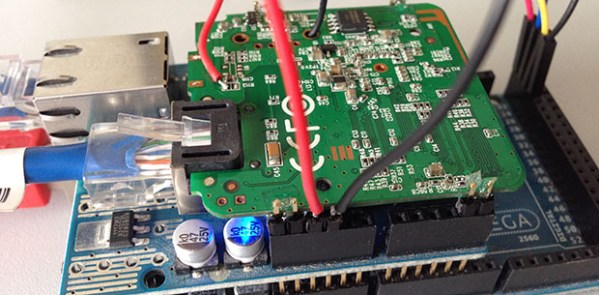
[Dirk] had a problem: while he already had an Arduino with an Ethernet shield, he needed WiFi for an upcoming project. Running a Cat5 cable was out of the question, and a true Arduino WiFi shield is outrageously expensive. He did, however, have a WiFi router lying around, and decided it would make a perfect WiFi shield with just a little bit of cutting.

The router [Dirk] used was a TL-WR702N, a common router found in the parts bins of makers the world over. Inspiringly, the size of the router’s PCB was just larger than the space between the Arduino’s pin headers. Turning the router into a shield is simply a matter of scoring the edge of the board and gluing on a few pins for mechanical strength.

Power and ground lines were soldered between the pin headers and the router, while data is passed to the Arduino and Ethernet shield through a short cable. It may not look pretty, but if it works in a pinch we can’t complain.

TI’s CC3000 WiFi Chip Gets A Library

About six months ago, Texas Instruments released a simple, cheap, single-chip WiFi module. At $10 a piece in quantities of 1000, the CC3000 is a much better solution to the problem of an ‘Internet of Things’ than a $50 Arduino Ethernet modules, or even the $30 Electric Imp. All indications, especially the frequent out of stock status for the dev board on TI’s web site, show the CC3000 will be a popular chip, but until now we haven’t seen a CC3000 library for the Arduino or other microcontrollers.

[Chris] just solved that problem for us with a CC3000 WiFi library for the Arduino. He ported TI’s MSP430 CC3000 library to the Arduino, allowing even the bare-bones Arduino Uno to connect to a WiFi network with just a handful of parts. The code itself takes about 12k of Flash and 350 bytes of RAM, giving anyone using the CC3000 enough room left over to do some really interesting stuff. There’s even a slimmed down library that uses somewhere between 2k and 6k of Flash, making an ATtiny-powered web server a reality.

There are a few caveats in using the CC3000 with an Arduino; it’s a 3.3 Volt part, so you’ll need a level shifter or some resistors. Also, the chip draws about 250 mA when it’s being used, so you’ll need a beefy battery if you want your project to last an entire day of use.

Now that the library is out of the way, be on the lookout for a CC3000 breakout board. Here’s one, but expect some more on the market soon.

Building A WiFi Enabled Nixie Counter

wifi-nixie-counter

[Kevin Ballard] built this Nixie counter on the company dime. Tubes like this are getting more and more difficult to find since they’re no longer being manufactured. But when the Bossman hands you a corporate credit card those kinds of concerns take a back seat to your parts-shopping impulses. Start to finished this WiFi enabled counter took six weeks to build.

Connecting the board to the internet was very easy thanks to the Electric Imp that drives it. The difficult part comes in building a driver board and sockets for the tubes. We don’t see a lot of detail on how he’s generating the high voltage. But you can get a good feel for the tube connectors from the picture. He’s using an adapter PCB from Kosbo which breaks the tube pins out to two rows of 0.1″ pitch pin headers. The acrylic base has a port for each made of pin sockets spaced by a thick chunk of acrylic. Wiring harnesses wrap around the back side of the base to mate with the driver hardware. It’s programmed to count some type of company metric (it was funded by the corporation after all). They must be fairly successful because those numbers are flying by in the demo video.

Continue reading “Building A WiFi Enabled Nixie Counter”

Gesture Control Uses WiFi Doppler Shift

wifi-gesture-control

We’ve said it before: in the future simple interfaces will use nothing but your body. At least at first glance that’s the case with this WiFi-based gesture control system. If you have Internet at home you probably have a WiFi access point. That’s the first portion of the equation. The remainder is a way of measuring how the radio waves bounce off of your body. So far this is being done with Software-Define Radio (SDR) but researchers at University of Washington think it may be possible to build the technique into future WiFi devices.

The demo video shows this man waving his arm to adjust the volume of his home entertainment system. Intuition tells us that this would be impossible if your arm wasn’t the only thing in motion at the time. But that issue is quickly addressed. Multiple antennas can track multiple people at the same time. There is also consideration for false-positives. The system requires a moderately complex wake-up gesture sequence to prevent you from, say, accidentally turning on the stereo when you roll over in bed.

If you’re having trouble wraping your mind around this, consider this ultrasonic music player. The WiFi version does the same thing, but processing changes in the returning radio waves is much more complex.

Continue reading “Gesture Control Uses WiFi Doppler Shift”

LED Mortar Board Battles Suns Brightness With 21W Of Power

[Jeremy Blum] aimed to be the brightest student at his Master’s graduation ceremony this spring. He designed an LED rig for his mortar board which should battle the sun’s intensity by using up to 21 watts of power. But he didn’t stop with eye-catching intensity. while he was at it he also included some interactive features so the guy behind him has a way to keep from going blind.

One thing that really caught our eye is the 3D printed parts he generated for the project. There’s a nice mounting plate for the LED side of things, and a wrist-mounted enclosure for the Raspberry Pi board. Wait, why does he need an RPi to drive some LEDs? We already mention interactivity which is facilitated by the Pi acting as a WiFi hotspot. Connect to the access point and choose a color. If you’re in the seat behind [Jeremy] you’ll want to choose black! All of this and is explained in his video presentation.

Continue reading “LED Mortar Board Battles Suns Brightness With 21W Of Power”

Wifi Pineapple Project Uses Updated Hardware For Man-in-the-middle Attacks

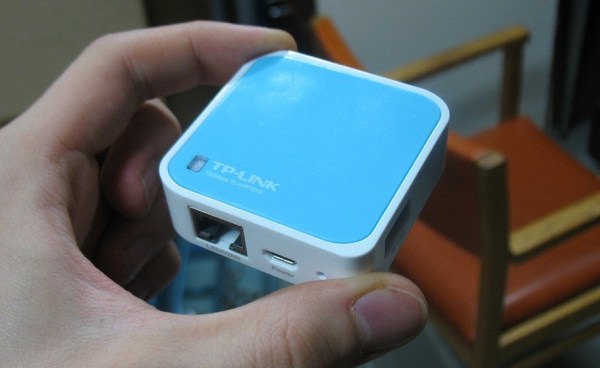
We’ve seen this small, cheap, and powerful WiFi router before. But this time it’s up to no good. [Andy] used a TP-Link WR703N to build an upgraded WiFi Pineapple hacking tool.

A WiFi Pineapple is a device spawned years ago by the Hak5 team (here’s a clip showing off the device). It uses a WiFi router that will answer to any SSID request. Basically if your computer or smart phone has an AP SSID saved and broadcasts a request to connect the pineapple will pretend to be that device and start the handshake. This provides the chance to sniff all the data passing through in a classic man-in-the-middle attack.

[Andy] is recreating the device but at a rock bottom price. He picked up this router for about $20 and added an $8 USB drive to it. The only other thing you would need is a power source and a way to hide the hardware. The code used in the Hak5 version is available for download and that’s what he worked on after flashing OpenWrt to the device.

[Thanks Midnite]