GSM-to-Skype Bridge Lets You Lose Those Roaming Fees

Here’s the scenario: you’re going to be traveling somewhere and you’ll be charged roaming fees if you use your cellphone. But there is free WiFi available in this place. You can save yourself money by leaving your SIM card at home and using a GSM-to-Skype bridge to take calls on your phone via WiFi.

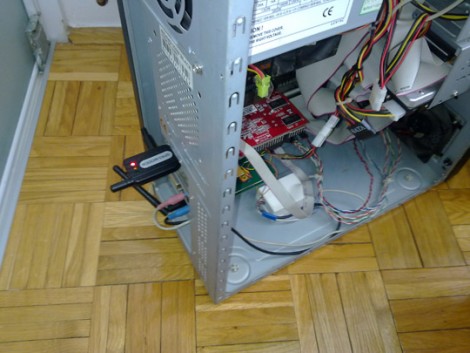
[Trax] is using a USB GSM modem to take cellphone calls on a PC. He leaves his sim card in this modem so that it can make and receive calls and text messages through your normal telephone number. For some reason, the USB connection only provides control of this modem and doesn’t pass bi-directional audio. To make this happen, he built an audio interface cable using two transformers and a few passive components to connect the modem to the computer’s audio card.

On the software side of things, an application written in Delphi 7 manages the modem, the audio stream, and the Skype application. When a call is incoming it sets up a Skype connection with your handset via the Internet, passing along the caller ID data in the process. If you choose to answer the Skype session the application will pick up the GSM call and you’ll be connected. It works the same way when placing an outgoing call.

This seems easier to manage than a rig that physically pushes a cellphone’s buttons via the Internet.

[Thanks Mure]
Tactical Wifi Cantenna Needs Picatinny Rails

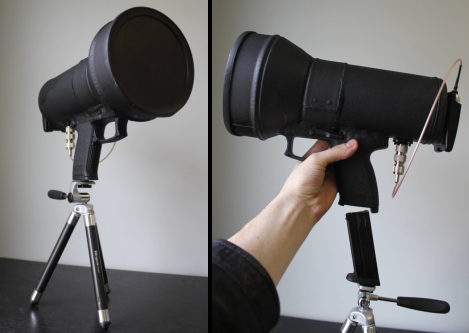
[Wes] built a cool looking Tactical Wifi Cantenna with some parts from a broken airsoft pistol. The antenna is a cookie can type with an added cone to increase performance, as seen in this tutorial. Once the antenna was built it was time to add some kind of handle, [Wes] just so happened to have such a thing on hand. After epoxy puddying the pistol’s grip to his cookie cantenna he observed that the magazine lock was still functioning. Quick thinking and the application of a  hammer in nut allows the whole rig to quickly attach to the tripod. The antenna also sports a plastic lid and textured paint finish for that ultimate tactical look and feel. A USB Alpha AWUSO36H Wifi dongle even mounts on the back of the rig. We wouldn’t go around outside pointing this at stuff attaching and detaching the tripod but the finish looks great, nicely done!

Check out some other various types of cantennas, even a rifle version if you crave more wifi goodness.

WiFi Radio Plays Your Tunes In Style

wifi_radio

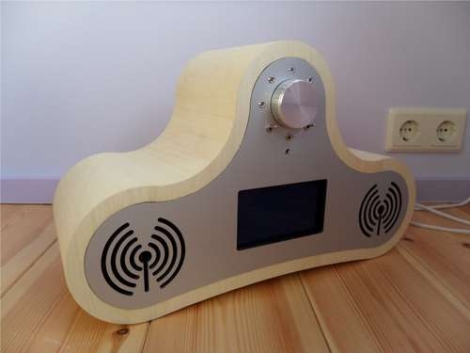
Instructables user [Jan] likes listening to music while hacking away in his workshop, but listening to the same CDs gets tired and boring after awhile. He contemplated listening to streaming audio over the Internet, but hated the idea of needing a computer around at all times. After a bit of reading, he found some information about building a WiFi radio, and got started on constructing his own.

Using a guide he found at the MightyOhm, he hacked an Asus router to use OpenWRT, adding a music player daemon to tune in various stations. He added a small LCD display and an ATmega32 to drive it, as well as a rotary encoder to allow him to switch between stations.

The case was built using several layers of  MDF which were cut using a CNC mill, and joined together with glue and wooden dowels. The front and back panels were milled out of  alucobond sheets, with the remainder of the case covered in white wood veneer. The detail that went into this build is great, we especially love the “WiFi Symbol” speaker grilles.

All of his code and schematics are available for download, should you desire to make a WiFi radio of your own. Stick around to see a video of his completed radio in action.

[via MightyOhm]

Continue reading “WiFi Radio Plays Your Tunes In Style”

Quick Hack Brings Wi-Fi To An Aging Laptop

usb_wifi_adapter

[Jarrod] has an older Compaq laptop he is still pretty keen on, but he has one niggling problem – the laptop doesn’t have a built-in wireless card. He recently changed security protocols on his home wireless network to WPA and realized that his old Linksys PC card only supports WEP. He decided it was time to find another way to connect wirelessly, so he started searching around for options.

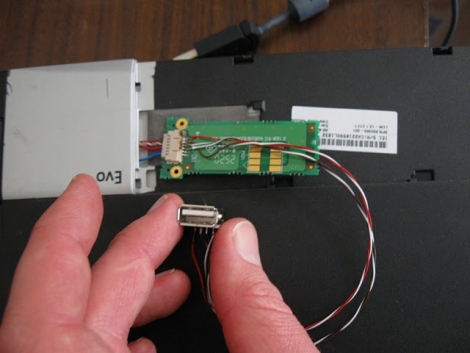
It turns out that his laptop does have the ability to accept a LCD-mounted add-on wireless card, but it costs about $100 and doesn’t support WPA. He figured that the card slipped into some sort of glorified USB port, and after disassembling the laptop, he found that he was right.

He quickly soldered a few wires and a USB adapter to the Bluetooth board that already occupied the card slot, then plugged in a wireless mouse to see what would happen. The mouse’s radio powered on without issue, and much to [Jarrod’s] delight, the port was USB 2.0 compatible.

Now that he knows the port is live, he plans on finding a small USB 802.11 G or N adapter to cram into the slot – with the deluge of miniature USB Wi-Fi adapters on the market, that shouldn’t be too hard.

How To Find WiFi: Carry A Big Stick And Use Long Exposures

Here’s an artsy way to map out WiFi networks around you; use a big light pole and long exposures to graph them on top of photographs. This capture method is often called light painting, and uses the relative brightness of LEDs to stretch out a still image – moving the stick quickly while the shutter is open.

The four-meter tall rod used in this project plays host to 80 white LEDs. An Arduino along with a WiFi shield detect the relative signal strength of the network surrounding the device. The images that are produced with this method are quite pleasing and you’ll enjoy watching the video after the break. We just wish that there was some kind of Google Street View interface to share this data since someone had to go out pounding the pavement with the rather peculiar looking apparatus in order to gather the data in the first place.

Continue reading “How To Find WiFi: Carry A Big Stick And Use Long Exposures”

Water Use Feedback Changes Behavior

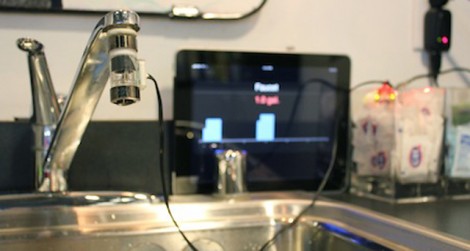
How much water do you use when showering, or washing your hands, or washing the dishes? Not how much does the average person use, but how much to you use? That’s what the team over at Teague Labs set out to find with this water usage feedback system. The sensor used is a Koolance flow meter which is intended to measure coolant flow in PC liquid cooling systems. At $20, it makes a nice low-cost sensor which was paired with a WiFi enabled Arduino. In the image above they’re using an iPad as a screen so that you can see how much water you’re using (or wasting) as you wash your hands. This resulted in saving 1/2 gallon of water every time someone washed their hands.

The project code, schematic, and board files are all available for download. Along with the hardware build there’s some nice server-side software that gathers and graphs the data over time. We’ve seen a lot of power-meter hacks, but it’s nice to have the option to track water usage, even if this is tailored to just one tap at a time.

Solar Powered WiFi Repeater

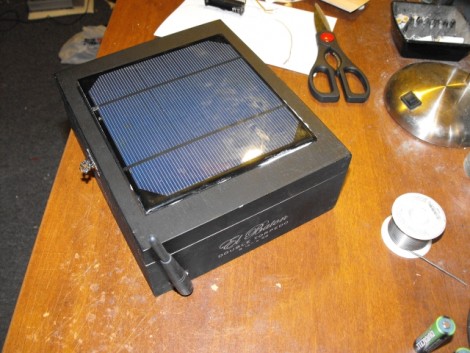
For all those times you need to broadcast your own access point where there’s no outlet [Larry] shows us how to make a solar-powered hotspot. He started by slapping a solar panel on the lid of a cigar box and attaching it to five rechargeable AA batteries inside. These power the mainboard from a router which is the perfect size to friction fit in the opening. It has been flashed with a copy of DD-WRT, and set to scan for open WiFi connections. When it finds one it connects and rebroadcasts its own WiFi signal to the surrounding area. He leaves it in the back window of his car and uses it to get on the net during lunch.