Friday Hack Chat: JavaScript On Microcontrollers

Microcontrollers today are much more powerful and much more capable than the 8051s from back in the day. Now, they have awesome peripherals and USB device interfaces. It’s about time a slightly more modern language was used to program these little chips.

During this Friday’s Hack Chat, we’re going to be talking about JavaScript on microcontrollers. [Gordon Williams] will be joining us to talk about Espruino. This is a tiny JavaScript interpreter that runs on the little embedded chips, has a debug interface, and allows you to program your board on any platform without any external programming hardware.

[Gordon] is the key developer of Espruino, and so far he’s launched a full-sized Espruino, and a pico Espruino on Kickstarter, both with amazing success. The software stack has been extremely popular as well — it’s been ported to the ESP8266 and dozens of other microcontrollers that will soon be in the Internet of Things.

During the Hack Chat, we’ll be discussing interpreted languages on microcontrollers, interpreter design and optimization, with a special emphasis on creating devices with Espruino and putting Espruino boards on the Internet with WiFi, Bluetooth, and other crazy radios. As always, we have a spreadsheet open to everyone if you’d like to ask a question.

Here’s How To Take Part:

join-hack-chatOur Hack Chats are live community events on the Hackaday.io Hack Chat group messaging. Hack Chats are mostly, usually, and this week noon, Pacific time on Friday. Here’s a time and date converter!

Log into Hackaday.io, visit that page, and look for the ‘Join this Project’ Button. Once you’re part of the project, the button will change to ‘Team Messaging’, which takes you directly to the Hack Chat.

You don’t have to wait until Friday; join whenever you want and you can see what the community is talking about.
Someone Finally Did It With A 555

[Jarunzel] needed a device that would automatically click the left button on a mouse at a pre-set interval. For regular Hackaday readers, this is an easy challenge. You could do it with an ATtiny85 using the VUSB library, a few resistors and diodes, and a bit of code that emulates a USB device that constantly sends mouse clicks over USB every few seconds. You could also do it with a Raspberry Pi Zero, using the USB gadget protocol. Now, this mouse-clicking gadget would be connected to the Internet (!), programmable with Node or whatever the kids are using these days, and would have some major blog cred. If you’re feeling adventurous, this mouse clicker gadget could be built with an STM32, Cypress PSoC, or whatever microcontroller you have in your magical bag of hacker tricks.

Then again, you could also do it with a 555 timer.

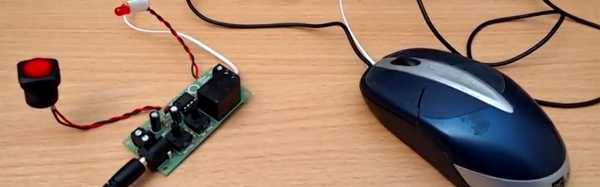
The reason [Jarunzel] couldn’t use any of the fancy hackertools for this build is because the system wouldn’t accept two mouse devices. No matter, because Maplin has a neat kit with a 555 timer and a relay. The relay is wired up across the microswitch in the mouse, and setting the values correctly makes the mouse click about once per second, with a click duration of about 100ms. Good enough.

With the kit built, wired into the mouse, a small app built to test the device, and a nice project box constructed, [Jarunzel] had exactly what he needed. There’s even a video of this mouse clicker in action. You can check out that riveting footage below.

Continue reading “Someone Finally Did It With A 555”

Laser Etching PCBs

A while ago, [Marco] mounted a powerful laser diode to a CNC machine in an attempt to etch copper clad board and create a few PCBs. The results weren’t that great, but the technique was promising. In a new experiment, [Marco] purchased a very cheap laser engraver kit from China, and now this technique looks like it might be a winner.

[Marco] sourced his laser engraver from Banggood, and it’s pretty much exactly what you would expect for a CNC machine that costs under $200. The frame is aluminum extrusion, the motors are off-the-shelf steppers, the electronics are just Pololu-like drivers, and the software is somewhere between abysmal and terrible. Nevertheless, this machine can cut wood, leather, fabric, and can remove spray paint with a big blue laser diode.

To create his PCBs, [Marco] is first cleaning a piece of copper clad board, coating it with spray paint, then blasting it with a laser. The preferred software for this is LaserWeb, and the results are pretty good for a cheap machine.

There are a few extra steps to creating the PCB once the board has been coated with paint and blasted with a laser. This process still requires etching in either ferric chloride or some other mess of acid, but the results are good. So good, in fact, that [Marco] is experimenting with copper foil and Kapton to create flexible circuit boards. You can check out the video of these experiments below.

Continue reading “Laser Etching PCBs”

Monoprice Mini Delta Review

For the last year or so, Monoprice has been teasing their follow-up to the fantastic $200 MP Select Mini. This is the $150 mini delta printer. We got a look at it last January at CES, it was on display at the Bay Area Maker Faire last May. Now there’s one on the Hackaday review desk.

Over the last few years, 3D printing has settled down into what most of us expected way back in 2010. No, not everyone wants, or arguably needs, a 3D printer on their desks. This is a far cry from the hype of a few years ago, leaving us with what we have today. 3D printers are just tools, much like a drill press or a laser cutter.

With that said, there still are some fantastic advances in 3D printing coming down from on high. Prusa will be shipping the 4-color multi-extruder add-on for the i3 Mk 2 shortly, and somehow or another we have infinite build volume printers. Still, there’s space to democratize 3D printing, and an opportunity for someone to release a very cheap, very good printer.

Monoprice was kind enough to send me a review unit of the MP Mini Delta before it officially hit their website. This is one of the first off the production line, alongside the few hundred pre ordered on an Indiegogo campaign earlier this year.  Does this printer live up to expectations? It sure does, and that’s not just because it’s a $150 printer.

This would be an excellent printer at three times the price, and evidence enough that 3D printing is changing from a weird hobbyist thing to a proper tool.

Continue reading “Monoprice Mini Delta Review”

Hackaday Links Column Banner

Hackaday Links: August 20, 2017

Foam core, dollar tree foam board, Adams foam board, or whatever we’re calling a thin sheet of foam sandwiched between two pieces of poster board, is an invaluable hacker’s tool. Everyone should have a few sheets on hand, and not just because each sheet is a dollar each at any Dollar Store. [Eric] has been working on a technique to create compound curves in foam board, and the results look great. It’s a true three-dimensional plane with weird curves, and certainly has applications for something.

The Apollo Lunar Module is the first, and only manned space-only spacecraft ever made. The design of this spacecraft isn’t constrained by trivialities like ‘atmosphere’, and the design didn’t need ‘bulkheads thicker than a stack of paper towels’. It is a beautiful ship, and now a company wants to produce a gorgeous 1/32 scale model of the LEM. The goal is $25k, which is quite high for the real space modeling market, but if this GoFundMe campaign succeeds, this will be one of the finest real space models ever created. It’ll also match the scale of the 1/32 Revell CSM.

Speaking of Apollo-related technology, here’s a slight bit of drama. [Fran] has been working on recreating the DSKY — the user interface for the Apollo Guidance Computer — for a few years now. She’s set up a crowdfunding campaign to recreate the electroluminescent, screen printed segment display, and things are going great. Now there’s a company selling commercial DSKYs (with a stupid TFT display), that potentially uses the same art. Is this copyright infringement? Maybe, but probably not. It is a dick move not to credit [Fran], though.

The Monoprice Mini Delta is phenomenal. More on that in a bit.

There’s a complete solar eclipse happening across the United States tomorrow. Many schools should have started classes by then, but they’re calling tomorrow a snow day. Everyone who is traveling to see the eclipse is probably already where they’re going to be, and there are clouds on the horizon. Literal clouds. Everyone is watching the weather channel to see what the cloud cover will be tomorrow. Some people don’t have to worry: [Dan] is building a high-altitude balloon to get 100,000 feet above any clouds. There’s a 360° camera onboard, and the resulting video will be awesome. At least one person in Charleston will be renting a plane; I question the wisdom of renting a 172 over a Piper or Cirrus or another low-wing plane, but whatever. If you’re working on a project that will look at the eclipse from above the clouds, leave a note in the comments. For those of you looking at clouds tomorrow, Hackaday is doing another eclipse meet up on the Pacific coast of Mexico on April 8, 2024.

Hackaday Prize Entry: Engine Control Units And Arduinos

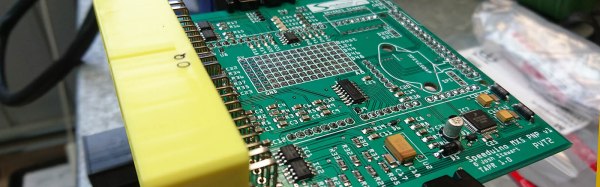
The modern internal combustion engine is an engineering marvel. We’re light-years ahead of simple big blocks and carburetors, and now there are very fast, very capable computers sensing adjusting the spark timing, monitoring the throttle position, and providing a specific amount of power to the wheels at any one time. For the last few years [Josh] has been building a fully-featured engine management system, and now he’s entered it in the Hackaday Prize.

The Speeduino project is, as the name would suggest, built around the Arduino platform. In this case, an Arduino Mega. The number of pins and PWMs is important — the Speeduino is capable of running the fuel and ignition for eight cylinder engines.

The Speeduino is designed to do everything an engine control unit can do, including rev limiting (although if you’re building your own ECU, why?), and reading ethanol sensors. Right now [Josh] is working on a beta run of the Speeduino designed for the 1.6L Miata. That’s an excellent platform for firmware performance tuning, and there’s still a lot of work to be done on the firmware side of things before everything’s all set to go. Still, this is a great project and sure to impress the bros at track day, bro.

Multiple Monitors With Multiple Pis

One of the most popular uses for the Raspberry Pi in a commercial setting is video walls, digital signage, and media players. Chances are, you’ve probably seen a display or other glowing rectangle displaying an advertisement or tweets, powered by a Raspberry Pi. [Florian] has been working on a project called info-beamer for just this use case, and now he has something spectacular. He can display a video on multiple monitors using multiple Pis, and the configuration is as simple as taking a picture with your phone.

[Florian] created the info-beamer package for the Pi for video playback (including multiple videos at the same time), displaying public transit information, a twitter wall, or a conference information system. A while back, [Florian] was showing off his work on reddit when he got a suggestion for auto-configuration of multiple screens. A few days later, everything worked.

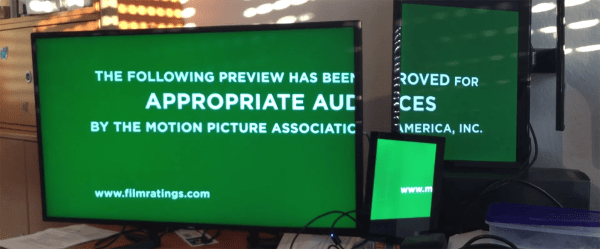
Right now, the process of configuring screens involves displaying fiducials on each display, taking a picture from with your phone and the web interface, and letting the server do a little number crunching. Less than a minute after [Florian] took a picture of all the screens, a movie was playing across three weirdly oriented displays.

Below, you can check out the video of [Florian] configuring three Pis and displays to show a single video, followed by a German language presentation going over the highlights of info-beamer.

Continue reading “Multiple Monitors With Multiple Pis”