Android App Review: ADSdroid Gives You Every Datasheet, Ever

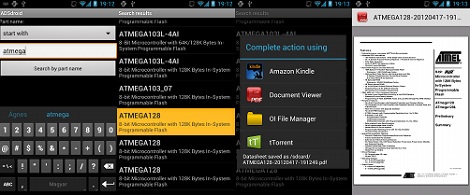
A few months ago when I reviewed the Android electronic reference app ElectroDroid, I made the offhand remark that a front end app for alldatasheet.com would be a killer mobile electronic reference app. [András Veres-Szentkirályi] accepted my challenge and built ADSdroid, the unofficial Android app for alldatasheet.com. You can check out my complete review after the break.

Continue reading “Android App Review: ADSdroid Gives You Every Datasheet, Ever”

Emulating ARM On An 8-pin AVR

Falling on the heels of some fabulous ‘lets see what we can emulate on an AVR’ builds we’ve seen, [Dimitri] emulated an ARM Cortex-M0 on an 8-pin ATtiny85.

The emulator is written entirely in AVR assembly. Unfortunately, the instruction set of ATtinys don’t have a multiply instruction, so that had to emulated in a separate piece of code. Even with this addition, the emulator is very small; the core is just over 1300 instructions and small enough to fit on the Flash of the very small ‘tiny85.

Unlike the ATMega running Linux we saw last month, [Dimitri] won’t be doing anything crazy like making the tiniest and worst Linux computer ever. The Cortex-M0 doesn’t have a MMU, so Linux is out of the question. [Dimitri] could go with μCLinux, with the addition of a I2C EEPROM and RAM, but don’t expect a speed demon for an emulated ARM running at 200kHz.

[Dimitri] put all the code up on his webpage, and the installation is just running ‘make.’  It looks easy enough to get up and running very quickly, so we’re sure some bored hardware guru will come up with something interesting to do with this code.

A New And Improved Magnetic Cello

Over the past few months, [Magnetovore] has been working on his magnetic cell project. It’s a very interesting instrument that seems right out of the electronic music explosion of the 1970s. Now, he’s ready to share his invention with the world, and we wouldn’t be surprised if we see this instrument being picked up by a few avant-garde musicians in the next few years.

Last September, we were introduced to [Magnetovore]’s magnetic cello. The original version used four ribbon sensors for each of the strings and had completely analog electronics, leaving us wondering why this cello wasn’t invented in the 70s. The new version of the cello keeps the analog electronics that sound remarkably like a real acoustic cello, but does away with three of the ribbon sensors. Now the cello has a single ribbon sensor being used as all four strings – to change which string is played, the musician just has to press a button on the ‘bow’.

There is a drawback to using only one ribbon sensor; it’s now impossible to play two strings simultaneously as on an acoustic cello. The electronics in [Magnetovore]’s original magnetic cello were monophonic anyway, so we’ll chalk this design change-up to reducing component cost.

After the break, you can check out a trio of very talented cellists playing [Magnetovore]’s magnetic cello. There’s the classic Pokemon Center theme, the Mario Bros. theme, as well a Bach minuet and a crazy improvisation showing off what the magnetic cello can do.

Continue reading “A New And Improved Magnetic Cello”

Communicating From Anywhere With A SPOT Connect

[Nate] over at Sparkfun put up a great tutorial for using the SPOT personal satellite communicator with just about any microcontroller. These personal satellite transmitters were originally intended to pair with the bluetooth module of a smart phone, allowing you to send a short 41-character message from anywhere in the world. Now, you can use these neat little boxes for getting data from remote sensors, or even telemetry from a weather balloon.

[Nate]’s teardown expands on [natrium42/a>] and [Travis Goodspeed]’s efforts in reverse-engineering the SPOT satellite communicator. The hardware works with the Globalstar satellite constellation only for uplink use. That is, you can’t send stuff to a remote device with a SPOT. After poking around the circuitry of the original, first-edition SPOT, [Nate] pulled out a much cheaper SPOT Connect from his bag of tricks. Like the previous hacks, tying into the bluetooth TX/RX lines granted [Nate] full access to broadcast anything he wants to a satellite sitting in orbit.

We’ve seen the SPOT satellite messaging service put to use in a high altitude balloon over the wilds of northern California where it proved to be a very reliable, if expensive, means of data collection. Sometimes, though, XBees and terrestrial radio just aren’t good enough, and you need a satellite solution.

The SPOT satellite service has an enormous coverage area, seen in the title pic of this post. The only major landmasses not covered are eastern and southern Africa, India, and the southern tip of South America. If anyone out there wants to build a transatlantic UAV, SPOT, and [Nate]’s awesome tutorial, are the tools to use.

Tip ‘o the hat to [MS3FGX] for sending this one in.

Playing Air Traffic Controller With Software Defined Radio

Being an air traffic controller is a very cool career path – you get to see planes flying around on computer screens and orchestrate their flight paths like a modern-day magician. [Balint] sent in a DIY aviation mapper so anyone can see the flight paths of all the planes in the air, with the added bonus of not increasing your risk of heart attack or stroke.

[Balint]’s Aviation Mapper uses software defined radio to overlay RADAR and ACARS messages from aircraft and control towers in an instance of Google Earth running in a web browser. After grabbing all the radio data from a software defined radio, [Balint]’s server parses everything and chucks it into the Google Earth framework. There’s a ton of info, pictures, and explanations of the inner machinations of the hardware on [Balint]’s official project page.

Right now, Aviation Mapper only displays planes within 500 km of Sydney airspace, but [Balint] is working on expanding the coverage with the help of other plane spotters. If you’re willing to help [Balint] expand his coverage, be sure to drop him a line.

Of course, [Balint] is the guy who gave us a software radio source block for those cheap USB TV tuner dongles. Just a few days ago we saw these dongles receiving GPS data, so we’re very impressed with what these little boxes can do in the right hands. [Balint] says his Aviation Mapper application will work with any GNU Radio receiver, so it’s entirely possible to copy his work with a handful of TV tuner dongles.

After the break, there’s two videos of [Balint] sitting at the end of the runway near the Sydney airport watching arrivials come in right above his head and on his laptop. It’s very cool, but we’d be interested in an enterprising hacker in the New York City area copy [Balint]’s work.

Continue reading “Playing Air Traffic Controller With Software Defined Radio”

Portal Radio Is Why Valve Needs To Build Hardware

We’ve seen Portal gun builds, a few cute turret replicas, and even a miniaturized version of GLaDOS, but [John]‘s Portal radio replica is the first physical version of this oft-forgotten Portal item.

Interestingly, the entire radio is made from scrap. The spheroid body shell is made from the foam insulation from a commercial freezer, carefully sculpted, Bondoed, and painted over the course of 300 hours. The radio guts are taken from an upcycled radio, and powered by either an internal battery or a wall wart DC adapter – perfect for carrying around a test chamber with a portal gun.

Right now, there’s an AM/FM receiver inside the radio along with an audio input so an iPod or such can be plugged in. While we would have loved to see a loop of theuptempo version Still Alive, we’re guessing [John] hasn’t found an easy way to do that with junked parts yet.

Check out [John]‘s build video after the break.

Continue reading “Portal Radio Is Why Valve Needs To Build Hardware”

DIY Battery Powered Soldering Iron

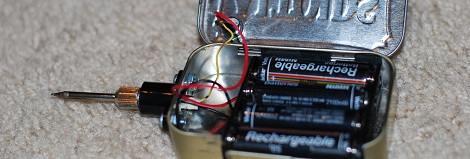
When it’s time to get started on a project and put our irons in the fire, we usually reach for a nice Weller or Hakko soldering iron. Unfortunately, that isn’t possible when we’re soldering something away from a wall outlet. Portable soldering irons usually range from slightly to completely terrible, and [Adam] thought he could do better. He put together an Instructable for a portable battery-powered soldering iron that’s extremely easy to build.

[Adam]’s project mounts a standard Radio Shack soldering iron tip in an E-10 flashlight bulb socket. Power is provided by 6 Volts of AA batteries, with a small switch added for the obvious safety concerns. Although [Adam] could have added a small project box, he chose to build his entire project around a piece of wood. This is an excellent choice in our humble opinion; wood doesn’t melt, has very low thermal conductivity, and anyone using this iron should be smart enough to turn it off if the handle starts smoking.

While this isn’t the best possible portable soldering iron (we’re partial to the disposable-lighter-fueled torches with a soldering iron attachment), it’s much better than the ColdHeat soldering iron that received consistently bad reviews.

Edit: [Adam] updated his build to be a little safer after this story was posted. We changed the original title pic to reflect this; here’s the old one.