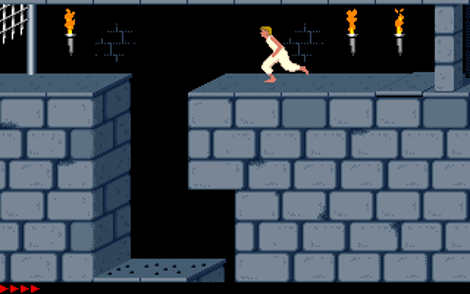
Original Prince Of Persia Game Source Code Released

The game that launched a multi-billion dollar franchise is now laid bare for your hacking pleasure. [Jordan Mechner] just posted the once-lost source code for Prince of Persia. This game was ground-breaking for its use of rotoscoping to mimic the movements of an actor (in this case it was his younger brother). Oh, and it’s a ton of fun to play.

This comes at an appropriate time since yesterday was the the 35th anniversary of the Apple II release. PoP was written for that platform but should be easy to get running on an emulator if you’re just interested in cloning the repository so that you can play it through once again. Interestingly enough, the source code went missing for many years. [Jordan’s] been looking for the original source code for a decade. Turns out his Dad came across a cardboard box with some original copies of the game in it and shipped it off for [Jordan] to take care of. Inside was a set of 3.5″ disks that are pure retro gold.

So here’s your chance to inject yourself into the game. The question is, will you be the Prince or will you be Jaffar?


He Blinded Me With Backup Lights

When driving at night you need to be able to see where you’re going. And that goes for reversing up as well. But the stock white lights on [Ryan’s] ride didn’t provide the type of illumination he wanted, so he replaced them with two sets of super bright LED modules. These are ridiculously bright, perhaps outshining some types of headlights. And since they bring a lot of heat there’s a fair amount of work that went into mounting them.

He sourced some Cree XM-L T6 LED modules, two for each side of the car. These can put out intensity approaching 1000 Lumens each. To keep them cool he grabbed one CPU heat sink for each. These include a copper core with aluminum fins coming off like a spiral starburst. To act as a bezel he used a piece of copper clad board. This gives him a surface to mount the heat sinks, and after coating it with chrome brite it also acts as a reflector. Once mounted he fires it up and the difference is remarkable.

Full Linux Distro On A Nook Color

We should have included a footnote in the title. You can say that [Thomas Polasek] installed a full version of Arch Linux on his Nook Color, but there’s one caveat. It’s running on top of the Android kernel and his proof-of-concept uses a second computer to get it up and running. But there’s potential for that to change moving forward.

Unlike previous attempts to run a Linux distro on Android, this does away with using a VNC to show the desktop. [Thomas] is commandeering Android’s frame buffer so that it can be used by the X desktop without needing to set up display drivers. To start off he installed a ROM based on CM7. A couple of Android apps give him the functionality needed to get the Arch Linux distro running from the SD card. This is accomplished by tunneling into the tablet via SSH, and using the ‘chroot’ command to make it active. The hope is that this can somehow be automated by a script.

A female to female USB coupler was used to connect the keyboard and mouse to the Nook. It looks like LXDE would be useless without them; touch control is not yet implemented. Those shortcomings aside, everything seems to be running pretty fast in the video after the break.

Continue reading “Full Linux Distro On A Nook Color”

Flea Market Finds

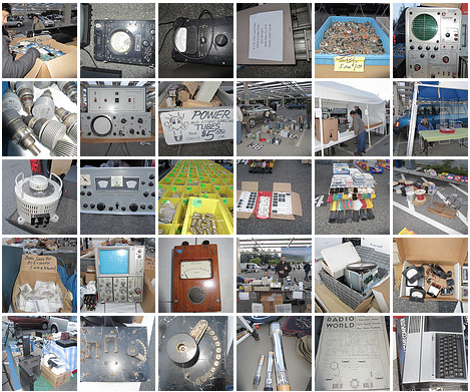
We sometimes wonder why do don’t see classic electronic equipment at second-hand stores. We had thought it’s because these items tend to get snapped up quickly, but perhaps we’re not shopping in the right places. Here’s a photo set documenting some of the finds from a recent flea market.

The offerings cover a wide range of products and components. There are all kinds of bench tools like oscilloscopes, voltage meters, and bench supplies. But we also see more modern computer parts like cardboard boxes full of motherboards, and heaps of PC power bus wires. You can get five tube sockets for a buck and if you need the tubes they’re just $3-5 a piece. One of the more useful finds is a display case full of shrink tube of every diameter; and one vendor is selling wire by the foot.

License plates and common sense place this Flea Market in the Silicon Valley area. But if you’ve got more concrete info on where this type of event goes down please share it in the comments section.

[via Adafruit]

Shocking Use Of Ice Cube Trays

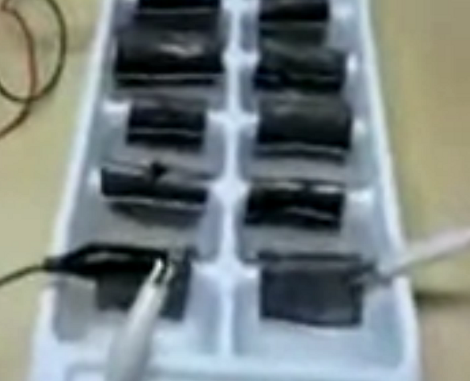
Looks like ice-cube trays are once again proving their versatility as this one is serving as the vessel for a home made lead-acid battery. With a collection of uniformly sized non-conductive containers, it makes the perfect base for a set of small cells. This project is the culmination of a Hackerspace class about batteries, and was put together to turn theoretical knowledge into a hands-on lab.

This is a captured image from the low-quality video found after the break. [Carpespasm] describes the setup; the black pieces are lead plates which are bent into a U-shape to straddle two ice-cube compartments. The each end of the plate is dipping into the acid to make the connection. Once assembled the battery was connected to a charger for about two hours. It puts out 8.5V and is tested by powering an LED cube. This works for just a short period and really drives home the lesson that battery concepts are easy to understand, but reliable battery technology is a bit harder to achieve.

Continue reading “Shocking Use Of Ice Cube Trays”

Joinery Sure To Be Useful On Your Next Sheet Goods Enclosure

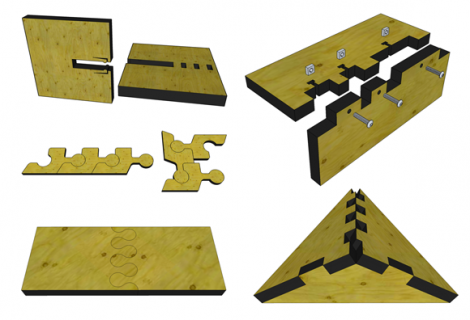
It’s hard to be an expert at everything, but this collection of wood joinery techniques will make your next project look like you’ve just finished your degree in mechanical engineering. They’re targeted for use in projects where thin sheets of plywood are CNC cut to make enclosures and parts. [Sean Ragan] mentions that these are not new, but we haven’t come across such a large collection of examples as this.

The joints shown above address a series of different needs. You’re probably already familiar with the joint on the bottom right which makes nice corners for a box, providing a lot of surface area for gluing. But just above that is a simple variation on the idea which includes slots for square nuts. This type of mechanical fastener brings strength while keeping the option to take the joint apart again

To the top left you can see a design that includes a snap lock. As the two pieces are slotted together, the barbs flex until they find their mating openings and hold the pieces firmly together. Below that are some bulbed finger joints which don’t need glue to hold themselves together.

[Sean’s] post goes on and on with these designs. He even covers the laser-cut bendable hinges which we are quite fond of.

Mechanical CPU Clock Is Just As Confusing As Its Namesake

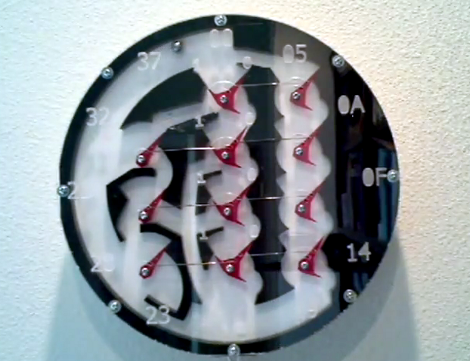
[Lior Elazary] designed and built this clock to simulate the function of a CPU. The problem is that if you don’t already have a good grasp of how a CPU works we think this clock will be hopelessly confusing. But lucky for us, we get it, and we love it!

Hour data is shown as a binary number on Register A. This is the center column of red parts and is organized with the MSB on the bottom, the LSB on the top, and left-pointing bits function as digital 1. The clock lacks the complexity necessary for displaying any other time data. But that’s okay, because the sound made by the ball-bearing dropping every minute might drive you a bit loony anyway. [Lior] doesn’t talk about the mechanism that transports that ball bearing, but you can see from the video after the break that a magnet on a circular path picks it up and transports it to the top of the clock where gravity is used to feed the registers. There are two tracks which allow the ball to bypass the A register and enter the B register to the right. This works in conjunction with register C (on the left) to reset the hours when the count is greater than 11.

If you need a kickstart on how these mechanical adders are put together, check out this wooden adder project.

Continue reading “Mechanical CPU Clock Is Just As Confusing As Its Namesake”