Keeping Tabs On Your Tabby With A Camera And GPS

cat_eye_pictures_and_gps

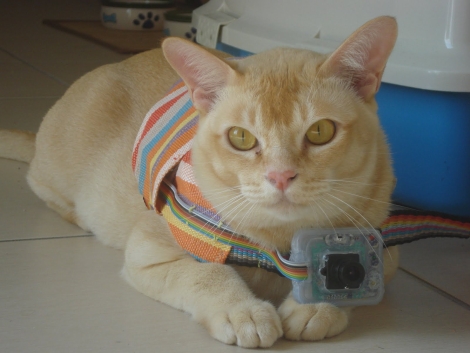
[Janis] has an outdoor cat that likes to roam all over the neighborhood. He was curious to see what he was up to all day, so he decided to build a small cat cam to document the feline’s comings and goings. After the cat returned one evening with a snail riding along on his back, [Janis] thought it would be pretty interesting to see where the cat was going as well.

He calls his creation “CatEye”, and it consists of a small JPEG color camera and GPS sensor, both of which are managed by what looks to be an ATMega328. The camera snaps pictures as the cat roams around, while the GPS sensor records its location throughout its travels. All of the data is stored on an SD card, making it easy to transfer the pics and .KML files back to his computer. A few clicks later, he can see everywhere his cat has been, using Google Earth.

It seems like a pretty interesting project, and we would love to see some schematics and code so that we can strap one of these on [Caleb] our cat to see where he’s been all day.
Boost Your Garden’s Output Using Ultrasonic Mist

ultrasonic_aeroponic_growing_rig

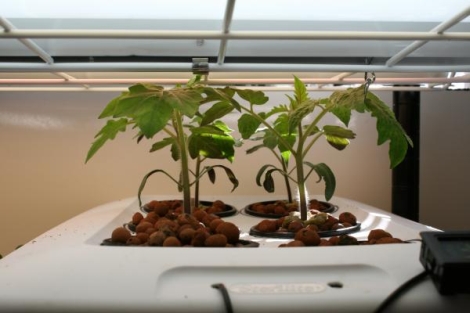
If you enjoy gardening, it’s never too early to start thinking about next year’s growing season. [Jared Bouck] over at InventGeek loves his tomatoes, but the slow grow rates of his dirt-bound plants were less than impressive. To get things moving faster, he created a low-cost aeroponics system that uses ultrasonic mist to produce some pretty impressive results.

The construction process of this ultrasonic aeroponics rig looks dead simple, and [Jared] said that he had everything assembled in about half an hour. A cheap ultrasonic mister was mounted in the bottom of a plastic tub, and holes were cut in the tub’s lid to make room for his growing baskets. Tomato seedlings were wrapped in rock wool and placed in a clay growing medium, suspended over the water bath. The mister was turned on, and after just a few days, the results were obvious.

In the last step of his tutorial, he compares his aeroponically grown plant to one grown in soil – the difference is unbelievable. Considering how reasonably priced his setup is, it seems like a no-brainer to start growing your entire vegetable garden this way.

Nanode: A Low-cost Network-enabled Arduino Ethernet Alternative

nanode_ethernet_enabled_arduino_board

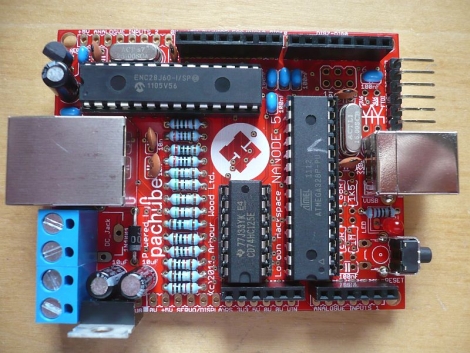
The folks over at Hackspace London have been working hard to create a “very low cost, open source, Internet connected platform on which others can develop their ideas”, which they have dubbed “Nanode”.

Essentially an Arduino with Ethernet networking on-board, the Nanode is armed with an ATMega 328 microcontroller along with all the other standard goodies you would expect from an Arduino-compatible device. The Nanode can be controlled with a web browser right out of the box, thanks to some custom Ethernet libraries. Additionally network of Nanodes can be easily configured to communicate with a “master” unit via a multidrop serial bus, allowing the device to be used for a wide array of distributed control tasks.

Obviously most of these features can be had in the form of an Arduino Ethernet board, or achieved by using an Ethernet shield. The Nanode is a touch cheaper than either option at $40 for a kit, and the native networking capabilities sound like they would be quite handy. That said, we are a bit bummed that it only has 10BaseT networking capabilities, though it is always nice to have options when it comes to choosing a microcontroller board.

[Thanks, TheHypnotist]

Add A Real Life Hardware Terminal To That Newfangled Computer Of Yours

vt200_serial_hardware_terminal_over_usb

If you find a crusty old IT guy and give him half a chance, he’ll probably regale you with stories of how things were done “in the old days” where no one had their own computer and everyone worked on mainframe-connected dumb terminals. [JSTN] yearned for a true to life terminal display that he could attach to his 2010 Mac Pro, and since there’s no chance anybody is bringing one to market any time soon, he pieced one together on his own.

He dug up a digital VT220 terminal, and got to work trying to interface this office relic with his shiny new Mac. He found a few helpful tips from someone

DIY Smart Tweezers Make SMD Work A Cinch

diy_smd_smart_tweezers

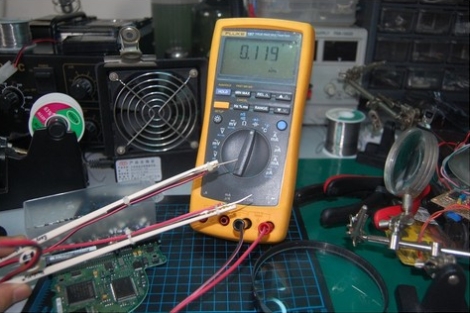
[Noel] does a lot of SMD work and wanted a pair of “smart” tweezers that could be used to place components as well as for reading their capacitance and resistance values on the fly. As we have seen, these things can be somewhat costly, and not really necessary if you already have a good multimeter. With that in mind, he figured he could build his own for almost nothing.

He started off with a pair of kids’ “training” chopsticks which are durable, but more importantly, non-conductive. He took a second pair of tweezers, this time made of metal, and split them in two. He soldered wire to a set of ring terminals, mounting one on each leg of his broken tweezers. The final bit of assembly involved using zipties to mount everything on the plastic chopsticks along with the addition of banana plugs to the end of his probes.

[Noel] says that the tweezers work quite well, and with such a low price tag, we can’t argue.

Control LED Lighting With An Old Stereo Receiver

stereo_controlled_home_lighting

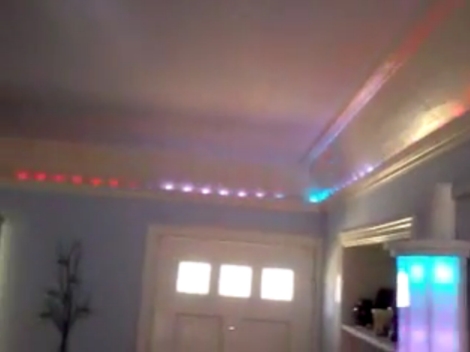
[Marklar] needed an IR receiver for a project he was working on, and his local electronics store was fresh out. He dug through his junk pile and found an old stereo receiver, so he decided to pull the IR module from it before tossing it out. Once he had it taken apart, he figured that he could utilize the wide array of electronic components he found inside, and set off to start a new project.

The control panel housed the components which interested him most of all. Using an Arduino, he was able to easily interface with the rotary encoders as well as the buttons, giving him a cheap and easy way to control his home lighting system. With a bit of programming, he was able to map lighting presets to various buttons, as well as use the rotary encoder to control the LEDs’ brightness and color. As an added bonus, he kept the IR receiver intact and can control his setup wirelessly as well.

Check out the video we have embedded below to see his scavenged control system at work.

[via HackedGadgets]

Continue reading “Control LED Lighting With An Old Stereo Receiver”

An Introduction To DC Boost Converters

simple_boost_converter

If you are planning on creating some sort of Nixie tube display, you will undoubtedly need to find yourself a high voltage DC power supply. If you don’t want to add a transformer to your project, you can always opt to build a boost converter instead. [Andrew Moser] shows us just how easy it is to build one, discussing the theory behind simple boost converters along the way.

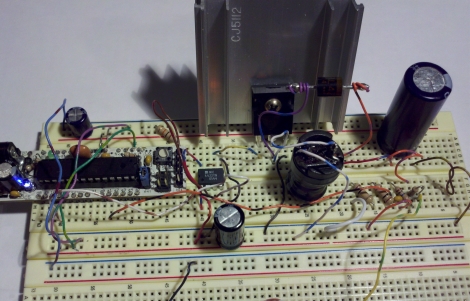
Boost converters are often driven by dedicated ICs, but in this case the PWM signal from an Arduino does the job just fine. [Andrew] covers the process of choosing the proper components for the circuit, discussing duty cycles and components to avoid lest your boost converter die an untimely death.

He shows us how to implement a feedback system to get a more precise output voltage, but as Lady Ada has shown us, an open loop works pretty well too.

For the beginners that want to just get things up and running, his instructions and code should be sufficient, but [Andrew] provides plenty of reference links for those looking to delve deeper into the subject.