Using Google’s ADK On Standard Arduino Hardware

adk_on_arduino

When we heard that Google’s open accessory development standard was forthcoming, we were pretty excited. However once we heard that the reference hardware kit was going to cost nearly $400, our thoughts changed to, “Surely you can’t be serious.”

Well, Google is dead serious (and we hear they don’t take kindly to being called Shirley either.)

With such a ridiculous asking price, it was only a matter of time before someone tried getting the ADK software running on vanilla Arduino hardware. [Inopia] wrote in letting us know that he did just that.

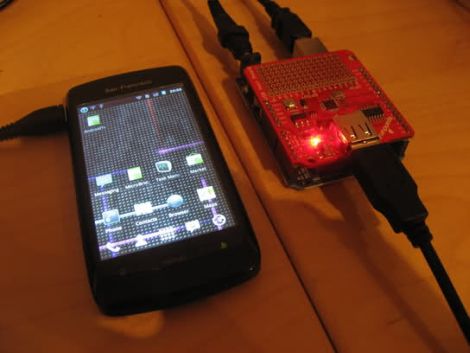
Using an Arduino Uno and a Sparkfun USB shield, he was able to get the ADK working without a lot of fuss. He tweaked the ADK firmware image in order to bypass a couple of hardcoded pin assignments Google made, and he was good to go. The image boots just fine, though he can’t necessarily guarantee that his setup works with an Android handset, as he doesn’t currently own one that supports accessory mode.

Now that just about anyone can get their hands on the ADK at a reasonable price, we look forward to seeing what you can put together!
ir_power_meter

Monitor Your Home’s Power Usage On The Cheap

[Paul] was pretty sure that he and his family used a lot of electricity throughout the day. Admittedly, he enjoys his creature comforts, but was wiling to try living a little greener. The problem was, he had no idea how much electricity he was using at a given time.

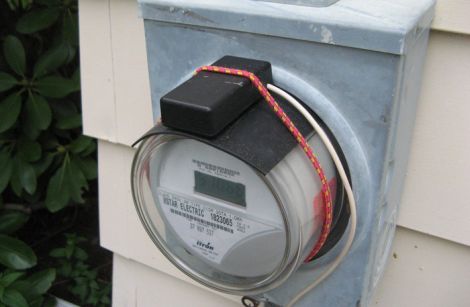
While some power companies offer devices allowing homeowners to monitor their energy usage, [Paul’s] did not. After a bit of research however, he was ready to build a power monitoring system of his own. He found that his meter emits a small infrared pulse every time a watt-hour of electricity is consumed, so his system counts how many flashes occur to measure usage.

The counting circuit is pretty simple consisting of only an AVR, a resistor, a capacitor, and a phototransistor. The data is fed to a computer where the results are graphed with gnuplot.

It’s quite a useful little hack, and undoubtedly far cheaper than purchasing a whole house power monitor.

Papercraft Flowers Teach Kids About Batteries

saltwater_papercraft_batteries

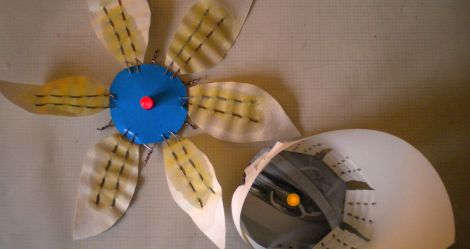
[Emily Daniels] has been teaching interactive electronics workshops geared towards children for some time now, recently holding a session that demonstrated how batteries work in a pretty novel fashion.

She wanted to keep things safe and simple due to the class size, so she didn’t want to rely on using soldering irons for the demonstration. Instead, she showed the children how batteries function by building simple voltaic cells with paper flowers, salt water, and LEDs. The paper flowers’ absorbency was used to act as a salt bridge between the wire pairs that adorned each petal. After salt water was applied to each of the flower’s petals, the center-mounted LED came to life, much to the amazement of her class.

The concept is quite simple, and the LED flowers are pretty easy to build, as you can see in her Instructables tutorial.

We think it’s a great way to demonstrate these sorts of simple concepts to kids, and hope to see more like it.

[via Adafruit blog]

Macetech Is Looking For A Few Good Processing Programmers

maker_faire_logo

[Garrett Mace] wrote to us in hopes of finding a few good programmers to help him out with a project he’s been working on for Maker Faire Bay Area 2011.

More specifically, he is looking for Processing programmers who are also pretty decent with graphics. Macetech’s big project for this year’s Maker Faire is a large overhead light matrix constructed from Chinese lanterns. They are using their new Satellite LED modules to light the 128-lantern array, which is laid out in a 16×8 matrix.

It seems that the Macetech crew has been so busy getting the array built and tested that they don’t have much time to program any visualizations for it – that’s where you come in. If you are so inclined, simply download his matrix simulation code, put together some cool displays, and send them his way. [Garrett] says that they will be taking video of the visualizations, so even if you can’t attend Maker Faire, we will all be able to enjoy your hard work (though it would be pretty cool if they sent contributors a Satellite LED module “sample” as well!)

Keep reading to see a quick demo video of the simulation software to get an idea of what they are looking for visualization-wise.

Continue reading “Macetech Is Looking For A Few Good Processing Programmers”

Adding A Tachometer To The SX2 Mini Mill

sx2_mill_tach

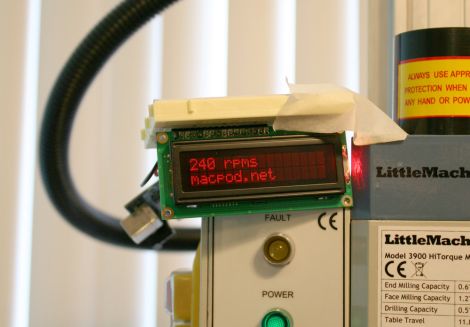
[Jeff] recently bought an SX2 mini milling machine with plans to eventually automate it for use as a CNC mill. After paying nearly $700 for the mill, he decided there was no way he was willing to pay for the $125 tachometer add on as well. Instead, he reverse-engineered the mill and constructed a tachometer of his own.

He opened the control box and started looking around. After identifying most of the components, he got sidetracked by a 3-pin header that didn’t seem to have any particular function. That is, until he realized that a lathe by the same manufacturer uses the same components, and figured that the header might be used for reversing the motor. Sure enough he was right, and after adding a reverse switch, he got back to business.

He probed the 7-pin socket with his logic analyzer and quickly picked out the mill’s data line. He hooked the line up to an Arduino and in no time had the RPM displayed on an LCD screen.

[Jeff] says that this little experiment is the first of many, since the mill is so hacker friendly. We definitely look forward to seeing a CNC conversion tutorial in the near future.

Bringing The Game Of Tag Into The Digital Age

tagurit

How long has it been since you’ve played a game of tag?

[Sylvia Cheng, Kibum Kim, and Roel Vertegaal] from Queen’s University’s human media lab have concocted a fun twist on the classic game that just might compel you to start playing again.

Their game, called TagURIt, arms two players with Lumalive LED t-shirts which sport embedded touch sensors. A third player, known as the “chaser” attempts to touch either of the other players in order to capture the token displayed on the player’s chest-based LED matrix. The game is score-based, awarding points to the chaser for capturing tokens, while giving the other players points for avoiding capture.

If both players wearing the LED shirts are near to one another, the token will jump to the other player in an attempt to thwart the chaser. In this game, each player is a location-tagged URI, and proximity is determined by either tracking the users with cameras indoors, or via RF sensors if the game is played outside.

It is definitely an interesting way of playing tag, and we imagine it could be quite fun in large groups.

Continue reading to see a video demonstration of the TagURIt game being played.

[via Adafruit blog]

Continue reading “Bringing The Game Of Tag Into The Digital Age”

Automating Rock Band Vocals

rockband_audio_simulator

When it comes to Rock Band, our friends suck at singing. No, really.

We’re cool with them beating on the drum set completely off-time, but the sound of them trying to sing “Tom Sawyer” makes us want to cut out our eardrums.

We’re willing to bet that Cornell students [Gautam Kamath and Dominick Grochowina] have friends like ours. Their Electrical and Computer Engineering final project aims to remove the tone deaf from in front of the microphone, allowing a computer to sing vocals instead.

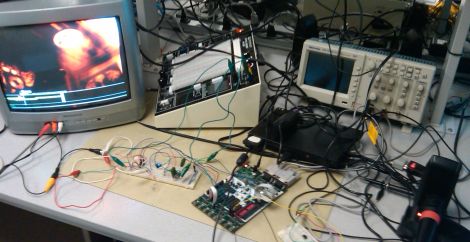
Since Rock Band simply listens for the proper frequency to be sung, the pair figured it would be easy enough to monitor the game’s output and feed computer-generated signals back into the microphone. Once the game’s vocal bar is isolated via a series of filters, an ATMega644 is used to interpret the notes and generate the corresponding tone via a speaker.

While automating Rock Band gameplay is nothing new, we don’t recall seeing anyone try to cut the singer from the band. We think it’s a pretty cool concept – rock on!

Edit: Updated with video

Continue reading “Automating Rock Band Vocals”