Google? In My Lightbulbs? It’s More Likely Than You Think

led_lighting_by_google

With the recent announcement and release of their ADK, it was only a matter of time before Google started invading your home in a big way. From the looks of it, Google will be jumping into the home lighting market very shortly, which could prove to be quite interesting.

Partnering with Florida-based Lighting Sciences, Google is planning on developing consumer-grade 60W equivalent smart LED light bulbs. The bulbs will be able to wirelessly communicate using Google’s new open-source home networking protocol. The lights will be controllable using any Android device allowing users to dim, brighten and toggle the lights on and off without ever touching a wall switch.

We think it’s an interesting idea, and we’re all for getting quality LED lighting in the home. That said, some of Google’s other utility-centric endeavors such as PowerMeter have met only mediocre success, so it remains to be seen if this concept takes off. If it does however, we can’t wait to see the flood of ADK-based hacks the community puts together. Since their new wireless protocol will likely be extended to all sorts of other household systems, the possibilities are endless.

DIY Hidden Bookshelf Speakers

hidden_speakers

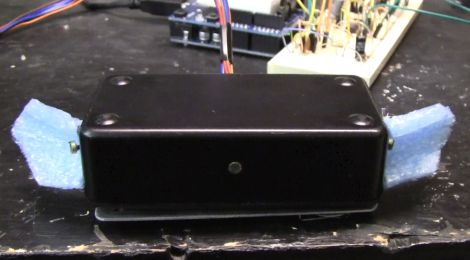
[Steve] was tired of looking at the speakers in his workshop and began searching around for something a little more aesthetically pleasing. Having recently received a set of hollowed out books used for hiding things as a gift, he thought that he might be able to solve his speaker issue in a similar fashion.

He grabbed a couple of books from a local thrift store and promptly removed the pages. They were replaced with cloth-covered plywood to make the device more sturdy while simulating the look of pages.

He mounted his speaker inside one of the books, and in a second installed a small 7W Class A amplifier. A third book houses a padded compartment to hold his iPod, completing the set.

[Steve] reports that the speakers are pretty much undetectable, and the sound quality is decent too. In fact, we’ve started looking for some old books to re-purpose in our workshop as well.

Arduino Magnetic Core Memory Shield

mag_core_memory

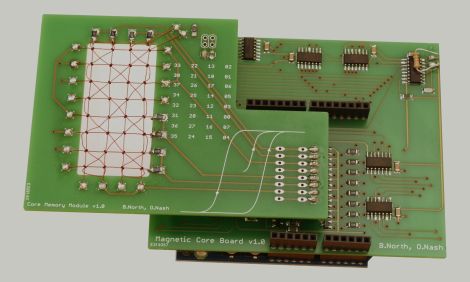
Magnetic core memory turns 60 years old today, and as a tribute [Ben North and Oliver Nash] have created a 32-bit magnetic core memory board for the Arduino.

Magnetic core memory was used from the 1950s through the 1970s, and provided a non-volatile means for storing data, as each magnetic core retained its orientation, even when the power was cut. While it sounds a lot like a modern hard drive, these devices were used in the same fashion as RAM is utilized today.

While the pair used surplus ferrite cores manufactured just before magnetic memory stopped being produced, they did allow themselves to use some modern components. Items such as transistors and logic gates were not available to the first magnetic core memory manufacturers, but the use of these items helped them complete the project in a reasonable amount of time.

Their final result is a magnetic memory board which can be used by any USB-enabled device and is reliable enough to withstand billions of read/write transactions.

Cheap Open-source Pace Clock Keeps Your Practice On Schedule

pace_timer

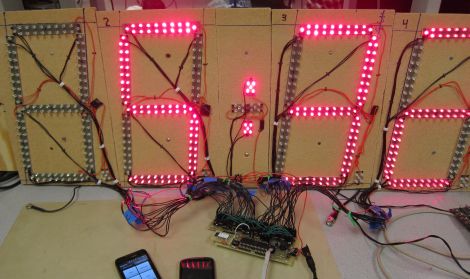
Pace clocks are used in a variety of sports, from swimming to track. The systems are typically expensive however, often beyond the reach of smaller organizations and underfunded programs. For their electrical and computer engineering final project, Cornell students [Paul Swirhun and Shao-Yu Liang] set out to build a much cheaper alternative to commercial pace clocks, with a far simpler wireless user interface.

Their clock uses an ATmega32a to handle all of the processing which is paired with a RN-42 Bluetooth module for communicating with Android smartphones. Their seven-segment displays are built using custom PCBs that they designed and fabricated for the project which are controlled by TLC5940NT LED drivers. The Android software allows users to connect to the pace clock remotely, creating any sort of multi-layered swimming or running routines.

When the project was completed, the pair tallied their total hardware cost to be under $250 apiece at low production volumes. Even when taking assembly time into account, their solution is several magnitudes cheaper than similar commercial systems.

Stick around if you are interested in seeing a demo video of their final product in action.

Continue reading “Cheap Open-source Pace Clock Keeps Your Practice On Schedule”

DIY Sound Localization Sensor

sound_localization_sensor

Sound localization is very popular in law enforcement circles due to its accuracy and ability to quickly separate gunshots from other similar noises. These systems don’t come cheap, and after trying to build one himself, [Fileark] knows why.

He thought it would be neat to build a sound localization sensor based on how the human ear determines a sound’s source. Once he got started however, he realized just how hard it was to do localization just right.

He used an LM324N op-amp as a volume comparator, which he says works decently enough though he figures there are ICs out there that can do a better job. [Fileark] reports that the sound detector works well when the source is within about a foot of the sensors, but performance deteriorates at greater distances. He may consider using an ARM Cortex-M3 as his sound processor if he builds a second version, since the Arudino he used just doesn’t have enough power to sample and run calculations within the 10-50 microsecond window he requires.

Keep reading to see a video of his sound localization sensor in action.

Continue reading “DIY Sound Localization Sensor”

Open Source Linear Bearing System

makerslide

While we normally don’t make it a habit to feature Kickstarter projects, we couldn’t pass this one up. [Barton Dring] from BuildLog.net is putting together a project called MakerSlide that we’re sure will interest many of you out there.

Through his various CNC builds, he has found that one of the more expensive and frustrating components to obtain is a linear bearing system. He notes that commercial systems are expensive, and while an occasional eBay bargain can be found, it’s not the ideal way of going about things. He also points out that homebrew systems usually work after some tuning and adjustments, but can be time consuming to build.

He is proposing a v-groove bearing system, complete with wheels made from Delrin, as a standardized replacement for all of the aforementioned solutions. He anticipates selling the rails for about 10 cents per centimeter, putting the average cost of a 4 foot system around $20.

As a bonus, he is offering up free MakerSlide materials to anyone that sends him a “new, innovative  or interesting open source design or basic idea that uses the material.” You would only have to pay shipping in order to get your new project off the ground.

Standardization is always good, and seeing this rail system go into production would definitely benefit the hacker community. Take a minute to check it out if you are so inclined.

Don’t Hit That Switch!

switch_box

Hackaday reader [Danukeru] sent us a video featuring a box-based robot with an interesting personality. The box is fairly simple and from the outside seems to consist only of a switch and an LED. When the switch is flipped however, the box comes to life.

When the box is activated, the lid opens, and a small arm reaches out to turn the switch off. We’ve seen that plenty of times, but this one turns out to be a little different. In the video, this process seems to repeat a couple dozen times before the robot gets angry and flips out. At first we thought that the end portion of the video was done with a bit of digital trickery, but after reviewing the creator’s blog, it looks like it could be legit. It is very hard to see the box’s innards in the video, but it does house a remote control car chassis that allows it to move around and spin out, as seen below.

It’s a pretty neat project, and if you can handle reading the creator’s site via Google translate, there is plenty of picture documentation of the build process for your perusal.

Continue reading “Don’t Hit That Switch!”