How To Fix Low Speaker Volume On The Nexus 5

The much-anticipated Nexus 5 starting shipping out a few weeks ago, and like many new products, some people have received phones with manufacturer defects. This is always unfortunate, but [Adam Outler] over at the XDA Developer forums thinks he’s found a solution to one of the ailments — a low speaker volume fix!

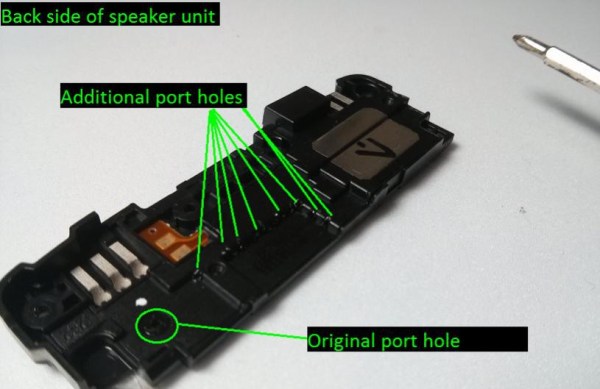
[Adam] noticed that his phone wasn’t quite as loud as he was used to, so he decided to take it apart and see if there was something causing the muffled sound quality. He assumes glue seeped into part of the speaker where it’s not suppose to during assembly, and what he discovered was, you can increase the audio output by opening up the speaker chamber. He found you can easily port the speaker chamber by popping a few holes in it using a hot needle, which helps increase the volume of the phone. It’s not exactly a confirmed hack, but he will be featuring it on XDA-TV in a few weeks, and hopefully a few more cases pop up in order to evaluate the effectiveness of the hack — it might even help users whose phone isn’t unusually quiet!

Now, most people will just return the phone under warranty, which makes sense. But this is Hackaday and XDA we’re talking about. It’s probably less effort to just suck it up, and fix it ourselves. Who cares about warranties?

[via XDA Developers]

Heirloom Chemistry Set

heirloom chemistry  set

We try not to share too many crowd funding projects, but when a tipster sent us to this Heirloom Chemistry Set we knew some would-be chemistry hackers might just want to see it!

[John Farrell Kuhns] runs a small science store with his wife in Kansas City called the H.M.S. Beagle, where young scientists (and adults!) can buy professional lab supplies, equipment, and the resources to study all things from chemistry to physics!

It all started when [John] was a child in the 1950’s and he received the classic Gilbert Chemistry Set as a Christmas present, which help set him on the course of becoming a professional research chemist. Now, wanting to share his love of chemistry with his children, he realized there just isn’t the same kind of chemistry sets available commercially!

Since the opening of his store he has made many custom chemistry sets very similar to the originals, but these were almost all one-off’s and very time consuming to make. So recently he decided to try making a set that he can produce in fair numbers to meet the demand, and so he started this Kickstarter to help it get off the ground. It’s already surpassed its goal by two times!

We wish we had one when we were growing up!

[Thanks Jeremy!]

DIY Bluetooth Home Automation

blueboard

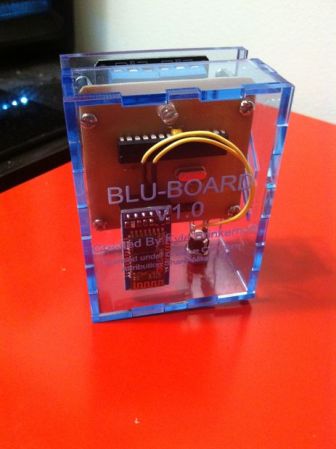
Interested in a bit of home automation? Don’t know where to start? We just found a great Instructable on making your own bluetooth controlled relay module!

[Kyle’s] been working on this for a while, and finally at his 5th iteration he’s ready to share it with the public. It’s a project you can make from scratch, and each unit will cost approximately ~$25 in components — which can control up to two outputs. He’s included an inkscape PCB layout which you can easily etch on your own using the toner transfer method. The heart of the build is an Atmega328, which helps keep the costs down — after all, it is only controlling two outputs! Then it’s just a matter of adding the components, a bit of soldering, and uploading the firmware! 

The entire design is open source, and [Kyle] would love some feedback to continue improving upon it. The write-up is quite thorough, so if you’re interested, take a look and leave him a comment!

Retropie Gaming Table

rasp pi gaming table

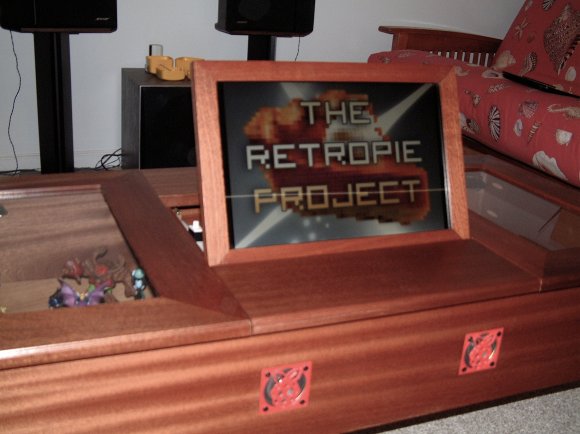
[Jody] just finished the write up on this awesome coffee table he’s been working on. It’s an all-in-one gaming table that makes use of Retropie.

When they finally got rid of the kids’ train-play-set table, they needed something to replace it. Eager to use his new collection of tools (including a 3D printer and a laser cutter!), [Jody] decided to build this thing from scratch. He admits he isn’t a very skilled woodworker, but we think he did an excellent job!

The screen is an old laptop LCD that [Jody] took apart and refitted into the nice wood frame you see above. He’s added speakers with 3D printed grills, and the whole thing turns on and off when the screen is lifted, all thanks to a pantry door switch he installed. In the side compartments he has wireless keyboards, mice, and xBox 360 controllers to play the games with. He and his son have already put many hours into the classic Cave Story, first released back in 2004.

There’s a great build log on his site, so if you’re interested in making your own, check it out!

Google Glass? How About This Home-brew Solution?

[Codeninja] has been sending us some great hacks over the years, and we’ve just learned that his attention has been on building wearable computers lately! He’s currently on his third iteration of a Google Glass-like prototype, which features a motorized element which allows for the retraction of the screen.

There’s not too much info on his blog about them, but we do know he’s using a Raspberry Pi, a few small servos, and a pico LCD screen. Most of the frame is 3D printed, and it also features a hidden camera, accelerometers, and a few environmental sensors.

He’s uploaded an animated gif of the mechanism that moves the display away from his eye, and it looks straight out of some science fiction movie — check it out after break!

Continue reading “Google Glass? How About This Home-brew Solution?”

Opentilt: Tag, You’re Out!

opentilt

Have you ever heard of the game Johann Sebastian Joust? We haven’t either, but [Juerd] has come up with an open source version of it called Opentilt, and we have to admit — it looks like a lot of fun!

Johann Sebastian Joust uses motion controllers for a game that can be played indoors or out, without a screen. Everyone gets a motion controller, and the object of the game is to make everyone else move their controller too fast. It even has a music mode that lets you move your controller relative to the speed of the music! Anyway, it had an extremely successful kickstarter, and it has been debuted at many events around the world — but it’s simply not available to the general public just yet. [Juerd] couldn’t wait that long so he decided to make a similar open source version of it, with cheap off-the-shelf parts. The biggest difference is this one doesn’t have the music.

The build is quite simple and inexpensive. You’re looking at some PVC pipe, an Arduino Nano, a RGB LED, a 2.4GHz radio module, an accelerometer, a pingpong ball, a battery pack, and various other resistors and wire. Nothing to it really! All the source code, and instructions are available off of [Juerd’s] site, and he’s done a great job explaining everything, down to fixing a common problem that some people have on Arduino Nanos!

Stick around after the break to see how the original Johann Sebastian Joust game works!

Continue reading “Opentilt: Tag, You’re Out!”

$13 Homemade RC Blimp

Here’s a great little RC hack you can do with the kids this weekend — make your very own RC Blimp!

First you’ll have to hack apart one of those little 1/64 scale RC cars you can get for a few dollars, and then all you need are a few household supplies, and a helium filled balloon. [Masynmachien] says the total cost of this project can be as little as $13 — depending on where you get your supplies.

So how does it work? Well, an 11″ helium filled party balloon can lift about 10g quite easily — if you strip away the body and chassis of one those RC cars you’ll be well under that weight. The RC cars typically have one small DC motor and a steering actuator, but [Masynmachien] found you can actually connect a second DC motor to the leads for the actuator and it works just fine. Doing this you can create a main prop to drive the blimp, and a secondary tail rotor to steer it. The Instructable uses mostly recycled components, but we’re sure if you had more time you could design and build an even nicer one. When the blimp is properly trimmed it sinks slowly in the air, so the main prop is responsible for keeping it at a certain altitude — this takes a bit of getting used to but it’s an easy way to get around steering in all directions.

Looking for a more advanced project using these little cars? How about building a RC plane with them! Or if you’re feeling ambitious, you can also control them using your computer! Stick around after the break to see it in action!

Continue reading “$13 Homemade RC Blimp”