Coffee Grinder Gets Bluetooth Weighing

Some people take their coffee grinding seriously. So what do you do when the hot new grinders automatically weigh coffee, and yours doesn’t? Well, if you are like [Tech Dregs] and the rest of us, you hack your existing grinder, of course. The link is to the source code, but for a quick overview, check out the video below.

In true hacker fashion, the first order of business was to pull a load cell out of a cheap scale. Originally, he intended to reuse the processor inside, too, but it was epoxied, so it was a good excuse to use some more modules. A load cell amplifier, an OLED display, and a tiny Xiao processor, which he describes as “ridiculous.” From the context, we think he means ridiculously small in the physical sense and ridiculously powerful for such a tiny board.

With the modules, the wiring wasn’t too hard, but you still need some kind of app. Thanks to App Inventor, an Android app was a matter of gluing some blocks together in a GUI. Of course, the devil is in the details, and it took a lot of “focused cursing” to get everything working correctly.

The coffee grinder has a relay to turn the motor on and off, so that’s the point the scale needs to turn the motor on and off. Conveniently, the grinder’s PCB had an unpopulated pin header for just this purpose.

This is one of those simple projects you can use daily if you drink coffee. We are always impressed that the infrastructure exists today and that you can throw something like this together in very little time without much trouble.

WiFi hacking coffee makers is a popular Java project in these parts. Upgrading a machine can get pretty serious with PID control loops and more.


Continue reading “Coffee Grinder Gets Bluetooth Weighing” →

Replacing A Clock IC’s Battery

You can find a lot of strange things inside IC packages. For example, the Dallas DS12885 and DS12887 real time clock “chips” were available in a large package with an internal battery. The problem, of course, is that batteries die. [New Old Computer Show] wanted to restore a machine that used one of these devices and was able to repair the device. You can see two videos below. In the first video, he replaces both the battery and adds an external oscillator which would be necessary for the DS12885. However, he actually had the DS12887, which has an internal oscillator, something the second video explains.

The repair used a PCB he ordered from Tindie. However, the board is only part of the problem. You also need to disconnect the dead battery which requires a Dremel and a steady hand.

Continue reading “Replacing A Clock IC’s Battery” →

Robot Hand Looks And Acts Like The Real Thing

Throughout history, visions of the future included human-looking robots. These days we have plenty of robots, but they don’t look like people. They look like disembodied arms, cars, and over-sized hockey pucks concealing a vacuum cleaner. Of course there’s still demand for humanoid robots like Commander Data, but there are many challenges: eyes, legs, skin, and hands. A company known as Clone may have the solution for that last item. The Clone Hand is “the most human-level musculoskeletal hand in the world,” according to the company’s website.

The 0.75 kg hand and forearm offer 24 degrees of freedom and two hours of battery life. It sports 37 muscles and carbon fiber bones. The muscle fibers can cycle over 650,000 times. You can watch the hand in action in the video below.

There is a hydraulic pump that the company likens in size to a human heart. The hand can also sense for feedback purposes. If you want to build your own, you’ll have to figure it out yourself. The Clone Hand is proprietary, but it does show what is in the art of the possible. The company claims they cost under $3,000, but it isn’t clear if that’s their cost or a projected future retail price.

Of course, human hands aren’t always the perfect robot manipulator. But when you need a realistic hand, you really need it. We see a lot of attempts at realistic hands, and we have to say they are getting better.

Continue reading “Robot Hand Looks And Acts Like The Real Thing” →

The X Macro: A Historic Preprocessor Hack

If we told you that a C preprocessor hack dated back to 1968, you’d be within your rights to remind us that C didn’t exist in 1968. However, assemblers with preprocessors did, and where there is a preprocessor, there is an opportunity to do clever things. One of those things is the so-called X macro, which saw a lot of use in DEC System 10 code but probably dates back even earlier. You can still use it today if you like, even though there are, of course, other arguably better ways to get the same result. However, the X macro can be very efficient, and you may well run into it in some code, too.

Background

Preprocessing used to be a staple of programming. The idea is that code is manipulated purely at the text level before it is compiled. These days, languages with a preprocessor usually handle it as part of the compiler, but you can also use an external preprocessor like m4 for more sophisticated uses.

Modern languages tend to provide other ways to accomplish many of the tasks handled by the preprocessor. For example, if you have a constant you want to set at compile time, you could say:

int X = 32;
y = X;

But then you’ve created a real variable along with the overhead that might entail. A smart compiler might optimize it away for you, but you can be sure by writing:

#define X 32
y = X;

A modern compiler would prefer you to write:

const int X=32;
y = X;

But there are still some common uses for macros, like including header files. You can also make more sophisticated macros with arguments so you don’t incur a function call penalty, although modern usage would be to mark those functions as inline.

The Problem

Which brings us to the X macro. With all great hacks, there is first a problem to solve. Imagine you have a bunch of electronic parts you want to deal with in your code. You don’t want a database, and you don’t want to carry a bunch of strings around, so you define an enumerated type:

Continue reading “The X Macro: A Historic Preprocessor Hack” →

Raspberry Pi Adds Second Laptop Monitor

If you have a cheap laptop and you realize you can’t connect a second monitor to it, what do you do? Well, if you are [Pierre Couy], you grab a Raspberry Pi and put together a virtual screen solution.

Like all good projects, this one started with some goals and requirements:

  • Low latency
  • Redable text
  • At least 10 frames per second
  • Fast catch up if the remote screen falls behind
  • Low-bitrate encoding; no hardware acceleration
  • A DHCP server on the Pi to manage the network
  • Power control for the attached monitor

Continue reading “Raspberry Pi Adds Second Laptop Monitor” →

Retrotechtacular: Military Graphics In The 1960s

While you might think the military doesn’t have a sense of humor with names. Take the AN/MSQ-19 “automated tactical operations central” for example. (Video, embedded below.) But then, when you find out that the truck-sized computer at the heart of it was MOBIDIC — yes, that’s pronounced Moby Dick — you know someone had a good chuckle somewhere. The video below was a promotional video from the early 1960s, and although it shows the unit in operation, it was most likely a mockup and not fully functional.

The MOBIDIC program ran from 1960-1964 and cost a whopping $25 million in 1960-era money. In 1964, testing revealed the system was too unwieldy, requiring at least five tractor-trailers, eight generators, portable buildings, and several large trucks to move around.

Continue reading “Retrotechtacular: Military Graphics In The 1960s” →

Three Way LED Bulb Gives Up Its Secrets

You’ve probably seen three-way bulbs. You know, the ones that can go dim or bright with each turn of a switch. [Brian Dipert] wondered how the LED version of these works, and now that he tore one apart, you can find out, too. The old light bulbs were easy to figure out. They had two filaments, one brighter than the other. Switching on the first filament provided some light, and the second gave off more light. The final position lit both filaments at once for an even brighter light.

LED or filament, three-way bulbs have a special base. While a normal Edison-base bulb has the threaded part as the neutral and a center contact for the live wire, a three-way bulb has an extra hot contact ring between the threaded part and the center contact. Obviously, a compatible LED bulb will need this same interface, but will work differently inside.

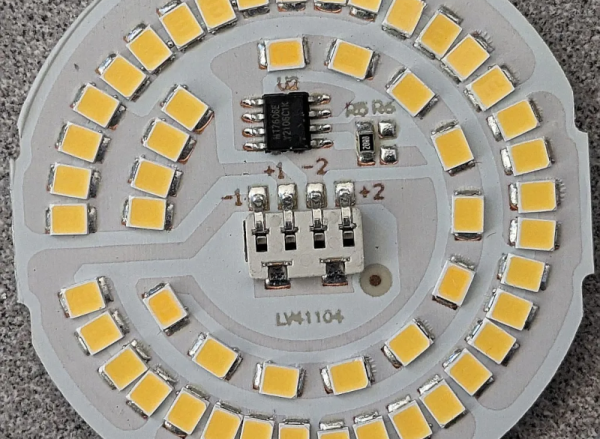
Inside the LED, [Brian] found two rings of LEDs that took the place of the filaments. He was able to identify all the ICs and devices on the board except one, an MT7712S. If you can read Mandarin, we think this is the datasheet for it.

We weren’t sure what [Brian] would find inside. After all, you could just sense which contacts had voltage and dim the LEDs using PWM. It probably wouldn’t take any less circuitry. LED lighting is everywhere these days, and maybe they don’t all work the same, but you have to admit, using two strings of LEDs is reasonably faithful to the old-fashioned bulbs.

Sometimes LED bulbs are different depending on where you buy them. We were promised LED bulbs would never burn out. Of course, they do, but you can usually scrounge some LEDs from them.