Running AI Locally Without Spending All Day On Setup

There are many AI models out there that you can play with from companies like OpenAI, Google, and a host of others. But when you use them, you get the experience they want, and you run it on their computer. There are a variety of reasons you might not like this. You may not want your data or ideas sent through someone else’s computer. Maybe you want to tune and tweak in ways they aren’t going to let you.

There are many more or less open models, but setting up to run them can be quite a chore and — unless you are very patient — require a substantial-sized video card to use as a vector processor. There’s very little help for the last problem. You can farm out processing, but then you might as well use a hosted chatbot. But there are some very easy ways to load and run many AI models on Windows, Linux, or a Mac. One of the easiest we’ve found is Msty. The program is free for personal use and claims to be private, although if you are really paranoid, you’ll want to verify that yourself.

What is Msty?

Talkin’ about Hackaday!

Msty is a desktop application that lets you do several things. First, it can let you chat with an AI engine either locally or remotely. It knows about many popular options and can take your keys for paid services. For local options, it can download, install, and run the engines of your choice.

For services or engines that it doesn’t know about, you can do your own setup, which ranges from easy to moderately difficult, depending on what you are trying to do.

Of course, if you have a local model or even most remote ones, you can use Python or some basic interface (e.g., with ollama; there are plenty of examples). However, Msty lets you have a much richer experience. You can attach files, for example. You can export the results and look back at previous chats. If you don’t want them remembered, you can chat in “vapor” mode or delete them later.

Each chat lives in a folder, which can have helpful prompts to kick off the chat. So, a folder might say, “You are an 8th grade math teacher…” or whatever other instructions you want to load before engaging in chat.

Continue reading “Running AI Locally Without Spending All Day On Setup”
Regular (Expression) Chess

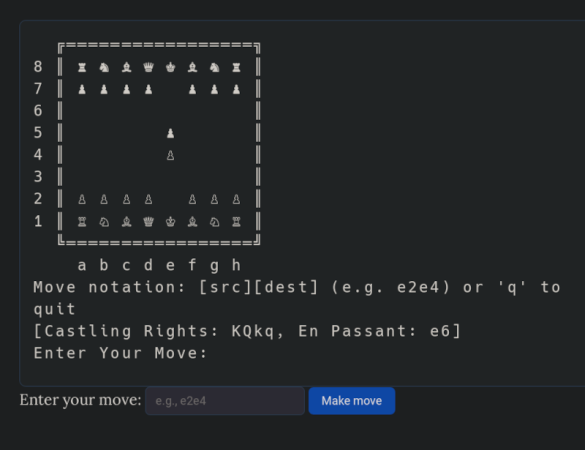
[Nicholas Carlini] found some extra time on his hands over the holiday, so he decide to do something with “entirely no purpose.” The result: 84,688 regular expressions that can play chess using a 2-ply minmax strategy. No kidding. We think we can do some heavy-duty regular expressions, but this is a whole other level.

As you might expect, the code to play is extremely simple as it just runs the board through series of regular expressions that implement the game logic. Of course, that doesn’t count the thousands of strings containing the regular expressions.

Continue reading “Regular (Expression) Chess”

The Helicone: Toy Or Mathematical Oddity?

We always enjoy videos from the [Mathologer], but we especially liked the recent video on the Helicone, a toy with a surprising connection to mathematics. The toy is cool all by itself, but the video shows how a sufficiently large heliocone models many “natural numbers” and acts, as [Mathologer] puts it, acts as “microscope to probe the nature of numbers.”

The chief number of interest is the so-called golden ratio. A virtual model of the toy allows easy experimentation and even some things that aren’t easily possible in the real world. The virtual helicone also allows you to make a crazy number of layers, which can show certain mathematical ideas that would be hard to do in a 3D print or a wooden toy.

Apparently, the helicone was [John Edmark’s] sculpture inspired by DNA spirals, so it is no surprise it closely models nature. You can 3D print a real one.

Of course, the constant π makes an appearance. Like fractals, you can dive into the math or just enjoy the pretty patterns. We won’t judge either way.

We’ve seen math sequences in clocks that remind us of [Piet Mondrian]. In fact, we’ve seen more than one of those.

Continue reading “The Helicone: Toy Or Mathematical Oddity?”

Before GPS There Was LORAN

We found it nostalgic to watch [ve3iku] fire up an old Loran-A receiver and, as you can see in the video below, he got it working. If you aren’t familiar with LORAN, it was a common radio navigation technique before GPS took over everything.

LORAN — an acronym for Long Range Navigation — was a US byproduct of World War II and was similar in many ways to Britain’s Gee system. However, LORAN operated at lower frequencies to improve its range. It was instrumental in helping convoys cross the Atlantic and also found use in the Pacific theater.

Continue reading “Before GPS There Was LORAN”

Mechanical Calculator Finds Derivatives

We like mechanical calculators like slide rules, but we have to admit that we had not heard of the Ott Derivimeter that [Chris Staecker] shows us in a recent video. As the name implies, the derivimeter finds the derivative of a function. To do that, you have to plot the function on a piece of paper that the meter can measure.

If you forgot calculus or skipped it altogether, the derivative is the rate of change. If you plot, say, your car’s speed vs time, the parts where you accelerate or decelerate will have a larger derivative (either positive or negative, in the decelerate case). If you hold a steady speed, the derivative will be zero.

Continue reading “Mechanical Calculator Finds Derivatives”

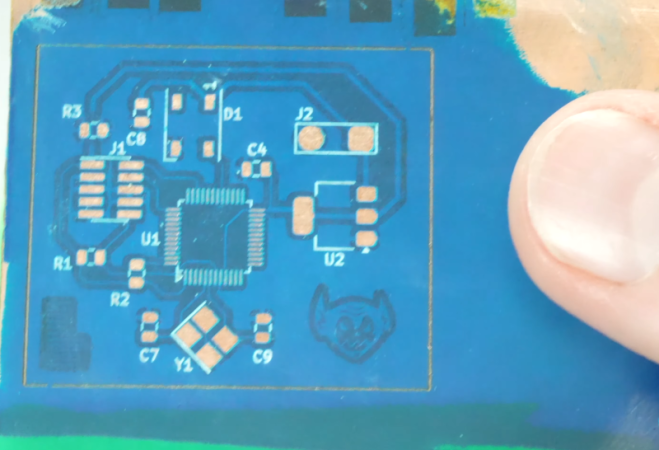
Perfecting 20 Minute PCBs With Laser

Normally, you have a choice with PCB prototypes: fast or cheap. [Stephen Hawes] has been trying fiber lasers to create PCBs. He’s learned a lot which he shares in the video below. Very good-looking singled-sided boards take just a few minutes. Fiber lasers are not cheap but they are within range for well-off hackers and certainly possible for a well-funded hackerspace.

One thing that’s important is to use FR1 phenolic substrate instead of the more common FR4. FR4 uses epoxy which will probably produce some toxic fumes under the laser.

Continue reading “Perfecting 20 Minute PCBs With Laser”

Stacy’s Computer Has Got It Going On

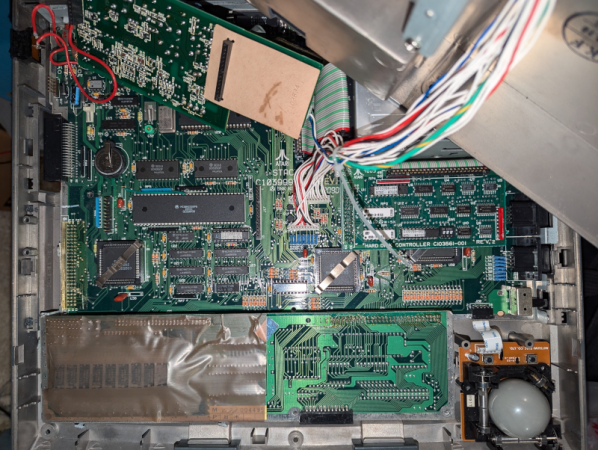
According to [ClassicHasClass], the best way to open an Atari Stacy is to not open an Atari Stacy. Apparently, these old computers were not pleasant to work on. The cables were not keyed and were prone to short against things. Screws easily strip out plastic holes. Of course, there wouldn’t be a story if there wasn’t a teardown and an upgrade that you can check out in the post.

The Stacy was one of Atari’s earliest portable systems and the first ST portable (that is, STacy). There’s a backlit LCD, a keyboard and trackball, and the usual ports. You could make do with a single floppy or spring for a second floppy or an internal SCSI hard drive. The 8 MHz 68000-based machine would set you back north of $2,300 back in 1989.

The original plan was to run the thing on C-cell batteries, but that would give you about 15 minutes of operation. They finally decided it was a luggable — you’d have to plug it into the wall. The battery compartment was there, but empty and glued shut.

Apparently, there were about 35,000 of these made, but they seem somewhat rare. But we do like a rare retrocomputer. Or even some that aren’t so rare.