Telepresence Robot With Skype Connectivity

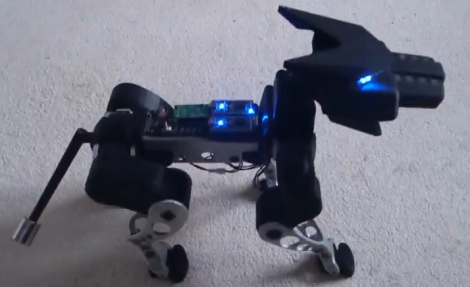
[Claire] sent in a project she’s been working on for the past few years. It’s called Botiful and aims to turn any Android phone into a mobile telepresence robot.

Botiful is built around the IOIO Android to Arduino dev board and provides a very clean way to interface your current cell phone with a tiny – and cute – robotic platform. The big feature of Botiful is its integration with Skype; just call a Botiful owner’s phone or tablet, and a panel pops up allowing you to control the robot, tilt the camera up and down, and even robotic yes, no, and ‘dance’ gestures.

Because Botiful is based on the IOIO, there’s a few pins available inside the bot for an I2C bus, PWM control, and even a serial output. It’s also possible to develop your own apps for Botiful, making for a neat mobile robotics platform.,

Right now, Botiful is only for Android but if [Claire] gets $100,000 out of her Kickstarter, she’s promised to add iDevice support. That seems fairly likely, as more than $60,000 has been pledged with three weeks to go. Pretty cool, and we can think of a few very useful asocial applications of the Botiful including running cable in a drop ceiling, and checking out that thing under your car.

Arduino Taipan! Clone Stays True To The Original

taipan

Fans of vintage Apple ][ and TRS-80 games will undoubtedly recognize the image above in short order. Taipan! was a popular game in its time, and [Simon] decided it was a great title to try recreating with an Arduino.

His goal was to use a standard Arduino Duemilanove to reproduce the game, rather than opting for a Mega or something like the Raspberry Pi. Seeing those two options as “too easy”, he ventured into the project with some self-imposed limitations, making it a more fruitful adventure.

In the end, [Simon] had to use two Arduinos – one to control the gameplay and another to run the display. Simon tucked both boards, a keypad, and an LCD screen inside a first run copy of Tai-Pan, a move that is sure to please Apple aficionados and Xzibit fans alike.

[Simon] made sure that no detail was overlooked during the port, making sure to include every line of text as well as every bug found in the original game.

Check out a video of the finished project below, and be sure to swing by his site for a very thorough build log.

Continue reading “Arduino Taipan! Clone Stays True To The Original”

Reworking The Electronics For Better Computer Speaker Audio

[Michael Chen] liked the sound he was getting out of these Corsair SP2200 computer speakers, with one big exception. They were giving off some unpleasant crackling sounds. He figured this might be as easy as replacing a faulty potentiometer, but soon found out the fix was going to be more complicated than that. All said and done he ended up reworking the design of the speakers’ amplifier board.

The hardest part was identifying the problem. Once he had cracked open the case he found the volume potentiometer was working correctly by testing it with a multimeter. Next he inspected the board for bad solder joints but didn’t really find any. The breakthrough came when he realized that the crackling was also happening when he used headphones. With that discovery he started making a few more observations and realized that the crackling didn’t happen when the volume knob was all the way up or all the way down. There was an impedance issue between that potentiometer and the amplifier circuit. He rerouted the signal flow on the board to use the headphone amp as a filter and it fixed the problem. Fittingly, he’s entered this project into the Instructables Fix & Improve contest.

A Look At The Upgraded MSP430 Chip Shipping With The TI Launchpad

[JMN] took some time to look at the MSP430G2553 mircocontroller (translated). Specifically, he was interested in the clock options and the low power modes. This chip is one of the upgraded processors which have been shipping with the TI Launchpad.

Both the MSP430G2553 and MSP430G2452 come with the Launchpad development board. They replace the MSP430G2231 and MSP430G2211 which came with the original offering. If you already have a Launchpad the chips themselves can be had for around $2.25 and are easily programmed since the development hardware hasn’t changed.

The review starts off by looking at clock options for the processor. The internal VLO is put to the test first, with a look at the power consumption followed by temperature stability through the use of a hair dryer. The actual frequency provided has fairly low accuracy, but it stays pretty stable when hit with the hot air. The next test uses the provided 32.768 kHz clock crystal as an external input. The crystal came with the Launchpad board, and the chip has configurable internal capacitors so this is as easy as soldering the package in place. Hit the link at the top to find out how this clock source fared in testing.

[Thanks D]

MSP430 Gaming Shield Based On The Gameduino

Get your 8-bit gaming fix with this gaming shield for the TI Launchpad. It’s called the Launchpad GamingPack and was developed as part of TI’s 2012 Intern Design Contest. The team had just six weeks to complete the project.

The video after the break starts off with some fast-motion PCB layout. It is followed by footage of the board being populated, then anchored with graphics testing and some game play demonstrations. It looks like a real blast! NES controller ports were included on the board, and the device puts out 400×300 VGA, as well as audio.

As with the Gameduino, the hard work is done by the FPGA at the center of this board. It handles all of the VGA timing work, using what looks like 3-bit color. It is also responsible for generating the audio and monitoring the inputs. Since the team was under a time crunch the shield also includes a 10-pin header on the underside which was added for easy connection with a logic analyzer.

Continue reading “MSP430 Gaming Shield Based On The Gameduino”

Scale Model Of A Civil War Mortar Shoots Steel Golf Balls

[Sir Keyboard Commando] just emerged from his machine shop to show off the 1/6th scale model of a Civil War mortar which he recently finished fabricating. It started with some bar stock that measured four inches in diameter and accepts steel balls the size of golf balls as ammunition.

The bore diameter is 1.725″ which gives just a bit of clearance for the 1.685″ golf ball specs. Each of the steel balls weighs in at just over 11 ounces. You get a really good look at the finished mortar in this test-fire video. It’s quite small but [Sir Keyboard Commando] reports that the full assembled unit still weighs in at a whopping forty pounds.

This certainly isn’t an improvised weapon, but we’re quite surprised to see it being test fired. We’d bet it turns some heads that the local firing range.

[via Reddit]

Developing A Better Way To Control 10,000 LEDs

The SoundPuddle project drives thousands of LEDs based on audio input. The team is working on a replacing the controller for this wire-filled setup with something more robust. They took the mess seen above to the Apogaea Festival and were plagued by loose wires and unreliable communications due to noise and interference. The aim of the new system is to reliably control up to 10,000 LEDs.

The red PCB seen at the center of the rats-nest is a Papilio FPGA board. They still want to use it to drive the installation, but a new hardware interface is necessary. The solution is to design what they call a megawing (wings are to Papilio as shields are to Arduino).  The LEDs will be in RGB strip form, so one of the requirements is to supply enough connectors to drive 16 channels of SPI devices. The wing will also include the 48V power source and connectors for the condenser microphone that serves as an input for the SoundPuddle. There are also two other options for audio input, one via a Bluetooth module (which can double as a control device) and the other via MIDI.

After the break you can see a lighting demo. Be ready with the volume controls as most of the sounds used in the test are quite annoying.

Continue reading “Developing A Better Way To Control 10,000 LEDs”