Interactive Digital Fireplace Is Great For Those Chilly Winter Evenings

video-fireplace

We’ve all seen them – those fireplace DVDs that seem to pop up on grocery store endcaps and get traded in white elephant gift exchanges. If you don’t happen to have a fireplace in your home they might make a reasonable solution, but [Nick] from the Gadget Gangster thought it would be far better if you could create your own interactive digital fireplace instead.

Using the Gadget Gangster Propeller USB platform and ProtoPlus board, his fireplace merges various video segments together based on user input, and plays them on any TV that comes equipped with RCA jacks. The process is fairly straightforward, and involves wiring up switches along with audio and video output to the Propeller board via the ProtoPlus board. The remainder of the work is done using software, requiring the user to select and encode video segments for storage on an SD card. [Nick] does however provide a whole set of clips for download, should you want to take the quicker route.

After encoding and categorizing the video clips to coincide with the “stoke” and “add wood” user input buttons, the Propeller does the rest of the work, randomly selecting clips from the appropriate category when requested.

The result is admittedly a bit Lo-Fi, though we thinks it’s cool and prefer to call it “retro” instead. It might not be a Hi-Def fireplace recording, but it’s far nicer to snuggle up to a hand made fireplace rather than a DVD you picked up as an afterthought.

Continue reading to see a quick demo video of the digital fireplace in action.

Continue reading “Interactive Digital Fireplace Is Great For Those Chilly Winter Evenings”
Time Twister Is An Ingenious Lego Clock

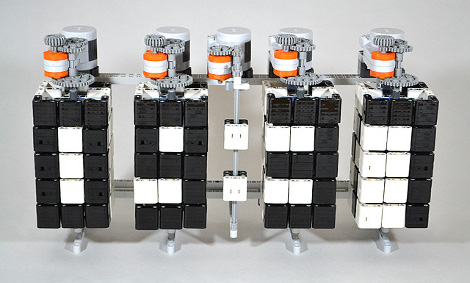
Here’s an interesting take on a Lego clock, it uses rotating squares to change the orientation of the black and white tiles to display the needed number. As we see one of the digits cycling to the next number in the video after the break, a couple of different things pop into mind. This seems very much like a 1-dimensional Rubik’s Cube, and it also has a hint of a very large ePaper display. Those use magnetic fields to swivel microspheres that are black on one side and white on the other.

The timepiece, which was built by [Hans Andersson], is limited to displaying numbers only. If you think about it, each row is three pixels but you don’t need to have every combination of those pixels available in order to display the digits. Four sides provide enough room for the necessary combinations. This would not be true if you were trying to scale it up to include all alpha-numeric characters.

The tick of this thing certainly sounds interesting, huh?

Continue reading “Time Twister Is An Ingenious Lego Clock”

Using Your Existing Hardware To Automate Scanning And Filing

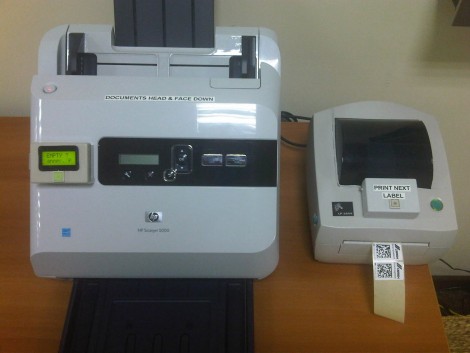
This one must have been fun to come up with because it’s got it all. There’s hardware, firmware, networking, and server scripts all working together to create a filing, scanning document center for your business. The best part is that [Janis Jakaitis] was tasked to do this as part of his job (we’re sure there’s a bunch of IT guys shaking their heads at this statement, but it sounds like fun to us!).

The goal was to use an existing document scanner to create PDFs which are then stored in a filing system on the network. Of course it needed to be automatic. The first big issue was that the scanner was USB only, and when connected to a USB-to-LAN bridge the buttons on the device no longer functioned. [Janis] put together an Arduino circuit that added that button, as well as a display to show the status of your scan job.

The next issue is getting the filing system to recognize the document as a unique file. The solution here is to generate a unique barcode label that can be affixed to the page before scanning. Since this is a standalone setup, it was tricky to get the label printer to spit out a unique label. He already had the Arduino working with the scanner, so [Janis] decided to use it to drive this barcode job as well. It calls to a Lua script running on the server, which then pushes the next unique code to the printer.

Tie it all together and you get the demo video after the break.

Continue reading “Using Your Existing Hardware To Automate Scanning And Filing”

USB And PS/2 Key Loggers And Mess With Your Grammar

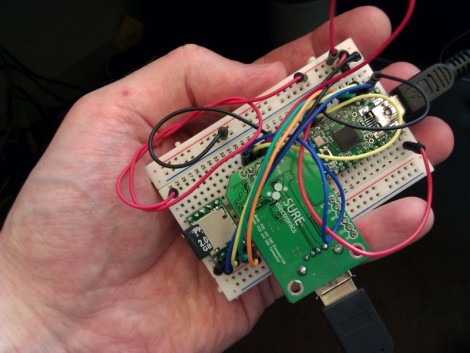
[Irongeek] is up to his old tricks once again with this new key logger prototype. It’s in the early stages, as attested by the breadboard built circuit, but [Adrian] still gives us a demo video after the break showing where he’s at right now. It comes in two flavors, the USB pass through seen above, or another that still connects to the computer via USB but functions with a PS/2 keyboard.

Aside from the obvious issue of a key logger stealing everything you type, there’s some prank value in this device too. The Teensy has more than enough processing power to watch what you typing and make changes as it goes. He shows off blatant rewrites, like changing “has” to “haz” or “you” to “U”. We think it would be better to change things like “they’re” to “their” or “it’s” to “its”. These would be very difficult to see happening and if you added randomness to how often the replacements occur, your victim would sooner come to the conclusion that they’re going crazy than that they’re the target of a little hazing. In fact, that’s probably the reason for our own grammar errors though the years; blast!

Continue reading “USB And PS/2 Key Loggers And Mess With Your Grammar”

Cheap OLED Display For Your TI Launchpad

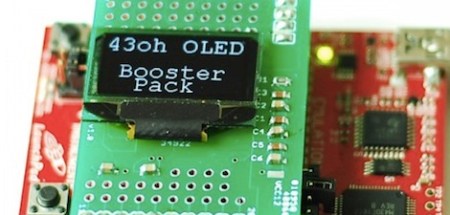
The guys over at the 43oh forums have been working on an OLED display booster pack for the TI Launchpad. The booster pack is now available in the 43oh store and is pretty cheap to boot.

The TI Launchpad is an awesome little dev board with a ravenous fan base. We’ve seen a lot of projects on Hack a Day use a Launchpad – everything from intervalometers to chicken coops. Unfortunately, the MSP430 doesn’t have the market penetration of the ‘board that shall remained unnamed,’ so it’s not very common to see a new Launchpad “shield.”

[bluehash] on the 43oh forums has been hard at work for the past month to put together his OLED booster pack. The display is 128×64 pixels with an incredible amount of brightness that we would expect from an OLED display. The software for the display is based on the SSD1306 driver with two font packs – Courier New large and small. Not a bad little piece of kit for an under appreciated dev board.

ChipKIT Temperature Shield Supports A Dozen Sensors

chipkit_temp_board

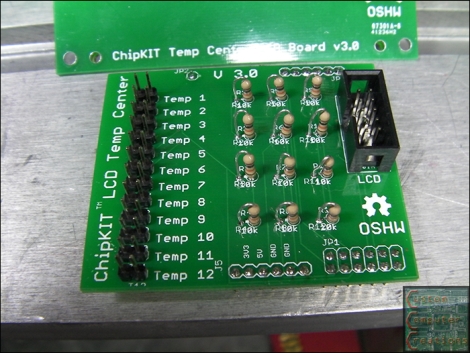
[Will] wrote in to share a useful add-on he designed for the ChipKIT UNO 32, a 12-port temperature sensor board.

Constructed for one of his customers, the shield accepts any 2-wire 10k thermistor sensors, outputting the readings to a small LCD screen. The screen is supported by some code put together by his associate [crenn], but you are not limited to solely displaying the temperatures there. Since this module piggybacks on top of the ChipKIT the same fashion as any standard shield, you clearly have the ability to use and manipulate the data at will. With 12 ports on board this would work well for a house-wide temperature monitoring system, or perhaps in a complex brewing setup.

Both the temperature shield and LCD boards have been released under the Open Source Hardware License, so you can easily build your own if you have the means, though [Will] has a few extras he’s willing to sell if you need one quickly.

Occupy Rigs Up Human-power After Generators Are Confiscated

Looks like New York’s fire brigade confiscated all of the gas (or bio-diesel) generators from Occupy Wall Street protesters in Zuccotti Park. Apparently the Fire Chief cites the generators as a fire hazard. This seems a dubious claim. One of the shots in the video after the break clearly shows fire extinguishers close at hand, but we’re no experts on fire code. We’d bet the concern is having combustibles around if the scene turns violent… or just wanting to pressure the group with the loss of a heat source.

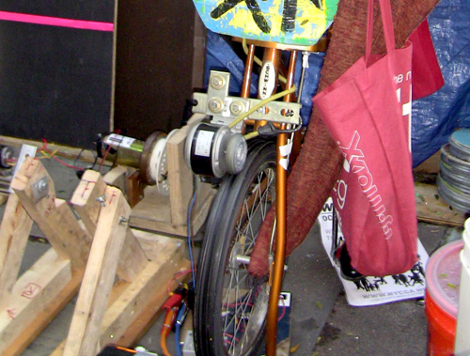
Instead of going without, the movement received help from a neighboring protest group in Boston. Bicycle power replaces the missing generators as volunteers pedal to produce electricity. Students from MIT plied their skills to help design multiple charging stations that can be used by the community. It won’t be enough to provide heat for the ongoing occupiers, but it does let them charge their electronic devices which helps ensure that current information is still flowing out of this epicenter of activity.

Does anyone have any ideas for hacking up a heat source that won’t ruffle the feathers of local officials? If so, leave a comment. And if you’ve already got a post written up on the topic don’t be afraid to send in a tip about it. Continue reading “Occupy Rigs Up Human-power After Generators Are Confiscated”