ATtiny Hacks: Look Ma, No Batteries!

ATtiny Hacks Theme Banner

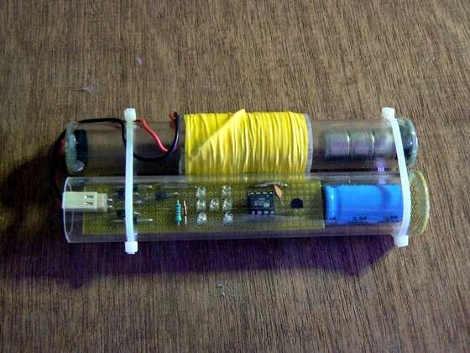
[Gadre] built his own ATtiny project without using any batteries. It’s an electronic Dice (or die if you’re being critical) which uses induction to charge a storage capacitor to act as the power source. The voltage generator is made from a tube of Perspex which houses a set of rare-earth magnets. At the enter of the tube [Gadre] machined a channel wich accepts about 1500 windings of 30 AWG magnet wire. When someone shakes the tube back and forth the magnet passes the wire, inducing a current.  The product is stored in a 4700 uF capacitor, which feeds a boost converter to power the rest of the circuit.

The ATtiny13V that controls the circuit is running its internal RC oscillator at 128 kHz, the lowest setting possible in order to minimize power consumption. After a good shake the user can press a button to roll the die, which is then displayed for several seconds on a group of seven LEDs. See for yourself in the video after the break.


Continue reading “ATtiny Hacks: Look Ma, No Batteries!” →

Upverter: It’s Like Github For Hardware

If there’s one thing we’ve noticed about hardware hackery and electronics project, it’s that all the resources to build a project are scattered about the Internet on forums, blogs (heh), and personal web pages. Enter Upverter. The fellows who started Upverter had the same observation, and after some Y Combinator funding, launched what they hope to be “The Github of electronics” and the “Google Docs of hardware design.”

Upverter has the features we would expect – forking, versioning, and integration with Github for a project’s code. Already there’s a few cool projects, like a PIC programmer, a TV-B-Gone, and a tiny version of Conway’s Game Of Life.

We’re not ready to wave the banner of an Upverter fanboy quite yet. There’s quite a number of components available in the schematic editor, but from our experience the component library could use some refinement both by weeding out duplicates and increasing the number of parts. We’d also like to put a zoom control for the schematic view on our wish list. Upverter doesn’t have a PCB editor either, but from this post from a VC rag, the team is working on one. While this is really just nitpicking – Upverter launched less than 24 hours ago – we’ll be happy to see the some projects roll in on the tip line that are hosted on Upverter.

EDIT: link to the Google cache, because we probably Slashdotted it. It’s up for now.

Motion Detecting Window Closers Keep Train Noise At Bay

motion_detecting_window_closers

[Ed Rogers] has the unfortunate privilege of living right next to a set of train tracks, and as a man who holds his sleep in high regard, he needed to find a way to keep the noise in his bedroom to a minimum. To combat the sound of passing trains, he built himself a system that automatically closes his windows when a train passes by his apartment.

The setup relies on a web cam, which uses motion-sensing software to detect a passing train. The video is analyzed by a computer in his room which passes a message to an Arduino when a train is near. The Arduino then sends a pair of window mounted linear actuators into action, slowly (and quietly) shutting his windows.

The linear actuators move pretty slowly as you can see in the video below, but we doubt that matters. Since it looks like [Ed] lives in a slow zone, it likely takes quite a bit of time for a freight train to pass, making the 40-second closing period more than reasonable.

Continue reading “Motion Detecting Window Closers Keep Train Noise At Bay” →

Transformer-based PSU Repair

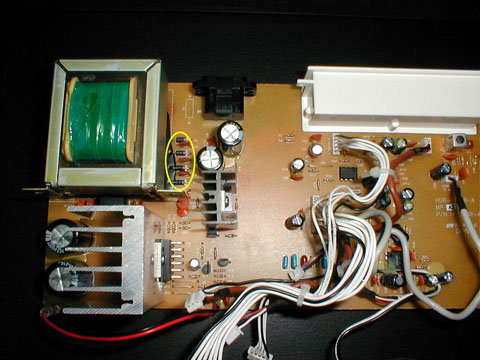
Repairing someone else’s design mistakes is much more difficult than starting from scratch. So whenever we come across someone who’s good at this type of trouble-shooting we pay attention. [Jim] had a Sangean HDR-1 in his home. It’s a tabletop HD radio that stopped powering up for some reason. He cracked it open and got to the bottom of the problem.

The first order of business is disassembly, which isn’t too hard with this model. With multimeter in hand he started probing the transformer and found that the contacts for the primary are an open circuit; signaling a problem. There’s no inline fuse for protection, and further study of the secondary winding let him to discover the use of 1N5817 diodes. These are underrated parts for this particular transformer. He replaced them with 1N4003 diodes to bring the device in spec. But there was still the issue of fuse protections. A bit of circuit free-forming allowed him add a fuse and varistor  by soldering the directly to the transformer’s contacts.

Why stop there? While [Jim] had the case open he also swapped out the low-end op-amp and a few electrolytic capacitors to improve the sound quality of the radio. Op-amp replacement seems to be a popular way to improve the sound from HD radios.

Get The Lead Out Of The Arduino Compile Process

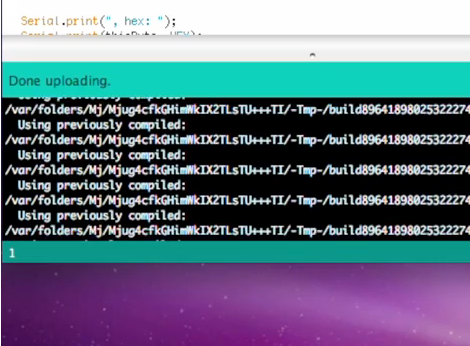
Relief is here from long compile times when developing firmware for your Arduino project. [Paul] was puzzled by the fact that every file used in a sketch is fully recompiled every time you hit upload–even if that file didn’t change. To make things more confusing, this behavior isn’t consistent across all Arduino compatible hardware. The Teensy has an additional feature not seen when working with other hardware boards in that it reuses previously compiled code if nothing has changed. It even tells you which files are being reused, as shown in the image above.

After the break we’ve embedded [Paul’s] video that walks us through the process of editing the Arduino IDE to reuse previously compiled files. It’s a one-liner addition to the boards.txt file. For example, if you’re working with the Arduino Uno all that needs to be added is ‘uno.build.dependency=true’. [Paul] had previously submitted a patch to roll this into the Arduino IDE source code, but it was not accepted citing a need for more testing. He’s asking for help with that testing and wants you to post your thoughts, or any bug information, on the new issue he’s opened regarding this feature. Continue reading “Get The Lead Out Of The Arduino Compile Process” →

Android Phone Serves As Arduino Terminal

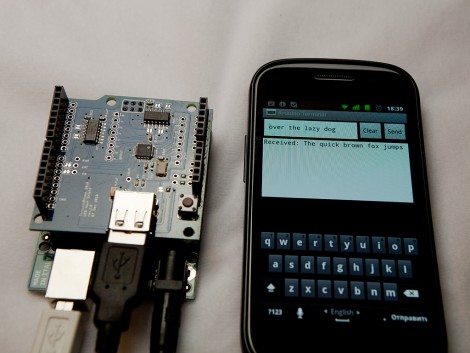
Looking to use his Arduino when on-the-go, [Oleg] has been working on a way to use the Android ADK terminal emulator with the Arduino. The Android side uses ADK features along with a custom application. [Oleg] received help from his friend [Victor] when developing the program for Android (you can check out our own Android Development tutorials if you’re interested in learning how this is done). The .apk file is available for download, but they’re waiting to release the source code until they can clean it up and get some of the gnarly bugs out of the beta version.

A USB host shield for the Arduino is needed to connect to an Android hand set. You’ll be able to send and receive strings via the terminal, with support for carriage return and life feed characters. Unfortunately this doesn’t allow you to change, compile, or write sketches to the Arduino. But it might come in very handy when trouble shooting a project when a computer is not around, or just for using an Android phone as an output.

Upload Firmware Over Ethernet

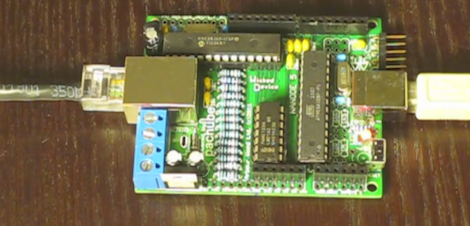
The team at Wicked Device has been working on working on a way to upload Arduino sketches over Ethernet for the Nanode and Arduino Ethernet boards. The team has gotten far enough along to show the world, and the new boot loader shows a lot of promise.

A new boot loader was needed to perform this magic. The boot loader sets up a TFTP with a server over DHCP or a static IP. An unmodified .hex file is downloaded from the server and the sketch starts up. The team is still working on a way to push new apps to the board over Ethernet, but that feature is expected to be completed sometime soon.

Booting over Ethernet isn’t a new idea – TFTP was proposed for this very purpose. Because Wicked Device’s Ethernet-enabled boot loader only works over a local connection and requires a press of the reset button, it should be considered an alpha build. That being said, the boot loader works as advertised, so check out the demo video after the break.

Continue reading “Upload Firmware Over Ethernet” →