Arduino WiFi Shield Available, Costs $85 USD

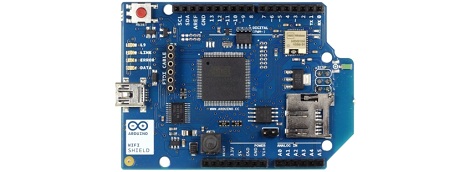
Over on the Arduino blog, the release of the official Arduino WiFi shield was just announced. On the spec page for this WiFi shield. we can see this new board isn’t a slouch; it’s powered by a 32-bit ATMega 32UC3 microcontroller, has provisions for WEP and WPA2 encryption, and supports both TCP and UDP with the Arduino WiFi library. It also costs €69/$85/ÂŁ55 from the Arduino store.

Now that the announcement of the Arduino WiFi shield is over with, we’ll take this opportunity to go through a few other WiFi adapters for the Arduino that don’t cost an arm and a leg.

The WiFly shield – available from Sparkfun – is a WiFi adapter with the same form factor as the ever popular XBee modules. Of course, it’s possible to make your own breakout board; the WiFly only needs a TX, RX, power and ground connection to connect your Arduino project to the Internet.

We’ve seen a few projects use the WiShield from async labs. It’s a WiFi module packaged in the familiar Arduino shield form factor, and costs $55 USD.

For the hardcore hackers out there, you could always get a bare Microchip WiFi module and get it to work with an AVR as [Quinn Dunki] attempted to. In all fairness, [Quinn] was trying to de-Arduinofy the WiFi library; if you’re cool with Arduino code swimming around in your project, this method will probably work.

There’s also the very, very cool Electric Imp. Basically, it’s an SD card with a built-in WiFi module. After configuring the Imp by holding it up to patterns flashing on your smartphone screen, this device serves as a transparent bridge to the magical ‘cloud’ we’ve been hearing about. The Electric Imp was supposed to have been released in late July/early August, and we’ll put a post up when this cool device actually launches.

Of course we’re neglecting the simplest solution to getting WiFi running on an Arduino project: just use a wireless router. Really, all you need is a pair of TX and RX pins and a copy of OpenWRT. Easy, and you probably have the necessary hardware lying around.

We’re missing a few methods of Arduinofying a WiFi connection (or WiFying an Arduino…), but we’ll let our readers finish what we started in the comments.

Fortifying Veronica’s VGA Output

[Quinn Dunki] just moved to a new work space and had to pack up her homebrew computer project — called Veronica — in the process. She just unboxed it again and decided now was a good time to fortify the VGA display hardware. It wasn’t in the greatest of shape, since everything for the initial video tests had been built on a breadboard. The transition to protoboard ended up turning out just swell.

One of the thing’s that we like best about [Quinn’s] hacks is that she documents her failures (or perhaps we should just call them hiccups?) just as much as she does her successes. This is not a small thing. We understand, because our own screw-ups don’t usually get photographed due to our raging need to just make the frakking thing work.

Once she had moved all the components to the new board the circuit was amazingly organized. Since she’s doing high-speed switching with the VGA signals it was important to keep the lines as short and straight as possible, hence the SRAM stack seen above. But when it was first fired up she had a jumble of only-somewhat-organized color stripes. It turns out that she had forgotten to change the color register in the AVR code, the color lines were hooked up in the wrong order, and the switch mode supply was injecting noise into the system. But thanks to her documentation of these issues we’ll know what to do when we find ourselves in a similar situation.

Hackaday Links May 13th 2012

Amazing ass… for a robot

Yep, Japan still has the creepy robotics market cornered. Case in point is this robotic posterior. Don’t worry, they’ve included a dissection so you can see how the insides work too. [via Gizmodo]

Time-lapse camera module results

As promised, [Quinn Dunki] sent in a link to the photo album from her time lapse camera module. In case you missed it, she built it in a Tic Tac container and stuck it to the side of a racecar.

Kinect controlled killbot

Didn’t we learn anything from RoboCop? We could totally see this Kinect controlled robot (which happens to weigh five tons) going out of control and liquefying an unsuspecting movie extra standing near it. [via Dvice]

Laser popping domino balloons

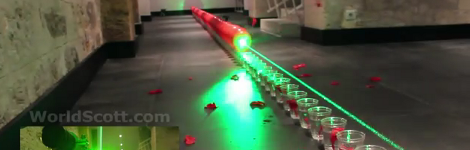
apparently [Scott] has set a world record by using a laser to pop a line of 100 red balloons. We enjoy seeing the size of the 1W laser that does the popping… it can’t be long now before we get a hold of handheld laser pistols. [via Gizmodo]

Laser balloon targeting

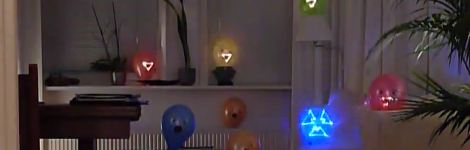
If that last one was a bit of a let down, you might enjoy this automatic targeting system more. The blue triangle shaped icon is setting a target, the amber triangles have already been targeted. Once all the balloons are identified a laser quickly zaps each in order. Quite impressive, although no details have been provided. [Thanks everyone who sent in a link to this]

http://gizmodo.com/5909007/we-hope-lasers-popping-hundreds-of-balloons-is-the-new-dominos-fad

8-bit Logic Chip Computer Build

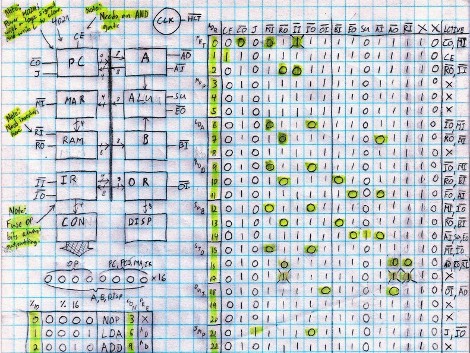
[Kyle] has been hard at working building an 8-bit computer from the ground up. He’s using a set of logic IC’s for the various components, and some NVRAM chips to store the control words. What you see above is the roadmap for his instruction set. He’s just started writing them to the chips, making the job easier by building an Arduino-based programmer.

We’ve enjoyed watching [Quinn Dunki’s] progress with her Z80  6502-based PC build which started on a breadboard in much the same way but has come a long way since those humble beginnings. Recently we also looked in on a 4-bit computer that is using discrete components. But [Kyle’s] take on the challenge falls somewhere in between the two.

The gist of his design can be found in one of his earlier post. He’s got a ring counter which starts by clearing the address register. It then loads the NVRAM address of the next instruction which is then executed on the subsequent count. It seems the build still has some way to go so make sure to keep your eye out for updates.

[via Reddit]

Veronica Gets VRAM And Its Own Boot Logo

[Quinn Dunki] just reported in on the latest iteration in her computer project which is called Veronica. This time she added RAM to increase the VGA performance of her build. Like just about every other part of the project, [Quinn] knew what she wanted to do, but had to overcome a lot of issues along the way.

The goal is to implement a 256×240 display with 8-bit color depth. [Quinn] says this is on par with game console technology from the 1980’s. The problem is that the 10MHz AVR controller can’t really keep up with the scan rate of this size of display. The answer is to add RAM which stores all of the color data, the microcontroller will simply advance the address pointer on the memory chips to match the sync rate of the VGA output.

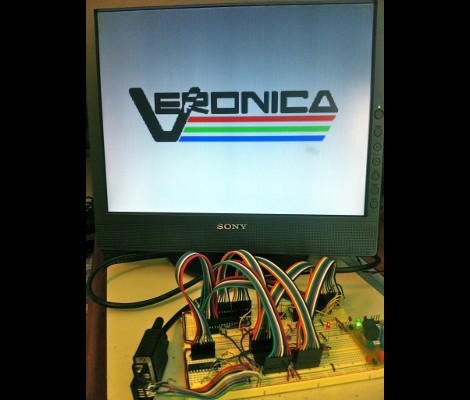
After hooking up her hardware design she gets a screen full of uninitialized pixel data. But moving from there to the final product seen above was quite frustrating. It turns out that noise on the breadboard was most of the problem, further compounded by entire breadboard row which wasn’t contacting the wires to make the temporary connections. A bit of jockeying for position and by Jove, she’s got a boot screen.

That breadboard sure has become crowded since her first VGA experiments.

808 Camera Hack Produces A Time-lapse Tic Tac Box

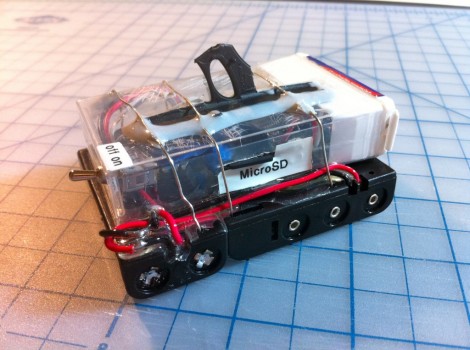
It’s not really conceived as a spy cam, but it could be. [Quinn Dunki] built this tiny time-lapse camera project with racing in mind. She’s involved in a group that endurance races clunkers, and part of the fun is sharing the experience of riding around in the old beaters. The module seen above takes a picture every four seconds and will last 24 hours before needing new batteries or an SD card change. We wonder if that’s longer than some of the ‘racecars’ make it?

She picked up an 808 camera, which looks like the key fob you use to unlock your car doors. They’re so cheap you can include them in projects and not really care if you don’t get them back. Inside it’s got a small lithium battery, the circuit board with a processor, microSD card slot, and of course the SSD used to capture the images. To control the device she used a tiny relay with an ATtiny13 used for the timing. We think the battery selection is a bit overboard, but maybe the next version will be a little more conservative.

There was one folly along the way. She wanted to attach this to the body of the car with a handful of magnets. But they don’t play nicely with the magnetic relays so that was out. The solution was to add that lanyard ring to the case which will allow the camera to be zip tied to the vehicle. So far there are no time-lapse movies available, but keep your eyes on our links posts and we’ll try to include one when it pops up.

ATmega324 Acts As A GPU For Homebrew Computer

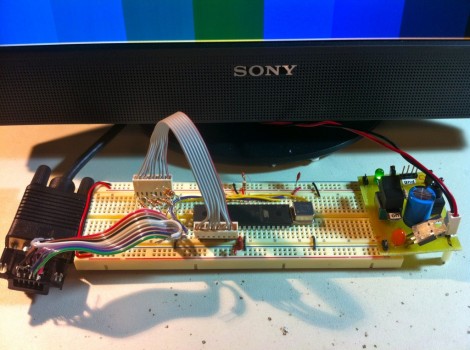
[Quinn Dunki’s] homebrew computer project is moving up another evolutionary rung. She needs a more versatile user interface and this starts with the data output. Up to this point a set of 7-segment digits has served as a way to display register values. But her current work is aimed at adding VGA output to the system.

She starts off her write up by justifying the protocol choice. Although composite video would be easier to get up and running (we see it in a lot of AVR projects) [Quinn] doesn’t have a screen that will display composite video. But there’s also a lot of info out there about VGA signal generation. She delved into the specifics and even found a great AVR-based example over at Lucid Science.

The version seen above uses the 40-pin ATmega324. It’s a lot bigger than necessary for the example she put together, but in the future she plans to add video memory and will be glad to have all of those extra I/O pins. When it comes to video sync, timing is everything. She wrote the code to drive the display using assembly. In this way, she was able to look up the cycles used for each command to ensure that the loop is running with near perfect timing.