Level Converters To Make All Your Hardware (5.5V And Under) Play With Each Other

txb0108-level-converters-ks0108-stellaris-launchpad

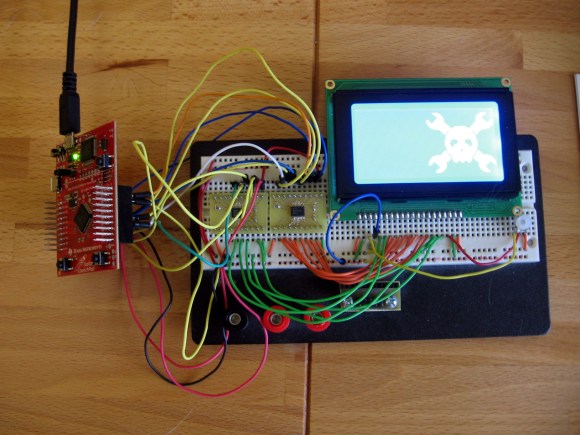
I finally set aside some time for one of my own projects. I have been playing around with ARM microcontrollers a lot lately and wanted to try out my GLCD display that uses the KS0108 protocol. It’s 5V but I had heard that some of these displays will work with 3.3V TTL. But the datasheet tells me otherwise. I tried using a pull-up resistor to 5V and configuring the Stellaris Launchpad pins to open drain, but the low voltage wasn’t getting below the 0.3V threshold needed by my display. My only choice was to use some type of level conversion. I actually ended up driving the KS0108 using a pair of TXB0108 level converters.

I figured this had to have been done before so I check over at Sparkfun. Their offerings are either one-way or have a direction pin that you must drive yourself. I figured there had to be a bi-directional solution and a search over at Mouser led me to the TXB0108. It is exactly what I was looking for and as you can see I etched my own circuit boards to make the TSSOP chips breadboard compatible. I’ve documented the process you can find the code and board files at my post linked above.

Update: one of the Reddit comments mentions this chip is available on a breakout board from Adafruit if you’re interested.

Building An ARM Cross Compiler On OSX

arm-cross-compiler-for-osx

We’ve tried building our own ARM cross compiler on a Linux box and it’s no picnic. Luckily there is a free cross compiling toolchain available through Mentor Graphics (formerly called Code Sourcery G++). But those looking to develop on a Mac aren’t so lucky. There is help via a script, and [Michael] wrote a guide detailing how to use crosstool-ng to build an ARM toolchain on Mountain Lion.

Crosstool-ng is a script which automates much of what is needed when compiling all the different components. But there is a some groundwork that needs to be in place before you can run it. For instance, some of the tools that ship with OSX aren’t entirely compatible with the GNU tools the script is looking for. One example is ‘grep’. Mountain Lion has the BSD version of grep but it is missing a few of the GNU version’s commands used by crosstool-ng. [Michael] will guide you through this and a handful of other issues until you have a functioning toolchain up and running.

Mass Storage Bootloader For Stellaris Launchpad

mass-storage-bootloader-ti-stellaris-launchpad

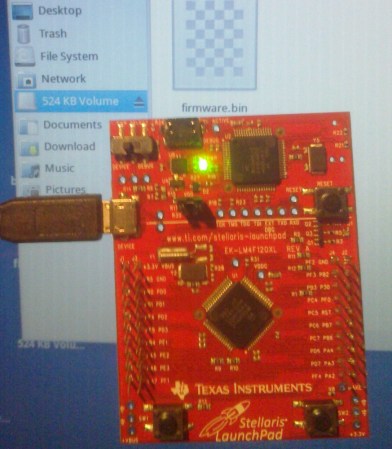
[Andrzej Surowiec] liked the functionality of the mass storage bootloader available on some NXP LPC development boards. His latest project was to write a mass storage bootloader for the Stellaris Launchpad. It allows you to flash your compiled firmware to the chip simply by mounting the board as a USB storage device and copying over the binary file. The chip has plenty of flash memory (the bootloader itself takes up 16 KB of the available 256 KB), and the board is already set up for use as USB hardware.

There is a precompiled binary available at the linked page above or you can get the source code from his github repository. We think this project is a good stepping off point for others. For instance, it should be relatively easy to use [Andzej’s] work as the base for implementing filesystem-based I/O control like we saw in the phatIO project.

How To Configure Eclipse For The Stellaris Launchpad

eclipse-for-stellaris-launchpad

We’re partial to using gedit and a makefile for our AVR projects. But for the most part we don’t a debugger with those smaller chips. Now that we’re getting going with ARM processors we use debugging all the time and Eclipse is a great way to combine code writing, compiling, and debugging in one place. Sure, we could use one of TI’s provided IDEs (some of them are based on Eclipse), but we’d rather build our tools up ourselves. [Doragasu] is making this a snap with his Eclipse for Stellaris Launchpad tutorial.

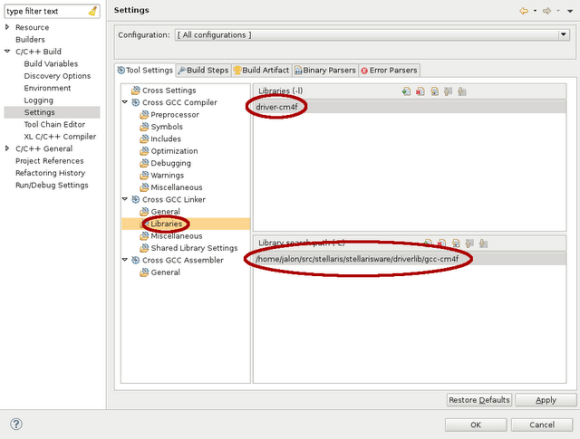
He illustrates every step with a screenshot like the one seen above. Here he is including the driverlib from StellarisWare in the linking step. After all of the compiler and linker settings are just right all you need to do is make a copy of the template to start a new project. The final part of the setup configures lm4flash to write binaries to the chip, and configures OpenOCD for use when debugging.

[via Comments]

A Study Of GCC And The TI Stellaris

hard-look-at-stellaris-and-gcc

There are several things that we really like about the TI Stellaris. We think the peripheral library — called Stellarisware — has a pretty intuitive API that makes it easy to get into. But we’re also quite impressed that the software comes with makefiles that build the libraries and examples using your own GCC cross compiling toolchain. We spent quite a bit of time pawing through those makefiles and the makedefs settings file to figure out how TI was doing things. Now if you don’t want to do that sleuthing yourself you can head on over to the GCC with TI Stellaris Launchpad guide which [Brandon] just published.

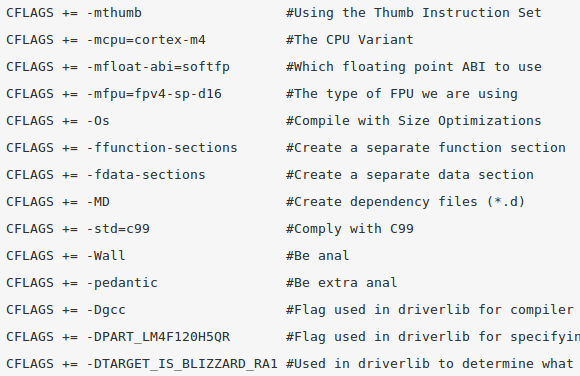
Shown above is the helpful chart of compiler flags which he pulled from the files with his added comments on what each does. He did the same for the linker flags, and then discusses the program calls made during compilation and linking. He then delves into how the driver library on the chip’s ROM can be accessed in code. This is just the first in a four-part series he plans to write. We can’t wait to see what he has to say about the hardware FPU as we haven’t had time to explore that for ourselves quite yet.

MOD Player For The Stellaris Launchpad

[Ronen K.] wrote in to tell us about the MOD playing Stellaris Launchpad project he recently completed. A MOD is a sound file for the computers of days long gone. But you’ll certainly recognize the sound of the 8-bit goodness that is coming out of this device.

To understand how a MOD file stores samples you might want to glance at the Wikipedia page. There are a ton of these files out there, but this implementation is meant for files with only four channels. For now the only external hardware used is an audio jack which needs a ground connection and a PWM signal on each of the two audio channels. [Ronen] is storing the files in flash memory rather than using an SD card or other external storage. This leaves 213k of space for up to six files that can be selected by the user buttons which cycle forward or backward through the list. See this demonstrated after the break.

The project ports existing code from an STM32 application. Since that is also an ARM microcontroller there’s not a ton of work that needed to be done. But he did have to write all of the PWM functionality for this chip. This PWM tutorial turned out to be very helpful during that process.

Continue reading “MOD Player For The Stellaris Launchpad”

How To Build OpenOCD With Stellaris Launchpad Support

The stable version of OpenOCD (an open source On-Chip Debugging software package) doesn’t have support for the ICDI protocol used by the Stellaris Launchpad board. But it is pretty easy to build your own OpenOCD from source after patching it to use the protocol.

We’ve already seen an open source tool used to flash binary images to the TI ARM board. But that can’t be used with GDB. With the recent inclusion of USB-based ICDI in the OpenOCD development branches we gain all the features that come with the package. We’re quite happy hear about this as we use OpenOCD for many hardware architectures and this makes development for this board feel more like normal.

Our Stellaris Launchpad hasn’t just been sitting in the closet since we got it. We’ve learned a lot by using the lm4tools to program the chip as we work our way through the online workshop. We’re really beginning to like the Stellarisware peripheral library that has been provided. For us it works in a much more intuitive way than the one that STM uses with their ARM Discovery boards. We’d recommend taking a look at the workbook PDF (which is basically a verbose listing of what’s in the video series) and the library reference (called SW-DRL-UG-9453.pdf) which is in the docs folder of the Stellarisware package.

[via Dangerous Protoypes]