In-depth Comparison At STM32 F3 And F4 Discovery Boards

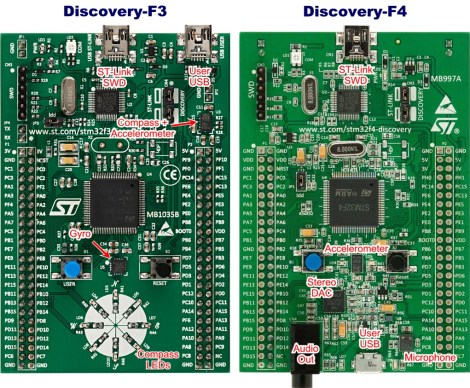
The STM32 F3 and F4 Discovery boards have been around for a while now. We’ve looked at both separately and they’re impressive dev boards for the price. Now can get a closer look at each from this in-depth comparison of the two Cortex-M4 development tools.

To start off, both of the boards have the same size and footprint (there are two dual-row pin headers which break out the connections to the ARM chip). Fundamentally the F3 and F4 chips have a different level of features, but the boards themselves are aimed at different applications as well. The F3 series of microcontrollers looks to be more affordable than the F4, containing less program memory, no Ethernet capability, and only one USB port. But both have hardware floating-point abilities and they’re blazing fast. The boards offer a MEMS accelerometer for prototyping. But the Discovery-F3 also contains a gyroscope while the Discovery-F4 provides audio hardware like a microphone, and DAC.

If you want to use a Linux box to develop with these tools you might find this guide helpful.

Netduino Gets A Huge Upgrade

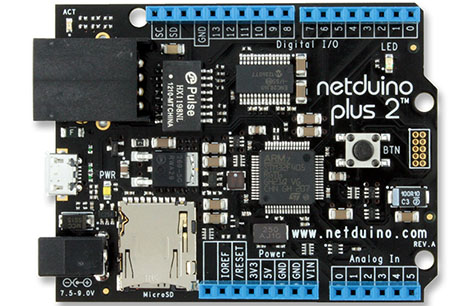
The Netduino, a dev board built around the .NET Micro framework with the goal of being compatible with Arduino shields just got a huge upgrade.

The new Netduino Plus 2 features an upgraded STM32 ARM Cortex-M4 uC running at 168 MHz, improving on the original Netduino’s ARM7 running at 47 MHz. In addition to some more processing power, the STM32-based microcontroller has twice the RAM and six times as much Flash memory. Also, Ethernet (10Mbps), a MicroSD card port, and of course compatibility with all Arduino shields – including the new Arduino ‘Revision C’ boards for the Leonardo – remains intact.

In keeping with the design goals of the Netduino, the new board uses the .NET Micro Framework running under Windows. It looks like OS X and Linux users won’t be left out in the cold for long, though; there’s a project to port the .NET Micro stuff over to Mono.

Tip ‘o the hat to [Jason] for sending this one in.

Developing With EBay-sourced ARM + LCD Dev Boards

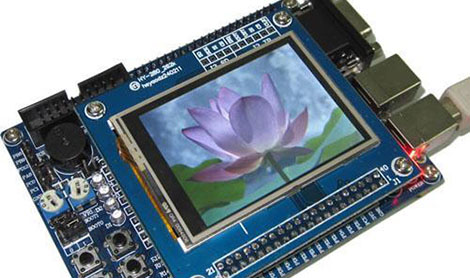
eBay isn’t only about counterfeit designer handbags and boxes of all-marshmallow Lucky Charms, sometimes there’s actually something useful for sale. [Matt] found a bunch of Chinese-made ARM development boards with integrated LCD displays on the ‘bay, but without a reliable toolchain, these boards – as cool as they are – are nearly useless. Thankfully, he figured out how to do something with these boards, and neatly packaged everything into a VirtualBox image.

The boards in question usually include a 2.4″ or 3.2″ touch panel LCD, an STM32F103 ARM Cortex-M3 CPU, a microSD card connector, and sometimes a few other goodies like 16MB of Flash memory and an RS-232 port. An amazing amount of computational capability packaged into an easy-to-use form factor made even more awesome by their $40 price point.

Because these boards offer so much more than a common Arduino, a proper OS is in order. [Matt] looked over FreeRTOS and included a few demo programs for his Ubuntu-based VirtualBox image (available for download on [Matt]’s site, it’s a dropbox, email us if you need some hosting, [Matt]) Never mind, see below.

Programming these boards can be done over a serial interface, but a JTAG programmer such as a Bus Blaster makes things very, very easy.

You can check out a few demos [Matt] put together after the break. It’s a very cool development that is much more suited for being integrated into an electronics project than a Raspberry Pi or other such high-power ARM board, and something we hope to see more of in the future.

EDIT: You know what’s really good for hosting Linux distros? Torrents. That’s [Matt]’s distro and the HaD crew is seeding. Please seed.

Continue reading “Developing With EBay-sourced ARM + LCD Dev Boards”

Vodafone USB 3G Modem Driver From Mbed

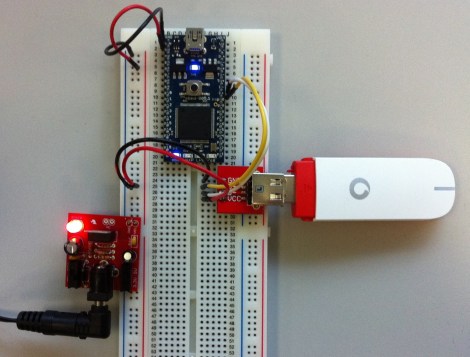
Wow, that’s a really simple hardware setup to supply your device with a 3G Internet connection. Better yet, the software side is just as simple thanks to the Vodafone USB Modem library for mbed. It will work for any of the cell data plans offered by Vodafone. The only problem you may have is not living in one of the 30 countries serviced by the telco.

The dongle seen at the right is sold by Vodafone and is meant to be used for Internet data, so you won’t be doing anything that might get your SIM banned. Connecting to the network is a one-liner thanks to the previously mentioned library. From there, gets and posts can be done with your favorite package. The  Hello World example uses HTTPClient. And since the mbed is simply an ARM platform it shouldn’t be hard to use the library with the ARM chip of your choice.

Turning A 600 Mil Chip To 300 Mil

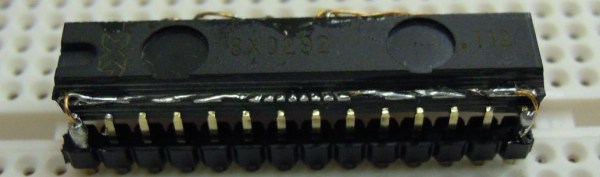
We’ve seen a few builds featuring NXP’s LPC1114 microcontroller before. This chip – the only breadboard friendly ARM microcontroller available – comes in a ‘still a little too large for prototyping’ 600 mil, 28 pin package. We won’t hazard a guess why NXP chose this rather large package, but the good news is it’s possible to shave this chip down to the more common 300 mil, 28-pin package used by AVRs and PICs.

In the video tutorial of this procedure, the chip is first taped down to a desktop CNC mill. 150 mil on each side of the die are removed, exposing the very cool-looking pattern of leads coming out of the chip. This isn’t enough area to solder, so the chip had to be further milled to expose some of the internal wiring.

After soldering everything to a set of pins, the new 300 mil package is covered in epoxy putty, milled down again into a nice cube shape and painted. Yes, the modified chip does work, and no, we can’t figure out why NXP chose a 600 mil package for this microcontroller over the far more common 300 mil chip.

Video after the break. Tip ‘o the hat to [Ian] for sending this one in.

Continue reading “Turning A 600 Mil Chip To 300 Mil”

BeagleBone Powers This Networked LED Marquee

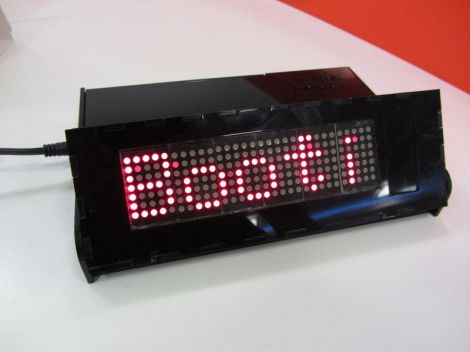
[Mahmut] calls this project SmartBox. It’s a BeagleBone controlled LED marquee which can pull down information off of the Internet.

The project started with the display itself. [Mahmut] used six 5×7 LED modules to populate a circuit board he produced himself. The low side of the modules is controlled by some MBI5026 constant current drivers, with PNP transistors on the high side. The display connects to the BeagleBone ARM board using a couple of IDC ribbon cable connectors. With that up and running he started working on the enclosure. The display board was modeled in Google SketchUp to ensure that the case design would fit it properly. The laser cut acrylic case is in two parts, the base holds the driver electronics, with a hinged section for adjusting the angle of the marquee.

So far there are a few different connectivity features which are shown off in the clip after the break. The BeagleBone has the ability to pull down Twitter feeds, notify about incoming email, and scroll messages.

Continue reading “BeagleBone Powers This Networked LED Marquee”

PWM On The Stellaris Launchpad

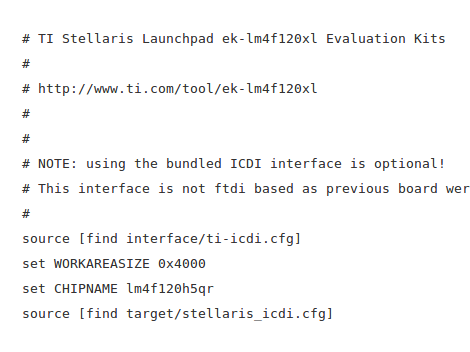
[Joonas] has been following TI’s ‘getting started’ tutorials for their new Stellaris Launchpad. Everything had been going swimmingly until [Joonas] reached the fourth tutorial on interrupts. To the ire of LEDs the world over, implementing PWM on the new Stellaris Launchpad is a somewhat difficult task. After banging his head against the documentation for hours, [Joonas] finally cracked his PWM problem and decided to share his discoveries with the world.

The Stellaris has a PWM mode for its six hardware timers, but unfortunately there are no PWM units on the chip. Solving this problem required making two 16-bit timers out of a single 32-bit one. This allowed [Joonas] to specify a ‘load’ and ‘match’ value.

After coding this up, [Joonas] discovered the PWM timer only works on two of the Launchpad’s pins. Hours of Googling later, he had real PWM on his Stellaris Launchpad.

Given the amount of time [Joonas] spent on this problem, we’re glad to help all the other frustrated Stellaris tinkerers out there by sharing this.