Dedicated LED Animation Framework For ESP32

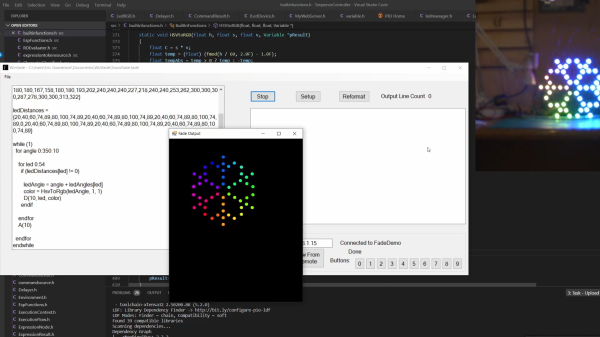
[Eric Arcana] has been creating animated holiday decorations for several years, which involved a lot of custom code to make things light up the way he wanted, pulling the microcontroller to make changes. Using ESP32s with remote software updates is easier, but [Eric] also wanted to make the code simpler. To achieve this he created Fade, a custom programming language/framework for controlling LED animations from the ESP32.

Fade is written for addressable RGB LEDs like the Neopixel/WS2812. It keeps track of the current color of every LED in the system and allows the user to define what color it should be at a specified time in the future. Time is specified using 10 ms clock cycles. The LEDs will smoothly change from one color to the other in the specified number of clock cycles, without needing to specify what the intermediate colors should be.

Code is written in simple IDE, running on a web server on the ESP32 itself, or on a remote Windows PC. The language is very simple, but still powerful enough to create complex LED animations. A key part of it is the ability to specify multiple concurrent state changes in just a few lines of code. [Eric] also included optioning to take touch button inputs and use them to update the animations. Another nice feature is a simulation window on the desktop IDE. It allows you to create custom LED layouts on PC, and test your code without needing to send it to the ESP32.

Addressable LEDs have made creating large LED installations a lot simpler, like this 6 foot LED ball or a LED Video Wall.

Continue reading “Dedicated LED Animation Framework For ESP32”
Create Large Scale Domino Art With A Robot

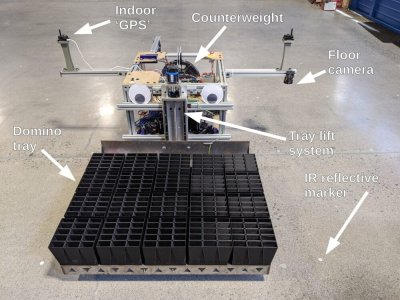
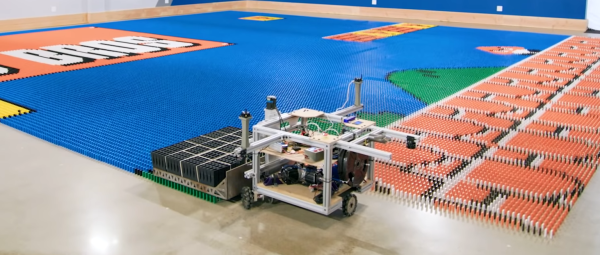
Creating large domino art displays is a long and nerve-racking process, where bumping a single domino can mean starting from scratch. To automate the process of creating these displays, a team consisting of [Mark Rober], [John Luke], [Josh], and [Alex Baucom] built the Dominator, a robot capable of laying 100 000 dominos just over 24 hours. Video after the break.

[Mark Rober] had been toying with the idea for a few years, and the project finally for off the ground after [Mark] mentioned it in a talk he gave at the 2019 Bay Area Maker Faire. To pull it off, the team created an entire domino laying system, including an automated loading station, a precision indoor positioning system, and the robot itself. The robot is built around a frame of aluminum extrusions, riding on three omnidirectional wheels driven by precision servo motors. A large tray mounted to the front of the robot can hold and release 300 dominos at a time. The primary controller is a Raspberry Pi 4, which receives positioning information from a Marvelmind indoor positioning system and a downward-facing IR camera that looks for reflective markers on the floor. The loading system uses a conveyor system to feed the different colored dominos to an industrial Kuka robot that drops them down a grid of tubes that can hold multiple layers at once.

Continue reading “Create Large Scale Domino Art With A Robot”

Video Feedback Effects Make A Glorious Spectacle In HD

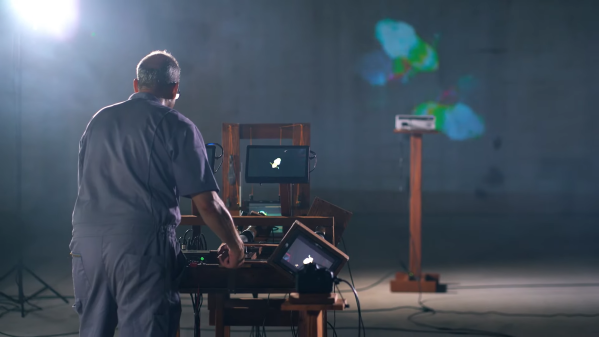
Video feedback is perhaps best known for its appearance in the film clip to Bohemian Rhapsody. It’s not a particularly popular effect that you see too often, as it’s rather messy to set up what with cameras filming screens and what not. Regardless, the effects possible are glorious, as demonstrated by [Dave Blair] and his amazing video feedback kinetic sculpture.

No computer is involved at all in the process – it’s just classic, old school video feedback. It’s produced by pointing a camera at a screen and feeding the image back to that same screen. Three cameras are combined with twin video switchers and a beam-splitting pane of glass, along with a source image via an HDMI input.

By turning and spinning the various cameras, [Dave] is able to generate beautiful curving fractal-like effects using the source imagery, with a rainbow of color melting and warping together as he interacts with the sculpture. It’s a beautiful effect and something we’re surprised we don’t see more of in the video industry.

Hopefully [Dave] is enlisted to put his machine to work on the next [Doja Cat] film clip so we can get more of this goodness. Video after the break.

Continue reading “Video Feedback Effects Make A Glorious Spectacle In HD”

Cool WS2811 Trick Makes LED Art Installation Smooth

Normally, when a project calls for addressable LEDs, we just throw a strip of WS2812s and an Arduino together, cobble together some code from the examples in the FastLED library, and call it a day. We don’t put much thought into what’s going on under the hood, unless and until we run into an LED project that’s a little more challenging.

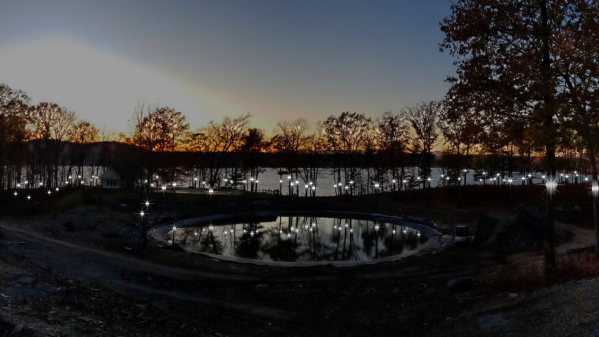
Inventor [Leo Fernekes] found himself in such a situation recently, when he pitched in on an LED art installation. The project called for rings of LED bars around the trunks of trees on a private estate. The physical size of the project and the aesthetic requirements created significant challenges, though. One of these was finding a way to control the LED bars, each of which draws about 100 mA and needs to be very smoothly dimmed. [Leo] looked at the WS2811 LED driver, but found that the low drive current and the 8-bit PWM output failed to tick either of those boxes.

[Leo] solved both problems by using two of the three PWM channels on the chip in concert — one to control the current and one to PWM the LED. The circuit he came up with is deceptively simple — just four transistors, a Schottky diode, and a bunch of passives. The other clever bit is the data interface between LED bars, which can be configured as either single-ended or differential. This allows the same interface to be used for the short distance between bars on a tree, and the longer runs between trees.

As usual, [Leo] does a great job of explaining his design and how it works, which we find very instructional. He did something similar when he managed to dim a non-dimmable LED fixture.

Continue reading “Cool WS2811 Trick Makes LED Art Installation Smooth”

Responsive Paintings Do It With Heat And Light

Art is a conversation, yes. But normally, it’s a short one: the artist makes a statement and the audience responds, each bringing their own interpretations. The hard thing about being an artist is that once you release a piece into the world, it’s sort of bound and gagged in that it can’t defend itself from comments and misinterpretation.

On the other hand, interactive art allows for a longer discussion. Pieces are responsive and no longer mute. But so much of the interactive art out there is purely digital, and lacks a certain analog warmth that comes from physicality. For this year’s Hackaday Prize, [Laura] sought to put a digital interface on an analog visual piece and make paintings that change based on data inputs.

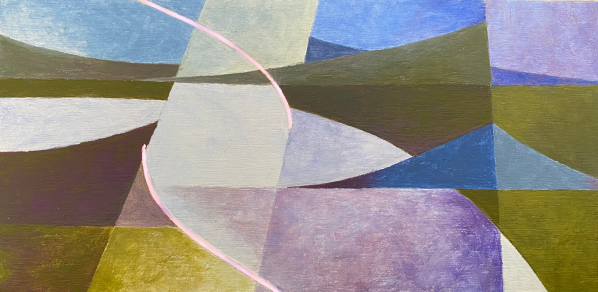
For now, [Laura] is focusing on adding two dynamic elements to her paintings: shifting color and light patterns in response to a viewer’s presence and/or actions using an Arduino and TinyML. For the color changes, [Laura] ended up mixing thermochromic pigment powder with a transparent gel medium.

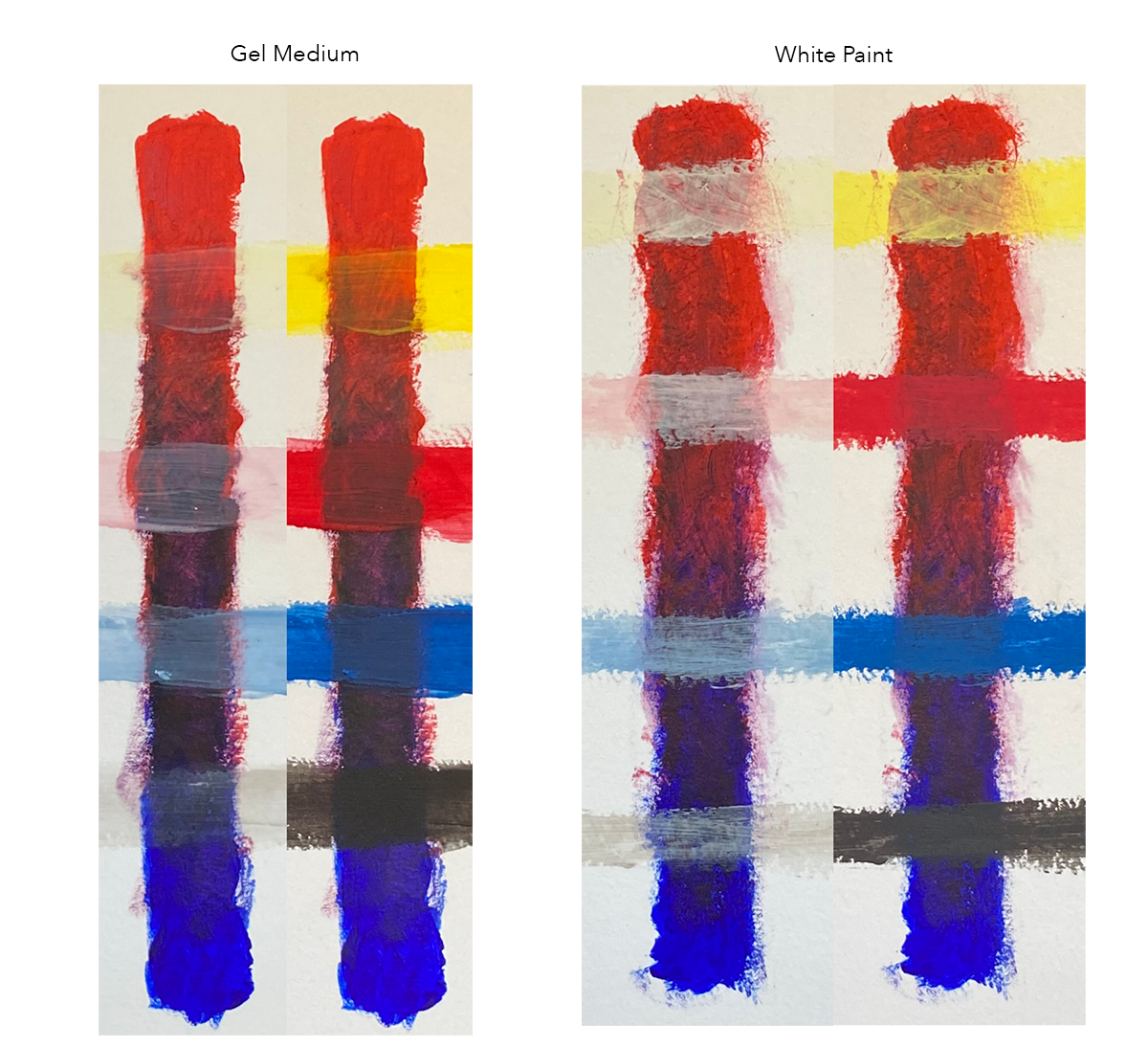
This was a bit of a journey, because the regular kind of transparent medium came out too runny, and mixing the pigments with white paint made the colors come out lighter than [Laura] wanted and left white behind when heated. But transparent gel medium was just right. You can see the difference in this picture — the colors come out darker with the gel medium, and disappear almost completely with heat.

[Laura] didn’t want to just poke LEDs through the canvas, which in this case is a 1/8″ birch panel. Instead, there’s an RGB matrix shining behind a pair of thin, diffused cutouts filled with thermoplastic.

Check out the video after the break of a painting sketch that uses both techniques. Keep your eye on the purple triangles on the right side, and watch them slowly turn blue in real time as light patterns dance behind the diffused cutouts. Stick around for the second brief video that shows an updated light animation.

We’ve seen many ways of making interactive art, like this Rube Goldberg fairy tale ball maze that you control with your phone.

Continue reading “Responsive Paintings Do It With Heat And Light”

High-Tech Paperweight Shows Off Working 60s-era Thin-Film Electronics

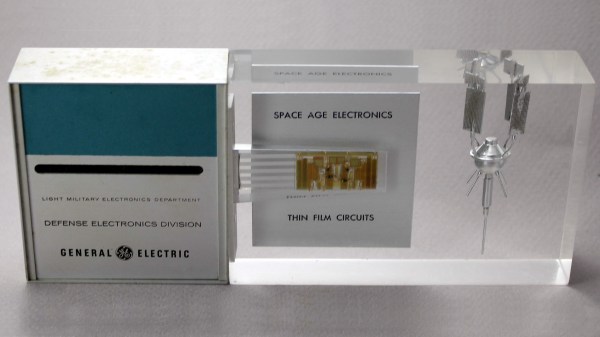
[Ken Shirriff]’s analysis of a fascinating high-tech paperweight created by GE at the height of the space race is as informative as it is fun to look at. This device was created to show off GE’s thin-film electronics technology, and while it’s attractive enough on its own, there’s an added feature: as soon as the paperweight is picked up, it begins emitting a satellite-like rhythmic beep. It is very well-made, and was doubtlessly an impressive novelty for its time. As usual, [Ken] dives into what exactly makes it tick, and shares important history along the way.

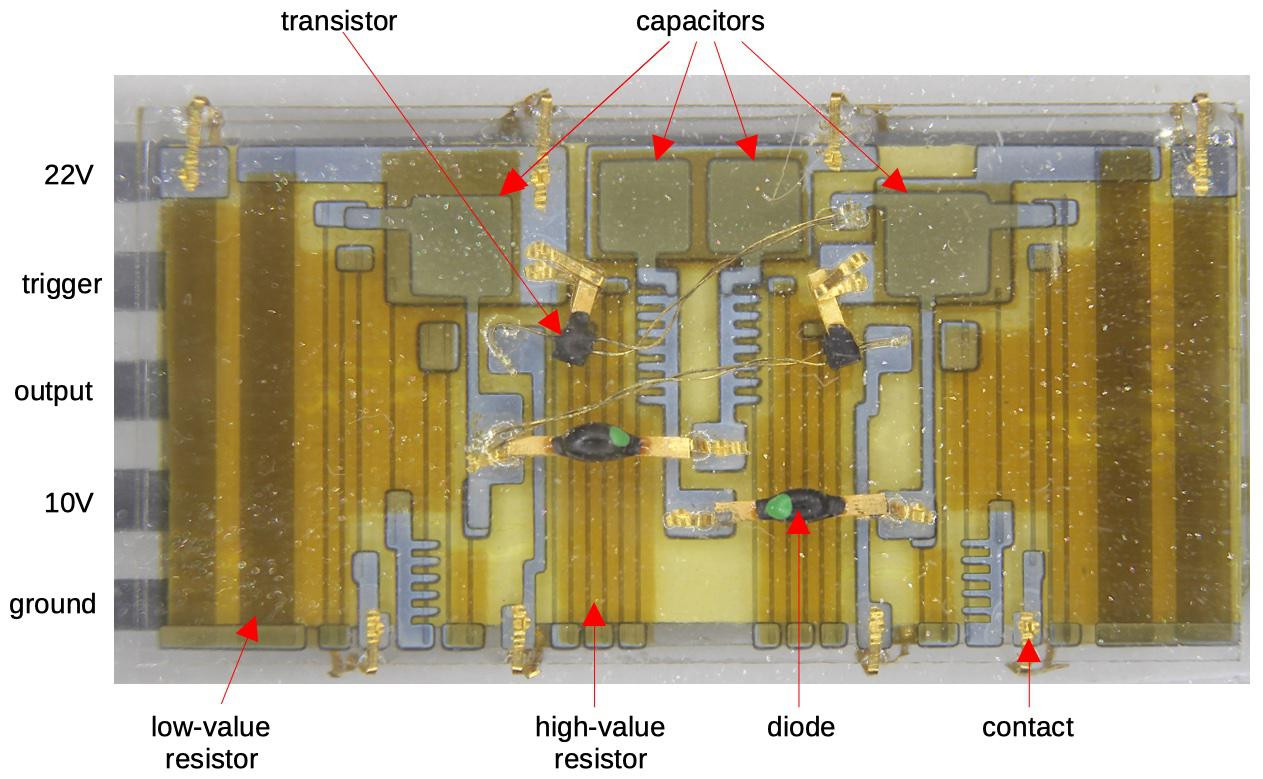
Thin-film module with labels, thanks to [Ken]’s vintage electronics detective work. Click to enlarge.
In the clear area of the paperweight is a thin-film circuit, accompanied by a model of an early satellite. The module implements a flip-flop, and the flat conductors connect it to some additional components inside the compartment on the left, which contains a power supply and the necessary parts to create the beeps when it is picked up.

Thin-film electronics reduced the need for individual components by depositing material onto a substrate to form things like resistors and capacitors. The resulting weight and space savings could be considerable, and close-ups of the thin film module sure look like a precursor to integrated circuits. The inside of the left compartment contains a tilt switch, a battery, a vintage earphone acting as a small speaker, and a small block of components connected to the thin-film module. This block contains two oscillators made with unijunction transistors (UJTs); one to create the beep, and one to control each beep’s duration. The construction and overall design of the device is easily recognizable, although some of the parts are now obsolete.

If you’d like a bit more detail on exactly how this device worked, including circuit diagrams and historical context, be sure to click that first link, and pay attention to the notes and references at the end. One other thing that’s clear is that functional electronics embedded in clear plastic shapes simply never go out of style.

Jigsaw Puzzle Lights Up With Each Piece

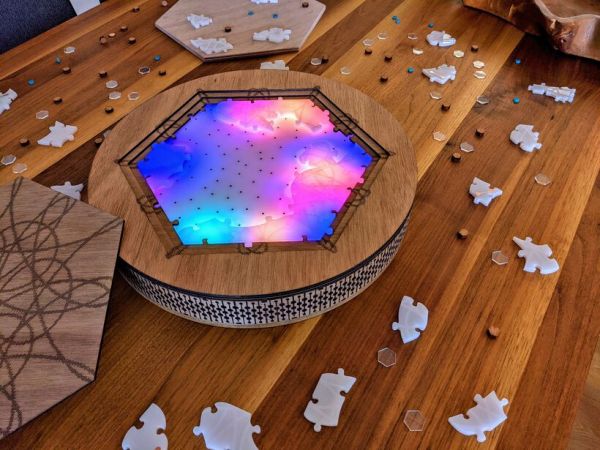
Putting the last piece of a project together and finally finishing it up is a satisfying feeling. When the last piece of a puzzle like that is a literal puzzle, though, it’s even better. [Nadieh] has been working on this jigsaw puzzle that displays a fireworks-like effect whenever a piece is placed correctly, using a lot of familiar electronics and some unique, well-polished design.

The puzzle is a hexagonal shape and based on a hexagonally symmetric spirograph, with the puzzle board placed into an enclosure which houses all of the electronics. Each puzzle piece has a piece of copper embedded in a unique location so when it is placed on the board, the device can tell if it was placed properly or not. If it was, an array of color LEDs mounted beneath a translucent diffuser creates a lighting effect that branches across the entire board like an explosion. The large number of pieces requires a multiplexer for the microcontroller, an ATtiny3216.

This project came out of a FabAcademy, so the documentation is incredibly thorough. In fact, everything on this project is open sourced and available on the project page from the code to the files required for cutting out the puzzle pieces and the enclosure. It’s an impressive build with a polish we would expect from a commercial product, and reminds us of an electrified jigsaw puzzle we saw in a previous build.

Thanks to [henk] for the tip!