Retrotechtacular: Miniseries On The Wright Brothers

retrotechtacular-wright-brothers

Admittedly we prefer our Retrotechtacular videos to be campy, but sometimes the content is just so cool we have to give up that goal. So is the case with this series on the Wright Brothers’ first manned, powered flight.

Now there is some argument on who actually flew for the first time on earth. And that issue is touched upon right away by sharing the benchmarks used to substantiate the claim:

  • The machine was heavier than air
  • Carried a man
  • Rose from the ground under its own power
  • Flew under control without losing speed
  • Landed safely at an altitude no lower than it took off

The two-part series clocks in at almost two hours. But the combination of images, video footage, and first-hand accounts makes for something incredibly interesting. The original flight happened 110 years ago this December. That doesn’t seem so long ago and it’s incredible to think that air-travel is now common in the developed world and we’re even seeing progress toward human powered flight that itself is doing the same kind of trailblazing the Wright Brothers did.

Continue reading “Retrotechtacular: Miniseries On The Wright Brothers”

Adventures In Hackerspacing: Freeside Atlanta, Part I

advInHSLayout00

The internet is littered with how-to step-by-step guides for starting and maintaining your very own hackerspace. Don’t worry, we’re not adding to the pile. If you want a checklist, Eric Michaud’s got that covered. Adventures in Hackerspacing is different: epic re-tellings, anecdotes, and behind-the-scene stories that fill in the gaps for those fragmented, laundry-list requirements. Here you’ll find nightmare scenarios come to life, clever legal loopholes to save the day, and overhauls that helped a space “click”. Adventures in Hackerspacing has plenty of advice to share, but like every good adventure, it’s about the journey, not the destination.

First up, Freeside Atlanta Part I: Philosophy and Culture.

I sat down with directors [Alan Fay] and [Steven Sutton] on a quiet summer evening to discuss how the space found redemption and success with its philosophy of promoting diversity and embracing humility.

Continue reading “Adventures In Hackerspacing: Freeside Atlanta, Part I”

How Do You Build A Relay CPU?

relay

The Hackaday tips line is always full of the coolest completed projects, but only rarely do we see people reaching out for help on their latest build. We’ll help when we can, but [Tim]’s relay-based CPU has us stumped.

[Tim] already has the design of his relay CPU completed with a 12-bit program counter, sequencer, ALU, and a transistor-based ROM. The problem he’s having deals with the mechanics and layout of his homebuilt CPU. Right now, all the relays (PC pin, we guess) are glued top-down to a piece of cardboard. This allows him to easily solder the wires up and change out the inevitable mistakes. This comes with a drawback, though: he’s dealing with a lot of ‘cable salad’ and it’s not exactly the prettiest project ever.

The ideal solution, [Tim] says, would be a PCB with through-hole plating, but this isn’t easy or cheap for the home fab lab. We’d suggest some sort of wire wrap setup, but proper wire wrap sockets and protoboards are for some reason unreasonably expensive.

If you have an idea on how to do the mechanical layout and connections of a relay-based computer, drop a note in the comments. [Tim] has a very cool project here, and it would be a shame if he were to give up on it due to a lack of tools.

Video below, and if you’re having a problem with a project, feel free to send it in.

Continue reading “How Do You Build A Relay CPU?”

Hackaday Links: October 13, 2013

hackaday-links-chain

This week’s post on core rope ROM was pretty popular. [Joey] wrote in with a book recommendation for those that found the project interesting. Digital Apollo discusses the technology which NASA built into the guidance computer. That was also the subject of a recent Retrotechtacular.

A few members of the Vancouver Hack Space came up with their own take on the Word Clock. It uses an old monitor, a laser-cut bezel, and Javascript to light up the correct characters.

When we last looked in on [Vincent’s] plywood stool project he had branched out into plywood folding chairs as well. Here’s two updates on his progress.

This one’s just silly. To keep up with his wife on exercise goals, this guy cheated using a reciprocating saw to spoof his exercise. Tape the FitBit to the saw blade, clamp the saw to the workbench, and then let her rip! [via Reddit]

[Harrison] wrote into share the Arduino button library he developed. It is designed to allow detection of multiple types of button events without blocking other operations. He came up with the project to use with his motorcycle hacking.

It looks like [Bertho] has kitted up his Executive Decision Maker. We first saw this as a perfboard project a couple of years ago.

And finally, [Bob Alexander] makes your hard drive clock look puny. His uses the platter from a 40-year-old mainframe hard drive.

Fail Of The Week: Photography Turntable

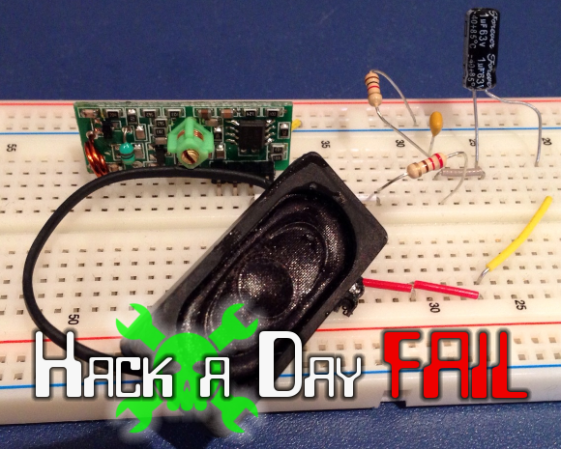
Turntable photography has seen a rise in popularity driven by online shopping. If you can’t hold it in your hand at least you can see what it looks like from all angles. From the still image, [Petteri Aimonen’s] roll-your-own turntable looks great. It’s completely enclosed and has a very nice paint job. But when you see it in action it appears to suffer from a stutter.

Continue reading “Fail Of The Week: Photography Turntable”

3D Printering: You Want UV Resin?

printering

Just a few short months ago, 3D printing with stereolithography was an uncommon and very expensive proposition. Consumer-oriented SLA machines such as the Form1 and the B9Creator are as expensive as the upper echelons of squirting plastic printers and the community behind these machines isn’t even as diverse as the forums for the fly-by-night printers featured on Kickstarter every week.

This may be about to change with last month’s reveal of the Peachy Printer, a remarkably clever stereolithography printer that requires no special equipment, hardly any electronics, and costs $100. Even if the folks behind Peachy never ship a single unit, their clever engineering ensures that stereolithography will be a staple in the makers toolbox in the near future.

There is, of course, the problem of material. While plastic filament can be bought  just about everywhere, UV curing resin is a little harder to come by and much more expensive per kilogram or liter. Where then does the stereolithography experimenter get their hands on some of this magical material from the future?

Before we get to the article…

I’ve been writing a 3D Printing column once a week for a few months now, and I’m running out of ideas. If you have something in the 3D printer world you’d like to see covered in a little more depth than the standard Hackaday post, send in a tip. I’ll send you a few Hackaday stickers if it’s a good idea.

Continue reading “3D Printering: You Want UV Resin?”

Ask Hackaday: What Is “Home Automation”?

homeAutomationCollage

We’re not entirely sure what’s become of the term “home automation.” The definition seems to have settled for any user interface in the home—via tablets, phones, handheld remote controls, etc. Some of these devices lack any form of automation and instead require manual input. Even Wikipedia’s home automation article suggests a move toward this trend, offering the following definition (emphasis ours):

It is automation of the home, housework or household activity. Home automation may include centralized control of lighting, HVAC (heating, ventilation and air conditioning), appliances, security locks of gates and doors and other systems, to provide improved convenience, comfort, energy efficiency and security.

Though “automation” is clearly included in the first sentence, one could interpret the bolded potion as meaning either:

  • Truly automated systems may also include centralized control (as a feature).
  • The category of home automation also includes systems that merely provide centralized controls.

So, are automated components optional? Judging by the phrasing of projects submitted to our tips line: yes sir. Truly automated systems exist, but if you browse through any home improvement store’s “home automation” section, you’ll be pummeled by a string of remote-controlled light dimmers and outlets. How many of these are designed to interact with sensors as feedback systems or otherwise function unattended?

Our articles often favor an “automation-optional” categorization. Should we, however, reserve the “automation” label for projects like the light switch based on room occupancy and deny other builds, like the voice-activated lights/outlets system or the RasPi lighting and audio control via web interface? Hit up the comments and help shed some light on how to properly use the terminology.