Home Security Anyone Can Build And Install

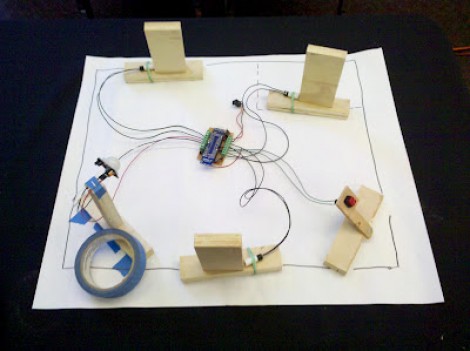
We’ve been seeing quite a few home security hacks around here lately and we think they’re a lot of fun. This is one that we missed a few weeks ago. [Sharpk] used his existing home security system as inspiration for a completely DIY security system. Above you can see the tiny models he used to help visualize how the system would be installed.

The board at the center is a JeeNode, a development board that pairs an ATmega328 with a wireless module. There are three magnetic door sensors which you can easily find at the home, hardware, or electronics store around the corner. They’re basically a reed switch and a magnet; one mounts on the door, the other on the jamb. There is also a panic button and a PIR motion sensor. [Sharpk] has even been working on a UI for the system. He crafted a 3D model of his home’s floor plan in SketchUp and uses it to indicate which part of the system has been triggered.

Now he just needs to add a keypad for arming and disarming the system.

Getting Connected With Your Home Security System

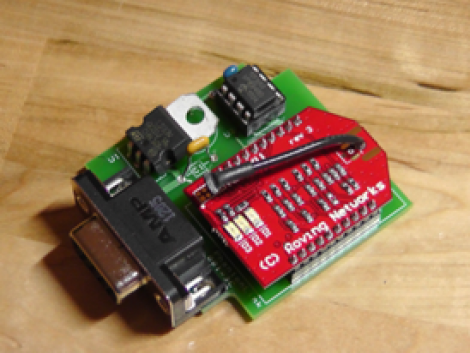
This simple device, paired with some creating code will let you become your own home security monitoring service. It’s called the PhantomLink and [Adam] started the project as a commercial venture. He recently decided to go open source with the hardware and will soon be posting a guide on how to program your own web interface too.

We just looked in on a project which takes control of a security panel using an Arduino. The PhantomLink is focused on not just reusing the input hardware, but monitoring the whole system. It sounds like several different protocols are supported.

The DB9 jack is intended for use with an adapter you can wire yourself. Basically just tap into the terminal block on the alarm controller for your house, then route those connections to the proper pins. A PIC 12F683 monitors the alarm system, pushing data via the WiFi module mounted on the board. With that web connection you can do anything you want by catching and formatting the data.

Bending A Home Security Control Panel To Your Will

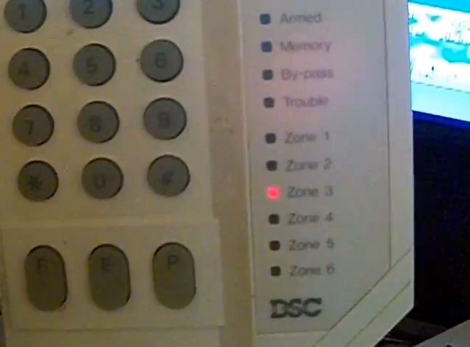
Does your home have a security system but you don’t subscribe to the monitoring service to make it work? Rip that baby off of the wall and do something with it, or just build your own system around it. If you have a DSC PC1500RK control panel [CaitSith2] shows us how easy it is to control the buttons, LEDs, and buzzer. If you’ve got a different model this is still a good jumping off point to start your own reverse engineering.

There are only four connections that need to be made. [CaitSith2] is using an Arduino for the demonstration. He connected the red wire to voltage, the black wire to ground, the yellow wire (clock) to digital pin 3 and the green wire (data) to digital pin 2. A communication cycle starts by setting the data line high, then clocking out eight bits to capture keypresses. 16-bits are then clocked in to set the LEDs and drive the buzzer. This is shown in the video after the break as well as documented in his sample code. We’ve embedded the sketch after the break to preserve it in case the pastebin code goes missing in the future.

Continue reading “Bending A Home Security Control Panel To Your Will”

Make A Cardboard Bookshelf In Less Than A Day

Lucas came up with a real winner when upcycling cardboard to use as a bookshelf. It’s visually pleasing, can be built basically for the cost of glue and a mounting brackets, and you don’t have to feel bad if you decide to get rid of it later on.

What he saved in raw material cost he spent in labor. There are 23 different layers of cardboard that went into the project, not including the spacer squares between each piece. The vast majority of the time spent in the clip after the break shows a fast-time video of him cutting out the layers. It apparently took about eight hours of cutting, and we’d image he’s got a claw of a hand after all of that work.

This is hanging from a single L bracket positioned in the square opening with two nails to keep it level. We’d suggest including a better mounting technique in your design. If you have some ideas about this please let us know in the comments.

Continue reading “Make A Cardboard Bookshelf In Less Than A Day”

Lighting Controller Counts How Many People Are In A Room

[Deekshith Allamaneni] built this controller which will automatically turn the lights in a room on and off. No big deal, right? You can already get a replacement light switch at the home store that will do this for you. But there is one big difference. The commercial solutions we’ve seen simply rely in a motion sensor and a timer. But [Deekshith] found a way to count the number of people that enter a room, turning the lights on when the first person enters and off when the last person leaves.

The video after the break shows a demo of his test rig. At first we just thought that this was only counting how many times an object passes between the sensors. But it can also detect in which direction that object was traveling. Now the system just needs to be scaled up for use in a doorway.

It would be a great addition to the house that doesn’t have any light switches.

Continue reading “Lighting Controller Counts How Many People Are In A Room”

Raspberry Pi Keeps Tabs On Your Solar Power Setup

raspberrypi-solarlogger

[Brian Dorey] has been adding green power solutions to his home for some time now, and as things have progressed, he has experimented with several different iterations of data loggers. The latest system watching over his solar power setup is a Raspberry Pi armed with a custom-built I2C analog/digital converter.

The Rasp Pi is responsible for monitoring several different temperature sensors related to his solar water heating and storage system, but that’s just the beginning. It also keeps watch over his roof-mounted solar electric panels, his battery bank, and its charge controller. For good measure, he also monitors his home’s temperature and his water tank’s recirculation pump because, why the heck not?

All of the collected data is relayed to his web server where it is handsomely displayed for his perusal and analysis. [Brian] has made his code available here, so you can monitor your home in the same fashion with little fuss.

Driving Your Home Appliances With Hybrid Power

This system of hybridizing your home’s electric appliances is an interesting take on solar energy. It focuses on seamlessly switching appliances from the grid to stored solar energy as frequently as possible. There’s a promo video after the break that explains the setup, but here’s the gist of it.

Follow along on the pictograph above. We start on the left with solar panel. This feeds to a charger that tops off a 12V battery. When that battery is full, the charger feeds to the inverter which converts the 12V DC to 110V AC power. This is fed to a pass-through which is in between the appliance (in this a case a lamp) and the wall outlet. The pass-through will switch between mains power coming from the outlet, and the 110 coming from the inverter. The homeowner won’t know, or care, which power source is being used. But sunny months should result in lower energy bills. The real question is how long it takes to cover the cost of the system in saved electricity.

Continue reading “Driving Your Home Appliances With Hybrid Power”