Beginner Concepts: We’re Gonna Let You Finish, But First This Tutorial On Arduino Interrupts

OK, year-old pop culture references aside [Kyle] dropped us a line to show us his tutorial on using interrupts with your Arduino. Given the single core nature of your average Arduino’s AVR you pretty much have two choices for monitoring occasional un-timed inputs: Either check an input at an interval (which risks missing the signal entirely) or set up an interrupt to pause the chip’s normal operation. Obviously working with interrupts saves you tons of clock cycles since you are not polling a pin over and over. [Kyle] plans on a follow up tutorial to cover timer based interrupts, which can come in handy when generating frequencies and stuff.

Looking for more Arduino Basics? How about Basic on an Arduino. Check out our other beginner concepts posts as well if you need to work on your fundamentals.
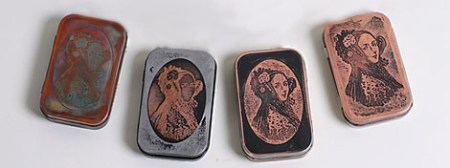
Altoid Tin Etching Tutorial

Eminent steampunker [Jake Von Slatt] wrote a small article on etching candy tins for The Steampunk Bible, but the limited space available in the book didn’t allow for a full exposition. To make amends for his incomplete tutorial, he posted this walk through to compliment the Bible’s article.

The process is very similar to the many tutorials we’ve seen on home-etching PCBs using the toner transfer method. Removing the paint from the Altoid tin, creating a mask, printing it on the Sunday circulars, and taking an iron to the tin is old hat for home fabbers.

Unlike PCB manufacturing, [Mr. Von Slatt] doesn’t bother with Ferric Chloride or other nasty chemicals – he does everything with electrolysis. After adding a few tablespoons of table salt to a bucket of water, [Jake] takes a DC power supply and connects the positive lead to the lid and the negative lead to the base. a bit of electrical tape around the corners of the lid keeps the metal from getting too thin.

A nice Copper finish can be applied to a finished tin by swabbing on a solution of Copper Sulfate – a common ingredient in “Root Kill” products. Of course that’s not a necessary step; you can easily enjoy and elegant Altoid tin bare metal.

Cheap Acoustic Panel DIY

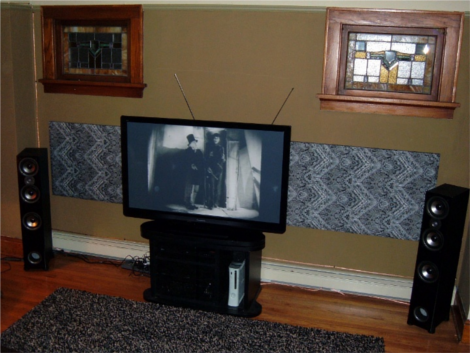
[Eric Wolfram] wrote in to let us know about a simple and cheap acoustic panel DIY he put together.  When installing a home theater acoustics are often neglected (especially if you spend so much on the TV you cannot afford any furniture for the room) resulting in reduced listening quality and poor spacial sound imaging from your surround system (also responsible for the furniture problem). The addition of sound absorbing panels helps control the acoustics of the room and may even class up the place a bit.  These are also come in handy for home studio usage where a low level of reverberation is preferred.

The panels are relatively simple to produce on a budget, just a sheet of 2″ thick dense fiberglass board glued into a wooden frame and covered in a sound-transparent fabric. [Eric] goes into a lot of the material selection process to help you along your way. The best part about the project (aside from its obvious utility) is that all of the materials can be found cheaply at your average home improvement store, with the exception of the fabric.  [Eric] mentions that you can substitute colored burlap if need be.  Once the panel is assembled and glued it just has to be hung on the wall of your choice like a large heavy picture frame. This could certainly help the acoustics and reduce some slap-back echo in your warehouse/shop. We might have to try this one over the weekend.

Thanks [Eric]!

Workbench Overhead Camera Boom Made From PVC

pvc_overhead_camera_ boom

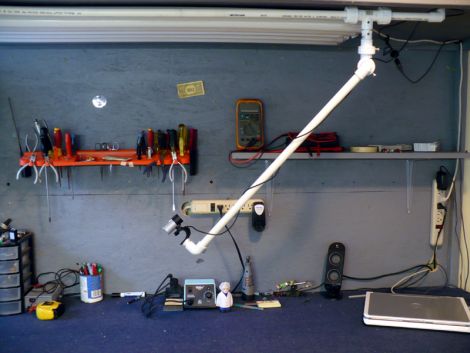
It looks like [Dino] is getting settled into his new digs, and while the moving process has kept him pretty busy, he’s slowly but surely getting his workshop area set up. One thing that he really wanted from his new bench was a better way to record video, for both his Hack a Week series as well as broadcasting over Ustream.

He bought a nice little Hi-Def web cam for making videos and set out to build a camera boom for his bench. The boom is constructed mostly from PVC piping along with some other odds and ends for mounting. In the video below, he walks through the construction step by step, making it easy for anyone to follow along and build one of their own.

The boom looks like it works very well, and is a bargain at under $40. It articulates every which way giving him complete coverage of his workbench, and makes it easy to film whatever he’s working on – big or small.

Continue reading “Workbench Overhead Camera Boom Made From PVC”

ATTiny Hacks: Run Your Arduino Project On An ATTiny!

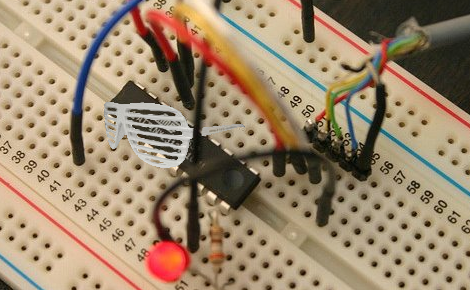
Yup. We have all been there. You throw together a really elaborate Arduino project that only really needs a couple pins, far fewer than the Arduino’s native microcontrollers have to offer. Well fear not, [Thatcher] has solved just this problem by adding some ATTtiny cores to the Arduino IDE. His blog details the process from grabbing the MIT developed core files and loading them up in your Arduino software directories. The modification looks simple and although [Thatcher] shows the whole process on a Mac it only involves unzipping and tossing files into a folder. With ATTiny chips only a few bucks each this is perfect for those simple software driven hacks that don’t require an entire Uno duct taped to the outside of an enclosure.  Nice work [Thatcher]!

Glass PCBs


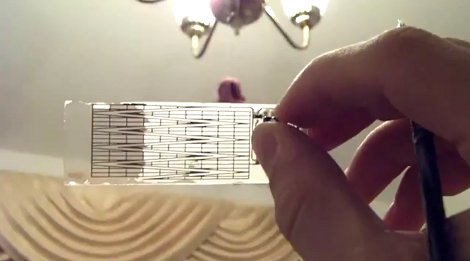
Our friend [Jeri] tipped us off about this cool video on youtube where the author makes his own “transparent” PCB’s using some nontraditional materials. One ounce copper foil is found online along with some clear glass microscope slides, from there it is just a matter of cementing the foil onto the glass slides with some thin UV curing glue. Once the 2 parts are mated the entire thing is popped into an eeprom eraser for its intense UV light, then excess is trimmed.

The normal routine of toner transfer is used to copy a circuit pattern onto the copper clad glass and it’s etched in standard ferric chloride. The copper is removed but the UV glue that was holding it is still left, some special care needs be followed as this stuff is pretty weak against even mild solvents, and you do not want your traces peeling up. Next no clean solder paste is applied and parts are soldered down with a heat gun, keeping the glass evenly heated to prevent it from cracking.
This leaves you with a board that looks like frosted glass, and in order to protect the glue while clearing up the frosted effect, some polyurethane is applied which fills in all the little bumps and smoothes the surface bout out to almost 100% clear.
The end application in this video is a touch sensitive board which works fine though the back side of the glass and presents a nice smooth interface for the user. Join us after the break for the video.

Continue reading “Glass PCBs”

Video: Learning Eagle CAD Part 2

This week we are continuing on with our multi-part series where [Jack] shows you how to use Eagle CAD. This video continues where last week’s video left off by showing how to create a custom part and how to use the schematic editor. If you haven’t seen last week’s video, you can find it here. Also, check out our youtube channel where we have uploaded several supplementary videos that go into further detail about many of the tools that are commonly used in the schematic editor. After watching these videos, you should have all of the knowledge that you need to start designing the schematic portion of a circuit board.

This is a fairly long video, clocking in at about 25 minutes, so be prepared to dedicate a chunk of time.