Machining Replacement Parts With Hand Tools

Jeff is a huge music fan, and like many of us likes old technology, so it seemed a bit silly (to him) that he did not have a turn table. His dad had a spare in the basement. A neat old Braun model from the 1970’s that was broken.

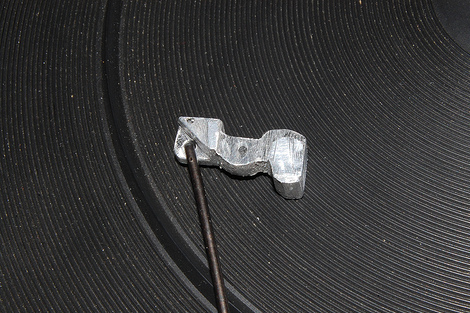
Opening the unit up he found that part of the arm mechanism was broken, and thanks to the age of the turntable and the wonders of mass production chances of finding a replacement were slim to none. Not being discouraged he busted out the hand tools and fabricated the replacement out of some aluminum. The end result is a perfectly functioning turntable that will serve many more hours pushing out warm jams.

Check out the fourm post above to get details and pictures, and we just wanted to tell [Jeff], awesome job!

DIY Portal Turret Is… Looking Pretty Good.

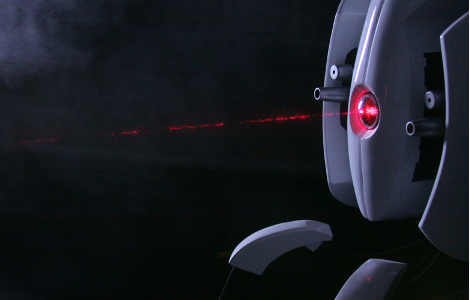
[Ryan Palser] wrote in to tell us about his Portal Turret. [Ryan] set about making this Portal 1 style turret by first carving a Styrofoam form, bondo and waxing then casting molds of the various components. Anyone interested in mold making (like us) should check out all the pictures and comments in the stream. The turret’s camera lens style eye has some excellent detail including a laser cut aperture with text inlay. A couple LEDs behind the eye assembly provide the signature red glow and evidently [Ryan] also fitted the little guy with a red laser. An internal Arduino (Incident Resolution Chip?) takes ques from a PIR sensor mounted in one of the turret’s arms to play one of 17 sound clips through a sparkfun MP3 player shield. In order to fight repetition the sound module runs through a playlist of the 17 tracks then shuffles it before playing through again. Theme music can also be spammed by pressing a button in the back of the motion sensing arm. The turret can be battery powered or plugged into a wall socket for constant operation. All that’s missing are the Aperture-Brand Resolution Pellets. We would love to see this integrated with some similar turret projects previously featured here.

Are you still there? We have more Aperture Science stuff including a Sentry Turret, Weighted Companion Cube, and even a portal shirt. If you are interested in more model making check out the spectacular Daft Punk helmet build from a little while back.

Learning Electronics Concepts Step By Step

arduino

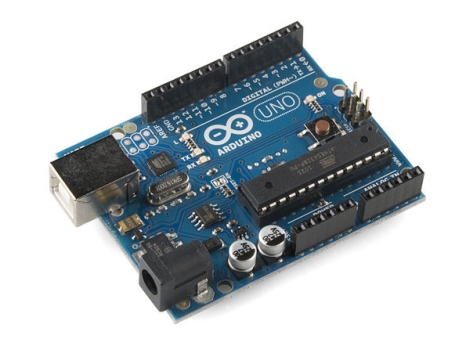
We realize that not everyone out there holds a degree in electrical engineering or has the ability to tell NPN transistors apart from PNP transistors by taste alone, so we occasionally like to mention things that appeal to the beginners in the crowd. While there is a clear division between Arduino supporters and detractors, it is hard to deny that the devices have their place, and can be quite useful when exploring certain electronics concepts.

For the supporters out there, [John Boxall] has put together a site jam-packed with Arduino tutorials covering a wide array of concepts and techniques. We have covered his work before in relation to specific topics, but we felt that his site deserved mention as a whole. His tutorials cover some of the most basic concepts such as lighting LEDs with the Arduino, and work their way to more advanced subjects, lesson by lesson.

He is not satisfied with simply introducing a concept and handing out a sketch that does the work. He takes the time to expand on the concepts, giving the reader enough detail to use their new-found knowledge in later projects. If you were to follow his tutorials from beginning to end, you would be exposed to LCD screen control, shift registers, real-time clocks, I2C bus communications, and more. These skills and concepts can be carried on to future projects as well as other micro controllers, making his tutorials a very valuable learning tool worth checking out.

Build A Real-life Escher’s Waterfall

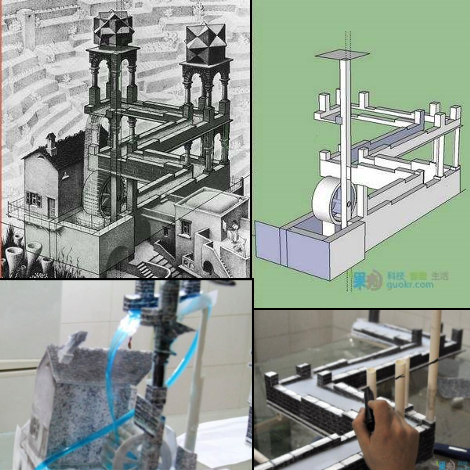
Instructables user [GuokrDIY] has provided a translation of a detailed guide on making one of our favorite Escher inspired illusions. Unlike the previous speculated solutions to Escher’s waterfall this one manages to keep the water path coherent up until the top level. The trick of the whole setup is very carefully controlling perspective to overlap the water source and outlet.  We say water but for some reason the builder is actually using “toilet detergents” as the liquid… At any rate, the liquid is allowed to flow downhill until it reaches the fourth corner, which does not exist. The liquid actually falls off the end of the table (out of sight) and into a basin. A carefully timed pump in the basin pushes liquid up to the top of the waterfall through one of the model’s pillars, where it then cascades over the wheel.

Using sketchup to model the various structural components of the waterfall the design is fashioned out of PVC and ABS plastic, then skinned with mapped textures to ensure that everything looks coherent. The visual details are fine tuned by viewing the whole setup through a camcorder.  The hardest part of the illusion seems to be modulating power to the pump in order to time it with the liquid’s flow.

We just hope that thing about toilet detergent was a mistranslation or some kind of sarcasm from the original Chinese article.  Check out the model in action after the jump!

Continue reading “Build A Real-life Escher’s Waterfall”

Motion Controlled Reddit Vote Sign.


A little while back I attended the largest east coast gathering of folks from the ever popular social news site, Reddit.com. Those of you familiar with Reddit already know that it is all about link aggregation. Users post links to interesting websites and material, and can then vote up or vote down content based on interest or relevance. Through the magical site algorithms original and interesting content is, as implied, aggregated up to the front page.  The whimsical nature of this big DC event lead many people to furnish signs of all types based on the culture of the site, internet memes, etc… The signs that really caught my attention were based primarily on the stylistic site layout, blowing up mail icons and other Reddit specific graphics.

The concept of using site graphics gave me the idea of being able to personally vote up or down other peoples’ signs. It was far too easy to just make a cardboard arrow, and I don’t have a color printer. I happened to have a shelved coffee table project involving orange and blue LEDs. Same colors as the arrows! Sweet. To make this project work I would have to work entirely from my project pile, there simply was no time to order anything from the internet. I managed to crank out a functional up/down voting sign in 3 days leading up to the gathering (and the morning of), here is what I did:

Continue reading “Motion Controlled Reddit Vote Sign.”

Apple II Weather Display (part 1)

Due to computer issues I had to rob some parts from my “electronics” computer, which wasn’t bad, since I was not working on anything at the time and I felt a software project itch. I also wanted to do something with my Apple //c, which resides on my computer desk, so this ghetto brute force “solution” to use the 25 year old computer as a weather display came about.

In a nutshell there is the Apple II, a serial cable, and a PC running linux mint 10 and a handful of command line utilities. My specific Apple is the fist revision of the //c which means its got a buggy rom and the serial port(s) can be troublesome, the best speed I was able to get was 600 baud with just basic, though every other model could probably go a little faster.

On the linux side, wget downloads html and the radar image from Weather Underground’s mobile site, which is not a perfect source, but its easy. A lua script phrases text and graphics into string patterns that the Apple II can handle as keyboard input, and its sent down a serial cable where it is drawn on screen in basic.

Yea its pretty darn slow … it typically takes about eight to twelve minutes to redraw the screen, which is not all that horrid (imo) considering what is going on, but anyone with a more serious take on this could find numerous ways to optimize it, I just wanted to see what it would look like.

Join us after the break for a short video and to read all the details about how this all works!

Continue reading “Apple II Weather Display (part 1)”

Atmega Analog Two Pack

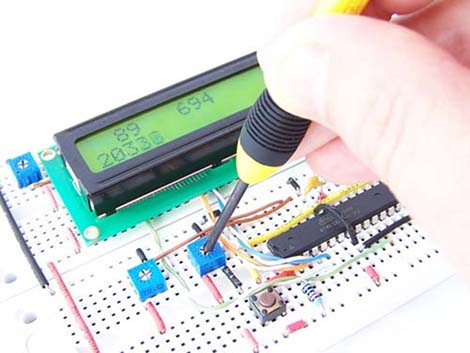
Back in February, [ProtoStack] posted a pretty good tutorial on how to do Analogue to Digital Conversion on an Atmega168. Based on a bread board, the tutorial also shows the often forgotten low pass filter on the AVCC lines to ensure an extra stable reference and an analog input connection to a simple voltage divider as a study point.

Moving on into the micro controller, the registers you’re going to need to twiddle are laid out and explained in detail. Finally you’re shown how to put it all together in a software project that outputs the analog reading onto a standard character LCD.

But hold on! There is more. Just released is a follow up to that tutorial which adds on Analogue to Digital Conversion Interrupts on an Atmega168A. So if you’re sitting there looking at an Arduino and want to know more about what’s going on under the hood, these are a good place to start.