Emulating The DCPU On An AVR

[skywodd] just finished his own DCPU emulator (French, translation) based on [notch]’s upcoming game, 0x10c. The neat thing about [skywodd]’s build is his emulator uses the lowly ATMega328, the same microcontroller found in (some) Arduinos.

The DCPU specification goes over the operations required of any DCPU emulator. There’s a lot of crazy stuff here – a division instruction that takes only 3 clock cycles, using an overflow for carry conditions, and a complete lack of a JMP instruction – but [skywodd] was able to tease something apart from DCPU studio and a VGA interface

Everything in this emulator is built on a solderless breadboard, but the ROM and RAM isn’t complete yet. As of now, everything is handled by the ‘328, using 478 bytes of RAM on the microprocessor.

We promised we would be holding a contest for the best physical implementation of the DCPU when we caught wind of 0x10c, and [skywodd]’s build is starting to look like the beginnings of the winning entry. We honestly have no idea when we’ll be holding this contest, but it’ll probably be shortly after the first playable release. Go bug [notch] if you’d like to speed up the progress, because obviously Twitter abuse speeds up software development.
[Dino’s] Talking Box(es)

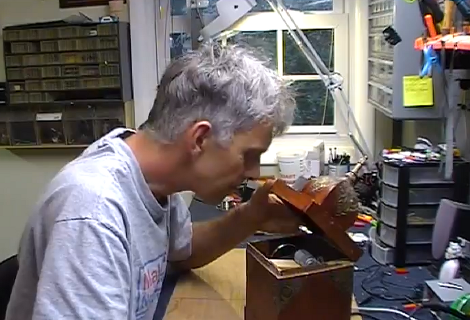
[Dino] is about three-quarters of the way through his talking box project. He’s completed one of the two boxes, and is showing off the technique he uses to marry motion with sound in order to mimic flapping lips with the box top.

You may remember [Dino’s] first look at the EMIC2. It’s a single-board text to speech module which is what provides the voice for the box. But what fun is that without some animatronics to go along with it? So [Dino] started playing around with different concepts to move the box top along with the speech. This is easier said than done, but as you can see in the video after the break, he did pull it off rather well. He built a motor control circuit that takes the audio output of an LM386 amplifier chip and translates it into drive signals for the motor. The shaft is not directly connected to the lid of the box. Instead it has a curved wire which is limited by a piece of string so that it doesn’t spin too far. It lifts the lid which is hinged with a piece of cloth.

Continue reading “[Dino’s] Talking Box(es)”

Hacked ARM Dev Board Gives You Two For The Price Of One!

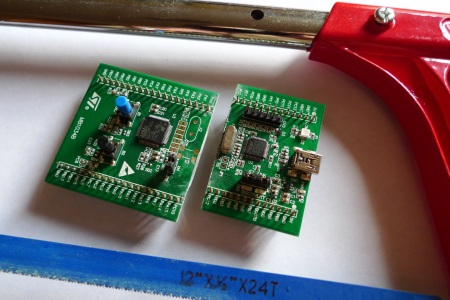
[Matt Evans] took a closer look at the popular (and cheap) STM32F0 Discovery development board and realized he could get a second board out of the deal.

The Discovery board is designed to advertise ST Microntroller’s STM32F0 microchip; which with 8k RAM, 64K Flash, a bunch of peripherals,  48MHz clock, and a low price is a great chip. Though, they needed a way to program the STM32F0. To do this they added a second, more powerful, chip to the board as an interface. The STM32F103, with 20k RAM, 64K flash, and a 72MHz clock speed. [Matt] summoned genius, and simply sawed the board in half using a hacksaw.

Of course the caveat to all this is that you need a working Discovery board, or at least a working ST-LINK programmer, at the end of the day, to get any use out of your creation. Since the boards are so cheap though, it shouldn’t be a problem to buy two.

The Many Iterations Of [Joe’s] PCB Business Card

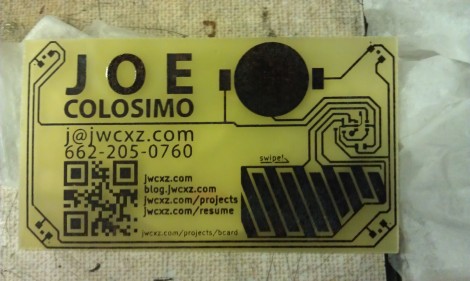
[Joe Colosimo] is putting on a show with his PCB business card project. The idea isn’t new, but his goal is to keep it simple and undercut the cost of all other PCB cards he’s seen. This is the third generation of the board design, and he’s just waiting on some solder mask solution before he tries running it through the reflow oven.

The first two prototypes used some through-hole parts. Notably, the battery was to be positioned in a circular cut-out and held in place by a metal strap and some bare wires. But he couldn’t quite get it to work right so this design will transition to a surface-mount strap for one side, and the large circular pad for the other. At each corner of the board there is a footprint for an LED. He tried milling holes in the board to edge-light the substrate. Now he just mounts the LED upside down to give the board a blue glow. The LEDs are driven by an ATtiny10 microcontroller which takes input from the touch sensor array at the bottom right.

He etched a QR code on the board which seems to work better than the milled QR experiments we saw back in April. The link at the top point’s to [Joe’s] main page on the card. Don’t forget to follow the links at the bottom which cover each part of the development more in-depth.

[Thanks Skitchin]

Lightweight Web Server Using The MSP430

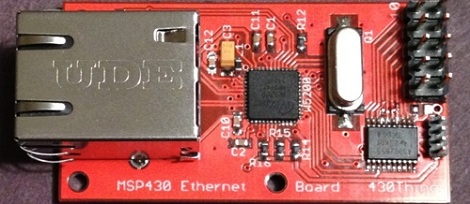
Need a tiny web server? [Rob] over on the 43oh forums made an Ethernet booster pack for the very popular TI MSP430 microcontroller. If that’s not enough, [Rob] also put together an all-in-one solution with a MSP430 and Ethernet controller that can be powered by a battery. Along with the web server that fits in just 5k of flash, we’re going to say [Rob] has a very good solution for remote sensing and data logging.

For his Ethernet-enabled 430, [Rob] chose to use the WIZnet W5200 Ethernet controller. This chip communicates with the 430 via and SPI interface and has a hardware TCP/IP stack that supports TCP, UDP, and PPPoE, offloading all the low-level stuff off of the 430 and onto the Ethernet controller.

After the break there are a pair of videos of [Rob] showing off his tiny web server. A few neat features include a full memory dump of the 430, as well as a reading the states of all the pins via an HTML page. If you’re looking for a way to collect data over Ethernet, we don’t think you could do better than [Rob]’s tiny 430-based web server. Also, if you’d like to control a few devices over the Internet, [Rob] included a few optoisolators  for lights or appliances.

The code is available on the 43oh forum page, but [Rob] says he’ll clean that up and put it in a Git.

Continue reading “Lightweight Web Server Using The MSP430”

A Detailed Tutorial On Speeding Up AVR Division

[Alan Burlison] is working on an Arduino project with an accelerometer and a few LEDs. Having the LEDs light up as his board is tilted to one side or another is an easy enough project a computer cowboy could whip out in an hour, but [Alan] – ever the perfectionist – decided to optimize his code so his accelerometer-controlled LEDs don’t jitter. The result is a spectacular blog post chronicling the pitfalls of floating point math and division on an AVR.

To remove the jitter from his LEDs, [Alan] used a smoothing algorithm known as an exponential moving average. This algorithm uses multiplication and is usually implemented using floating point arithmetic. Unfortunately, AVRs don’t have floating point arithmetic so [Alan] used fixed point arithmetic – a system similar to balancing your checkbook in cents rather than dollars.

With a clever use of bit shifting to calculate the average with scaling, [Alan] was able to make the fixed point version nearly six times faster than  the floating point algorithm implementation. After digging into the assembly of his fixed point algorithm, he was able to speed it up to 10 times faster than floating point arithmetic.

The takeaway from [Alan]’s adventures in arithmetic is that division on an AVR is slow. Not very surprising after you realize the AVR doesn’t have a division instruction. Of course, sometimes you can’t get around having to divide so multiplying by the reciprocal and using fixed point arithmetic is the way to go if speed is an issue.

Sure, squeezing every last cycle out of an 8 bit microcontroller is a bit excessive if you’re just using an Arduino as a switch. If you’re doing something with graphics or need very fast response times, [Alan] gives a lot of really useful tips.

Adding A Heart Rate Monitor To Your Exercise Equipment

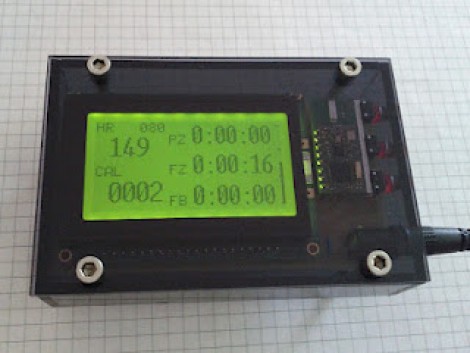
This is the readout which [Remick] added to his stationary bicycle. It displays heart rate, calories burned, and a few other items to help motivate his workout routine.

Back when he was ordering a TI Chronos watch he also picked up a heart rate chest strap and receiver. The receiver can be read using a UART, making it easy to interface with the ATmega328 which drives the system. The screen is a graphic LCD, which gave him a lot of control on how to organize the displayed data. Three buttons on the side operate the menu system into which a user can enter sex, age, and weight information. This is used to calculate the calories burned and the percentage of maximum heart rate. The three readouts to the right are for time spent in each workout zone (fat burning, fitness, or performance). The final product looks great because of the PCB he etched and the case he housed it in.