Wear This RISC V, RPN Calculator Watch For Maximum Nerd Cred

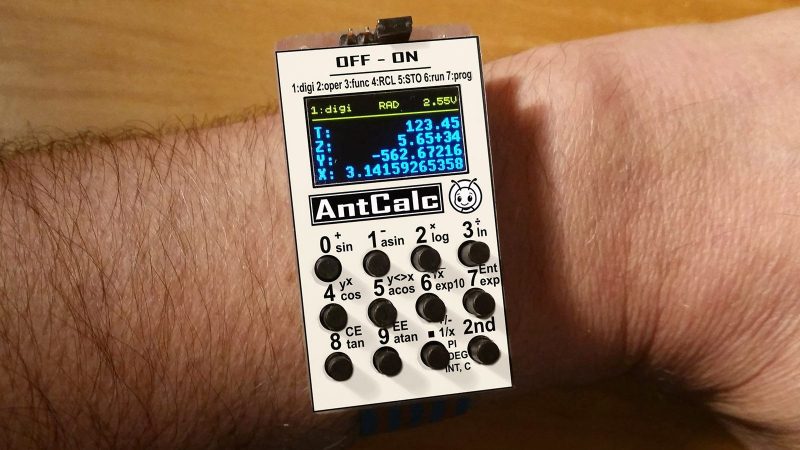
Once upon a time, owning a calculator watch was the epitome of cool. Well, for a very specific subset of the population with our own definition of “cool” anyway. The only thing cooler than wearing a calculator watch? Making a calculator watch, of course! If you do it as part of developing your own SDK for a popular RISC V microcontroller, all the better. That’s what [Miroslav Nemecek] did with his Antcalc watch, which is one of the demo projects for the CH32Lib SDK, which is currently under development at version 0.35 as this is written.
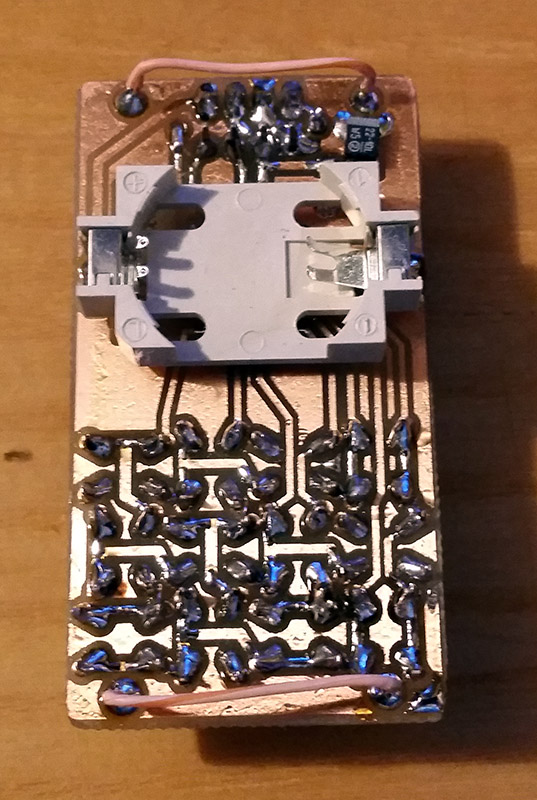
It appears as though the solid core wire on the back of the homemade PCB is used to hold the watch band, a nice little hack.

As you might guess, CH32LibSDK is targeting the super-cheap CH32 series of RISC V microcontrollers. Perhaps because the SDK is so early in development, there’s not much documentation outside of the example projects. The examples are all worth looking at, but our tipster wanted us to cover the Antcalc calculator watch specifically.

The Antcalc watch uses the SOP16-packaged CH32V002A4M6 to drive a small OLED display while taking input in Reverse Polish Notation from a dozen small buttons. We’re not sure how the cool kids feel about RPN these days, but that’s got to be worth extra nerd cred. Using a RISC V chip doesn’t hurt in that department, either.

For something so small– 30 mm x 55 mm–it’s looks like a decent little calculator, with 10 registers holding a mantissa of 21 digits and exponents up-to +/-99 in binary coded decimal. Seven layers on the dozen-key input pad mean most of the scientific functions you could ask for are available, along with the ability to record and replay upto 10 macros. There are also ten memory slots, all of which go into the chip’s onboard flash so are non-volatile during a battery swap. (Of which many will be necessary, since this appears to run on a single coin cell.)

If you get bored of wrist-mounted calculating, you could always repurpose this microcontroller to play MOD files on your wrist. Some people couldn’t imagine ever getting bored by a wrist-mounted calculator, and just for them we have this teardown of a beautiful 1975 model and a this article on the history of the calculator watch.

Thanks to [James Bowman] for the tip.

Amiga? Arduino? AMeagerBall Gets The Uno Bouncing

When the iconic “Boing Ball” first debuted 40 years ago, it was a wonder to behold. There was nothing like it in the home compuing world upto that time, and it showed that Commodore’s new “Amiga” was a powerhouse sure to last the test of time. Forty years later, the Amiga as we knew it then might not be with us anymore, but [Mark Wilson] is recreating its iconic demo on a microcontroller– but not just any microcontroller. “AMeagerBall” is an Arduino Uno exclusive, and it even tells the time.

Like the original “Boing Ball”, the demo is running at 320×240, though on a touch LCD shield instead of a CRT. Unlike some microcontrollers, the Uno doesn’t have the horsepower to just brute-force emulate a 1980s home computer, so [Mark] has had to recreate the boing ball from scratch. He’s not doing it with any graphics libraries, either. On the Uno that would be too slow, so [Mark] is driving the LCD directly to its appropriate registers, to stay close enough to the metal to make it work. That means if you’re going to try the code on his GitHub repository, you’ll need to be sure to use matching hardware or be prepared to port it.

One of the things about Amiga’s demo that was so impressive is that it hardly made use of the CPU, allowing the Workbench to be pulled up while the ball bounced. That’s not the case here, as the UNO doesn’t have any extra graphics chips. Still, [Mark] was able to squeeze enough horsepower out of everyone’s favourite ATmega to present us with an Amiga-styled clock– either analog, digital, or in the workbench title bar in that iconic blue-and-white. To keep the clock accurate, he’s squeezed an RTC module in, too. Lovely! The different clocks can be accessed via the touchscreen.

Oh, did we forget to mention that the touchscreen is implemented? This certainly stretches the hardware far enough to be considered a demo. If just a bouncing ball doesn’t work the UNO hard enough for you, try booting Linux.

This isn’t the first bouncing ball demo we’ve seen on a microcontroller:  here are four of them bouncing in an ATtiny85.

Continue reading “Amiga? Arduino? AMeagerBall Gets The Uno Bouncing”

Possibly-Smallest ESP32 Board Uses Smallest-Footprint Parts

Whenever there’s a superlative involved, you know that degree of optimization has to leave something else on the table. In the case of [PegorK]’s f32, the smallest ESP32 dev board we’ve seen, the cost of miniaturization is GPIO.

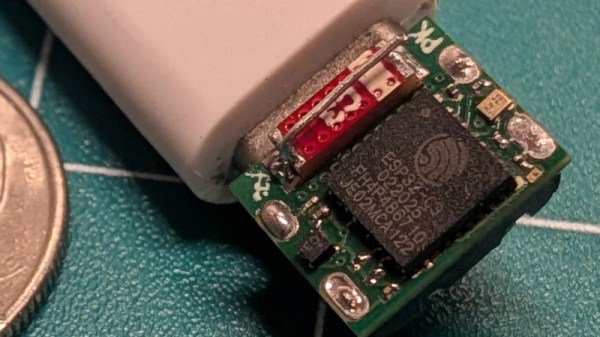
There’s only one GPIO pin broken out, and it’s pre-wired to an LED. That’s the bad news, and depending on what you want an ESP32 for, it might not phase you at all. What is impressive here, if not the number of I/O pins, is the size of the board: at 9.85 mm x 8.45 mm barely overhangs the USB-C socket that takes up one side of the board.

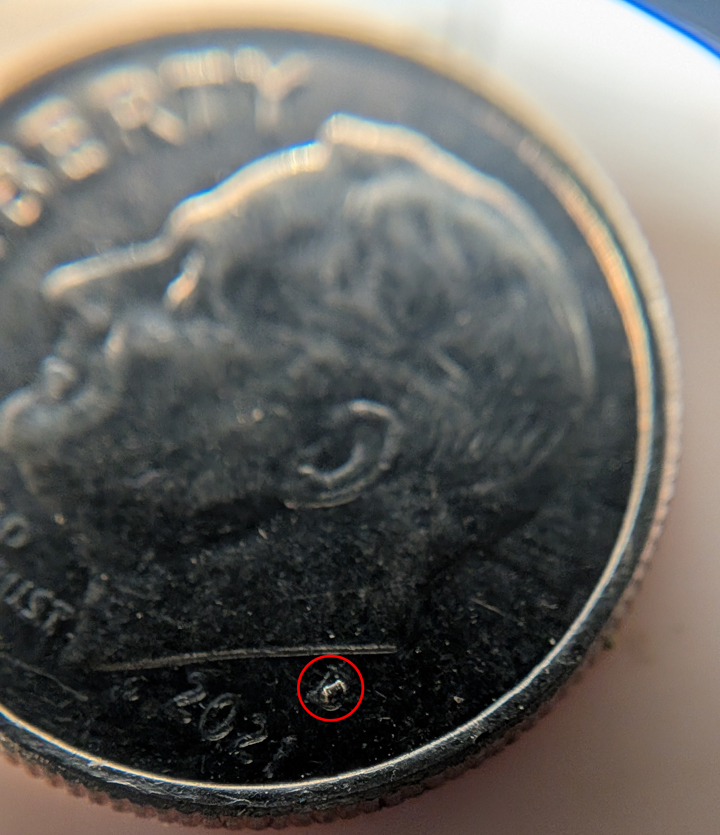
Pegor provides this helpful image in the readme so you know what you’re getting into with the 01005 resistors.

In order to get the ESP32-C3FH4 onto such a tiny board, all of the other support hardware had to be the smallest possible sizes– including resistors in 01005. If you don’t speak SMD, one could read that number code as “oh god too small” — at 0.4 mm x 0.2 mm it’s as minuscule as you’ll find– and [Pegor] hand soldered them.

OK, he did use a hot plate for the final step, but he did tin the pads manually with a soldering iron, which is still impressive. Most of us probably would have taken PCBWay up on their offer of assembly services, but not [Pegor]. Apparently part of the reason for this project was that he was looking for an excuse to use the really small footprint components.

Aside from leaving out GPIO and needing too-small SMD components, [Pegor] admits that pesky little details like antenna matching circuits and decoupling capacitors had to get cut to make the tiny footprint, so this board might be more of a stunt than anything practical. So what can you do with the smallest ESP32 board? Well, [Pegor] put up a basic web interface up to get you started blinking the built-in LED; after that, it’s up to you. Perhaps you might fancy a teeny-tiny minecraft server? If you can stand to increase the volume a little bit, we’ve seen how to hack a C3 for much better wifi performance.

Thanks to [Pegor] for the tip, and remember– submit your projects, big or small, we read ’em all!

Micro:Bit Gets Pseudo-Polyphonic Sound With Neat Hack

The Micro:bit is a fun microcontroller development platform, designed specifically for educational use. Out of the box, it’s got a pretty basic sound output feature that can play a single note at a time. However, if you’re willing to get a bit tricky, you can do some pseudo-polyphonic stuff as [microbit-noob] explains.

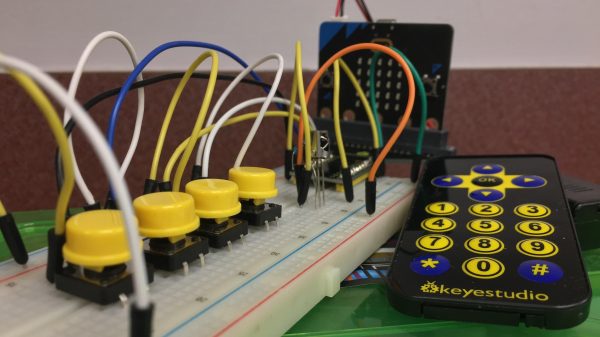
The trick to polyphony in a monophonic world? Rapidly alternating between the different notes you want to be playing at the same time. Do this fast enough and it feels like they’re playing together rather than seperately. [microbit-noob] demonstrates how to implement this with a simple function coded for the Micro:bit. Otherwise, it uses the completely stock sound hardware. However, the IR receiver is added to the device in order to allow a simple remote control to be used to command the notes desired, along with some extra tactile buttons to add further control.

Is it chiptune? Well, it’s a chip, playing a tune, so yes. Even if it is through a tiny speaker stuck to the PCB. In any case, if you’re trying to get some better bleeps and bloops out of the Micro:bit, this is a great place to start. If you’ve got other hacks for Britain’s educational little board, let us know on the tipsline!

Building A Smart Speaker Outside The Corporate Cloud

If you’re not worried about corporate surveillance bots scraping your shopping list and manipulating you through marketing, you can buy any number of off-the-shelf smart speakers for your home. Alternatively, you can roll your own like [arpy8] did, and keep your life a little more private.

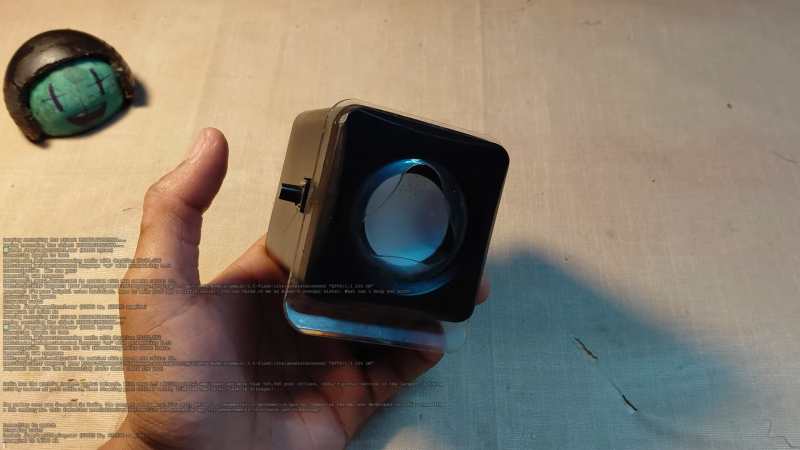
The build is based around an ESP32 microcontroller. It connects to the ‘net via its inbuilt Wi-Fi connection, and listens out for your voice with an INMP441 omnidirectional microphone module. The audio data is trucked off to a backend server running a Whisper speech-to-text model. The text is then passed to Google’s Gemini 2.5 Flash large language model. The response generated is passed to the Piper Neural Voice text-to-speech engine, sent back to the ESP32, and spat out via the device’s DAC output and a speaker attached to an LM386 amplifier. Basically, anything you could ask Gemini, you can do with this device.

By virtue of using a commercial large language model, it’s not perfectly private by any means. Still, it’s at least a little farther removed than using a smart speaker that’s directly logged in to your Amazon/Google/Hulu/Beanstikk account. Files are on Github for those eager to dive into the code. We’ve seen some other fun builds along these lines before, too. Video after the break.

Continue reading “Building A Smart Speaker Outside The Corporate Cloud”

Tiny386 On An Espressif ESP32-S3

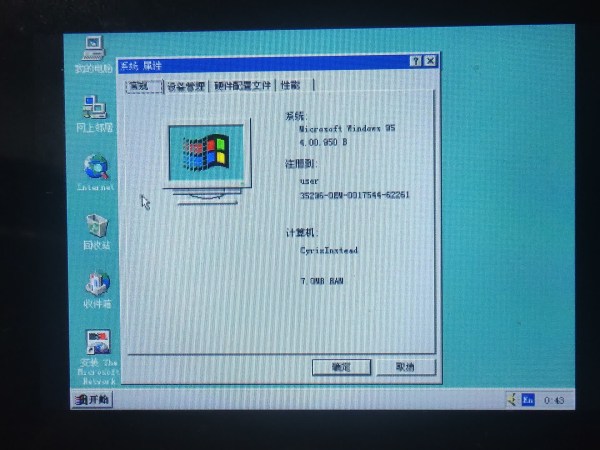
Some people may remember the joys of trying to boot Linux on an 8-bit AVR microcontroller, which was an absolute exercise in patience. In comparison [He Chunhui]’s Tiny386 emulator running on an ESP32-S3 MCU is positively zippy when it boots and runs Windows 95. The provided video (also embedded below) makes clear that while you can comfortably waddle off to prepare and pour a fresh cup of tea, it’s actually borderline usable.

The source code can be obtained via GitHub, which contains not just the basic emulated 80386 CPU written in C99, but also peripherals borrowed from TinyEMU and QEMU, along with a SeaBIOS ROM. In addition to the Windows 95 demo it’s claimed that Tiny386 should be able to run most 16/32-bit software.

Right now the ESP32-S3 version targets the JC3248W535 board, which is a roughly $30 development board featuring a built-in display with touch screen and an ESP32-S3 module. Although it has a USB-C port, it appears that this one is just for programming and not for the USB peripheral of the ESP32-S3. With the USB OTG peripheral used, one could conceivably make a small 386 system based around an ESP32-S3 that features a USB hub to plug a keyboard, mouse, etc. into.

Considering that the Tiny386 emulator is a very simple and straightforward approach to emulating an early-90s PC, some optimization might enable a pretty zippy general purpose PC for early 90s software. Quite a boost from watching Linux struggle into a command line on an AVR, indeed.

Continue reading “Tiny386 On An Espressif ESP32-S3”

Running A Minecraft Server On A WiFi Light Bulb

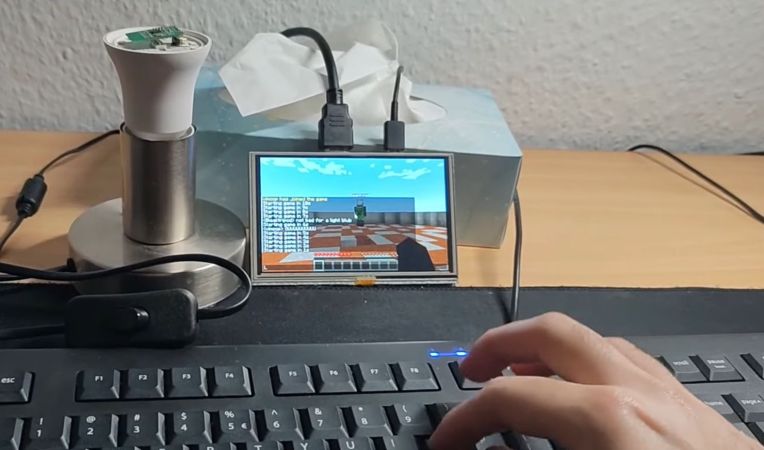
WiFi-enabled ‘smart’ light bulbs are everywhere these days, and each one of them has a microcontroller inside that’s capable enough to run all sorts of interesting software. For example, [vimpo] decided to get one running a minimal Minecraft server.

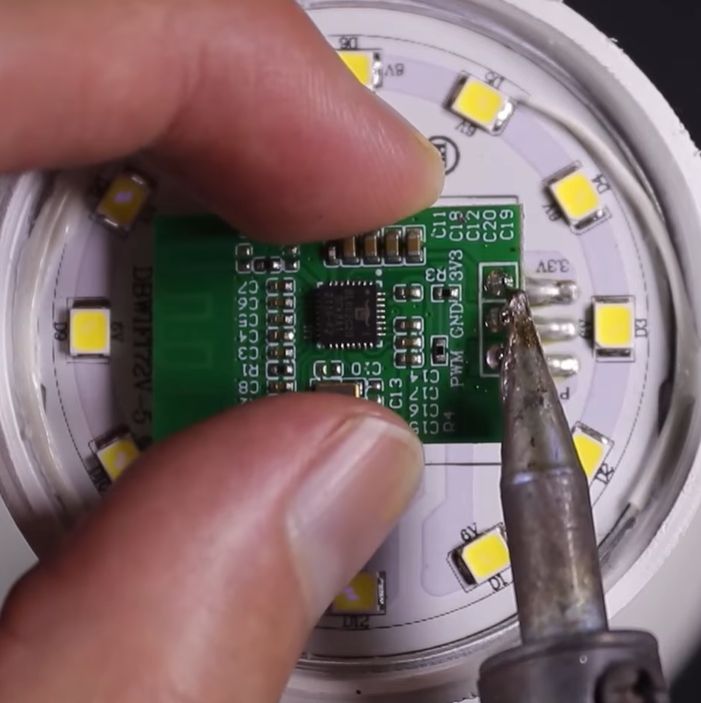
The Bl602-equipped board inside the LED lightbulb. (Credit: vimpo, YouTube)

Inside the target bulb is a BL602 MCU by Bouffalo Lab, that features not only a radio supporting 2.4 GHz WiFi and BLE 5, but also a single-core RISC-V CPU that runs at 192 MHz and is equipped with 276 kB of RAM and 128 kB flash.

This was plenty of space for the minimalist Minecraft server [vimpo] wrote several years ago. The project says it was designed for “machines with limited resources”, but you’ve still got to wonder if they ever thought it would end up running on a literal lightbulb at some point.

It should be noted, of course, that this is not the full Minecraft server, and it should only be used for smaller games like the demonstrated TNT run mini game.

Perhaps the next challenge will be to combine a large set of these light bulbs into a distributed computing cluster and run a full-fat Minecraft server? It seems like a waste to leave the BL602s and Espressif MCUs that are in these IoT devices condemned to a life of merely turning the lights on or off when we could have them do so much more.

Continue reading “Running A Minecraft Server On A WiFi Light Bulb”