WSL9x: Add A Linux Subsystem To Your Windows 9x

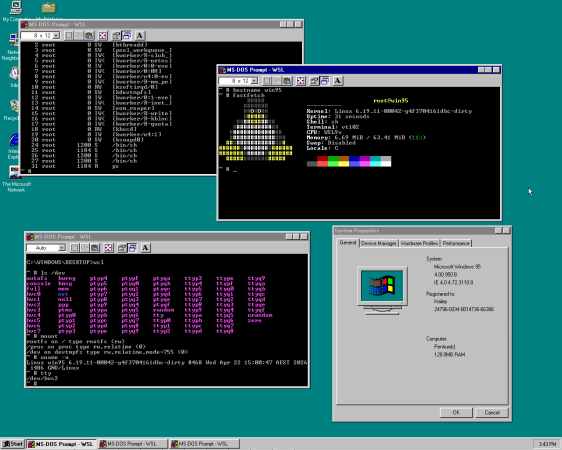
Considering that Windows NT has the concept of so-called ‘subsystems’ whereby you can run different systems side-by-side, starting with the POSIX subsystem and later the Windows Subsystem for Linux (WSL), it was probably only a matter of time before someone figured that doing this with Windows 9x was also completely reasonable. Ergo we now got [Hailey Somerville]’s Linux Subsystem for Windows.

To make running Linux inside Windows 9x work, it was necessary to heavily patch a Linux kernel, as normally there are no provisions for such a subsystems in Windows 9x’s kernel unlike the NT kernel. Correspondingly, the Linux kernel is based on user-mode Linux and hacked to call Windows 9x kernel APIs instead of the POSIX ones.

In order to use WSL9x you thus need to build said modified Linux kernel – currently at version 6.19 – along with a disk image containing an installed copy of Windows 9x. From there WSL9x can be loaded with the wsl command and you’re then free to cooperatively run the Win9x and Linux kernel side-by-side. This is reminiscent of Cooperative Linux (coLinux), which did something similar except with Windows NT and Linux kernels running side-by-side, and of course we have WSL2 with Windows 10+.

Thanks to [adistuder] for the tip.
Tiny386 On An Espressif ESP32-S3

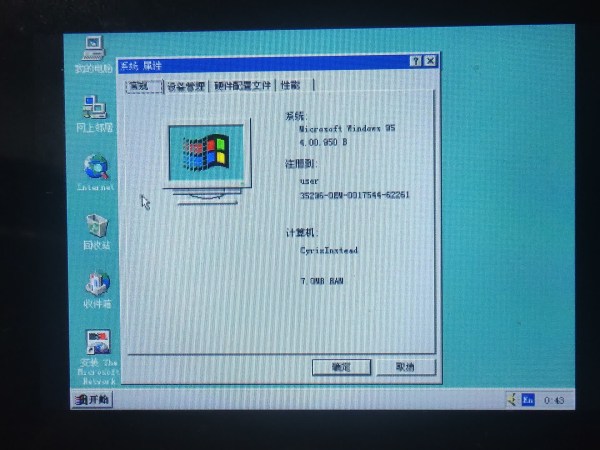
Some people may remember the joys of trying to boot Linux on an 8-bit AVR microcontroller, which was an absolute exercise in patience. In comparison [He Chunhui]’s Tiny386 emulator running on an ESP32-S3 MCU is positively zippy when it boots and runs Windows 95. The provided video (also embedded below) makes clear that while you can comfortably waddle off to prepare and pour a fresh cup of tea, it’s actually borderline usable.

The source code can be obtained via GitHub, which contains not just the basic emulated 80386 CPU written in C99, but also peripherals borrowed from TinyEMU and QEMU, along with a SeaBIOS ROM. In addition to the Windows 95 demo it’s claimed that Tiny386 should be able to run most 16/32-bit software.

Right now the ESP32-S3 version targets the JC3248W535 board, which is a roughly $30 development board featuring a built-in display with touch screen and an ESP32-S3 module. Although it has a USB-C port, it appears that this one is just for programming and not for the USB peripheral of the ESP32-S3. With the USB OTG peripheral used, one could conceivably make a small 386 system based around an ESP32-S3 that features a USB hub to plug a keyboard, mouse, etc. into.

Considering that the Tiny386 emulator is a very simple and straightforward approach to emulating an early-90s PC, some optimization might enable a pretty zippy general purpose PC for early 90s software. Quite a boost from watching Linux struggle into a command line on an AVR, indeed.

Continue reading “Tiny386 On An Espressif ESP32-S3”

Windows 95, With Just A Floppy Drive

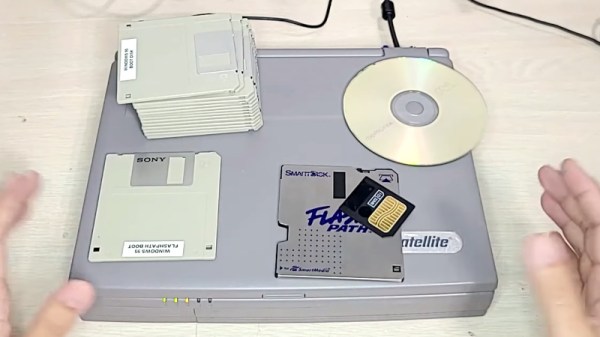
It’s something of a shock to be reminded that Microsoft’s Windows 95 is now 30 years old — but the PC operating system that brought 32-bit computing to the masses and left behind a graphical interface legacy which persists to this day, is now old enough that many in the community have never actually seen it. The original requirements were a 386 or better, 4 megabytes of memory, and a hard drive. [Robert’s Retro] is exploding one of those requirements, creating a full Windows 95 install using only a floppy drive.

As you might imagine, even if you had one of the super-rare 2.88 megabyte drives, such a feat would require a few tricks. In this case the biggest trick is the FlashPath, a curious 1990s peripheral that allows a SmartMedia card to be used in a floppy drive. With a special DOS driver it allows what is in effect a 32 megabyte floppy disk, but even that’s not enough for ’95. In come a couple of further tricks, installing Windows 95 to a compressed DriveSpace volume which is copied to the FlashPath, and copying the Drivespace volume to a RAM drive and mounting it, on boot. It needs a conventional floppy to boot before swapping to the FlashPath and it seems the copying process is extremely slow, but we’d expect Windows 95 from RAM to be very quick indeed.

There have been other minimalist Windows 95s over the years, but what makes this one unusual is that it’s a full install. Five years ago at the OS’s quarter century we took a look at it with 2020 eyes, and tried gauge its effect on modern desktops.

Continue reading “Windows 95, With Just A Floppy Drive”

Windows 95 On PlayStation 2 Works As Well As You Expected

When you hear “PS2” and “Windows 95,” you probably think someone forgot a slash and are talking about peripherals, but no — this hack is very much about the Sony PlayStation 2, the best-selling game console of all time. [MeraByte] walks us through the possibly ridiculous task of installing Windows 95 on the last hardware anyone at Microsoft would ever endorse in a video you can watch below.

Obviously, the MIPS-based Emotion Engine at the heart of the PS2 is not going to be able to handle x86 instructions Win95 is expecting, but that’s all solved by the magic of emulation. [MeraByte] is running a version of Bochs, an x86 emulator that has been built for PS/2 after trying and failing to install Windows (both 3.1 and 95) to an experimental DOSBox build.

As expected, it is not a smooth journey for [MeraByte], but the flailing about and troubleshooting make for entertaining viewing. Once loaded, it works surprisingly well, in that anything works at all. Unfortunately, neither the mouse nor Ultimate Doom 95 worked. We suppose that ultimately means that this hack fails since even Doom can run Doom. The mouse thing is also important, probably.

If you have a PlayStation 2, maybe skip Windows 95 and try running GoLang.  If you do have DOOM running on the PlayStation 2, send us a tip. There was never an official release for PS2, but after 26 years, someone must have done it by now. Continue reading “Windows 95 On PlayStation 2 Works As Well As You Expected”

How Discord Was Ported To Windows 95 And NT 3.1

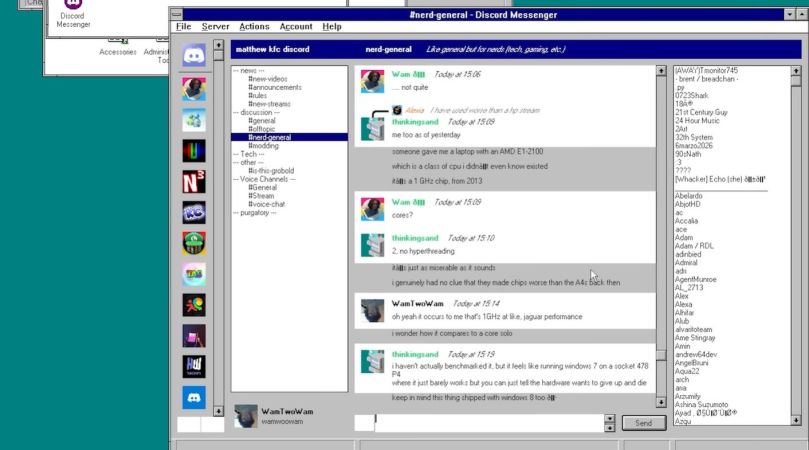
On the desktop, most people use the official HTML and JavaScript-based client for Discord in either a browser or a still-smells-like-a-browser Electron package. Yet what if there was a way to use a third-party client and even run it on Windows XP, Windows 95, and NT 3.1? This is exactly what [iDontProgramInCpp] did with their Discord Messenger project.

Fortunately, as a web ‘app’ the Discord API is readily accessible and they don’t seem to be in a rush to ban third-party clients. But it did require a bit of work to add newer versions of TLS encryption to Windows XP and older. Fortunately OpenSSL still supports these older platforms, so this was not a major hurdle and Windows XP happily ran this new Discord client. That left porting to older Windows versions.

Most of the challenge lies in writing shims for API calls that do not exist on these older platforms when backporting software from Windows XP to older Windows versions, and GCC (MinGW) had to be used instead of MSVC, but this also was a relatively minor detail. Finally, Windows NT 3.1 was picked as the last challenge for Discord Messenger, which ran into MSVCRT runtime issues and required backporting features to the NT 3.1 version that was still part of the OS back then.

[MattKC] covers the project in a recent video, as well as the AeroChat client which targets Windows Live Messenger fans.  Hopefully the API that allows these projects to operate doesn’t get locked down, as third-party clients like these bring their own unique advantages to the Discord ecosystem.

Continue reading “How Discord Was Ported To Windows 95 And NT 3.1”

Celebrating 30 Years Of Windows 95 At VCF

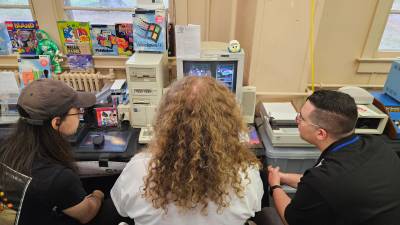
It’s been 30 years since Windows 95 launched. [Ms-Dos5] and [Commodore Z] are celebrating with an epic exhibit at Vintage Computer Festival East 2025. They had no fewer than nine computers — all period-correct machines running versions of Windows 95. The pictures don’t do it justice, so if you are near Wall, NJ, on Sunday, April 5, 2025, definitely go check out this and the rest of the exhibits at VCF.

An exhibit like this isn’t thrown together overnight.  [Commodore Z] and [Ms-Dos5] worked for months to assemble the right mix of desktops, laptops, and peripherals to showcase Windows 95. Many of the computers are networked as well – which was no easy task.



One particular Thinkpad 760e required pliers and force to remove a stuck PCMCIA modem card. After a struggle that was ultimately destructive to the card, the pair determined it was stuck due to a sticker that had effectively glued the card into the laptop. As the sticker finally gave up, the card popped itself out of the laptop.

Continue reading “Celebrating 30 Years Of Windows 95 At VCF”

Porting Modern Windows Applications To Windows 95

Windows 95 was an amazing operating system that would forever transform the world of home computing, setting the standard for user interaction on a desktop and quite possibly was the OS which had the longest queue of people lining up on launch day to snag a boxed copy. This raises the question of why we still don’t write software for this amazing OS, because ignoring the minor quibbles of ‘security patches’ and ‘modern hardware compatibility’, it’s still has pretty much the same Win32 API as supported in Windows 11, plus it doesn’t even spy on you, or show you ads. This line of reasoning led [MattKC] recently to look at easy ways to port modern applications to Windows 95.

In the video, the available options are ticked off, starting with straight Win32 API. Of course, nobody writes for the Win32 API for fun or to improve their mental well-being, and frameworks like WxWidgets and QuteQt have dropped support for Windows 9x and generally anything pre-Win2k for years now. The easiest option therefore might be Microsoft’s .NET framework, which in its (still supported) 2.0 iteration actually supports Windows 98 SE, or basically within spitting distance of running it on the original Win95.

Continue reading “Porting Modern Windows Applications To Windows 95”