Hackaday At The World MakerFaire In NY

For the next two days, [Caleb Kraft] and [Brian Benchoff] will be wandering around the World MakerFaire  in NY. Primarily stationed at the booth meant to show off our winning entry into the Redbull Creation contest, we hope to find some interesting things for you to read about.

We’ve already scoped out the MakerFaire and met a few people so we’re eager for the gates to open today and let in the flood of enthusiastic people. Speaking of floods, its been raining quite a bit so we’ve got our fingers crossed that we’ll get some clear patches so we can enjoy the things that require a little more space, like the “Centrifury” from North Street Labs.

While everything is going on here, it can be hard to sit down and write a worthwhile article, so those probably won’t appear until monday. In the meantime though, we will be uploading random amusing things as we find them to our youtube account.

Continue reading “Hackaday At The World MakerFaire In NY”

Hands On The Stellaris Launchpad

We just got our hands on a Stellaris Launchpad. We had placed an order when the preorder was originally announced, but the marketing folks at TI reached out an offered to send us one a bit sooner and took them up on it. We’ve embedded a quick unboxing video after the break but read on for some info that didn’t make it into that clip.

The look and feel of the board and its packaging are almost exactly the same as the MSP430 version of the Launchpad. But why not? After all it worked so well the first time. This board hosts an ARM Cortex-M4 processor. The two buttons on the bottom are user buttons, the one on the upper right is a reset button. The top of the board is the programmer, with a micro USB port for connectivity. The kit also includes about a 2′ cable for this connection. Next to that jack is a switch that selects a power source. You’ll also notice a USB port to the left, this because the processor includes USB functionality, with a free library available from TI. Power can come from the programmer/debugger USB port, or from this device USB port. There are dual pin headers to either side on the face of the board, and pin sockets on the back which break out pins of the processor. Just below the reset button is a RGB LED, and a clock crystal has also been populated just above the chip.

When plugged in via the programmer’s USB port the PWR LED lights up as does the RGB LED. The firmware that ships on the device fades through a range of colors and the user buttons scroll through a set of predefined colors. The device enumerates as: “Bus 002 Device 005: ID 1cbe:00fd Luminary Micro Inc.” on our machine. But if you connect it via the device USB jack it enumerates as: “Bus 001 Device 015: ID 04e8:689e Samsung Electronics Co., Ltd GT-S5670 [Galaxy Fit]”. Interesting.

We have no idea if there are programming tools for flashing the board using a Linux box, but we’ll be trying to figure it out. If you have some info please share it in the comments.

Continue reading “Hands On The Stellaris Launchpad”

advice

Machine Offers Cheap Advice – Charges More For Something Profound

[Nick Johnson] recently wrote in, sharing a neat project he put together in his spare time.

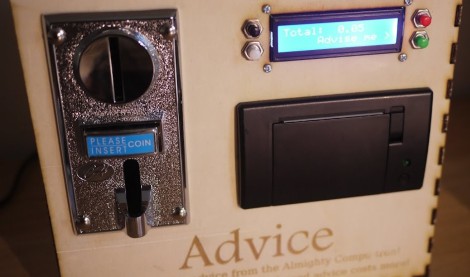
Our readers are most likely familiar with the ubiquitous “fortune” program that ships with many *nix distros, offering cheeky comments and quotes with the press of a button. [Nick] thought it would be cool to build a fortune telling machine using the app, resulting in the handsome device you see above.

The laser-cut wooden case is home to a Raspberry Pi which does the heavy lifting, a coin acceptor, an LCD screen for displaying the device’s status, along with a SparkFun thermal printer. Upon feeding the machine some money, the user can press the “Advise Me” button, prompting the RaspPi to present a printed fortune from its vast database of sayings. [Nick] took some time to do some rough categorization of the fortune databases, enabling the machine to offer more substantial content as the user inputs more coins.

Check out the video below to see [Nick’s] fortune telling machine in action.

Continue reading “Machine Offers Cheap Advice – Charges More For Something Profound”

Makerbot, Occupy Thingiverse, And The Reality Of Selling Open Hardware

Yesterday, Makerbot Industries introduced the Replicator 2, a very good-looking 3D printer that will is probably the closest thing we’ll see to a proper ‘consumer’ 3D printer for a year or so. There’s only one problem. The new Replicator 2 is rumored to be closed source. If that’s not enough, [Bre Pettis], co-founder and CEO of Makerbot Industries will be speaking at the Open Source Hardware Association conference next week with the suitably titled talk, “Challenges of Open Source Consumer Products.”

Of course, the Replicator 2 being closed source is hearesay, and we can’t blame them for closing up parts their product; they have investors to worry about and people are blatantly copying their work. There was another change in Makerbot’s operation at the press conference yesterday: Makerbot now owns everything you’ve put up on Thingiverse.

This news comes from [Josef Prusa], creator of what is probably the most widely used 3D printer in the world.

[Prusa] begins his rant with the history of the RepRap. The project began with a team of core developers headed by [Adrian Bowyer], and supported by [Zach Smith], [Adam Mayer], and [Bre Pettis]. [Boyer] gave the guys a bit of money to start Makerbot, and it’s something the guys at Makerbot have never been ashamed of. Makerbot went on to create Thingiverse, became the darlings of the Open Hardware movement, and acquired $10 million from investors.

All things change, of course, and Makerbot is no exception. Along with the (again, rumored) closed-source Replicator 2, [Prusa] pointed out the Terms of Use for Thingiverse say that Thingiverse – and thus Makerbot Industries – owns everything submitted by Thingiverse users. [Prusa] started an Occupy Thingiverse movement in response to this discovery.

Honestly, we hope [Josef Prusa] is wrong on this one. We hope the specific clauses in Thingiverse’s Terms of Use granting itself a license to do whatever it wants with uploaded Things is just a bunch of legal mumbo jumbo added in by lawyers to protect Thingiverse from being sued by crazy people. Still, if rumors are true, it may be a portent of things to come.

In any event, [Prusa] will be taking his Thingiverse things down. He plans on posting his stuff on GitHub, probably the most Open Source-friendly community in existence. You can do the same with this GitHub template for 3D printed objects.

So, learned reader of Hackaday, what do you make of this? Is Makerbot right to close up their projects? Are we finally becoming disillusioned with Open Hardware? What say you?

Introducing The Makerbot Replicator 2

A few short hours ago at press conference, Makerbot announced the release of their Replicator 2 3D printer.

The original Makerbot Replicator was released earlier this year at CES and regaled by the press as a quantum leap in home manufacturing (a quanta is actually very small, guys) with and option for dual extruders and a rather large build volume. The Replicator 2 takes the same formula and adds a powder coated steel frame, larger build volume (11.2″ x 6.0″ x 6.1″ or 28.5 x 15.3 x 15.5 cm) and a resolution so fine as to approach the realm of uber expensive 3D printers (100 microns or 0.004 inches).

Base price is $2200 USD for the single extruder model with no Makercare service plan. A dual-extruder Replicator 2X is slated to be released after the beginning of next year. This model will also handle ABS filament, although we can’t find anything that says the single-extruder Replicator 2 is only able to use PLA.

Even though the new Replicator 2 is rumored to be closed source, we’d really struggle to come up with a better 3D printer for a high school shop class, college CS and/or engineering department, or even a hackerspace.

Preserve History And Dispose Of Asbestos

If you’ve ever visited Gettysburg, the turning point of the American Civil War, you’ve probably seen this illuminated topographical map. For years, it was housed in one of the many visitor centers in Gettysburg and demonstrated the progress of the 3-day battle with an amazing 1960s-era visualization using a 30 foot by 30 foot topographical map and many, many light bulbs. Even the coolest museum exhibits are eventually made obsolete, so this masterpiece of battlefield education is now up for sale. The starting price for this auction? Five dollars.

We’re going to be honest. We talked about using Hackaday’s influence (and funding to buy toys such as an AR Drone and the Oculus Rift) to put a project together to save this gigantic map. It’s got everything we love in a large-scale project: giant things weighing several tons, cool representations of data, and vintage electronics. Really, restoring this map is the perfect project for any (very) ambitious hacker. It also helps I live a half hour away from Gettysburg.

There’s a problem, though: the map is literally covered in asbestos. Also, it takes up four shipping containers and weighs 12 and a half tons. Basically, you’re bidding on a GSA auction to be responsible for a hazardous waste disposal project.

Now that our dreams of doing something really cool with five dollars have come crashing down, we’re turning it over to Hackaday readers. If you run an asbestos disposal company and are around South Central PA or Maryland, there may be some people who want to get in touch with you. Drop a note in the comments.

Really, we’d really just like someone to scan this 30-foot square map with a Kinect and a high-resolution camera, and maybe get our hands on a video of the hourly show when this map was still in operation. It should be possible to dig up some topographical data and replicate this map fairly easily… maybe someone should start a Kickstarter to build a smaller, non-asbestos laden copy?

Kalman Filter Keeps Your Bot Balanced

If you’re looking to improve the stability of your self balancing robot you might use a simple horrifying equation like this one. It’s part of the journey [Lauszus] took when developing a sensor filtering algorithm for his balancing robot. He’s not breaking ground on new mathematical ideas, but trying to make it a bit easier for the next guy to use a Kalman filter. It’s one method of suppressing noise and averaging data from the sensors commonly used in robotic applications.

His robot uses a gyroscope and accelerometer to keep itself upright on just two wheels. The combination of these sensors presents an interesting problem in that accelerometer input is most accurate when sampled over longer periods, and a gyroscope is the opposite. This filter takes those quirks into account, while also factoring out sensor noise. Despite the daunting diagram above, [Lauszus] did a pretty go job of breaking down the larger function and showing us where to get the data and how to use it in microcontroller code.