Hackaday Now Officially Has A G+ Page

There was a recent announcement that G+ opened the doors to businesses and organizations for g+ pages. This means we can have an official G+ page with google’s blessing. We’ve opened one up here. We plan on having “hangouts” from time to time so people can show off what they’ve done. Don’t worry if you’re not into the g+ thing. All stories will still be published here on the site. Maybe we can take a page from Adafruit’s book and record some online “show and tell” sessions to share with you guys.

Of course, sometimes it can be more fun to follow the writers individually, since we are more prone to post opinions and things that aren’t official hackaday info, you can find me,( Caleb Kraft ), pretty easily. For the others, you’ll have to search for their names. None of them are online right now so I can ask permission to link to them.


Announcing Our Next Theme: Kitchen Hacks

Here’s a theme that has the Hackaday staff quite excited; Kitchen hacks. This is a wide-ranging subject that can include anything having to do with food, food preparation, kitchen implements, and enhancements.

We’ve seen quite a few fantastic examples of this theme already. How about a kitchen island the mixes cocktails to order? Perhaps you’d prefer an AI that keeps track of your shopping list or just a computer kiosk that’s nicely integrated. Of course there’s already an iPod dock for that! You might be looking to supe up a pressure cooker, or add a Sous Vide machine to your culinary arsenal. We shouldn’t leave out the ability to ‘print’ images on toast.

Speaking of toast… we’re still waiting for someone to build a laser bread slicer that toasts as it goes. You get the point. Ladies and Gentleman, grab a computer, document your Kitchen hacks, and send them our way!

Weekly Roundup 11/5/11

In case you missed them the first time, here are this week’s most popular posts:

Our most popular post is about an octocopter that is big enough to hover a person who is perched perilously in the center of an angry array of blades that are counting on Murphy’s law for their chance to taste a little human blood.

Next up is a post about an interesting clock made out of Legos that uses a mechanism similar to the one inside of a combination lock to display the time.

In third place is a post about [Lizzie] and her ‘ball of dub’ that is hard to explain but interesting to listen to.

Next we have a post about how some Occupy Wall Street protesters are generating electricity despite having their generators confiscated. This one is about the hack folks, not the protest. Let’s try to keep the comments civil…

Finally, we have one about a new circuit board put out by the folks who brought us the Beagleboard. This one is called the Beaglebone and it is packing some serious firepower for just $89! We can’t wait to see what our readers come up with these puppies (pun intended)!

DIY Binary Alarm Clock Small Enough To Fit In Your Pocket

portable-binary-clock

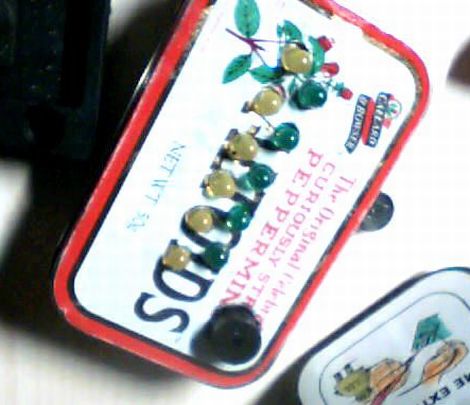
[linux-dude] always wanted to have a binary clock, but he didn’t want to pay someone else to make it for him. Additionally, he was looking for a compact alarm clock he could take on the road, rather than relying on the one in his hotel room.

Inspired by other binary clock projects he has seen over the years, he set off to build his own, which he wanted to fit inside an Altoids tin. His binary clock uses an Arduino Duemilanove (which fits perfectly in the tin) to keep time and control the indicator LEDs. The LEDs are arranged in two rows as you would expect, representing hours and minutes. A small piezo speaker serves as the alarm buzzer, which should be sufficient to wake up most people, though something bigger might be required for heavy sleepers.

We didn’t see any sort of battery pack or power plug mentioned, so we’re not quite sure how [linux-dude] keeps his clock juiced up. Additionally, the lack of an real time clock is something we’re puzzled by. While the Arduino does have a clock function that can be used, an RTC might serve him better – then again if he’s gone for just a day or two at a time, a small amount of drift may not be an issue.

Video: Analog To Digital Conversion On The ATmega328p

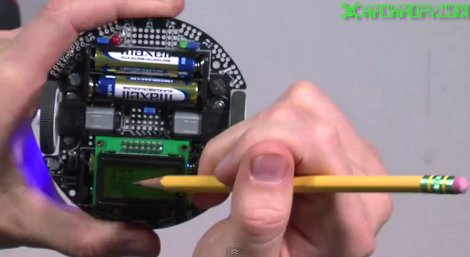
In this week’s video, we continue on where we left off last week with another in our series of videos where we discuss how to program for the ATmega328p processor. This week, [Jack] takes a look at the analog to digital converter and takes us through how to set things up and then how to perform a conversion using the potentiometer on the 3pi as the analog source. Playing with potentiometers isn’t the most interesting thing in the world, but after watching this video, you will be able to do things like take light readings using a cadmium sulfide cell, read the weight applied to a sensor, calculate the temperature from a resistor and a thermistor, or interface with an analog gyroscope.

If you have missed our previous videos, here are some links:
Part 1: Setting up the development environment
Part 2: Basic I/O
Part 3: Pulse Width Modulation

Stay tuned for next week’s* video where we will take a look at how to interface with the 3pi’s line sensors.

Video is after the break…

* HAD is in the process of moving our secret headquarters so next week’s video may come some time later than next week.

Continue reading “Video: Analog To Digital Conversion On The ATmega328p”

Video: PWM On The ATmega328p

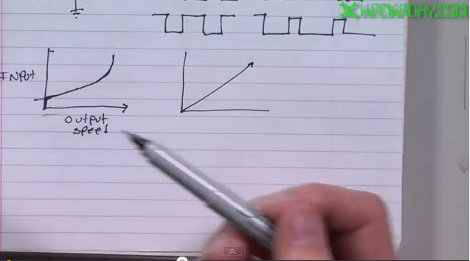
This week we continue on with another video in our series about how to program for the ATmega328p processor using C. The ATmega328p is at the heart of many Arduino boards. If you have been using them but want to add some more horsepower to your projects, this series of videos is for you. In this video, [Jack] talks about various types of pulse width modulation (PWM). You can use PWM to control the speed of a motor, the brightness of a LED, or to generate analog waveforms. [Jack] shows how to set up the processor to do locked anti-phase PWM to drive the wheels of the 3pi robot and then demos a short program that shows the code in action.

If you missed the previous posts in this series and would like to check them out…
Intro and how to set up the development environment : Click Here
Working with I/O pins: Click Here

Video is after the break…
Continue reading “Video: PWM On The ATmega328p”

You Want How Much For A Phone Charger?

People quickly find out that I am a dork, and their next question typically is “why do you own that old as dirt dumb phone?”. Well to be honest, I don’t like phones. After a decade of Palm Pilots and Windows CE devices, I really don’t like touch screens either (fat man fingers and a bad habit of chewing nails does not help). I also do not like that in order to get a fancy PDA with a radio you usually have to sign up for a data plan, or pay for the thing in full.

Now get off my lawn! Seriously though, I really only need my phone to do two things, make phone calls, and send SMS messages. If I had a wishlist the only other things I would like is mass storage for MP3 files, and Bluetooth. Naturally when I started my new day job I found the geek in the department and shortly there after I got asked about my basic LG flip phone.

After a few days of interrogation I jokingly snapped back with “well since you are so worried about it why don’t you give me a better phone!” With a little hinting around and a bribe of a “Swiss Roll” at lunch, I was given an old HTC phone with Windows Mobile 5.

While it is not exactly an iPhone or an Android,  it is much more featured than what I had, and it has a mini SD card slot and Bluetooth! The only catch was, he could not find the charger. We did not know if the thing even worked (he had never seen the thing turned on) , or what condition the battery was in.

As a good little hacker I took it anyway,  join me after the break to see me get it fired up and save a quite a bit of change in the process.

Continue reading “You Want How Much For A Phone Charger?”