Adding A Bomb Bay To A Quadcopter

The Fourth of July is fast approaching, and what better way to celebrate the independence of your country than by blowing up a small piece of it? [Anzel360] decided to take that line of thought to a whole new level by adding a bomb bay to his quadrocopter.

[Anzel360] recently upgraded his transmitter to a Spektrum DX8, giving him two extra channels on his four-channel quadrotor. After adding a small servo to the quad, it was a simple matter of taping a box to the undercarriage and filling it full of fireworks.

The ammo [Anzel] is using is just a handful of Snappin’ Pops – otherwise known as the lamest firework ever created. We won’t hold that against him, though; a remote ignition system for a few Black Cats mounted on a fancy quadrocopter is just asking for trouble. We do recall a throwable cap gun bomb from our youth, though, that would allow for year-round ammo replenishment…

Getting Started With Software Defined Radio

In the last few months, software defined radio has seen an explosion in popularity thanks to a small USB TV tuner dongle able to receive anything broadcast between 64 and 1700 MHz. It’s a very neat project that opens the door to a whole bunch of radio experimentations, but getting started in the SDR world can be a bit daunting. To help everyone out, [MS3FGX] is writing a getting started guide so everyone can get into the world of software defined radio.

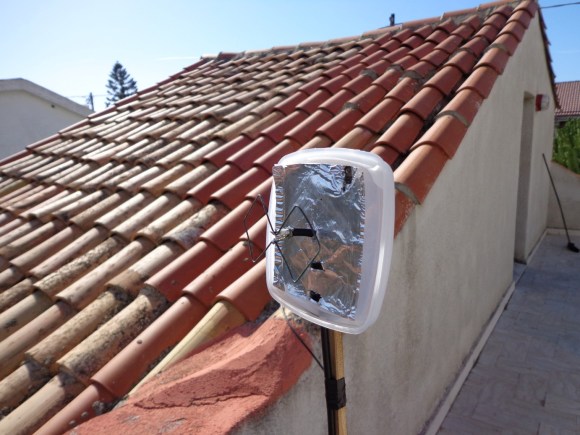
After getting one of the TV tuners supported by the RTL-SDR project (by far the most commonly used is this one from Dealextreme), the next thing you’ll need is a decent antenna. [MS3FGX] has had some success with this Radio Shack antenna, but it’s very easy to make your own.

The most popular software package to use with the RTL TV dongle is GNU Radio, and [MS3FGX] goes over the ins and outs of setting this up along with a brief aside for the Gqrx receiver.

After your hardware and software is set up, the only thing left to do is tuning into a few of your favorite stations. The range of frequencies the RTL covers includes AM and FM radio, along with GSM and GPS signals. Of course there’s a whole lot more you can do with this project like listening in on your car’s keyless entry fob, pagers, and wireless weather stations.

Amateur Radio Field Day Is Upon Us

Looking for something to do this fine Saturday morning? For the US and Canadian readers out there, the fourth weekend in June is amateur radio field day, a day when all the amateur radio and ham geeks get together, string up a few antennas, and do their yearly community outreach/contact as many other radio heads as possible.

This weekend, there are more than 1600 field day events taking place all across the US and Canada. Odds are, you’re not more than a half hour drive from a field day event; you can find the closest one with the AARL’s handy Google Map of field day locations.

Since last year, we’ve seen a whole host of cool stuff to do with radio including a $20 software defined radio. If getting your license is too big of a step for you right now, you could at least plug a USB TV tuner dongle into your computer and see what is possible with radio. As a neat little bonus, you don’t even need a license for SDR. You might need a better antenna, and the ham guys at field day will be more than happy to point you into the right direction.

Building A Radio Telescope For A School Science Project

The image above is a picture of  Hydrogen emissions from our galaxy. The cool thing about this picture is it wasn’t taken with millions of dollars worth of equipment; instead, only a few hundred dollars worth of ham radio gear was needed to get a picture of the Milky Way. [Shanni Prutchi], with the help of her dad [David] built this radio telescope in 5th grade, and even gave a presentation on this build at the National Radio Astronomy Observatory.

Instead of a gigantic satellite dish, [Shanni] used a loop yagi antenna to collect radio signals in the 1420 MHz band. These signals are amplified, filtered, and sent to an ICOM IC R-7000 receiver specially modified by [Shanni]’s dad for radio astronomy.

After her telescope saw first light, [Shanni] and [David] decided to use their brand new toy to detect the passage of the sun. At around 10:00 am they pointed the telescope at where the sun would be at 1:30 pm. For the next few hours, the telescope gathered and integrated radio signals to make an awesome graph. Yep, [Shanni]’s scope can detect radio waves coming directly from the sun.

Like a lot of us, [Shanni] was very much influenced by the movie Contact, something we brought up last week in a post on software-defined radio telescopes. This telescope was built in 2005, meaning [Shanni] couldn’t take advantage of any of the new advances in cheap software radios. We’re still waiting for someone to throw a Realtek SDR telescope together, so if you’ve got one send it in

Putting Scores Of Arduinos On The Internet With One Router

Like many hackers of late, [Rick] has been experimenting with connecting Arduinos to the Internet with a disused WiFi router and an installation of OpenWRT. Unlike his fellow makers, [Rick] thought it would be wasteful to dedicate a single router to one Arduino project, so he used a small, low power wireless module to connect up to 30 Arduinos to the Internet.

Just as in a few recent builds (1, 2), [Rick] found an old Fonera router sitting in a box at his local hackerspace. After installing OpenWRT, [Rick] connected a very small wireless module to the router’s GPIO pins and patched the firmware to put an SPI bus on the router.

Now, whenever [Rick] wants to connect an Arduino project to the Internet, all he needs is a $4 radio module. This radio module connects to the router, and the router handles the networking requirements of up to 30 DIY projects.

If you’re looking to build an Internet-enable sensor network, we honestly can’t think of a better or cheaper way of going about it. Nice job, [Rick].

Two Software Defined Radio Hacks From Our Resident SDR Guru

It seem [Balint] is becoming somewhat of a SDR guru around these parts; in the past few months, he’s gotten a USB TV tuner receiver working with GNU Radio, started a software defined radio tutorial YouTube channel, and even used this project to listen in on conversations between airplanes and air traffic control. This time, [Balint] is back using this cheap USB TV tuner for radio direction finding and running HDSDR in Linux and OS X.

[Balint]’s radio direction finding presentation goes over traditional means of direction finding using the doppler effect and mechanically rotated antennas. Because [Balint] is dealing with frequencies around 150MHz (about 2 meter wavelength), building a physical direction finding setup requires spinning antennas at around 40,000 RPM; much to fast for any hardware build. [Balint]’s solution was to attach 4 antennas around the circumference of a circle and electronically switch between them many thousands of times a second. [Balint] put up a wiki page going over all the theory and implementation details of his build.

[Balint] also put wrote up a neat app to control software defined radios – including the Realtek TV dongle –  over a network. Spread over a wide enough geographic area, it could become extremely easy for anyone to play air traffic controller. The BorIP Server can also be used to run HDSDR in Linux and OS X under Wine; just connect HDSDR to the network loopback on the same machine, and you get around Wine’s distaste for accessing hardware natively.

Awesome work, and we can’t wait to see what comes out of [Balint]’s laboratory next.

Edit: instead of the dongle, [Balnt] is using a ‘real’ software radio board. A lot of people are messaging him asking if the same method of direction finding is possible with the dongle. Here’s what [Balint] has to say:

The trick, as I see it, would be to create some (more or less simple) additional hardware to take the clock signal straight off the dongle’s on-board oscillator and divide it down for use with the antenna switch, i.e. 28 MHz à tens of kHz (this is the bit that’s done in ‘software’ on the FPGA). One problem still remains however: the counter needs to remain calibrated against the known direction the antenna was pointing at the time – otherwise a stop/start of the data stream from the dongle will mean the direction will go out of sync by 90/180/270 degrees each stop/start. Perhaps someone will figure out an elegant solution for this slight hurdle!

So there you go. Up for a challenge?

A Simple RF Signal Strength Meter

rf_metr_breadboard

[Scott] wrote in to us with his simple, but well done RF signal strength meter. As he points out in his post, sometimes an Arduino is overkill, so a Picaxe 08M was used instead. Apparently this was a refresh of a high school project that he did. Certainly many of us would have liked to go to that high school!

An interesting part of this project is how he used a laser cutter to produce his PCB traces. This was done by applying black paint to the copper on his board and cutting everywhere he didn’t want copper traces. The results were quite good, and should work well when this project is finalized in an enclosure

Check out the video after the break to see this circuit in action. He explains the build in it, but if you just want to see the signal strength lights come on, fast forward to around 2:25. Continue reading “A Simple RF Signal Strength Meter”