DIY Battery Reconditioner Saves Old Rechargeable Batteries From The Landfill

rechargeable_battery_reconditioner

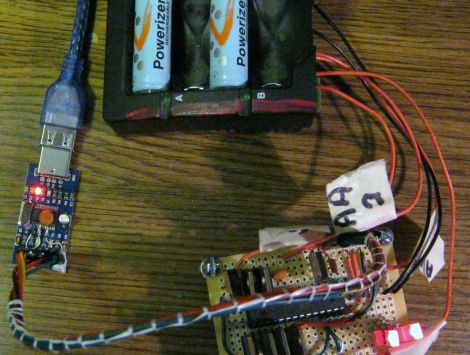
Instructables user [msuzuki777] had amassed quite a collection of batteries over the years, but was finding that some of his rechargeable AA and AAA cells seemed to be at the end of their useful life. After reading some information at the Battery University regarding the restoration process for nickel-based batteries, he figured he might as well try building a battery reconditioner of his own.

He worked through several designs that either flat-out did not work, or had issues that limited the number of batteries he could simultaneously recondition. After reading about this rechargeable battery capacity tester we featured a few months back, he was ready to give the project one more try.

It seems that the third try was the charm, because his FET-based design worked quite well. He ended up wiring two FETs to each battery, which are connected via a relay. The batteries get discharged until the voltage drops down to 1V, at which point one FET is turned off, allowing the batteries reach their target voltage of 0.4V more slowly.

Despite the self-proclaimed messy layout of his circuit, [msuzuki777] is quite happy with the results. He has been able to recover several batteries, which is a fantastic alternative to letting them decay in a landfill.
Repaired Microwave Keypad Looks As Good As New

microwave_keypad_repair

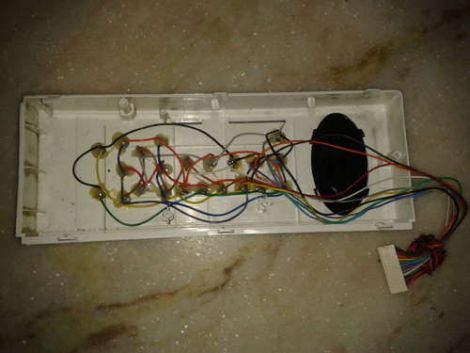
Instructables user [Rohit] had an out-of-warranty microwave with a broken membrane keypad. Much like our friend [Alexandre] from Brazil, he found the cost of replacement parts beyond reasonable, so he had to find a way to repair it instead.

He disassembled the front cover of his microwave to get at the main controller board. Once it was detached, he removed the keypad’s cover to get a closer look at the matrix underneath. While taking notes on how the matrix was wired, he found that some keypad traces connected to other traces rather than buttons. He says that they are likely used by the microwave to detect that the keypad is present, so he made sure to short those traces out on the controller board when he wired everything back together.

He replaced the aging keypad with microswitches, but rather than mount them on the front panel of the microwave, he drilled holes for each switch so that he could mount them inside the face plate. Once everything was wired and glued in place, he re-mounted the keypad’s cover. Now the microwave looks stock but has firm, reliable, user-serviceable buttons that are sure to last quite a while.

Canon A70 CCD Replacement/repair

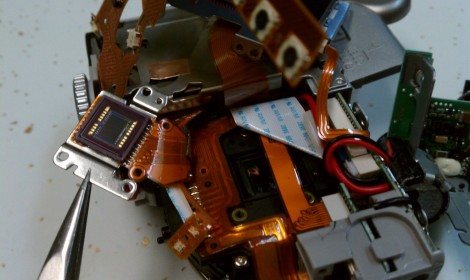
Looking for an underwater camera setup, [Imsolidstate] picked up a Canon A70 and a Canon water-tight housing on eBay for around $45. Unfortunately the camera arrived with a non-functioning CCD. Another trip to the online auction site landed him a replacement CCD which he set about installing.

We have this exact model of camera with a cracked LCD display. Being that we like to hack around on things we’ve pulled it apart in order to replace the screen and believe us, there’s no extra room inside that thing. The video after the break shows the teardown, and you can see what a pain it is to get the unit apart. That process in only eclipsed in difficulty by the reassembly itself.

In the end it wasn’t a problem with the CCD itself, but with the connector on the PCB that received the flat cable. It wasn’t holding the contacts tight, but [Imsolidstate] fixed that with a strategically placed piece of foam.

Continue reading “Canon A70 CCD Replacement/repair”

Breathing New Life Into A Broken IPod

ipad_nano_button_fix

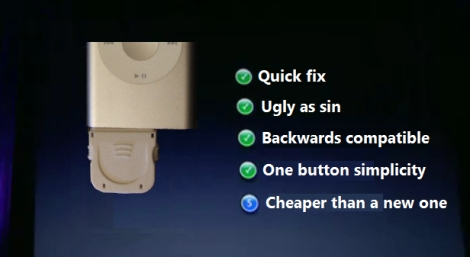
[Craig] had a busted 2nd Gen iPod Nano that was well out of warranty. The play/pause button no longer worked, leaving him unable to play or pause music, nor power off the device. He didn’t want to scrap the iPod, so he figured out a way to add an external play/pause button instead.

He ordered an iPod dock connector from SparkFun and found that it had just enough space inside for the electronic components he would be adding. He consulted some online references for pinout information, then got busy cramming an ATiny13 and a pushbutton into the dock connector.

To minimize the drain on the iPod’s battery, he puts the ATiny into sleep mode when it is not being used. When the button is pressed, it wakes up the microcontroller and sends the proper signal to the iPod. Based on his estimations, it would take nearly 250 years for the ATiny to drain the iPod’s battery completely, so he’s pretty comfortable leaving the dongle attached at all times.

If you have an iPod with similar issues, he has made his source code available so you can save yours from the trash heap as well.

Reviving A Broken HSDPA Modem With A Bit Of Clever Investigation

hsdpa_modem

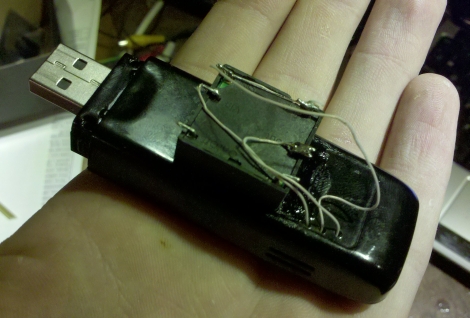
Hack-a-Day forum member [Necromant] was recently working on a router when he made a terrible mistake. He connected the wrong power brick to the router, causing a 2.5v over-voltage. The router itself was just fine, as it contained a good stepdown converter, but the HSDPA modem connected to the router’s USB port was not so lucky. It seems that the USB host is powered directly from the router’s power supply without any conversion – this meant his modem got a nice 7.5v zap when he used the wrong plug.

He assumed the modem was dead, so he figured there was no harm in disassembling it. He examined the modem’s circuit board and found that when plugged in, the onboard stepdown converter supplied 0 volts to the rest of the PCB. He couldn’t find any documentation for the converter online, so he employed a little bit of trial and error clever investigation to determine what sort of voltage the stepdown provided before being cooked.

After a bit of testing with his home-built low dropout regulator, he determined that the damaged stepdown provided 3.3v to the rest of the modem (that’s a 4.2v over-voltage for those of you who are keeping track). He added a linear voltage regulator to the board in place of the old stepdown, which worked for about 15 seconds before overheating.

In the end, he decided to add a pretty hefty 3.3v stepdown converter to the modem, throwing aesthetics to the curb. The result is one ugly, but quite functional HSDPA modem.

oscope_teardown

Rigol Oscilloscope Teardown And Repair

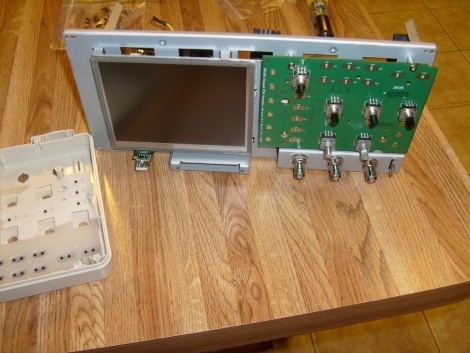
[Hotsolder] encountered a bad encoder in his Rigol Oscilloscope, so he opened it up in order to replace the damaged part. According to him, it was quite an adventure, so he documented the disassembly and component swap for the benefit of anyone else out there that might have to do the same.

The teardown is in the form of a slideshow, which is available on his site. The images are all pretty well annotated, so you should be able to follow along quite easily if you happen to be tearing one apart yourself. There’s not a ton of exotic things to see inside the scope, it pretty much contains what you would expect to see if you cracked one open.

The encoder replacement went off without a hitch, and he even took pictures of the defective one to discuss how it works.

It’s definitely a quick and interesting read if you are simply curious about oscilloscopes, or if you happen to need to dismantle yours.

[Thanks, oakkar7]

Simple Fixes Breathe New Life Into Aging Game Consoles

dreamcast_repair

While the Sega Dreamcast has long been out of production, there is an avid fanbase that loves the console dearly. As with many CD/DVD-based consoles, the Dreamcast can sometimes run into issues reading discs, at which point all games are unplayable.

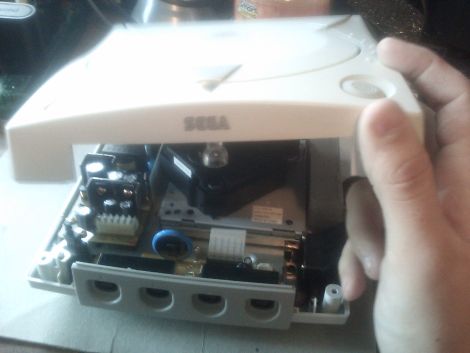
Instructables user [Andrew] got his hands on a pair of the consoles and found that one could not read CDs, while the other suffered from a fried controller interface board, the result of a controller wiring mix-up on his part. Determined to get the consoles up and running again, he disassembled them and got to work, sharing his fixes with us.

The CD drive fix is a pretty standard one. He first needed to locate the potentiometer that regulates the laser. Once he did, a slight counter-clockwise turn is all it required in order to increase the laser’s voltage. Once he did this, he popped in a game to see if it worked. No longer greeted with a disc read error when he powered on his Dreamcast, he reassembled the console and began work on the other one.

To fix his controller issues, [Andrew] had to remove the entire controller board from the console. He eventually located a resistor that had been damaged by his wiring mishap, and replaced it. The console was tested and seeing that the controllers worked again, he put everything back together.

While this pair of fixes is not incredibly complex, it’s nice to see people sharing their tips for bringing these consoles back to life.