Raspberry Pi As Speed Camera

Wherever you stand on the topics of road safety and vehicle speed limits it’s probably fair to say that speed cameras are not a universally popular sight on our roads. If you want a heated argument in the pub, throw that one into the mix.

But what if you live in a suburban street used as a so-called “rat run” through route, with drivers regularly flouting the speed limit by a significant margin. Suddenly the issue becomes one of personal safety, and all those arguments from the pub mean very little.

Sample car speed measurements

[Gregtinkers]’ brother-in-law posted a message on Facebook outlining just that problem, and sadly the local police department lacked the resources to enforce the limit. This set [Gregtinkers] on a path to document the scale of the problem and lend justification to police action, which led him to use OpenCV and the Raspberry Pi camera to make his own speed camera.

The theory of operation is straightforward, the software tracks moving objects along the road in the camera’s field of view, times their traversal, and calculates the resulting speed. The area of the image containing the road is defined by a bounding box, to stop spurious readings from birds or neighbours straying into view.

He provides installation and dependency instructions and a run-down of the software’s operation in his blog post, and the software itself is available on his GitHub account.

We’ve had a lot of OpenCV-based projects but haven’t featured a speed camera before here on Hackaday. But we have had a couple of dubious countermeasures, like that humorous attempt at an SQL injection attack, or a flash-based countermeasure.
Ethernet Controller Discovered In The ESP8266

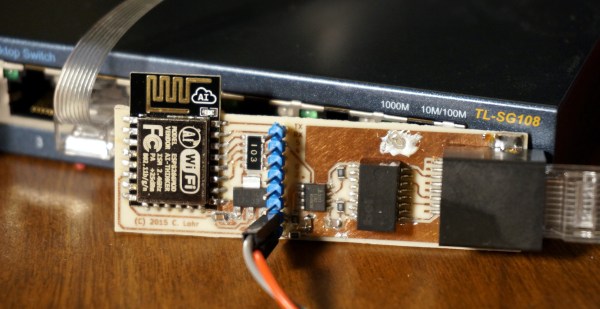
The venerable ESP8266 has rocked the Internet of Things world. Originally little more than a curious $3 WiFi-to-serial bridge, bit by bit, the true power of the ESP has become known, fully programmable, with a treasure trove of peripherals it seemed that the list of things the ESP couldn’t do was short. On that list, at least until today was Ethernet.

No, despite the misleading title, the ESP does not have a MAC and/or PHY, but what it does have is an incredible 80 MHz DMA-able shift register which can be used to communicate 10BASE-T Ethernet using a new project, espthernet. Join me after the break for video proof, and a deep dive into how this is possible.

Continue reading “Ethernet Controller Discovered In The ESP8266”

Apple Introduces Their Answer To The Raspberry Pi

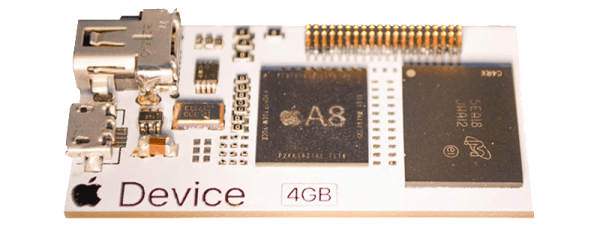
Today, Apple has announced their latest bit of hardware. Following in the tradition of the Raspberry Pi, BeagleBone, and the Intel Edison, Apple have released a single board computer meant for embedded and Internet of Things applications. It’s called the Apple Device, and is sure to be a game changer in the field of low-power, Internet-enabled computing.

First off, some specs. The Apple Device uses Apple’s own A8 chip, the same dual-core 64-bit CPU found in the iPhone 6. This CPU is clocked at 1.1 GHz, and comes equipped with 1GB of LPDDR3 RAM and 4GB of eMMC Flash. I/O includes a Mini DisplayPort capable of driving a 4k display, 802.11ac, Bluetooth, and USB. In a massive break from the Apple zeitgeist of the last decade or so, the Apple Device also includes a forty pin header for expansion, much like the Raspberry Pi, BeagleBone, and Edison.

Although Apple’s first foray into the embedded computing market is a shocker, in retrospect it should come as no surprise; the introduction of HomeKit in iOS 9 laid the groundwork for an Internet of Apple Devices, embedded into toasters, refrigerators, smart homes, and cars. The Apple Device lives up to all these expectations, but what is the hands-on experience like?

See our review of the Apple Device after the break.

Continue reading “Apple Introduces Their Answer To The Raspberry Pi”

Co-Exist With Your Coax: Choose The Right Connector For The Job

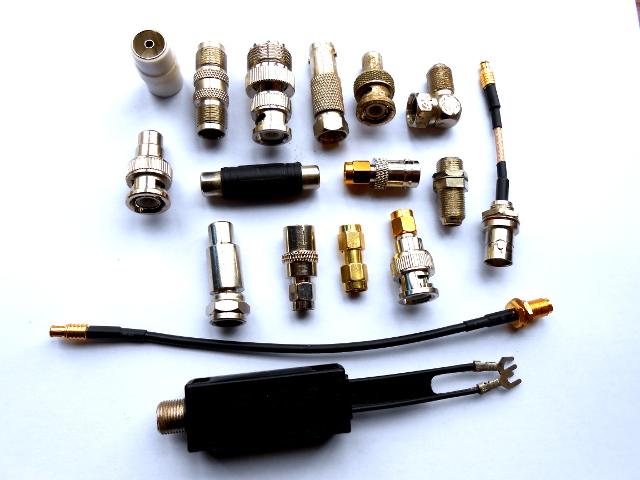
Just a selection from the author's unholy assortment of adaptors.
Just a selection from the author’s unholy assortment of adaptors.

If you do any work with analogue signals at frequencies above the most basic audio, it’s probable that somewhere you’ll have a box of coax adaptors. You’ll need them, because the chances are your bench will feature instruments, devices, and modules with a bewildering variety of connectors. In making all these disparate devices talk to each other you probably have a guilty past: at some time you will have created an unholy monster of a coax interface by tying several adaptors together to achieve your desired combination of input and output connector. Don’t worry, your secret is safe with me.

Continue reading “Co-Exist With Your Coax: Choose The Right Connector For The Job”

Intel Ups The Dev Board Ante With The Quark D2000

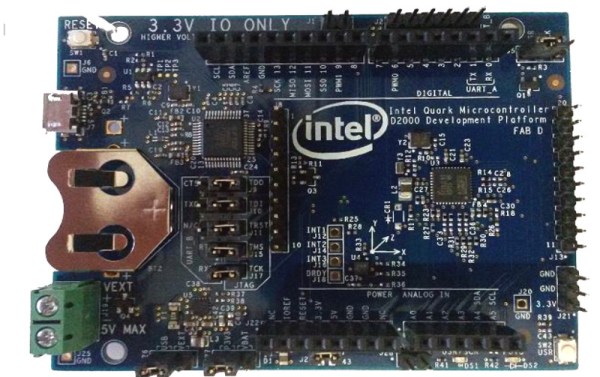
Intel have a developer board that is new to the market, based on their Quark (formerly “Mint Valley”) D2000 low-power x86 microcontroller. This is a micropower 32-bit processor running at 32MHz, and with 32kB of Flash and 8kB of RAM. It’s roughly equivalent to a Pentium-class processor without the x87 FPU, and it has the usual impressive array of built-in microcontroller peripherals and I/O choices.

The board has an Arduino-compatible shield footprint, an FTDI chip for USB connectivity, a compass, acceleration, and temperature sensor chip, and a coin cell holder with micropower switching regulator. Intel provide their own System Studio For Microcontrollers dev environment, based around the familiar Eclipse IDE.

Best of all is the price, under $15 from an assortment of the usual large electronics wholesalers.

This board joins a throng of others in the low-cost microcontroller development board space, each of which will have attributes that its manufacturers will hope make it stand out. Facing such competition the Intel board will have to be something rather special to achieve that aim, so why should it excite your interest? We would point to the low price, the x86 code if that is your flavour of choice, and the relatively tiny power consumption.

Stepping back from the dev board for a moment, consider this processor as an illustration of technological progress in semiconductor fabrication. Over twenty years ago this chip’s Pentium ancestor ran on 5 volts and got so hot you could fry an egg on it, here is a Pentium that can run on a few milliwatts from a coin cell. Fortunately you won’t be running Windows 95 on it though.

We’re sure we’ll see plenty of projects here in the future using the Quark. Intel’s previous effort in this space, the Edison, has made several appearances. We’ve covered its launch in 2014, looked at someone running Doom on it, and examined its use with audio effects.

Thanks [Nolan M] for the tip.

A Ridiculous Way To Light An LED: Candle-power

If you have ever entertained yourself by reading comprehensive electronic-theory textbooks you’ll have seen references to technologies that sound really interesting but which you will rarely hold in your hand. They may be dead-ends that have been superseded by more recent innovations, or they may be technologies that have found uses but in other fields from those in which they originally showed promise. What if you could take these crazy parts and actually build something?

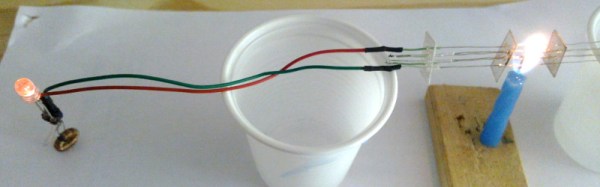
[Fedetft] has an interesting project that combines two of those intriguing textbook references, he’s created a thermopile that lights an LED through an inverter whose oscillator is a tunnel diode. Dig out the textbook.

If you’ve used a thermocouple thermometer or a semiconductor thermoelectric generator then you’ll have encountered the thermoelectric effect. Perhaps you’ve even operated a Peltier cooling element in this mode. When a circuit is made with two junctions between different types of conductor with a temperature difference between the two junctions, a current will flow in the circuit which is dependent on both the scale of the temperature difference and the properties of the conductors.

A thermopile is a collection of these thermoelectric junction circuits between metal conductors, arranged in series to increase the voltage. [Fedetft]’s thermopile uses chromel and alumel wires taken from a K-type thermocouple. He’s made six sets of junctions, and supported them with small pieces of mica sheet. Using the heat from a candle he found he could generate about 200mV with it, at about 3.7mW.

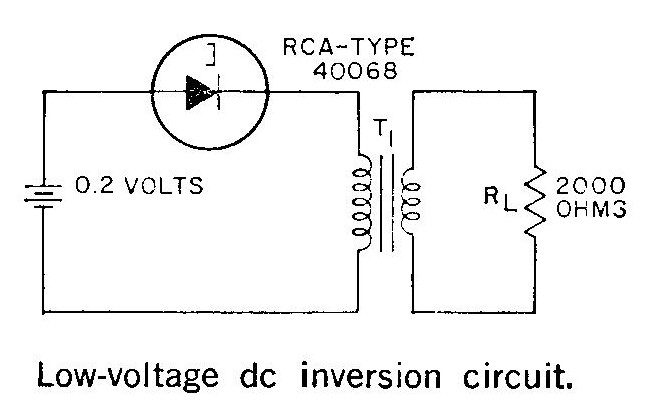
The RCA tunnel diode inverter circuit

Such a tiny source of electricity would be of little use to light an LED directly, so he needed to build an inverter. And that’s where the tunnel diode comes in. Tunnel diodes have a negative-resistance region that can be used to amplify and oscillate at extremely high frequencies in extremely simple circuits, yet they’re not exactly a device you’d encounter very often in 2016. [Fedetft] has a Russian tunnel diode, and he’s used it with a toroidal transformer in an inverter circuit he found in an RCA tunnel diode manual from 1963. It’s a two-component Joule Thief. The RCA manual is a good read in itself for those curious about tunnel diodes.

The resulting circuit produces a 15kHz oscillation with 4.5v peaks, and has just enough power to light an LED.

While it might seem pointless to barely light an LED from a brightly lit candle, the important part of [Fedetft]’s project is to gain some understanding of two of those technological backwaters from the textbooks. And we applaud that.

It’s the mark of a truly esoteric technology that it features rarely on Hackaday, and neither of these two disappoint. We’ve only mentioned tunnel diode in passing when looking at diodes in general, and we’ve tended to use “thermopile” in another sense to refer to thermal imaging cameras.

Windows And Ubuntu: “Cygwin Can Suck It”

For the last ten years or so, computing has been divided into two camps: Windows, and everything else with a *nix suffix. Want a computing paradigm where everything is a file? That’s Linux. Want easy shell scripting that makes the command line easy? Linux. Want a baroque registry with random percent signs and dollar symbols? That would be Windows. Want to run the most professional productivity apps for design and engineering? Sadly, that’s Windows as well.

*nix runs nearly the entire Internet, the top 500 supercomputers in the world, and is the build environment for every non-Windows developer. Yet Windows is the most popular operating system. The divide between Windows and *nix isn’t so much a rivalry, as much as people who still spell Microsoft with a dollar sign would tell you. It’s just the way personal computing evolved by way of legacy apps and IT directors.

Now, this great divide in the world of computing is slowly closing. At Microsoft’s Build 2016 developer’s conference, Microsoft and Canonical, Ubuntu’s parent company, announced a partnership that will allow Ubuntu to run using native Windows libraries.

In short, this announcement means bash and the Linux command line is coming to Windows 10. The command line is great, but userland is where it’s at, and here this partnership really shines. Unlike Cygwin, the current way to get *nix stuff running in a Windows environment, Windows’ bash will allow unmodified Linux programs to run unmodified on Windows 10.

It is not an understatement to say this is the most important development in operating systems in the last 10 years. For the last decade, every developer who is not purely a Windows developer has picked up a MacBook for the sole reason of having BSD under the hood. If you’re looking for a reason Apple is popular with devs, it’s *nix under the hood. This announcement changes all of that.