Building A Yagi-Uda Antenna

[Tommy Gober] built this Yagi-Uda antenna that has some handy design features. The boom is a piece of conduit with holes drilled in the appropriate places. The elements are aluminum arrow shafts; a good choice because they’re straight, relatively inexpensive, and they have #8-32 screw threads in one end. He used some threaded rod to connect both sides of the reflector and director elements. The driven elements are mounted offset so that a different machine screw for each can be connected to the appropriate conductor of the coaxial cable. The standing wave ratio comes in right where it should meaning he’ll have no trouble picking up those passing satellites as well as the International Space Station.

PCB Trace Antenna

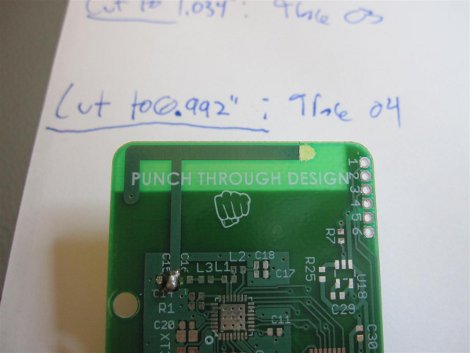
If you’re working on a device that includes RF wireless, [Colin’s] Guide to PCB Trace Antenna Design might clear some headaches when sending off for PCBs. While it is directed at devices transmitting at 2.4GHz, the techniques and recommended equipment (read: espresso smith charts and network analyzers) should work for almost any frequency. While trace antennas aren’t as easy to implement as a measured wire, the space benefits make up for the difficulty. Unless you don’t mind how larger your project is, did someone say cantenna?

WiMax Antenna With Auto-positioning System

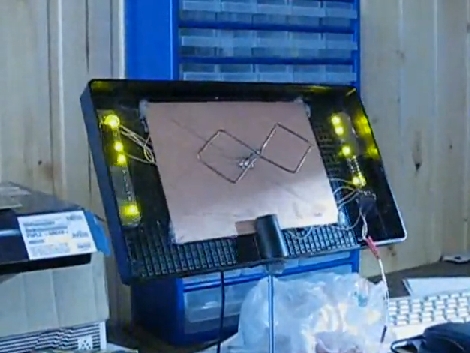
[Andrew] certainly brings a bit of a James Bond feel to connecting to your WiMax base station. He built this antenna along with an auto-positioning system to get the strongest signal possible. The device, which appears a bit fragile, breaks down into a nice little case. When you get to your next checkpoint you can set it up and the stepper motor along with an ATtiny2313 will rescan to get you on with your mission as fast as possible. This is one of our favorite antenna builds so far, and we’ve seen a lot of hacked antennas. Don’t miss the action-packed trailer after the break. Continue reading “WiMax Antenna With Auto-positioning System”

Building A Window Mounted Antenna For Your Car

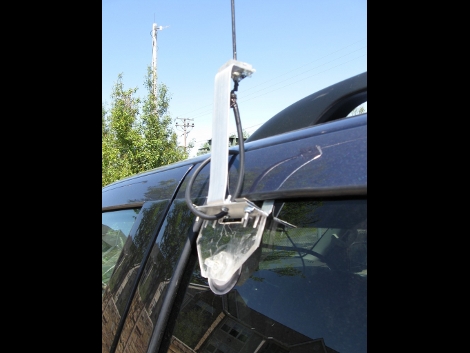
If you’re into ham radio and want it when you’re on the go give this antenna mount a try. [Cirictech] started with a design from the November 2009 issue of QST and added his own fabrication touches. Everything except the antenna itself is available from the hardware store for just a few bucks, and you should be able to complete this project in a flash. This makes us wonder what the antenna for the 47 GHz band radio setup would look like.

How To Replace A Netgear Router Antenna

rp-sma-adapter-installed

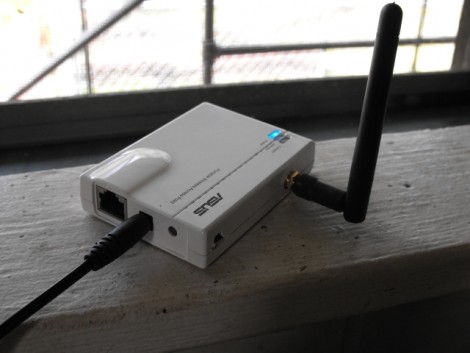
a.ntivir.us wanted to use a different antenna for their Netgear mbr624gu WiFi router. Unfortunately, this model comes with an antenna that is not removable. As with other antenna retrofits, this involves no soldering. But because there is already a mounting area for an antenna, no case altering is needed either. After opening the router with a Torx driver it was discovered that the non-removable antenna was connected to the board with a mini rf connector (U.FL). The antenna and its mounting bracket were removed and a U.FL to RP-SMA adapter was put in its place using a washer to secure it to the rear plate of the router. Now any external antenna can be used and the router still looks brand new.

Aspire One External Antenna

IMG_0023-300x225

External antennas on netbooks are notorious, from EEE PCs to the Panasonic CF-R1, but this is the first on an Acer Aspire One we’ve seen. [xRazorwirex] sent in his external antenna hack for the 802.11n capable D150, with the intention of increasing performance, but he says he can’t attest to any change. Unfortunately the lock slot had to be removed, but a small price to pay for a big increase in connectivity. The process seems simple enough, and could probably be done within a half an hour. Now that there is an external link why not build a Cantenna, hop in the car, and HeatMap the neighborhood!

Removable Router Antenna

antenna

[Mike] takes us through the process of adding  a removable high gain antenna to the WRTSL54GS in this article. The antenna that comes on this unit from the factory is a bit small and underpowered. After upgrading it using OpenWrt, an open source full featured router software package, he felt it needed a beefier antenna. So, he cracked it open. The new antenna can simply be soldered in place, where the old antenna was.