LED Magic Staff Just In Time For Halloween!

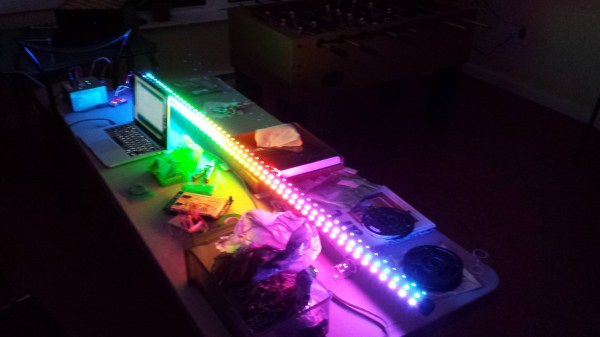
[Dave]’s been working pretty hard on his Arduino driven, LED-lit, magical staff for the past few months, and now it’s finally coming together.

He’s using 6 LED strips that contain 55 LEDs each — at full brightness the staff can suck up an impressive 20A @ 5V! To power it, he’s equipped the staff with 8 NiMH C size batteries (5000mAh @ 1.5V). This works out to about 15-20 minutes of runtime at full power (255, 255, 255, LED values) — to counter this he usually runs a sparkly LED algorithm that lasts much longer. Besides, at full power it’s really quite blinding.

The staff is controlled by an Arduino Uno and currently only has two different modes: random and full brightness. Not to worry though, he’s planning on adding a sound sensor to turn it into an equalizer, a shock sensor to give it a cool ripple effect while walking, and maybe a few other interesting patterns!

Stick around after the break to see the first test video!

Continue reading “LED Magic Staff Just In Time For Halloween!”

Microslice: The Tiny Arduino Laser Cutter

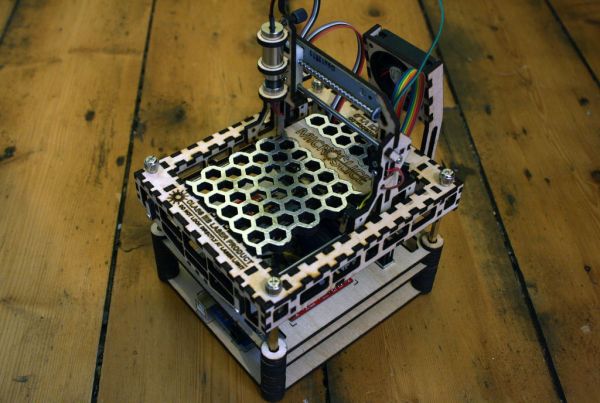
[SilverJimmy] already had a full-sized 50 watt laser cutter, but he decided to try his hand at putting together something smaller and microcontroller-driven. The result is this adorable little engraver: the MicroSlice.

To keep the design simple, [SilverJimmy] opted for a fixed cutting table, which meant moving the cutting head and the X-Axis as a unit along the Y-Axis. The solution was to take inspiration from gantry cranes. He snagged a couple of stepper motors with threaded shafts, designed the parts in Inkscape, then fired up his full-size cutter to carve out the pieces. An Arduino Uno and the relays for the laser and fans sit on the MicroSlice’s bottom platform, and two EasyDriver motor controllers sit above them on the next layer.

Swing by the Instructables for more details including the source code, and to see a video of the engraver below. [SilverJimmy] sourced his laser from eBay, but check out the engraver from earlier this year that used a DVD diode.

Continue reading “Microslice: The Tiny Arduino Laser Cutter”

Playing Footsie With Your Video Games

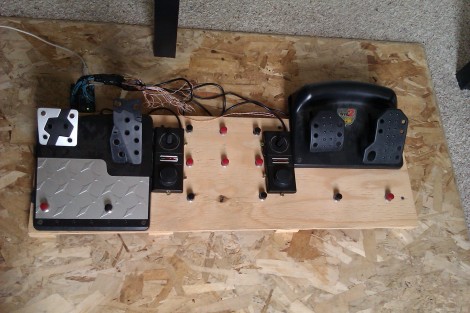
[Jon] will be tapping away with his toes during gaming session thanks to this foot controller which is packed with buttons and sensors. It’s the second iteration of the build. The original had some solder joints break and the USB stopped working. He had also been experiencing some erratic behavior and so he decided to upgrade the control hardware and add a few more things in the process.

This version uses an Arduino Uno as the interface board. He did a bunch of prototyping to find the best way to hook up all the analog sensors, and how to properly debounce the buttons. Once he was happy with the inputs he set about finding a better way to use the USB HID standard with the device. We were surprised to hear that the ATmega16u2 (one of the new AVR chips which includes USB hardware) doesn’t play nicely with Linux. But [Jon] managed to hack his way around that issue and now he’s gaming with an even better foot controller than before.

Fallout Brought To Life With This Working PIP-Boy 3000

working_pipboy_3000

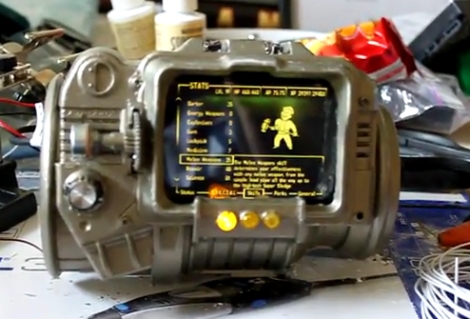
[MyMagicPudding] wanted to try his hand at hobby electronics, so he decided to go all-in and build himself a PIP-Boy 3000. If the name doesn’t ring a bell, the PIP-Boy 3000 is a wrist-mounted computer from the popular Fallout video game series.

The PIP-Boy is based around an HTC Desire HD mobile phone, which [MyMagicPudding] mounted inside case custom made for him by [Skruffy] from the Replica Prop Forum. He wanted to stay true to the game, so the wrist-mounted computer’s interface eschew’s the Desire’s touch screen and is instead controlled via a set of buttons and dials on its face. The external inputs all interface with the Desire via an Arduino Uno, which communicates with the phone using TCP over USB.

While he admits that his soldering skills are pretty dodgy, and that there’s no longer room behind the neat-looking facade to mount the PIP-Boy on his wrist, we think that it looks great. If this is an example of his first electronics project, we can’t wait to see what comes next.

Continue reading to see the PIP-Boy 3000 in action.

Continue reading “Fallout Brought To Life With This Working PIP-Boy 3000”