Moisture Control For A DIY Greenhouse

greenhouse_moisture_controller

[Clover] loves plant biology, and tends a small garden while she is at home during breaks from college. She says that her family is notoriously unreliable when it comes to caring for plants, so she decided to construct a greenhouse to ensure that her garden will still be around the next time she comes home.

With her raised bed garden built and her seeds planted, she started work on the greenhouse itself, which was constructed using PVC pipe and clear plastic sheeting. Satisfied with how the structure came out, she focused on the greenhouse’s watering system and moisture sensors. The watering system uses solenoids that are connected to a pair of Arduino regulated relays. The Arduino uses moisture sensors constructed from nails, triggering the water flow when things get too dry.

The controller along with its LCD status panel was mounted inside a bird house to protect it from the elements while keeping in line with the house’s decor. [Clover] seems pretty happy with the build, but we suspect she will be adding some temperature and regulation at some point, to facilitate longer growing cycles.

Check out the video below for a quick tour of her setup.

Continue reading “Moisture Control For A DIY Greenhouse”

Alarm Clock Forces You To Play Tetris To Prove You Are Awake

tetris_alarm_clock

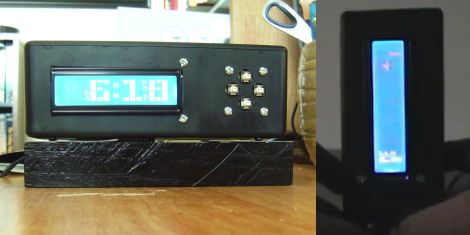
Oversleeping sucks, but we’ve all been there. Whether its a matter of hitting the snooze button a dozen times too many, or turning off the alarm and drifting back to sleep – sooner or later, you are going to wake up late.

Instructables user [nolte919] has overslept a time or two in his life, and he set out to design a clock that would make it nearly impossible to wake up late. His clock is Arduino-based and shares many features with off the shelf models including multiple alarms, a backup battery, and snooze features. His alarm however goes one step further and ensures you are fully awake each morning.

If you hit the user-defined snooze limit, the alarm sounds and will not turn off until you have cleared 4 lines in Tetris. That’s right, you have to prove to the clock that you are awake and coherent before it will shut off. Technically you can silence the alarm for a 30 second period so you can focus on Tetris, but that’s all the break you get.

It really is a novel way of ensuring you are awake in the morning, and heck, how bad can the day be when you start off by playing video games for a few minutes?

Stick around to see a quick video of his Tetris alarm clock in action.

Continue reading “Alarm Clock Forces You To Play Tetris To Prove You Are Awake”

Controlling A CGA Monitor With An Arduino

CGA monitors may not be an amazing technological advance these days, but they can generally be found very cheaply. Additionally, they have a DB-9 connector and work off of TTL ranges (0-5VDC) making them ripe for experimentation. This hack takes advantage of all of these aspects to bring you an Arduino controlled CGA monitor.

One problem with experimenting with one of these monitors is that they are not that well documented. Fortunately, the detailed write up for this hack goes over some of the timing and frequency issues that one may encounter with this particular monitor. The article gives an Arduino pinout and the program used to drive the monitor with very detailed comments.

Although this hack is by no means a finished product, the now blurry test pattern seen above gives a pretty good proof of concept. It will be exciting to see if this hack inspires any other microcontroller-based projects. For some further information about CGA monitors, Wikipedia also has a fairly in-depth write-up about the technology.

External Text Display For Nexus One

Nexus One External Display

[follower] prototyped a 2-line external display for his Nexus One using an Arduino with a USB Host Shield, and the Android Open Accessory Protocol. There are two basic software pieces at work: an Arduino sketch that handles displaying data sent from the phone, and a lightweight android app to detect the presence of the external screen and send data to it. As shown here, it diplays the time and the beginning of the most recently received SMS message.

This project coalesced from several other things [follower] had been working on with regards to USB accessories, background services, interfacing with the Arduino and handling SMS messages, so it’s modular and open-source.  If you’re interested in mashing up microcontroller projects and your android phone, there’s plenty of stuff in this project to help you get off the ground.

As hacks go, this is very much a “because you can” sort of deal that’s designed to tie a bunch of cool things together. You’re unlikely to catch us carrying an LCD and breadboard around in our pockets any time soon, but it paves the way for some potentially fun phone accessories.

Androcade Is A Controller And Stand In One

We remember when retro-gaming required a lot of equipment and a serious time commitment to put together a gaming interface. [Scooter2084] proves that we’ve come a long way with this gaming controller built to complement Android hardware.

It’s not immediately obvious from the image above, but the controller itself looks just like Andy the Android. His head is tilted upward and acts as the tablet stand, while his torso hosts the controls. We don’t the arms and legs have a functional use but they are necessary to complete the look.

Traditionally arcade controls have used a hacked gamepad, or dedicated hardware like the MAME cabinets that use iPac control boards. But this rendition interfaces the joystick and four buttons using an Arduino. A Bluetooth shield lets you control the Android device wirelessly, and opens up the possibility to use this as a controller for laptop-based emulators and the like. Don’t miss the video after the break.

Continue reading “Androcade Is A Controller And Stand In One”

Tweeting Home Alarm System

tweeting_home_alarm_system

Instructables user [willnue] wanted to build a DIY Tweeting alarm system from the ground up, but reconsidered after taking a close look at the scope of such a project. He settled on using an off the shelf security system, taking care of the Twitter interface on his own. He bought a GE 45142 Wireless alarm and promptly disassembled it to see how he might retrieve status messages from the unit.

He figured that monitoring the alarm’s LEDs would make the most sense, so he used a bit of Ethernet cable and wired all of the system’s indicators to his Arduino board. He hooked up an Ethernet shield to the Arduino, then wrapped the pair up in a plastic project box that closely matched the look of the security system. Once that was done, he wrote some simple code for the Arduino that monitors each of the alarm system’s six status lights, sending updates to Twitter via the ThingTweet service.

With this system you might not get your status messages in time to foil whoever is carrying off your plasma TV, but at least you will know what to expect once you get home!

If you want to keep tabs on [Will’s] security system to find out the best time to rob him see how things are going, check out his Twitter feed here.

Google Android ADK Bluetooth Wireless Communications

arduino_to_android_ADK_bluetooth_communications

Once the Google ADK was announced, the team over at [ElectFreaks] jumped right in and started experimenting to see what they could do with the new Arduino/Android interface. While the ADK was great for allowing the two devices to interact over a USB connection, they felt that the system would be far better if it allowed for wireless communications instead.

They added a Bluetooth Bee to their Arduino setup and got busy writing an Android application that uses the handset’s built in Bluetooth module to communicate using the ADK. The application configures your phone to act as either a client or server when pairing. This does not affect data flow, as communications are bi-directional, it merely decides which device is placed in discoverable mode.

As you can see in the second part of their post, once the phone and Arduino are connected, it is quite easy to send serial data back and forth between the two devices.

As of right now, their Bluetooth API is in Beta, so things might still be a bit rough around the edges. They do encourage anyone to download and modify the code, which is freely available on their site.