Toy Helicopter Charging Fix

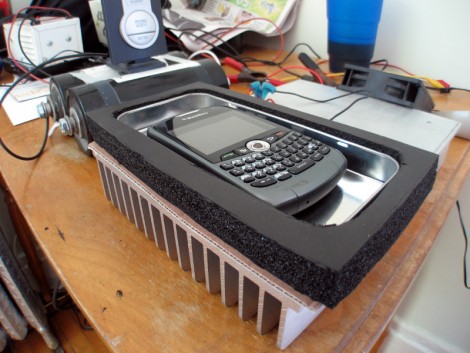
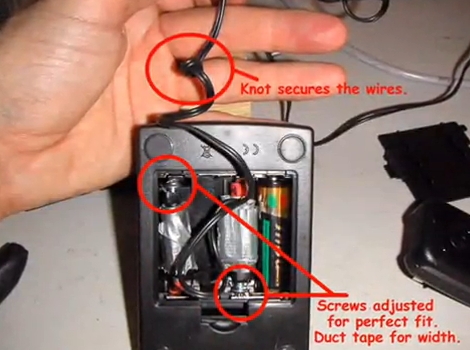
[Onefivefour] was surprised that his E-flite Blade MCX radio controlled helicopter came with a charger that used AA batteries to recharge the lithium batteries in the flying unit. Yeah, that’s a bit crazy. He set out to modify the base unit to work with AC power. There are four batteries inside this base unit, one of them powers the charge detector circuit and the others are used to juice-up the chopper’s rechargeable cells. He took a 5V regulated charger from a Motorola cellphone and modified it to interface with the contacts for the three AA cells. Like the Magic Trackpad hack, he did this without altering the holder by cutting a couple of pencils to length and attaching the positive and negative contacts from the AC charger to them. Check out the video after the break for a walk though, noting how he still has the option to go back to battery power if he so chooses.

Continue reading “Toy Helicopter Charging Fix”

Power Adapter For Digital Cameras Without An External Jack

[Kusnick] is into using digital camera rigs for book scanning. The problem is that keeping the batteries charged is a pain, but there’s no external AC adapter jack which would allow him to use the mains. His solution was to build his own adapter to replace the batteries.

There are some fancy book scanning setups that allow you to just flip through the pages, but it’s much simpler to build a rig that uses two cameras. [Kusnick’s] setup is the latter, which means he’s found two inexpensive cameras that don’t need to be mobile. The first attempt at making an adapter featured a block of acrylic with the positive and negative contacts connected to a shielded cord which he then hooked to an external supply. The camera would come on and then turn off citing that the cameras were “for use with compatible battery only”. Turns out there’s some type of verification circuit built into the proprietary batteries. But the solution to that came quite easily; remove the circuit board from the battery and insert it in the adapter to trick the camera.

[Thanks Daniel]

Rechargeable Battery Capacity Tester

Rechargeable-Battery-Capacity-Tester

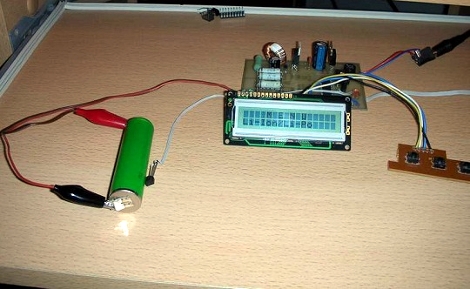
If you are like most people, you likely have a mixed pile of rechargeable batteries sitting around with no idea as to what kind of charge they can hold. You could watch a voltmeter for a few hours while you drain each and every battery, noting when it drops below its stated voltage – but then again, you have a life.  Instead of wasting away in front of his multimeter, [BrianH] decided he would build an automated battery capacity tester to do the job for him.

He created a simple circuit that drains any AA battery, NiMh or NiCd, and records its useful capacity in milliamp hours.  Since the ATMega168 microcontroller used has 6 analog/digital converters on board, he figured that he might as well design his tester to measure the capacity of three batteries simultaneously.  [BrianH] wired the meter up to an old Nokia LCD, then moved his project to a perfboarded ATMega, freeing up his Arduino for other tasks. Once he had things reassembled, he packed it all into a handsome wooden box.

His writeup is chock full of details and source code, so be sure to check it out.  We have video of the charger in action after the jump.

Continue reading “Rechargeable Battery Capacity Tester”

Button Cell Connectors For Breadboarding

We’re working on a project that has a battery backup, but we don’t have any more coin cell holders on hand. No problem, we remember seeing a double pin header used for this. But when we tried to shove the CR2032 battery in between the pins it was a no-go. We could swear we’d featured a project that does this but couldn’t find it here at Hackaday. After much searching we came up with the Guerrilla battery holder which is seen on the left. No wonder it wasn’t working, the CR1212 in that picture is a much smaller package. So we figured we’d have to come up with something else, until inspiration struck.

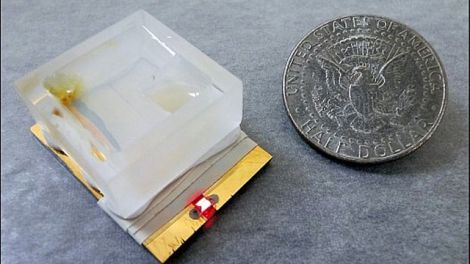
There must be some other way to configure the pin header to work with a fatter cell body. On the right you can see that a diagonal orientation works like a charm. Join us after the break for a couple of close-ups of that connector and our thoughts on using this with a variety of different cells.

Continue reading “Button Cell Connectors For Breadboarding”

Fixing The Rovio Battery Charging Circuit

[Chris] was unhappy with the battery performance of his Rovio. It seems that he’s not alone, so he set out to reverse engineer the battery charging circuit to see if there was a fix. Boy is there, what he found is the diode above, apparently installed backwards when compared to the silk screen diode symbol. Now it’s entirely possible that the silk screen is wrong and this was fixed during assembly. We think that’s unlikely because if the closer of the two diodes was supposed to have the same polarity as the one next to it there should have been room to install them both in exactly the same orientation. [Chris] pulled out a soldering iron and changed the diode to match the silk screen. That fixed his problem and he’s now getting better performance than he ever has.

[From our comments section]

Tuesday Two-Fer: Battery Cases And ABS Lettering

These are both interesting, unrelated, and can’t quite stand on their own so we threw them into one post.

On the left you see the product of using toner transfer on ABS plastic. [Bogdan] tried this out as a way to make front panels for his enclosures. It really shouldn’t work very well because ABS has a lower melting point than toner does. But it seems that it takes a while for the ABS to heat up. If you’re quick, ironing for about 10 seconds, you can get the toner to stick to the plastic and then soak the paper off, leaving your printed design looking nice and clean.

To the right you see a printed battery case. [Nikolaus Gradwohl] ran across the same problem we’ve face many times: how to attach batteries to your projects? We’ve duct-taped them together, used the blister packs they’re sold in, Dremeled them out of thrift-store toys and just about every other thing you can imagine. He decided to make them easy to manufacture with a 3D-printer. This is accomplished with an OpenSCAD file he wrote. Plug in the size and number of batteries and a printable package will be automatically generated.

Beefy Battery Backup Still Running After A Decade

In 1997 [Michael Butkus Jr.] found an uninterruptible power supply in the dumpster. The batteries were shot, but he needed a backup to keep his pellet stove running for heat, drive the exhaust fan to keep the smoke out of the house, and power his computer and other electronics. After a bit of head scratching he decided to beef up the UPS using deep-cycle batteries.

He actually built two of these. One is smaller, and similar to what we’ve seen before. The other is larger and uses four batteries, two pairs in parallel which are then connected in series. He’s careful to use heavy gauge wiring and 50 amp fuses for each battery, both of which will protect against the risk of fire. One thing we found interesting is that the batteries are stored in the basement, directly below the UPS which is connected via a short run of 12 gauge home electrical wire.

We were happy to see that he’s done updates at the top of his post over the years. He lost a few batteries due to neglectfully letting the water levels drop too much. He did switch over to sealed automotive batteries sometime in 2004 or 2005. Looks like things have been going strong ever since.

[Thanks Spencer]