When Hacking And Biosensing Collide

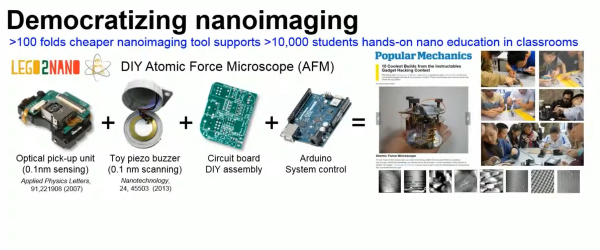
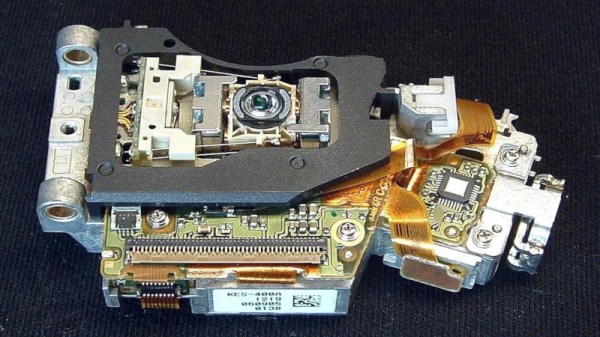
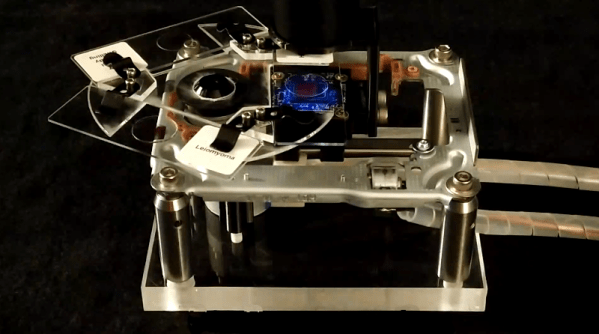
[Prof. Edwin Hwu] of the Technical University of Denmark wrote in with a call for contributions to special edition of the open-access scientific journal Biosensors. Along the way, he linked in videos from three talks that he’s given on hacking consumer electronics gear for biosensing and nano-scale printing. Many of them focus on clever uses of the read-write head from a Blu-ray disc unit (but that’s not all!) and there are many good hacks here.

For instance, this video on using the optical pickup for the optics in an atomic force microscope (AFM) is bonkers. An AFM resolves features on the sub-micrometer level by putting a very sharp, very tiny probe on the end of a vibrating arm and scanning it over the surface in question. Deflections in the arm are measured by reflecting light off of it and measuring their variation, and that’s exactly what these optical pickups are designed to do. In addition to phenomenal resolution, [Dr. Hwu’s] AFM can be made on a shoestring budget!

Speaking of AFMs, check out his version that’s based on simple piezo discs in this video, but don’t neglect the rest of the hacks either. This one is a talk aimed at introducing scientists to consumer electronics hacking, so you’ll absolutely find yourself nodding your heads during the first few minutes. But then he documents turning a DVD player into a micro-strobe for high speed microfluidics microscopy using a wireless “spy camera” pen. And finally, [Dr. Hwu’s] lab has also done some really interesting work into nano-scale 3D printing, documented in this video, again using the humble Blu-ray drive, both for exposing the photopolymer and for spin-coating the disc with medium. Very clever!

If you’re doing any biosensing science hacking, be sure to let [Dr. Hwu] know. Or just tear into that Blu-ray drive that’s collecting dust in your closet.

Continue reading “When Hacking And Biosensing Collide”

The Real Story: How Samsung Blu Ray Players Were Bricked

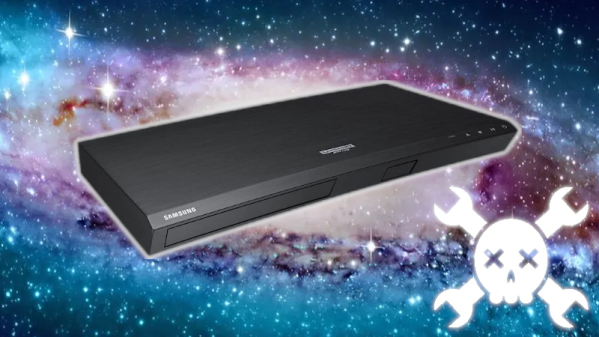
In June, many owners of Samsung Blu Ray players found that their devices were no longer usable. Stuck in a boot loop, speculation was rife as to the cause of the issue. Now it seems that the issue has become clear – a badly formatted XML file may be responsible for the problems (via The Register).

The problem stems from the logging system that stores user data and passes it back to Samsung over the Internet. Which data is logged and sent back is managed by an XML file which contains the policy settings that control this behaviour. According to a source known only as “Gary” “Gray”, the XML file posted on Samsung’s servers on June 18 featured a malformed list element. This caused a crash in the player’s main software routine, leading the player to reboot.

The failure was exacerbated by the fact that the XML file is parsed very early in the boot sequence, even before checking for firmware updates or a new XML file. This has prevented Samsung from rolling out an update or fix over the air, and is why the player gets stuck in a loop of continuous reboots.

Reportedly, the file can be found at this URL, though is now an updated version that shouldn’t brick players. Samsung have had to resort to a mail-in repair scheme, wherein technicians with service tools can manually remove the offending XML file from the player’s storage, allowing it to boot cleanly once again. While this shows our initial assumptions were off the mark, we’re glad to see a solution to the problem, albeit one that requires a lot of messing around.

[Thanks to broeckelmaier for the tip!]

Ask Hackaday: What Can Be Done With Your Bootlooping Blu-Ray?

Last Friday, thousands of owners of Samsung Blu Ray players found that their home entertainment devices would no longer boot up. While devices getting stuck in a power-cycling loop is not uncommon, this case stands out as it affected a huge range of devices all at the same time. Samsung’s support forum paints a bleak picture, with one thread on the issue stretching to 177 pages in just a week.

So what is going on, and what can be done to fix the problem? There’s a lot of conflicting information on that. Some people’s gear has started working again, others have not and there are reports of customers being told to seek in-person repair service. Let’s dive in with some wild speculation on the problem and circle back by commiserating about the woes of web-connected appliances.

Continue reading “Ask Hackaday: What Can Be Done With Your Bootlooping Blu-Ray?”

Tearing Down A PS3 Blu Ray Drive

Optical drives are somewhat passe in 2019, with most laptops and desktops no longer shipping with the hardware installed. The power of the cloud has begun to eliminate the need for physical media, but that doesn’t mean the technology is any less marvellous. [Leslie Wright] and [Samuel Goldwater] took a deep dive into what makes the PS3’s optical drive tick, back in the heyday of the Blu Ray era.

The teardown starts by examining the layout of the assembly, and the parts involved. This is followed by a deep dive into an exploration of the triple-laser diode itself, There are tips on how to safely extract the delicate parts, which are highly sensitive to electrostatic discharge, as well as exhaustive specifications and measurements of performance. There’s even a break down of the optical package, too, including a patent search to shed more light on the complicated inner workings of the hardware.

And if this lures you to dig deeper into Sam’s Laser FAQ, prepare to spend the rest of the week.

We’ve seen other optical teardowns before, too – like this look inside a stereo microscope. It’s quite technical stuff, and may fly over the heads over the optically inexperienced. However, for those in the know, it’s a great look at the technology used in a mass-produced console.

Reverse Engineering A Blu-ray Drive For Laser Graffiti

There’s a whole lot of interesting mechanics, optics, and electronics inside a Blu-ray drive, and [scanlime] a.k.a. [Micah Scott] thinks those bits can be reused for some interesting project. [Micah] is reverse engineering one of these drives, with the goal of turning it into a source of cheap, open source holograms and laser installations – something these devices were never meant to do. This means reverse engineering the 3 CPUs inside an external Blu-ray drive, making sense of the firmware, and making this drive do whatever [Micah] wants.

When the idea of reverse engineering a Blu-ray drive struck [Micah], she hopped on Amazon and found the most popular drive out there. It turns out, this is an excellent drive to reverse engineer – there are multiple firmware updates for this drive, an excellent source for the raw data that would be required to reverse engineer it.

[Micah]’s first effort to reverse engineer the drive seems a little bit odd; she turned the firmware image into a black and white graphic. Figuring out exactly what’s happening in the firmware with that is a fool’s errand, but by looking at the pure black and pure white parts of the graphic, [Micah] was able guess where the bootloader was, and how the firmware image is segmented. In other parts of the code, [Micah] saw thing vertical lines she recognized as ARM code. In another section, thin horizontal black bands revealed code for an 8051. These lines are only a product of how each architecture accesses code, and really only something [Micah] recognizes from doing this a few times before.

The current state of the project is a backdoor that is able to upload new firmware to the drive. It’s in no way a complete project; only the memory for the ARM processor is running new code, and [Micah] still has no idea what’s going on inside some of the other chips. Still, it’s a start, and the beginning of an open source firmware for a Blu-ray drive.

While [Micah] want’s to use these Blu-ray drives for laser graffiti, there are a number of other slightly more useful reasons for the build. With a DVD drive, you can hold a red blood cell in suspension, or use the laser inside to make graphene. Video below.

Continue reading “Reverse Engineering A Blu-ray Drive For Laser Graffiti”

Blu-ray CNC Looks Great For Branding And Engraving

[Nav] got the bug for a tiny little laser cutter. He pulled off the build, and has just finished the second rendition which makes some nice improvements. He’s was hoping for a laser cutter, but we think this really shines when it comes to branding objects like the scrap wood seen above.

This joins a long line of optical drive parts builds. For instance, we saw this plotter that used the lens sleds from some CD-ROM drives. You may think that [Nav] doesn’t need to worry about the Z axis since this is a laser but you’d be wrong. The focal point of the light needs to hit at the right place to cut efficiently, and this is often the trouble with laser cutters. As material is burned away the laser becomes less efficient if you don’t adjust the lens for vertical position. That’s why we think it’s best as an engraver, but the original build writeup for his cutter does show some success cutting letters in dark paper.

Check out a clip of this design being burnt into the wood after the break.

Continue reading “Blu-ray CNC Looks Great For Branding And Engraving”

Fairly Simple Hack Makes Samsung TVs Reboot Forever

[Luigi Auriemma] almost rendered his brother’s TV useless attempting to play a simple practical joke. In the process, he uncovered a bug that could potentially upset a lot of people. His idea was to connect a computer to the system via WiFi, masquerading as a remote control.  [Luigi] found that by altering the packet being sent to the TV by adding a line feed and some other characters to the name, it would begin an endless reboot loop.

He also discovered that he could easily crash the devices by setting the MAC address string too long. We’re not sure if he’s modifying the remote, or the television on this one though.

These bugs affect the Samsung TVs and Blu Ray players that utilize the same chip. The crazy part is that despite his attempts, he has been unable to contact anyone at Samsung to let them know!

[via BoingBoing]