Using Your Bench Tools To Test A New Display

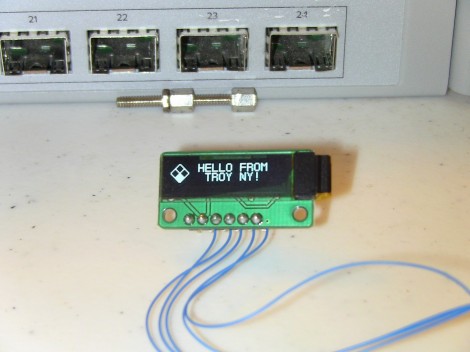
It usually takes a bit of work to gain confidence when it comes to using new parts. [Glitch] got his hands on this OLED display which is manufactured by Sabernetics and wanted to give it a whirl before building a project around it. He grabbed his Bus Pirate to help learn the ins and outs of the new part.

The 96×16 Dot-Matrix display uses the i2c protocol, keeping the pin count really low (six pins for: ground, reset, clock, data, chip select, and voltage). Since the Bus Pirate gives you command-line-like access to i2c it’s a natural choice for a first test. In fact, the tool has been our go-to device for that protocol for most projects.

The first commands sent are configuration values for the SSD1306 that drives the display. These configure contrast, voltage conversion, and other important values necessary to power on the display. It sprung to life, showing random pixels since the RAM had not yet been initialized. With that success [Glitch] moved on to the Bus Pirate’s scripting capabilities and ended up with a Python script that drives the demo seen above. Now that he knows the commands he needs, it’ll be a lot easier to write code for a microcontroller driver.

Adding An OLED To A LEGO Set

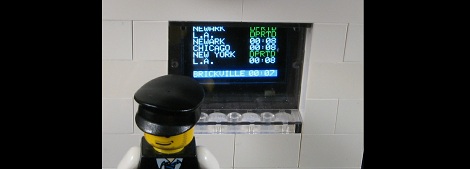
Sure, as a very powerful and influential LEGO dictator you’re more than able to make the trains run on time, but how do you make your LEGO citizens realize the benefits of living under your regime? With an OLED LEGO train schedule, of course! [Dan] over at Adafruit put together a great guide to interfacing a very small OLED display to a LEGO setup, perfect for displaying which trains are on schedule and not displaying which trains are heading to a ‘camp.’

The build uses a 96×64 RGB OLED display that is just under an inch in size. After connecting the display to an Arduino, [Dan] crafted a bezel and mounted it inside a LEGO brick wall. Seems like just the thing for the Adafruit LEGO set.

Of course, the tiny Adafruit OLED display can be used for much more than showing the train schedule at a LEGO train station. We imagine this could be put to use in an awesome model train layout or even a small plastic security checkpoint.

Crayolascope Turns Flat Displays Into Volumetric Coolness

[Blair] sent in a project he’s been working on for a while. It’s called the Crayolascope, and it allows for the creation of an extremely low-fi volumetric display using a Crayola Glow book.

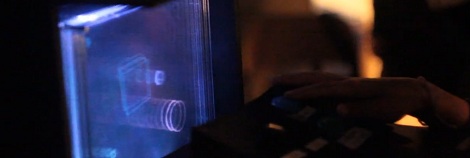
The Crayola Glow Book is a pretty neat toy composed of four clear plastic panels. Each of these four panels are illuminated from the side to reveal the image drawn with fluorescent ‘glow pens’. [Blair] had the idea to take several of these Glow Books and draw a rudimentary 3D animation by sequentially lighting one of the 12 plastic panels.

After tracing single frames from a rotating cube animation, the Crayolascope pages through the plastic panel-based 3D display with the help of an Arduino Mega. For each frame of animation, the Arduino illuminates a single display with edge-mount LEDs. Of course there’s a control panel to regulate how fast the frames are shown, along with the ability to scrub a frame and apply a fade effect.

[Blair] admits there are a few problems; there’s a lot of internal reflections in the array of clear plastic sheets, and frames near the end of an animation are really only observable in a very dark room. [Blair] hopes the next version of the Crayolascope will use thinner plastic panels to increase the depth of the animations – a solution that may just solve the decreasing brightness of ‘deeper’ panels.


[Matt’s] Bubble Display Updated

[Matt] emailed in to show us how he has improved his bubble display since the last time we saw it. If you recall from last time, he was having issues with the air pressure dropping when multiple bubbles were released, resulting in smaller bubbles. This time around, he has added an aesthetically pleasing air reservoir to help ensure that his bubbles don’t vary too much. There really wasn’t a reason to use two containers for the reservoir, aside from the fact it is what he had on hand. He has also torn part the part of the display that houses the oil, replacing it with individual tubes for each vertical segment. This makes it easier to regulate the speed of the bubbles, as he found they travel at a constant rate if they are in contact with the edges of the tube.

One downfall of using the vinyl tubes is the fact that it comes in a giant roll. This leaves the tube wanting to curl. To get around this, he stretched it on a wooden dowel and heated it with a heat gun till it relaxed. Using clear PVC or acrylic tubing would be an alternative but would be more expensive.

Continue reading “[Matt’s] Bubble Display Updated”

Analog Clock Display Uses A Nipkow Disk

Although [Serokoy] is not thrilled with the outcome of his Nipkow disk clock (translated), but we really enjoy it. It uses the Persistence of Vision concept to create a light display from a rotating disk.

We’ve come across a lot of rotating disk clocks. Several were based off of the platters of a hard drive, using a slit, or series of slits to make up the display. This Nipkow disk uses a similar technique but in a more general way. The series of holes arranged in a spiral pattern allows a grid of concentric rings to be used as pixels when the disk is spinning. The bottom portion of the disk is used as the display area. Each pixel is illuminated at just the right time by LEDs below in order to freeze that pixel in the viewer’s eye. The demo is a bit rough, and [Serokoy] mentions that the precision of the hole layout makes all the difference. He drilled these by hand in a CD which was spray painted matte black. Even though he used a computer to lay out and print a template, it took four tries to get a suitable disk.

[Thanks Svofski]

Collimated Displays Wrap Around That Home Cockpit

We don’t recall having heard the term ‘collimated display’ before, but we’ve seem them in action. These are mirrored projection display that give the viewer a true peripheral vision experience thanks to well-designed optics. Here is a project that [Rob] and [Wayne] have put a ton of time into. It’s their own version of a DIY collimated display that uses a shop vac and Arduino to form the screen shape.

The frame above is the structure that will support the screen. A sheet of mylar was later attached to the edges of that frame. That is pulled into place by the suction of the vacuum. But it needs to be stretched just the right amount or the projected image will be distorted. They’ve got something of a PID controller to manage this. A valve box was built to vary the amount of vacuum suction inside the screen’s frame. A switch positioned behind the mylar sheet gives feedback to the Arduino when the screen reaches the appropriate position and a servo closes off the suction box. If you lost us somewhere in there the description in the clip after the jump will help to clear things up.

Here’s an unrelated project that implements the same concept on a smaller scale.

Continue reading “Collimated Displays Wrap Around That Home Cockpit”

Easy Tactile Controls And Displays For Your Flight Simulator

If you’ve been thinking of adding some tactile controls and readouts for your flight simulators this guide should give you the motivation to get started with the project. [Paul] explains how to build controls and connect them to the simulator data. He makes it look easy, and thanks the interface examples in his code it actually is.

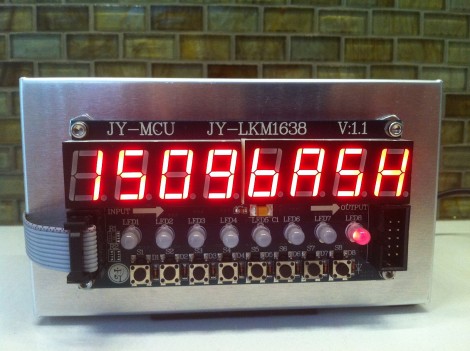
Here he’s built the hardware using a Teensy controller board. The controller communicates via USB and the software is cross-platform. He’s controlling the heading information of the X-Plane simulator using the rotary encoder for fine adjustments and the buttons for increments of 100. But he doesn’t stop there. He’s working on an auto-throttle design that uses a servo motor to move the throttle lever. A potentiometer can be used to vary the throttle, with the servo mapped to the position of that knob. But it works both ways, dragging the virtual throttle on-screen will do the same.

This is one way to make flight simulators more interesting without devoting a whole room of your house to the cause. Don’t miss [Paul’s] fantastic demo video after the break.

Continue reading “Easy Tactile Controls And Displays For Your Flight Simulator”