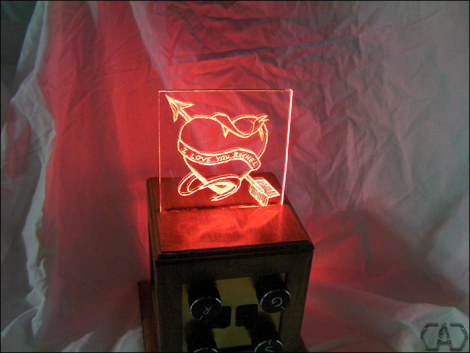
A Lot Of Love Went Into This Glowing Valentine

[Will] didn’t pick up a card, rose, and bottle of wine for Valentine’s Day like most guys. Nope, he planned way ahead and built this color-selectable glowing Valentine. When we first saw it, we figured he threw some LEDs together with a microcontroller and edge-lit a piece of acrylic. While that is technically what happened, there was a lot more design and craftsmanship at play here than you might think.

First off, the controller board is a beautifully designed two-sided PCB which he etched rather than throwing a mess of wires and hot glue into an enclosure. Speaking of enclosures, he grabbed a wooden picture box from the big box store and used a piece of brass plate stock to serve as the control panel. The enclosure was finished with tinted polyurethane after having a slit added to the top for the acrylic. The message itself was milled using an engraving bit and a Dremel tool. This was done by hand and we think achieves a finished look that is comparable to the CNC milled ornaments we’ve seen in the past.

Get a good look at the device and a demonstration of its features in the clip after the jump.

Continue reading “A Lot Of Love Went Into This Glowing Valentine”
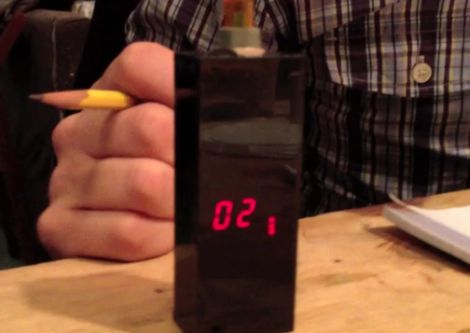
Puncher Tracks Your Freelancing Hours, Time Spent In TSA Patdowns

freelance-puncher

[Raphael Abrams] does a lot of freelance work, but he has trouble accurately keeping track of the hours he has put in for his clients. After trying various applications and methods of logging his time, he finally decided to build a device that worked just the way he liked.

He calls his device the “Freelance Puncher”, though it already has been nicknamed the detonator, as it looks like something you would find in the hands of a [James Bond] villain. The device uses a PIC16LF1827 to track the time, saving his logged hours to the built-in EEPROM when powered off. A pair of 7-segment displays are used to display the accumulated hours upon power-on, and a set of seven SMT LEDs separated into two banks keep track of quarter and hundreds of hours worked.

[Raphael] has made his code and schematics available on Github, so you can easily replicate his work if you are looking for a better way to track your time. We think it looks great, though it could be the sort of thing that traveling freelancers might want to keep in their checked luggage, unless they want to spend some quality time with the TSA! Be sure to stick around to see a short video where [Raphael] shows off and explains how his Freelance Puncher works.

Continue reading “Puncher Tracks Your Freelancing Hours, Time Spent In TSA Patdowns”

CNC Light Painting

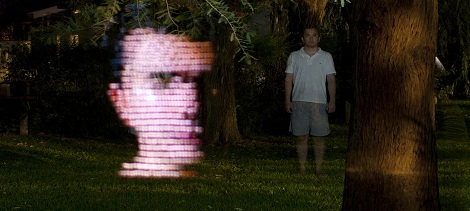
Light painting is a technique where a shape is drawn with a light source while a camera is taking a very long exposure shot of it. To do this well by hand would take a lot of skill, so I naturally decided to make my “light art” with a CNC router.

Using this technique, the LED light is treated just like an engraving bit would be under normal circumstances. The difference is that the Y axis is swapped with the Z axis allowing for easy movement in the plane that you see displayed in the picture above. This allows the old Y axis to switch the light on and off in the same way that an engraving bit is lifted to stop engraving and lowered to start (explained here). Instead of a bit though, it’s a switch.

Be sure to check out the video of the router in action (with the lights on) after the break: Continue reading “CNC Light Painting”

Plotting Pictures With Light

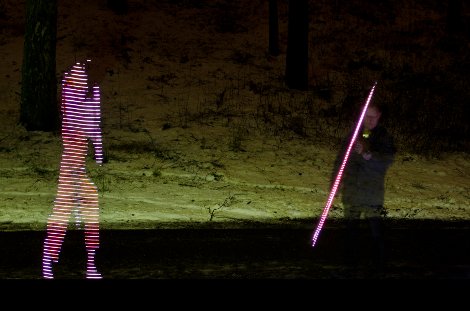
Flashing LEDs for a persistence of vision display are on bicycle wheels, alarm clocks, and even light painting sticks to draw images in the air. What if you wanted to plot an image in the air (translation) with a single LED? That’s what [acorv] did after taking a cue from a polar plotter.

Like the polar plotter and Drawbot, [acorv]’s build began with a pair of stepper motors and fishing line (translation). [acorv]’s brother upped the stakes a bit and suggested replacing the marker with an LED and taking long exposure photographs. Armed with a DSLR and a lot of patience, a few experimental pics were taken. To plot the image, the Lightbot flashes its LED as it goes across the plot area. The process of building an image pixel by pixel takes a while – eight minutes for this image – but the brothers were encouraged enough to take their rig outside.

After setting up the polar plotter between two tripods, [acorv] and his brother made this image in the dead of night. It’s an interesting spin on the POV LED builds we’ve seen before. Check out [acorv]’s Lightbot slowly drawing something after the break.

Continue reading “Plotting Pictures With Light”

Color Sensor Gives The RGB Values Of Anything

[Rick Osgood] wanted to build a color sensor that could be held up to any object to get RGB color values. He originally started with a photoresistor and a few LEDs, but couldn’t get that to work reliably. [Rick] finally completed his color sensor after finding a digital luminosity sensor on Adafruit, ending up with a pretty accurate piece of hardware to judge the color of something.

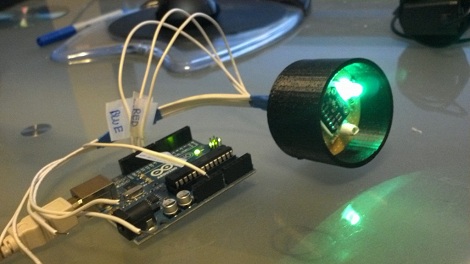
The idea behind the color sensor is to light up red, green, and blue LEDs and see how much light is reflected back from the object with a luminosity sensor. [Rick] chose an Arduino to do all the heavy lifting for the light sensor and activating the LEDs.

After a few tests [Rick] got his color sensor working, but it’s not up to par with what he had expected. This isn’t really a problem: the LEDs probably don’t have the same brightness and the luminosity sensor doesn’t respond evenly across the entire rainbow. Those things can always be fixed in software, though. It’s a nice project that could serve as part of a prototype for this color picker pen.

office-game-show-buzzer

Office Game Show Buzzer Keeps Things Fair And Square

The sales team in [Chuck’s] office is a pretty competitive bunch as you might expect, and they decided that they wanted a system which would allow them to challenge one another during their weekly meetings. The competition involves answering questions posed by their manager, but hand raising only works for so long – they needed a definitive way to tell who “buzzed in” to answer a question first.

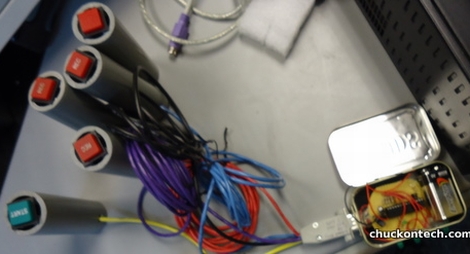
Since [Chuck] only had a short bit of time and a tiny budget to work on, he opted to find the easiest solution to the problem, which was an Arduino-based game show buzzer system. The game display is built from an Arduino, some LEDs and an Altoids tin, while the buzzer pushbuttons were salvaged from an old radio broadcast console.

Now, when a question is posed, the salesman can buzz in to answer, knowing that only the quickest person’s button click will be registered. When it’s time for another question, the host simply clicks his buzzer to reset the console.

While it’s not quite as fancy as this game buzzer system we featured a while back, [Chuck] says it does the job perfectly and was cheap to boot.

Continue reading to see a short video of the office game buzzer system in action.

Continue reading “Office Game Show Buzzer Keeps Things Fair And Square”

Paint Your Pictures, No PC Needed

LEDs and and cameras always make a fun mixture, and its not all that hard to have quite a bit of fun as well. The Light Painting Stick is similar to other long exposure camera tricks like LightScythe and gets about the same reults. The difference is the Light Painting Stick is self contained meaning you don’t have to drag nearly as much stuff along with you to have fun.

Hardware used is HL1606 controlled RGB led strip commonly found at Adafruit, the brains are a Leaf Labs Maple micro controller board with an SD card and some human interfaces attached, and is powered by a 6 volt lantern battery.

Images are 64*infinity 24 bit BMP files which means there is not much fuss preparing your graphics other than doing a simple rotate. You can select which image is displayed by using a 2 way switch and the LEDs on the stick. Select your images, dial in your speed with the potentiometer, and you’re  ready to hit the fire button for some photo fun.