Blinking An LED Passively

It is a pretty common first project to use an Arduino (or similar) to blink an LED. Which, of course, brings taunts of: you could have used a 555! You can, of course, also use any sort of oscillator, but [Mustafa] has a different approach. Blinking an LED with three resistors and a capacitor. Ok, ok… one of the resistors is a light-dependent resistor, but still.

In reality, this is a classic relaxation oscillator. The capacitor charges until the LED lights. This, however, causes the capacitor to discharge, which eventually turns off the LED, and the process starts again.

There is one wrinkle that could be considered a feature. In daylight, the capacitor will stay in the off state, so the blinking only occurs in darkness. Of course, the resistor also has to have a sufficient view of the LED. You might use this as a safety light that only works in the dark.

A simple circuit, but it just goes to show that we tend to forget the simple solutions in a world where a computer costs less than a dollar.

Of course, you can get a chip whose sole purpose is to blink LEDs. We always like examples of doing more with less.

Continue reading “Blinking An LED Passively”

Train Speed Signaling Adapted For Car

One major flaw of designing societies around cars is the sheer amount of signage that drivers are expected to recognize, read, and react to. It’s a highly complex system that requires constant vigilance to a relatively boring task with high stakes, which is not something humans are particularly well adapted for. Modern GPS equipment can solve a few of these attention problems, with some able to at least show the current speed limit and perhaps an ongoing information feed of the current driving conditions., Trains, on the other hand, solved a lot of these problems long ago. [Philo] and [Tris], two train aficionados, were recently able to get an old speed indicator from a train and get it working in a similar way in their own car.

The speed indicator itself came from a train on the Red Line of the T, Boston’s subway system run by the Massachusetts Bay Transportation Authority (MBTA). Trains have a few unique ways of making sure they go the correct speed for whatever track they’re on as well as avoid colliding with other trains, and this speed indicator is part of that system. [Philo] and [Tris] found out through some reverse engineering that most of the parts were off-the-shelf components, and were able to repair a few things as well as eventually power everything up. With the help of an Arduino, an I/O expander, and some transistors to handle the 28V requirement for the speed indicator, the pair set off in their car to do some real-world testing.

This did take a few tries to get right, as there were some issues with the power supply as well as some bugs to work out in order to interface with the vehicle’s OBD-II port. They also tried to use GPS for approximating speed as well, and after a few runs around Boston they were successful in getting this speed indicator working as a speedometer for their car. It’s an impressive bit of reverse engineering as well as interfacing newer technology with old. For some other bits of train technology reproduced in the modern world you might also want to look at this recreation of a train whistle.

Continue reading “Train Speed Signaling Adapted For Car”

Why Have Seven Segments When You Can Have 21?

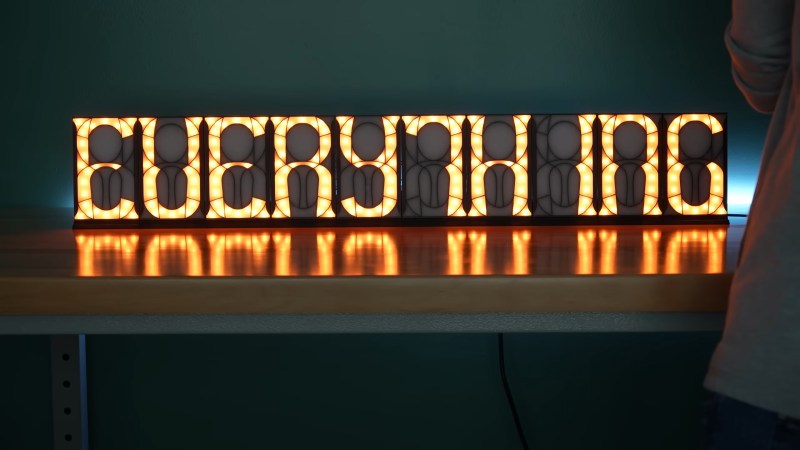
IO user [monte] was pointed towards an 1898 display patent issued to a [George Mason] and liked the look of the ‘creepy’ font it defined. The layout used no less than 21 discrete segments to display the complete roman alphabet and numerals, which is definitely not possible with the mere seven segments we are all familiar with. [monte] then did the decent thing and created a demonstration digit using modern parts.

For the implementation, [monte] created a simple PCB by hand (with an obvious mistake) and 3D-printed an enclosure and diffuser to match. After a little debugging, a better PCB was ordered from one of the usual overseas factories. There isn’t a schematic yet, but they mention using a CH32V003 Risc-V micro, which can be seen sitting on the rear of the PCB.

Maximum flexibility is ensured by storing every glyph as a 32-bit integer, with each LED corresponding to a single bit. It’s interesting to note the display incorporates serifs, which are definitely optional, although you could display sans-serif style glyphs if you wanted to. There is now a bit of a job to work out how to map character codes to glyph codes, but you can have a go at that yourself here. It’s still early doors on this project, but it has some real potential for a unique-looking display.

We love displays—every kind. Here’s a layout reminiscent of a VFD digit but done purely mechanically. And if you must limit yourself to seven digits, what about this unique thing?

Continue reading “Why Have Seven Segments When You Can Have 21?”

Build Yourself A Beautiful Interactive Light Toy

Sometimes, we build things with LEDs as indicator lamps or to illuminate something important. Sometimes, we build things with LEDs purely to glow and be beautiful. This interactive light toy from [Jens] falls into the latter category.

The build uses a 16×16 addressable LED matrix.  [Jens] then ported some “Bouncy Bubbles” Processing code from Keith Peters to the Arduino Mega, and set it up to display on the matrix. An accelerometer was used to control the bouncing ball animations, while a second Arduino was then tapped to act as a musical synthesizer to add more vibes. The whole kit was then built into a 3D-printed housing with a nice hazy diffuser to give the LEDs a smoother, even look. [Jens] steps through how he got the diffuser just right, including a support structure that made all the difference to the aesthetic of the finished product. Getting diffusion right is key to making a nice LED project, and [Jens] got it very right here.

It’s a nice little art piece that looks kind of relaxing to play with in a dark room. We love a good glowable project here at Hackaday, so if you’ve built your own—don’t hesitate to let us know! Video after the break.

Continue reading “Build Yourself A Beautiful Interactive Light Toy”

Forget Ship In A Bottle, How About Joule Thief In A Fuse Tube?

We love close-up pictures of intricate work, and [w] hits the spot with a tiny joule thief in a fuse case (social media post, embedded below) powered by an old coin cell from a watch. It’s so tiny!

Ethernet transformers contain tiny coils.

A joule thief is a sort of minimum-component voltage booster that can suck nearly every last drop of energy from even seemingly-drained batteries, and is probably most famously used to light LEDs from cells that are considered “dead”.

Many joule thief designs feature hand-wound coils, which is great for junk box builds but certainly becomes more of a challenge for a tiny build like this one.

We really like that [w] salvaged a miniscule coil from an Ethernet transformer, most of which look like blocky SMD components from the outside but actually contain tiny coils.

The joule thief has been the basis of plenty of hacks over the years, and it’s always nice to see new twists on the concept.

Continue reading “Forget Ship In A Bottle, How About Joule Thief In A Fuse Tube?”

Programming Tiny Blinkenlight Projects With Light

[mitxela] has a tiny problem, literally: some of his projects are so small as to defy easy programming. While most of us would probably solve the problem of having no physical space on a board to mount a connector with WiFi or Bluetooth, he took a different path and gave this clever light-based programming interface a go.

Part of the impetus for this approach comes from some of the LED-centric projects [mitxela] has tackled lately, particularly wearables such as his LED matrix earrings or these blinky industrial piercings. Since LEDs can serve as light sensors, albeit imperfect ones, he explored exactly how to make the scheme work.

For initial experiments he wisely chose his larger but still diminutive LED matrix badge, which sports a CH32V003 microcontroller, an 8×8 array of SMD LEDs, and not much else. The video below is a brief summary of the effort, while the link above provides a much more detailed account of the proceedings, which involved a couple of false starts and a lot of prototyping that eventually led to dividing the matrix in two and ganging all the LEDs in each half into separate sensors. This allows [mitxela] to connect each side of the array to the two inputs of an op-amp built into the CH32V003, making a differential sensor that’s less prone to interference from room light. A smartphone app alternately flashes two rectangles on and off with the matrix lying directly on the screen to send data to the badge — at a low bitrate, to be sure, but it’s more than enough to program the badge in a reasonable amount of time.

We find this to be an extremely clever way to leverage what’s already available and make a project even better than it was. Here’s hoping it spurs new and even smaller LED projects in the future.

Continue reading “Programming Tiny Blinkenlight Projects With Light”

You Can Use LEDs As Sensors, Too

LEDs are a wonderful technology. You put in a little bit of power, and you get out a wonderful amount of light. They’re efficient, cheap, and plentiful. We use them for so much!

What you might not have known is that these humble components have a secret feature, one largely undocumented in the datasheets. You can use an LED as a light source, sure, but did you know you can use one as a sensor?

Continue reading “You Can Use LEDs As Sensors, Too”