In Which I Vibe-Code A Personal Library System

When I was a kid, I was interested in a number of professions that are now either outdated, or have changed completely. One of those dreams involved checking out books and things to patrons, and it was focused primarily on pulling out the little card and adding a date-due stamp.

Of course, if you’ve been to a library in the last 20 years, you know that most of them don’t work that way anymore. Either the librarian scans special barcodes, or you check materials out yourself simply by placing them just so, one at a time. Either way, you end up with a printed receipt with all the materials listed, or an email. I ask you, what’s the fun in that? At least with the old way, you’d usually get a bookmark for each book by way of the due date card.

As I got older and spent the better part of two decades in a job that I didn’t exactly vibe with, I seriously considered becoming a programmer. I took Java, Android, and UNIX classes at the local junior college, met my now-husband, and eventually decided I didn’t have the guts to actually solve problems with computers. And, unlike my husband, I have very little imagination when it comes to making them do things.

Fast forward to last weekend, the one before Thanksgiving here in the US. I had tossed around the idea of making a personal library system just for funsies a day or so before, and I brought it up again. My husband was like, do you want to make it tonight using ChatGPT? And I was like, sure — not knowing what I was getting into except for the driver’s seat, excited for the destination.

Continue reading “In Which I Vibe-Code A Personal Library System”

Worst Clock Ever Teaches You QR Codes

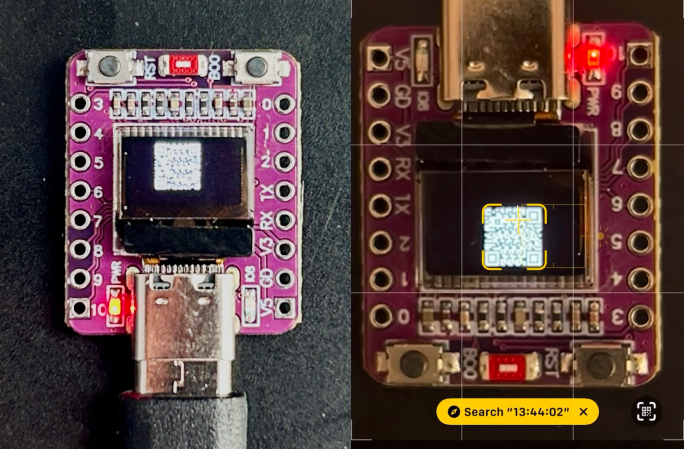
[WhiskeyTangoHotel] wrote in with his newest clock build — and he did warn us that it was minimalist and maybe less than useful. Indeed, it is nothing more than a super-cheap ESP32-C3 breakout board with an OLED screen and some code. Worse, you can’t even tell the time on it without pointing your cell phone at the QR code it generates. Plot twist: you skip the QR code and check the time on your phone.

But then we got to thinking, and there is actually a lot to learn from here on the software side. This thing pulls the time down from an NTP server, formats it into a nice human-readable string using strftime, throws that string into a QR code that’s generated on the fly, and then pushes the bits out to the screen. All in a handful of lines of code.

As always, the secret is in the libraries and how you use them, and we wanted to check out the QR code generator, but we couldn’t find an exact match for QRCodeGenerator.h. Probably the most popular library is the Arduino QRCode library by [ricmoo]. It’s bundled with Arduino, but labelled version 0.0.1, which we find a little bit modest given how widely it’s used. It also hasn’t been updated in eight years: proof that it just works?

That library drew from [nayuki]’s fantastically documented multi-language QR-Code-generator library, which should have you covered on any platform you can imagine, with additional third-party ports to languages you haven’t even heard of. That’s where we’d go for a non-Arduino project.

What library did [WTH] use? We hope to find out soon, but at least we found a couple good candidates, and it appears to be a version of one or the other.

We’ve seen a lot of projects where the hacker generates a QR code using some online tool, packs the bits into a C header array, and displays that. That’s fine when you only need a single static QR code, but absolutely limiting when you want to make something dynamic. You know, like an unreadable clock.

You will not be surprised to know that this isn’t the first unreadable QR-code clock we’ve featured here. But it’s definitely the smallest and most instructive.

Continue reading “Worst Clock Ever Teaches You QR Codes”

OpenSCAD Library Creates QR Codes On The Fly

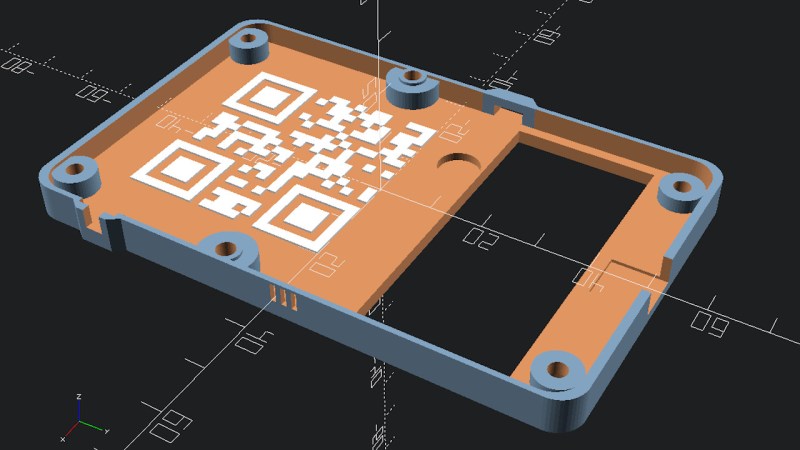
If you’ve been reading Hackaday for awhile, you’ll know we’re big fans of OpenSCAD around these parts. There’s a number of reasons it’s a tool we often reach for, but certainly one of the most important ones is its parametric nature. Since you’re already describing the object you want to generate with code and variables, it’s easy to do things like generate an arbitrary number of cloned objects by using a for loop.

There are a number of fantastic OpenSCAD libraries that explore this blurred line between code and physical objects, and one that recently caught our eye is scadqr from [xypwn]. The description says it lets you “Effortlessly generate QR codes directly in OpenSCAD”, and after playing around with it for a bit, we have to agree.

Continue reading “OpenSCAD Library Creates QR Codes On The Fly”

Spying On The ESP32’s GPIO

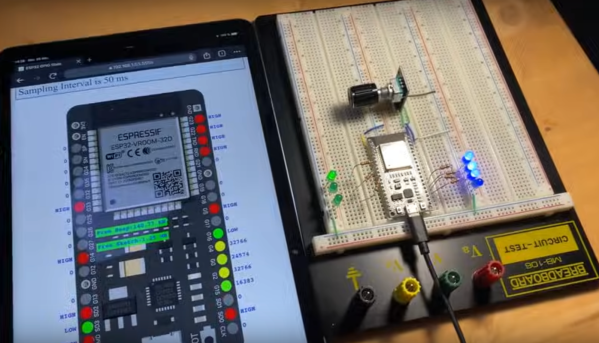
The ESP32 has been a go-to microcontroller platform for a while now, thanks to its versatile capabilities, integrated Wi-Fi and Bluetooth connectivity, and low power consumption. It’s ideal for a wide range of projects especially those revolving around IoT, partially because of all of the libraries and tools available for it now. The latest tool from [The Last Outpost Workshop] adds a feature we didn’t know we wanted until now: a webserver showing real-time updates of what all of the GPIO pins are doing.

The live GPIO pin monitoring library sets up the ESP32 to stream information about what all of the pins are doing in real time to a webserver, which displays the information as a helpful graphic. The demonstration in the video below shows and example troubleshooting a situation where the code is correct but there’s a mistake in the wiring, helping to quickly identify the problem and hopefully eliminating a wild goose chase for a bug in the software. The library can be quickly installed using the Arduino IDE and only requires the use of one other library and a few lines of code to get everything up and running.

As far as a debugging tool goes, something like this could save a lot of us a significant amount of time, especially with how easy it is to set up. A real-time look into the pins and their behavior, including those set up for PWM, is invaluable for plenty of situations. Of course if you’re building something like a real-time operating system that needs responses within a very specific interval you may want to look at more in-depth strategies for probing the GPIO.

Thanks to [Bob] for the tip!

Continue reading “Spying On The ESP32’s GPIO”

PyOBD Gets Python3 Upgrades

One of the best things about open source software is that, instead of being lost to the ravages of time like older proprietary software, anyone can dust off an old open source program and bring it up to the modern era. PyOBD, a python tool for interfacing with the OBD system in modern vehicles, was in just such a state with its latest version still being written in Python 2 which hasn’t had support in over three years. [barracuda-fsh] rewrote the entire program for Python 3 and included a few other upgrades to it as well.

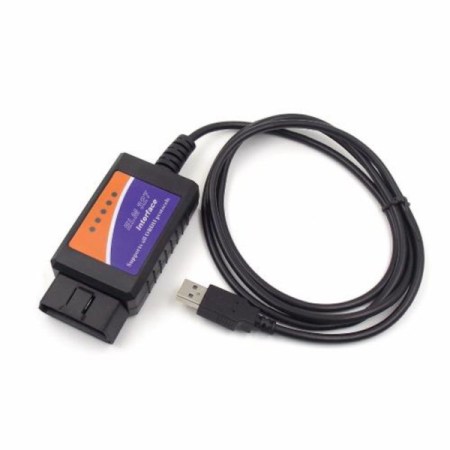
Key feature updates with this version besides being completely rewritten in Python 3 include enhanced support for OBD-II commands as well as automating the detection of the vehicle’s computer capabilities. This makes the program much more plug-and-play than it would have been in the past. PyOBD now also includes the python-OBD library for handling the actual communication with the vehicle, while PyOBD provides the GUI for configuring and visualizing the data given to it from the vehicle. An ELM327 adapter is required.

With options for Mac, Windows, or Linux, most users will be able to make use of this software package provided they have the necessary ELM327 adapter to connect to their vehicle. OBD is a great tool as passenger vehicles become increasingly computer-driven as well, but there are some concerns surrounding privacy and security in some of the latest and proposed versions of the standard.

A Usable Arduino Debugging Tool

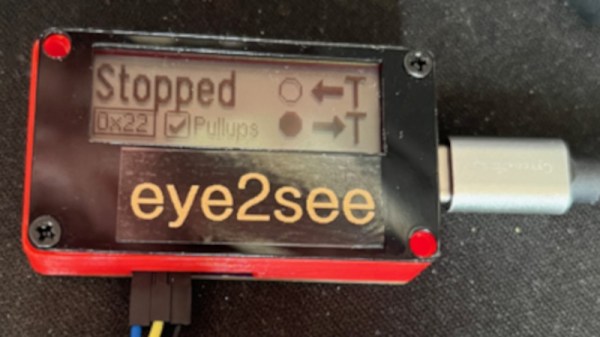
For as popular as the Arduino platform is, it’s not without its problems. Among those is the fact that most practical debugging is often done by placing various print statements throughout the code and watching for them in the serial monitor. There’s not really a great way of placing breakpoints or stepping through code, either. But this project, known as eye2see, hopes to change that by using the i2c bus found in most Arduinos to provide a more robust set of debugging tools.

The eye2see software is set up to run on an Arduino or other compatible microcontroller, called the “probe”, which is connected to the i2c bus on another Arduino whose code needs to be debugged. Code running on this Arduino, which is part of the eye2see library, allows it to send debugging information to the eye2see probe. With a screen, the probe can act as a much more powerful debugger than would otherwise typically be available, being able to keep track of variables in the main program, setting up breakpoints, and outputting various messages on its screen.

The tool is not without its downsides, though. The library that needs to run on the host Arduino slows down the original program significantly. But for more complex programs, the tradeoff with powerful debugging tools may be worth it until these pieces of code can be removed and the program allowed to run unencumbered. If you’d like to skip needing to use a second Arduino, we’ve seen some other tools available for debugging Arduino code that can run straight from a connected PC instead.

The First Search Engines, Built By Librarians

Before the Internet became the advertisement generator we know and love today, interspersed with interesting information here and there, it was originally a network of computers largely among various universities. This was even before the world-wide web and HTML which means that the people using these proto-networks, mostly researchers and other academics, had to build things we might take for granted from the ground up. One of those was one of the first search engines, built by the librarians who were cataloging all of the research in their universities, and using their relatively primitive computer networks to store and retrieve all of this information.

This search engine was called SUPARS, the Syracuse University Psychological Abstracts Retrieval Service. It was originally built for psychology research papers, and perhaps unsurprisingly the psychologists at the university also used this new system as the basis for understanding how humans would interact with computers. This was the 1970s after all, and most people had never used a computer, so documenting how they used search engine led to some important breakthroughs in the way we think about the best ways of designing systems like these.

The search engine was technically revolutionary for the time as well. It was among the first to allow text to be searched within documents and saved previous searches for users and researchers to access and learn from. The experiment was driven by the need to support researchers in a future where reference librarians would need assistance dealing with more and more information in their libraries, and it highlighted the challenges of vocabulary control in free-text searching.

The visionaries behind SUPARS recognized the changing landscape of research and designed for the future that would rely on networked computer systems. Their contributions expanded the understanding of how technology could shape human communication and effectiveness, and while they might not have imagined the world we are currently in, they certainly paved the way for the advances that led to its widespread adoption even outside a university setting. There were some false starts along that path, though.